Introduzzjoni
Thank you for choosing the UNIWEIGH Digital Kitchen Scale. This precision instrument is designed to provide accurate measurements for various items, including food, jewelry, and other small objects. Please read this manual thoroughly before use to ensure proper operation and to maximize the lifespan of your scale.
Informazzjoni dwar is-Sigurtà
- Do not overload the scale beyond its maximum capacity of 3000 grams (6.61 lbs).
- Evita li tesponi l-iskala għal temperaturi estremi, umdità, jew dawl tax-xemx dirett.
- Żomm l-iskala 'l bogħod minn kampi elettromanjetiċi qawwija.
- Naddaf l-iskala b'artab, damp drapp. Tgħaddix fl-ilma jew tuża tindif li joborxu.
- Immaniġġja b'attenzjoni biex tevita ħsara minn waqgħat jew impatti.
Kontenut tal-Pakkett
- UNIWEIGH Digital Kitchen Scale
- Two weighing trays (different sizes)
- 2 batteriji AAA (inklużi)
- Manwal ta' Istruzzjoni
Karatteristiċi tal-Prodott
- Preċiżjoni Għolja: Weighs from 0.5g up to 3000g (6.61 lbs) with an accuracy of 0.1g.
- Unitajiet ta' Kejl Multipli: Easily switch between grams (g), ounces (oz), grains (gn), carats (ct), pennyweights (dwt), and troy ounces (ozt).
- Funzjoni tat-tara: Allows you to subtract the weight of a container for net weight measurement.
- Counting Function (PCS): Provides an accurate count for multiple small items.
- Clear Back-lit LCD Screen: Jiżgura qari faċli f'diversi kundizzjonijiet tad-dawl.
- Funzjoni Auto-Off: Automatically turns off after 180 seconds of inactivity to conserve battery life.
- Disinn kompatt: Portable and easy to store with dimensions of 5" x 4.2" x 0.6".
- Materjali Durabbli: Constructed with a stainless steel platform and ABS plastic frame for easy cleaning and longevity.

Immaġni: Fuqview of the UNIWEIGH Digital Kitchen Scale highlighting its key features including 3kg max capacity, 0.1g accuracy, low battery alarm, tare function, and overload alarm.
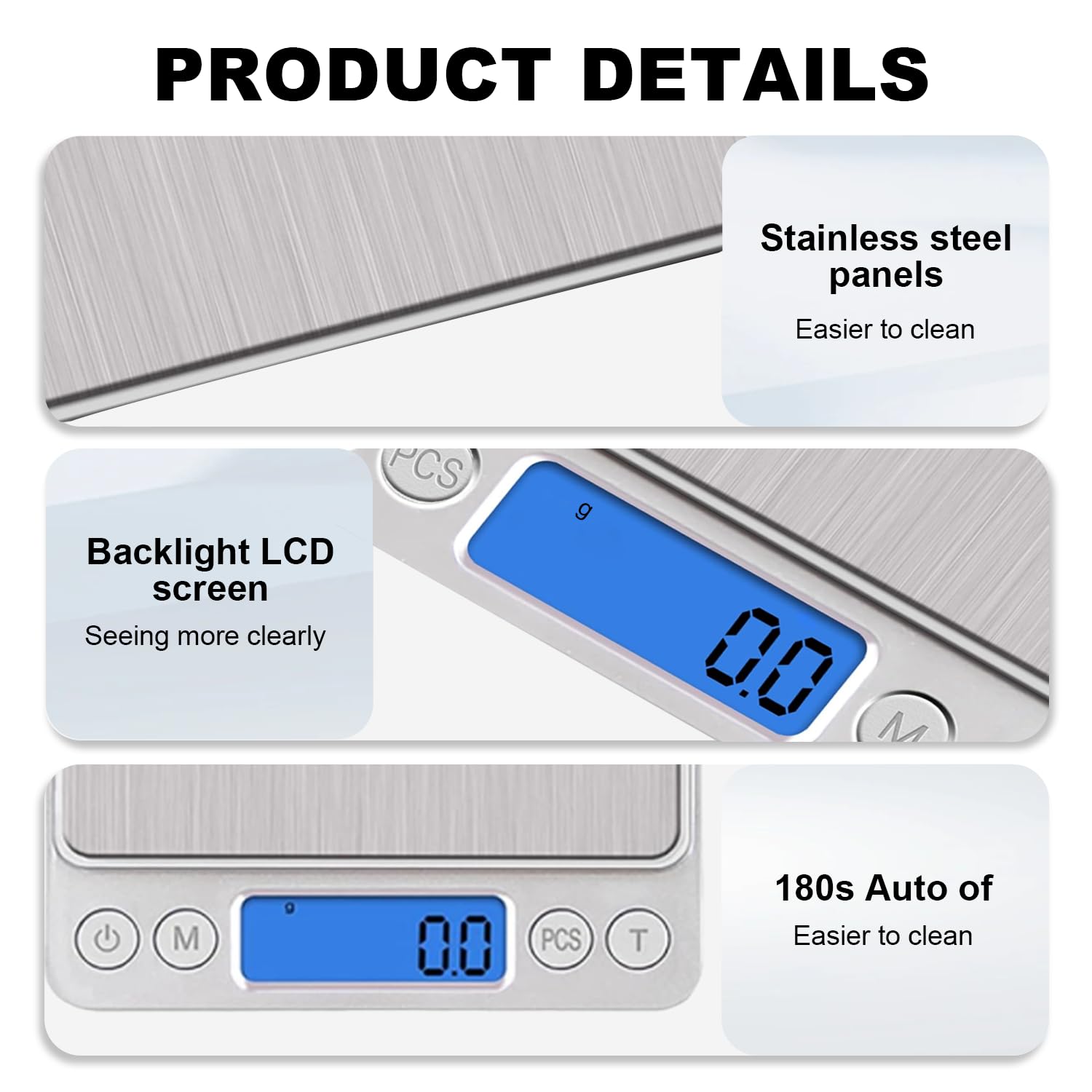
Immaġni: Dettaljata view of the scale's stainless steel weighing surface, the clear blue backlit LCD display, and the 180-second auto-off feature for energy saving.
Setup
- Iftaħ l-Iskala: Neħħi l-iskala u l-aċċessorji kollha mill-imballaġġ bir-reqqa.
- Installa Batteriji: Iftaħ il-kompartiment tal-batteriji fuq in-naħa ta’ taħt tal-iskala. Daħħal iż-żewġ batteriji AAA, waqt li tiżgura l-polarità korretta (+/-). Agħlaq il-kompartiment sew.
- Pjazzament: Place the scale on a flat, stable, and level surface to ensure accurate readings. Avoid placing it on soft or uneven surfaces.
Istruzzjonijiet Operattivi
- Power On/Off: Agħfas il- Buttuna tal-qawwa (
 ) to turn the scale on. The LCD display will show '88888' then '0.0' or '0.00'. Press and hold the Power button to turn the scale off.
 - Qlib tal-Unità: Agħfas il- Buttuna tal-modalità ('M') to cycle through the available weighing units: grams (g), ounces (oz), grains (gn), carats (ct), pennyweights (dwt), and troy ounces (ozt).
- Oġġetti li jiżnu: Place the item directly onto the center of the weighing platform. The weight will be displayed on the LCD screen.
- Funzjoni tat-tara: To weigh items in a container, first place the empty container on the scale. Press the Buttuna tat-tara ('T'). The display will reset to '0.0'. Now, add the items to the container, and the scale will display only the net weight of the items.
- Counting Function (PCS):
- With the scale on and showing '0.0', press and hold the buttuna PCS until a sample size (e.g., '25', '50', '75', '100') appears.
- Place the corresponding number of sample items on the scale.
- Press the PCS button again to confirm the sample size. The scale is now calibrated for counting.
- Add the items you wish to count, and the display will show the quantity.
Video: Demonstrates the boot display, weight measurement, unit switching, and tare function of the UNIWEIGH Digital Kitchen Scale.
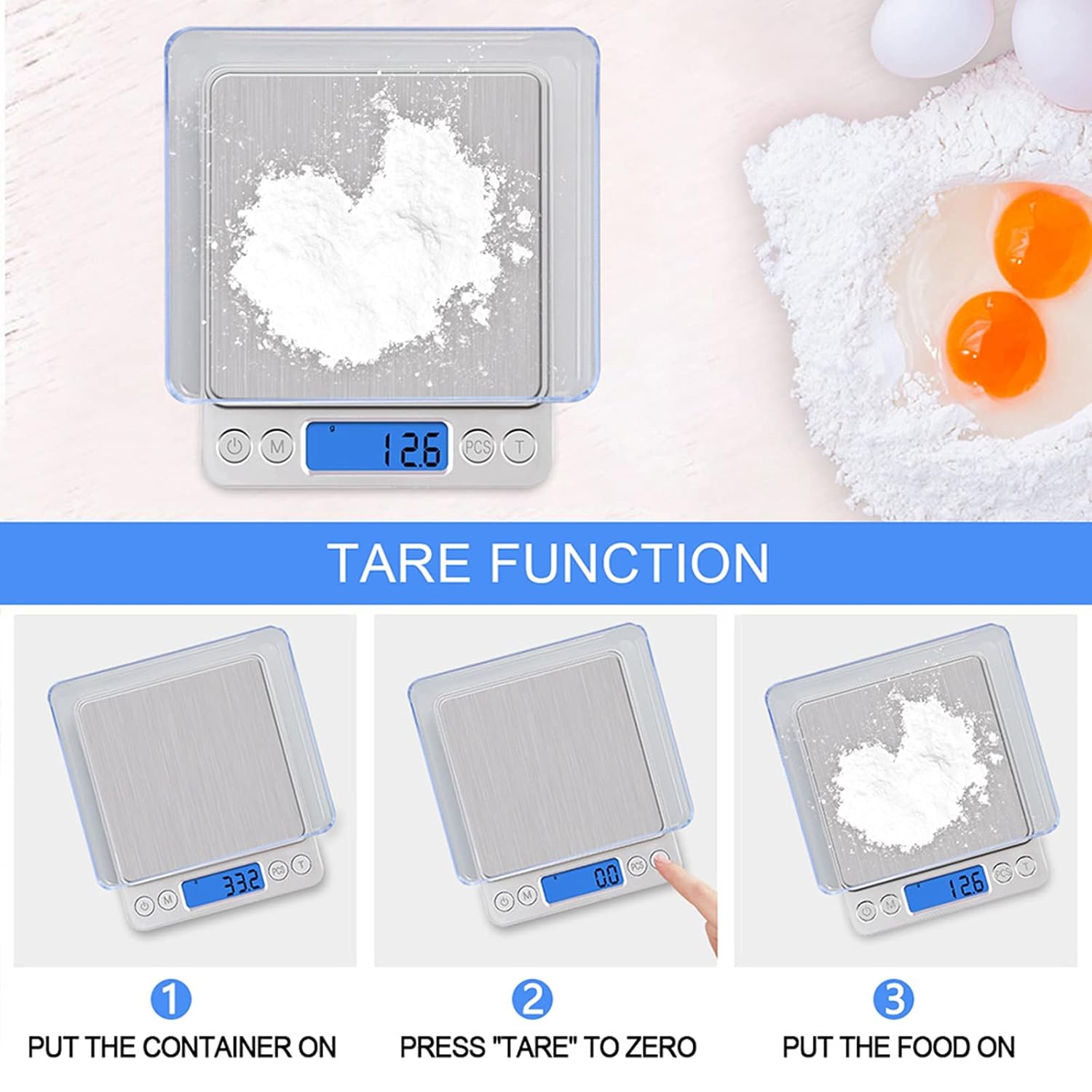
Image: Step-by-step guide on how to use the tare function to weigh ingredients accurately in a container.
Manutenzjoni
- Tindif: Imsaħ il-wiċċ tal-iskala b'd ħafifamp cloth. For stubborn stains, use a mild detergent. Ensure no liquid enters the internal components.
- Ħażna: Store the scale in a cool, dry place. If not used for an extended period, remove the batteries to prevent leakage.
- Kalibrazzjoni: The scale is factory calibrated. If you suspect inaccuracies, refer to the troubleshooting section or contact customer support for calibration instructions.
Issolvi l-problemi
| Problema | Kawża Possibbli | Soluzzjoni |
|---|---|---|
| Id-displej juri 'Lo' | Qawwa baxxa tal-batterija. | Ibdel il-batteriji. |
| Id-displej juri 'O-Ld' | Tagħbija żejda. | Neħħi l-oġġett immedjatament. Tiżenx aktar minn 3000g. |
| Qari mhux eżatt | Unstable surface, external interference, or needs calibration. | Place on a flat, stable surface. Avoid vibrations. Ensure no strong electromagnetic fields. If issues persist, contact customer support for calibration guidance. |
| L-iskala ma tixgħel | Batteriji installati ħażin jew eżawriti. | Iċċekkja l-polarità tal-batterija jew ibdel il-batteriji. |
Speċifikazzjonijiet
- Ditta: UNIWEEIGH
- Numru tal-Mudell: 609378971129
- Kulur: Fidda
- Limitu tal-Piż: 3000g (6.61 lbs)
- Preċiżjoni tal-qari: 0.1g
- Tip ta' wiri: LCD backlit
- Unitajiet: g, oz, gn, ct, ozt, dwt
- Materjal: Stainless Steel (platform), Acrylonitrile Butadiene Styrene (ABS) (frame)
- Dimensjonijiet tal-Prodott: 5 x 4.2 x 0.6 pulzieri
- Piż tal-oġġett: 9.2 uqija (0.26 Kilogrammi)
- Sors tal-Enerġija: 2 batteriji AAA (inklużi)
- Karatteristiċi Speċjali: Auto Shut Off, Backlit Display, High Weight Capacity, Lightweight, Tare Function, Counting Function
Garanzija u Appoġġ
UNIWEIGH products are rigorously tested and calibrated before shipment. For any questions, technical support, or warranty claims, please contact UNIWEIGH customer service through the retailer where the product was purchased. Please retain your proof of purchase for warranty validation.

