Introduzzjoni
This manual provides essential instructions for the safe and efficient operation of your JVC 40W Portable Party Speaker, Model XS-N5223PB. Please read this manual thoroughly before using the device and retain it for future reference.
The JVC 40W Portable Party Speaker features integrated Bluetooth technology for wireless audio streaming, a built-in USB port for multimedia file playback (MP3, picture, video), TF card support, Karaoke function, and an LED light show. It delivers 40W output through two 8-inch speakers and is powered by a 4000mAh battery.
Informazzjoni Importanti dwar is-Sigurtà
- Tesponix l-ispiker għall-ilma jew għal umdità eċċessiva.
- Evita li tpoġġi l-ispiker ħdejn sorsi ta’ sħana jew fid-dawl tax-xemx dirett.
- Tippruvax tiżżarma jew timmodifika l-ispiker. Irreferi kull servizz lil persunal kwalifikat.
- Use only the specified charging adapter.
- Żomm fejn ma jintlaħaqx mit-tfal.
- Żgura ventilazzjoni xierqa madwar l-ispiker waqt it-tħaddim.
Kontenut tal-Pakkett
Jekk jogħġbok iċċekkja li l-oġġetti kollha huma preżenti fil-pakkett:
- 1 x JVC 40W Portable Party Speaker (Model XS-N5223PB)
- 1 x Cable tal-Iċċarġjar
- 1 x Manwal tal-Utent (dan id-dokument)
Prodott Overview
Familiarize yourself with the main components and controls of your JVC Portable Party Speaker.
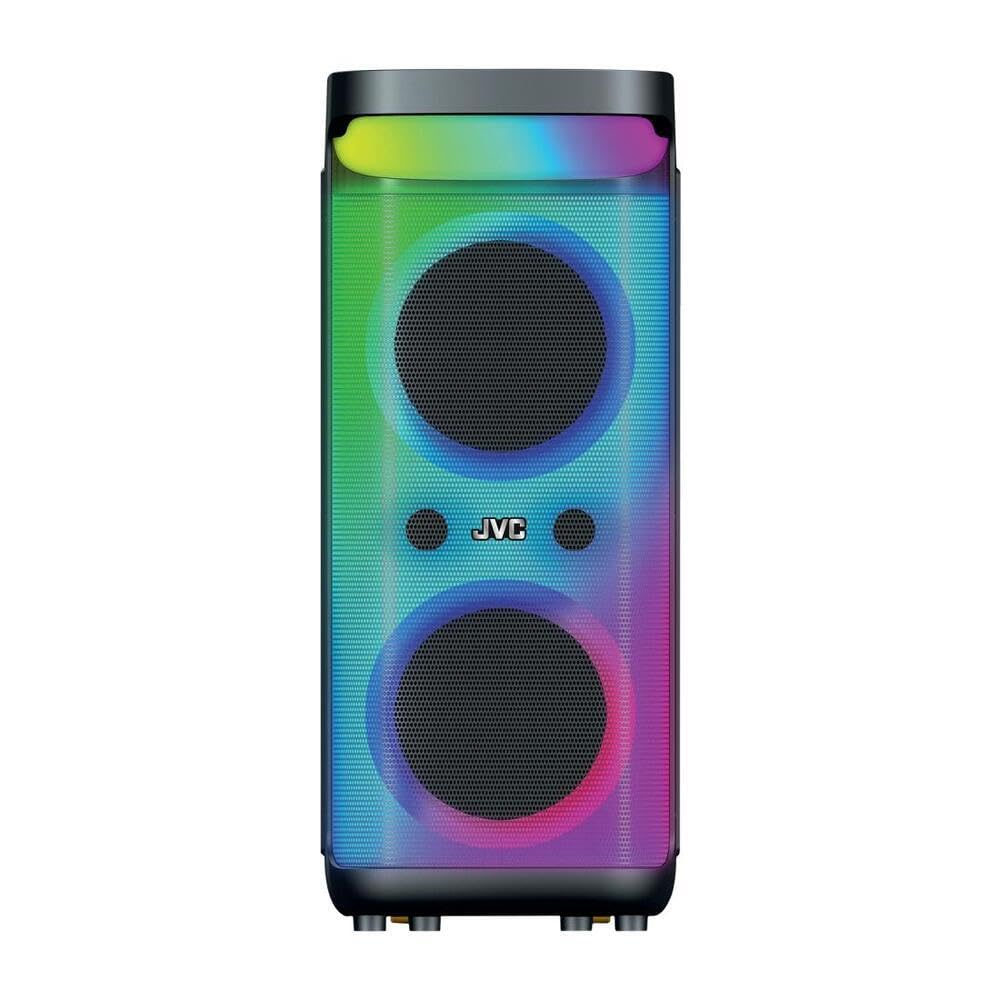
Stampa 1: Quddiem u fuq view of the JVC 40W Portable Party Speaker, showing the control panel, LED lights, and speaker grille.

Stampa 2: Dettaljati view of the speaker's top control panel, highlighting buttons for mode selection, volume, playback, and input ports.
Funzjonijiet tal-Panew tal-Kontroll:
- Buttuna tal-Qawwa: Jixgħel/jitfi l-ispiker.
- Buttuna tal-Modalità: Switches between Bluetooth, USB, TF Card, and AUX input modes.
- Buttuni tal-Volum: Adjusts master volume and microphone volume (if applicable).
- Buttuna Play/Pause: Jikkontrolla l-plejbek tal-midja.
- Buttuni tal-Track ta' Preċedenti/Li jmiss: Jinnaviga permezz tal-binarji.
- Buttuna tad-Dawl LED: Toggles or changes LED light show patterns.
- Port USB: For USB drive playback of MP3, picture, and video files.
- Slott tal-Karta TF: For TF (MicroSD) card playback of MP3, picture, and video files.
- Input AUX: Għall-konnessjoni ta' apparati awdjo esterni permezz ta' kejbil ta' 3.5mm.
- Input tal-mikrofonu: For karaoke function.
Setup
Iċċarġjar lill-Ispeaker
- Qabbad il-kejbil tal-iċċarġjar mal-port tal-iċċarġjar tal-ispiker.
- Plug the other end of the charging cable into a suitable power adapter (9 Volts input) and then into a wall outlet.
- Id-dawl indikatur tal-iċċarġjar jixgħel, tipikament aħmar, waqt l-iċċarġjar. Jibdel il-kulur jew jintefa meta jkun iċċarġjat kompletament.
- For first use, fully charge the speaker for approximately 4-6 hours.
Tqegħid Inizjali
Place the speaker on a stable, flat surface. Ensure there is adequate space around the speaker for optimal sound dispersion and ventilation. The speaker is designed for floorstanding placement.
Istruzzjonijiet Operattivi
Qawwa mixgħul/mitfi
- To turn on: Press and hold the Power button until the display illuminates.
- To turn off: Press and hold the Power button again until the display turns off.
Konnessjoni Bluetooth
- Turn on the speaker. It will automatically enter Bluetooth pairing mode, indicated by a flashing "BLUE" on the display or an audible prompt.
- Fuq l-apparat mobbli tiegħek (smartphone, tablet, eċċ.), attiva l-Bluetooth u fittex apparati disponibbli.
- Select "JVC XS-N5223PB" (or similar name) from the list of devices.
- Once paired, the speaker will confirm the connection with an audible sound, and "BLUE" on the display will stop flashing.
- Issa tista' tixxandar l-awdjo mingħajr fili mit-tagħmir tiegħek għall-ispiker.
Daqq tal-Kard USB/TF
- Insert a USB flash drive or TF (MicroSD) card into the respective port/slot on the speaker.
- The speaker will automatically switch to USB or TF card mode and begin playing supported audio, picture, or video files. If it does not switch automatically, press the Mode button to select the correct input.
- Uża l-buttuni Play/Pause u Preċedenti/Li Jmiss Track biex tikkontrolla l-plejbek.
Input AUX
- Qabbad tarf wieħed ta' kejbil awdjo ta' 3.5mm (mhux inkluż) mal-port tad-dħul AUX fuq l-ispiker.
- Qabbad it-tarf l-ieħor tal-kejbil mal-jack tal-output tal-awdjo tat-tagħmir estern tiegħek (eż., MP3 player, laptop).
- Press the Mode button on the speaker until "AUX" mode is selected.
- Ikkontrolla d-daqq u l-volum mit-tagħmir estern tiegħek.
Funzjoni Karaoke
- Connect a microphone (not included) to the Microphone Input port.
- Aġġusta l-volum tal-mikrofonu billi tuża l-pum apposta fuq il-pannell tal-kontroll.
- Play music via Bluetooth, USB, TF card, or AUX, and sing along.
Uri tad-Dawl LED
Press the LED Light button to cycle through different light patterns or to turn the LED lights on/off.
Funzjoni True Stereo Wireless (TWS)
The TWS function allows you to pair two JVC XS-N5223PB speakers together for a stereo sound experience.
- Kun żgur li ż-żewġ kelliema huma mixgħula u fil-modalità Bluetooth, iżda mhux konnessi ma' xi apparat.
- On one speaker (this will be the primary speaker), press and hold the TWS button (refer to your speaker's specific button layout if not explicitly labeled).
- L-ispiker primarju se jfittex l-ispiker sekondarju. Ladarba jkunu konnessi, iż-żewġ kelliema se joħorġu ħoss ta’ konferma.
- Issa, qabbad l-apparat mobbli tiegħek mal-ispiker primarju permezz tal-Bluetooth kif deskritt hawn fuq. L-awdjo se jindaqq miż-żewġ kelliema b'mod stereo.
Manutenzjoni
- Tindif: Uża drapp artab u niexef biex tnaddaf il-barra tal-ispiker. Tużax prodotti tat-tindif likwidi jew materjali li joborxu.
- Ħażna: When not in use for extended periods, store the speaker in a cool, dry place. It is recommended to charge the battery every 3-6 months to maintain its lifespan.
- Kura tal-batterija: Avoid fully discharging the battery frequently. Charge the speaker when the low battery indicator appears.
Issolvi l-problemi
| Problema | Kawża Possibbli | Soluzzjoni |
|---|---|---|
| L-ispiker ma jixgħelx. | Il-batterija hija skarikata. | Qabbad l-ispiker ma' sors tal-enerġija u ċċarġjah. |
| L-ebda ħoss. | Il-volum huwa baxx wisq; mod ta' input mhux korrett; apparat mhux imqabbad. | Increase volume on speaker and connected device. Ensure correct input mode is selected. Reconnect Bluetooth or check cable connections. |
| Tqabbil Bluetooth ifalli. | L-ispiker mhux fil-modalità ta' tqabbil; l-apparat huwa 'l bogħod wisq; interferenza. | Ensure speaker is in Bluetooth pairing mode. Move device closer to speaker. Avoid strong electromagnetic interference. Try restarting both devices. |
| Il-karta USB/TF mhux qed tilgħab. | Mhux appoġġjat file ifformattja; il-kard/drajv mhux imdaħħal sew; korrott files. | Tiżgura files are in supported formats (e.g., MP3). Reinsert the USB drive/TF card. Try with a different USB drive/TF card or different files. |
| Id-dwal LED mhux qed jaħdmu. | LED lights are turned off. | Press the LED Light button to turn them on or change patterns. |
Speċifikazzjonijiet
| Numru tal-Mudell | XS-N5223PB |
| Qawwa tal-Ħruġ | 40W |
| Daqs tal-Kelliem | 8-il pulzier x 2 |
| Konnettività | Bluetooth, USB, Karta TF, AUX |
| Kapaċità tal-batterija | 4000mAh |
| Input Voltage | 9 Volts |
| Dimensjonijiet (D x W x H) | 33 ċm x 28.5 ċm x 66 ċm |
| Materjal | Plastik |
| Tip ta 'Immuntar | Sular |
| Karatteristiċi Addizzjonali | TWS Function, Karaoke, LED Light Show |
Informazzjoni dwar Garanzija
This JVC Portable Party Speaker (Model XS-N5223PB) comes with a Garanzija tal-Manifattur ta' Sena mid-data tax-xiri. Din il-garanzija tkopri difetti fil-manifattura fil-materjali u l-abbilità taħt użu normali.
Il-garanzija ma tkoprix:
- Ħsara kkawżata minn inċident, abbuż, użu ħażin, għargħar, nar, terremot, jew kawżi esterni oħra.
- Damage caused by operating the product outside the permitted or intended uses described by JVC.
- Damage caused by service performed by anyone who is not an authorized service provider of JVC.
- Products or parts that have been modified to alter functionality or capability without the written permission of JVC.
Jekk jogħġbok żomm il-prova tax-xiri tiegħek għal pretensjonijiet ta' garanzija.
Appoġġ u Informazzjoni ta' Kuntatt
For technical support, warranty claims, or further assistance, please contact JVC customer service.
- Websit: www.jvc.com (Please check your regional JVC website for local support details)
- Email: Refer to the JVC website for specific contact email addresses.
- Telefon: Refer to the JVC websit għal numri tat-telefon ta' kuntatt speċifiċi.
When contacting support, please have your product model number (XS-N5223PB) and proof of purchase readily available.


