1. Istruzzjonijiet Importanti dwar is-Sigurtà
Please read and understand all safety instructions before installation and operation. Failure to follow these instructions may result in injury or product damage.
- Kapaċità tal-piż: Teċċedix il-kapaċità massima tat-tagħbija ta' 110 lbs (50 kg).
- Installazzjoni: The TV lift mechanism must be securely mounted against a wall or within a sturdy cabinet structure using appropriate fasteners. Ensure the mounting surface can support the combined weight of the lift and the TV.
- Sigurtà Elettrika: Ensure all electrical connections are secure and comply with local electrical codes. Do not operate the lift with damaged cords or plugs. Keep liquids away from electrical components.
- Clearance: Maintain clear space around the lift and TV during operation to prevent obstructions and potential damage.
- Tfal u Pets: Keep children and pets away from the lift during operation.
- Użu Intenzjonat: This product is designed for lifting and lowering televisions within its specified size and weight range. Do not use for any other purpose.
2. Kontenut tal-Pakkett
Ivverifika li l-komponenti kollha huma preżenti u mhux imħassra qabel ma tipproċedi bl-installazzjoni.
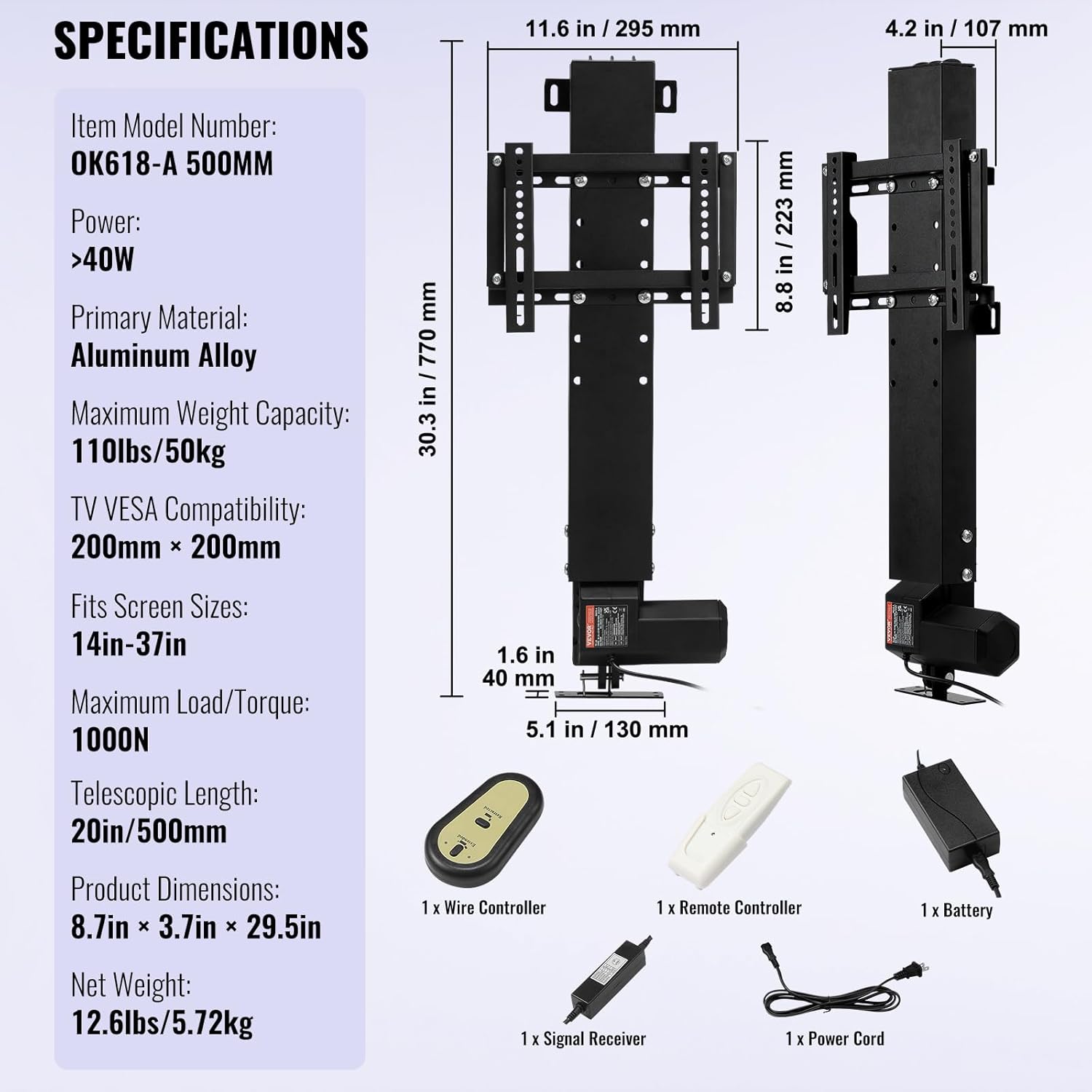
- Motorized TV Lift Unit
- Brackets tal-Immuntar tat-TV (2 biċċiet)
- Kontroll mill-bogħod
- Wired Hand Controller
- Riċevitur tas-Sinjal
- Adapter tal-Enerġija
- Korda tal-Enerġija
- Ħardwer tal-Immuntar (viti, woxers, ġewż)

3. Setup u Installazzjoni
Follow these steps carefully for proper installation of your VEVOR Motorized TV Lift.
3.1. Assemble the TV Bracket
- Attach the two vertical TV mounting brackets to the horizontal crossbars using the provided screws and a drill. Ensure they are securely fastened.

3.2. Connect the Control System
- Connect the wired hand controller to the signal receiver.
- Connect the linear actuator cable from the TV lift unit to the power adapter.
- Ipplaggja l-adapter ta 'l-enerġija fi żbokk ta' l-elettriku adattat.


3.3. Extend the Lift and Attach TV Bracket
- Use the wired hand controller or remote control to extend the linear actuator of the lift.
- Fix the assembled TV bracket onto the extended lift mechanism using the provided screws. Ensure a secure fit.

3.4. Mount the TV
- Attach the connector racks to the back of your TV using the appropriate VESA mounting screws.
- Carefully lift your TV and hook the connector racks onto the TV mounting brackets on the lift. Ensure the TV is level and securely seated.

4. Istruzzjonijiet Operattivi
The VEVOR Motorized TV Lift can be operated using either the wireless remote control or the wired hand controller.
4.1. Operazzjoni ta 'Kontroll mill-Bogħod
- Buttuna 'l fuq: Press to raise the TV.
- Buttuna 'l isfel: Press to lower the TV.
- Buttuna Waqqaf: Agħfas biex twaqqaf it-TV f'kull għoli mixtieq.
4.2. Wired Hand Controller Operation
- The wired hand controller features similar Up, Down, and Stop buttons for direct control.

4.3. Automatic Lift Functionality
The lift is designed to automatically raise or lower the TV. The TV can be hidden within a cabinet when not in use, providing a clean aesthetic.
Vidjo 4.1: VEVOR Motorized TV Lift in action. This video demonstrates the automatic lifting and lowering functionality of the VEVOR Motorized TV Lift, showing how a TV can be discreetly hidden within a cabinet.
5. Manutenzjoni
Regular maintenance ensures optimal performance and longevity of your TV lift.
- Tindif: Wipe the lift and TV mounting brackets with a soft, dry cloth. Avoid abrasive cleaners or solvents.
- Spezzjoni: Periodically check all screws and connections to ensure they are tight. Inspect the power cord for any signs of damage.
- Lubrikazzjoni: The linear actuator is generally maintenance-free. Do not attempt to lubricate internal components unless specifically instructed by VEVOR support.
6 Issolvi l-problemi
If you encounter issues with your VEVOR Motorized TV Lift, refer to the following table for common problems and solutions.
| Problema | Kawża Possibbli | Soluzzjoni |
|---|---|---|
| Lift does not move. | Bla enerġija, konnessjoni maħlula, batterija tar-remote mejta. | Check power cord connection, ensure outlet is active. Verify all control cables are securely connected. Replace remote control batteries. |
| Lift moves erratically or stops. | Obstruction, overloaded, motor issue. | Check for any obstructions in the lift's path. Ensure TV weight does not exceed 110 lbs. Contact VEVOR support if the issue persists. |
| Il-kontroll remot mhux qed jirrispondi. | Remote battery dead, signal interference. | Replace remote control batteries. Ensure no strong signal interference sources are nearby. Try using the wired hand controller. |
7. Speċifikazzjonijiet
Detailed technical specifications for the VEVOR Motorized TV Lift.
- Numru tal-Mudell tal-Oġġett: 28CDSTSZJ0000035456
- Materjal Primarju: Liga tal-Aluminju
- Kulur: Iswed
- Dimensjonijiet tal-Prodott: 30.3 x 10.6 x 5.1 pulzieri (770 x 269 x 130 mm)
- Piż tal-oġġett: 13.7 liri (5.72 kg)
- Tul tal-puplesija: 19.6 pulzieri (500 mm)
- Height Adjustable Range: 30.4 inches - 50 inches (770 mm - 1270 mm)
- Kapaċità massima tal-piż: 110 lbs (50 kg)
- TV VESA Compatibility: Max 200 x 200 mm
- Fits Screen Sizes: 14-37 pulzier
- Tip ta' Moviment: Artikulazzjoni
- Qawwa: > 40W
- Maximum Load/Torque: 1000N
8. Garanzija u Appoġġ
For warranty information, technical support, or service inquiries, please contact VEVOR customer service through the official VEVOR website or your purchase platform. Please have your model number (28CDSTSZJ0000035456) and purchase details ready when contacting support.


