1. Introduzzjoni
This manual provides essential information for the proper installation, operation, and maintenance of your GAMEMAX RGB-1050 1050W ATX 3.0 & PCIe 5.0 Power Supply. Please read this manual thoroughly before installation and retain it for future reference.

Image 1.1: The GAMEMAX RGB-1050 1050W ATX 3.0 & PCIe 5.0 Power Supply, showcasing its white chassis and addressable RGB fan.
2. Informazzjoni dwar is-Sigurtà
Observe the following safety guidelines to prevent injury and damage to your equipment:
- Kun żgur li l-provvista tal-enerġija hija skonnettjata mis-sokit tal-enerġija AC qabel l-installazzjoni jew l-immaniġġjar.
- Dan l-apparat fih volum għolitagkomponenti e. Tiftaħx il-provvista tal-enerġija casing. Irreferi s-servizz kollu lil persunal kwalifikat.
- Installa l-provvista tal-enerġija f'żona ventilata sew, 'il bogħod minn sorsi ta' sħana u umdità.
- Use only the modular cables provided with this power supply. Using incompatible cables may cause damage.
- Aċċerta ruħek li s-sistema tal-kompjuter tiegħek hija mqabbda sew mal-art.
3. Kontenut tal-Pakkett
Ivverifika li l-oġġetti kollha huma preżenti fil-pakkett:
- GAMEMAX RGB-1050 1050W Power Supply
- Modular Cable Set (refer to Image 3.1 for details)
- Kurdun tal-Enerġija AC
- Viti tal-Immuntar
- Manwal għall-Utent (dan id-dokument)
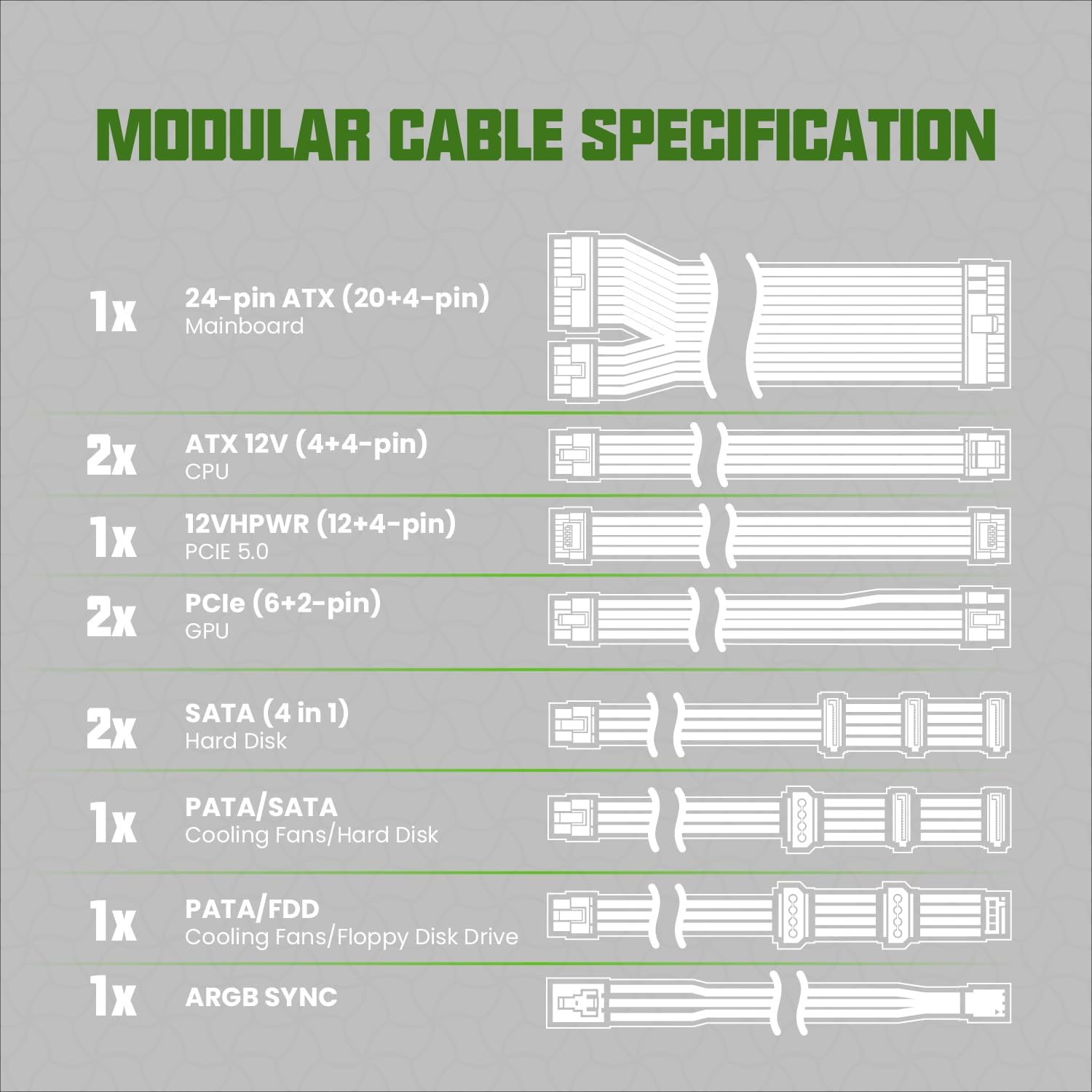
Image 3.1: Diagram illustrating the modular cable specifications included with the power supply, detailing connector types and quantities such as 24-pin ATX, ATX 12V (4+4-pin) CPU, 12VHPWR (12+4-pin) PCIe 5.0, PCIe (6+2-pin) GPU, SATA, PATA/SATA, PATA/FDD, and ARGB Sync cables.
4. Prodott Aktarview & Karatteristiċi
The GAMEMAX RGB-1050 is a high-performance power supply designed for modern gaming systems, offering efficiency, stability, and customizable aesthetics.
4.1. Karatteristiċi ewlenin
- Ċertifikat 80 Plus Gold: Achieves 90% or higher efficiency under typical loads, reducing energy consumption and heat generation.
- Stable & Safe Output: Features a DC-DC structure, LLC resonance assist, and 12V synchronous rectification for consistent and reliable power delivery.
- Lest għall-ATX 3.0 u l-PCIe 5.0: Equipped with a 12VHPWR 16-pin connector, capable of delivering up to 600W to power-hungry graphics cards. Supports up to 2x total power excursion and 3x GPU power excursion, ensuring compatibility with future high-performance components.
- Kontroll tad-Dawl ARGB: Addressable RGB lighting can synchronize with motherboard ARGB software, offering 25 smart lighting modes and an RGB memory function.
- Ultra-quiet & Durable Fan: A 140mm fan with hydraulic bearing provides efficient heat dissipation while maintaining low noise levels.
- Disinn Kompletament Modulari: Allows for cleaner cable management by connecting only the necessary cables.
- Kondensaturi 100% Ġappuniżi: Ensures long-term reliability and stability.

Immaġni 4.1: Fuqview of the power supply highlighting key features such as 80 Plus Gold certification, 100% Japanese capacitors, ARGB Addressable lighting, ATX 3.0 compatibility, 12VHPWR connector, and DC-DC conversion.

Immaġni 4.2: Mill-qrib view emphasizing the PCIe 5.0 readiness with a 12VHPWR connector capable of 600W output, alongside icons representing various protection features: Over Power Protection (OPP), Over Current Protection (OCP), Over VoltagProtezzjoni Elettronika (OVP), Taħt Voltage Protection (UVP), Short Circuit Protection (SCP), and Over Temperature Protection (OTP).

Immaġni 4.3: Stampa dettaljata view of a Japanese capacitor inside the power supply, indicating its role in providing durability and stability.

Image 4.4: Illustration of the 140mm fan, highlighting features such as PWM temperature control, quiet operation, 50,000-hour hydraulic bearing lifespan, and 9-blade design for enhanced airflow.
5. Speċifikazzjonijiet
| Karatteristika | Deskrizzjoni |
|---|---|
| Mudell | RGB1050-ABJAD |
| Output Wattage | 1050W |
| Ċertifikazzjoni tal-Effiċjenza | 80 Plus Deheb |
| Fattur tal-Formola | ATX |
| Disinn tal-Provvista tal-Enerġija | Modulari Sħiħ |
| Appoġġ PCIe | PCIe 5.0 (12VHPWR 16-pin connector) |
| Metodu tat-tkessiħ | Air (140mm Hydraulic Bearing Fan) |
| Dawl RGB | Addressable RGB with Motherboard Sync |
| Kondensers | 100% Kondensers Ġappuniżi |
| Dimensjonijiet tal-Prodott (L x W x H) | 11.41 x 10.28 x 5.24 pulzieri |
| Piż tal-oġġett | 6.87 liri |
| Apparati Kompatibbli | PC Systems, Gaming Components |
| Klassifikazzjoni kurrenti | 12 Amps |
6. Gwida għall-Installazzjoni
Follow these steps for installing your GAMEMAX power supply:
6.1. Installazzjoni Fiżika
- Ipprepara s-Sistema Tiegħek: Kun żgur li l-kompjuter tiegħek huwa mitfi u skonnettjat mill-plakka tal-ħajt. Iftaħ il-kaxxa tal-kompjuter tiegħek.
- Neħħi l-PSU l-Qadim (jekk applikabbli): Skonnettja l-kejbils kollha mill-provvista tal-enerġija l-qadima tiegħek u neħħi l-viti tal-immuntar tagħha. Żerżaqha bir-reqqa 'l barra mill-kaxxa.
- Mount New PSU: Slide the GAMEMAX RGB-1050 power supply into the designated PSU bay in your computer case. Ensure the fan is oriented correctly (typically facing downwards for bottom-mounted PSUs, or upwards if your case has no bottom vent). Secure it with the provided mounting screws.
6.2. Konnessjonijiet tal-kejbil
Utilize the fully modular design to connect only the necessary cables. Refer to Image 3.1 for cable identification.
- Qawwa tal-mainboard: Connect the 24-pin ATX cable to the corresponding port on your motherboard and the power supply.
- CPU Power: Connect the ATX 12V (4+4-pin) CPU cable(s) to your motherboard's CPU power connector(s) and the power supply.
- GPU Power: For modern graphics cards, use the 12VHPWR (12+4-pin) PCIe 5.0 cable if your GPU supports it. Otherwise, use the appropriate PCIe (6+2-pin) GPU cables for your graphics card(s). Connect them to the GPU and the power supply.
- Peripheral Power: Connect SATA cables for SSDs/HDDs and PATA cables for older devices or case fans as needed.
- ARGB Sync Cable: If you wish to synchronize the power supply's RGB lighting with your motherboard, connect the ARGB Sync cable from the power supply to an available 5V Addressable RGB header on your motherboard.
- Ġestjoni tal-Kejbil: Route cables neatly behind the motherboard tray or in designated channels to improve airflow and aesthetics.
- Kontroll Finali: Double-check all connections to ensure they are secure. Close your computer case.
- Qabbad l-Enerġija AC: Ipplaggja l-korda tal-enerġija AC fil-provvista tal-enerġija u mbagħad f'sokit tal-ħajt.
7. Operation (ARGB Lighting)
The GAMEMAX RGB-1050 features addressable RGB lighting for aesthetic customization.
7.1. Motherboard ARGB Sync
If you connected the ARGB Sync cable to your motherboard's 5V ARGB header, you can control the power supply's lighting effects directly through your motherboard's RGB software (e.g., ASUS Aura Sync, GIGABYTE RGB Fusion, MSI Mystic Light Sync, ASRock Polychrome RGB).

Image 7.1: An illustration demonstrating the A-RGB Sync capability, showing the power supply's lighting synchronized with other components in a PC build via motherboard software from brands like ASUS, GIGABYTE, MSI, and ASRock.
7.2. Built-in Lighting Modes
If your motherboard does not have a 5V ARGB header or you prefer not to use software control, the power supply has built-in lighting modes. These can typically be cycled through using a dedicated button on the power supply itself or a connected case button (if applicable and wired correctly). Refer to your case manual for external RGB control options.
8. Manutenzjoni
Manutenzjoni regolari tgħin biex tiżgura l-lonġevità u l-prestazzjoni ottimali tal-provvista tal-enerġija tiegħek.
- Tindif tat-Trab: Periodically clean dust from the power supply's fan and ventilation grilles using compressed air. Ensure the system is powered off and unplugged before cleaning.
- Spezzjoni tal-Cable: Occasionally check all modular cable connections to ensure they are secure and free from damage.
- Kundizzjonijiet Ambjentali: Operate the power supply within recommended temperature and humidity ranges. Avoid extreme conditions.
9 Issolvi l-problemi
Jekk tiltaqa' ma' problemi bil-provvista tal-enerġija tiegħek, irreferi għall-passi komuni li ġejjin għas-soluzzjoni tal-problemi:
- Ebda Qawwa:
- Kun żgur li l-korda tal-enerġija AC hija pplaggjata sew kemm fil-provvista tal-enerġija kif ukoll fis-sokit tal-ħajt.
- Check the power switch on the back of the power supply; it should be in the 'ON' position.
- Verify all modular cables are correctly and firmly connected to both the power supply and the components.
- Ittestja s-sokit tal-ħajt b'apparat ieħor biex tikkonferma li għandu l-enerġija.
- Instabbiltà/Ħsarat tas-Sistema:
- Kun żgur li r-rekwiżiti tal-enerġija tas-sistema tiegħek ma jaqbżux il-kapaċità ta' 1050W tal-PSU.
- Iċċekkja għal konnessjonijiet tal-kejbil maħlula, speċjalment mal-motherboard u l-karta grafika.
- If overclocking, return to default settings to rule out power-related instability.
- Ħoss tal-fann:
- A certain level of fan noise is normal under load. If the noise is excessive or unusual, check for dust accumulation and clean the fan.
- Kun żgur li l-ebda kejbil jew ostruzzjoni ma tkun qed tinterferixxi max-xfafar tal-fann.
- RGB Lighting Not Working/Syncing:
- Verify the ARGB Sync cable is correctly connected to a 5V ARGB header on your motherboard.
- Ensure your motherboard's RGB software is installed and updated.
- Check if the lighting can be controlled via the power supply's built-in modes (if applicable).
If issues persist after following these steps, contact GAMEMAX customer support.
10. Garanzija u Appoġġ
The GAMEMAX RGB-1050 1050W Power Supply comes with a garanzija ta 'sena mid-data tax-xiri. Din il-garanzija tkopri difetti fil-materjali u l-abbilità taħt użu normali.
For warranty claims or technical support, please visit the official GAMEMAX website or contact their customer service department. You may be required to provide proof of purchase.


