1. Introduzzjoni
Thank you for choosing the Defender Enjoy S200 Portable Bluetooth Speaker. This manual provides essential information for setting up, operating, and maintaining your speaker to ensure optimal performance and longevity. Please read this manual thoroughly before use.
The Defender Enjoy S200 is a versatile portable speaker featuring Bluetooth 5.3 connectivity, True Wireless Stereo (TWS) pairing, an integrated FM radio, and MP3 playback capabilities via USB flash drive or microSD card. It also includes an LED light and supports hands-free calling. Designed for portability, it offers up to 9 hours of playback on a single charge and convenient USB Type-C charging.
2. Prodott Aktarview
2.1 Karatteristiċi ewlenin
- Bluetooth 5.3: For stable and efficient wireless audio streaming.
- Stereo bla fili veru (TWS): Connect two Enjoy S200 speakers for a stereo sound experience.
- Modi ta' Daqq multipli: Bluetooth, FM Radio, USB Flash Drive, MicroSD Card (up to 32GB).
- Dawl LED integrat: Provides visual ambiance.
- Sejħat mingħajr idejn: Mikrofonu inkorporat għal telefonati.
- Ħajja twila tal-batterija: Sa 9 sigħat ta' daqq kontinwu tal-mużika.
- Iċċarġjar USB tat-Tip C: Port tal-iċċarġjar modern u konvenjenti.
- Disinn portabbli: Compact and lightweight with a carrying strap.
2.2 Kontenut tal-Pakkett
- Defender Enjoy S200 Portable Bluetooth Speaker
- Kejbil tal-Iċċarġjar tat-Tip C
- Gwida Quick Start
- Ċinga tal-Ġarr

Image: The Defender Enjoy S200 Portable Bluetooth Speaker, showcasing its compact design and front grille with an illuminated LED ring.

Image: An infographic highlighting key features such as multi-colored LED lighting, True Wireless Stereo (TWS) pairing, Bluetooth 5.3, MP3 player, FM receiver, and hands-free calling.
3. Setup
3.1 Iċċarġjar tal-Ispeaker
- Locate the Type-C charging port on the back of the speaker.
- Connect the provided Type-C charging cable to the speaker and the other end to a USB power adapter (not included) or a computer's USB port.
- L-indikatur LED juri l-istatus tal-iċċarġjar. Iċċarġjar sħiħ tipikament jieħu madwar 3-4 sigħat.
- Skonnettja l-kejbil ladarba jkun iċċarġjat kompletament.
3.2 Tixgħel/Jitfi
- To power on, slide the ON/OFF switch located on the back of the speaker to the 'ON' position.
- Biex titfi, żżerżaq is-swiċċ ON/OFF għall-pożizzjoni 'OFF'.
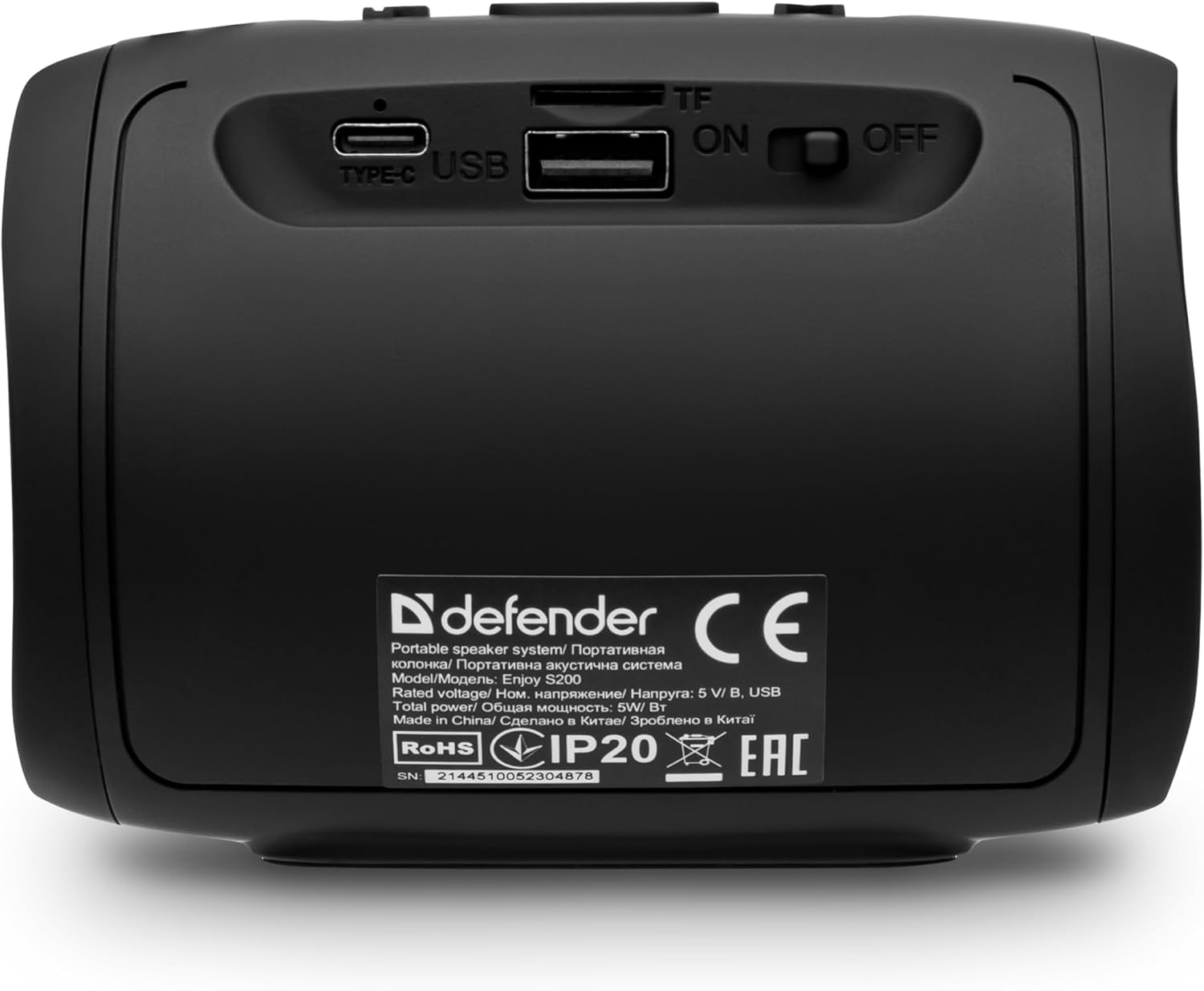
Immaġni: Wara view of the Defender Enjoy S200 speaker, showing the Type-C charging port, USB port, TF (microSD) card slot, and the ON/OFF power switch.
3.3 Tqabbil tal-Bluetooth
- Kun żgur li l-ispiker ikun mixgħul u fil-modalità ta' tqabbil Bluetooth (indikat minn LED li jteptep).
- Fuq l-apparat tiegħek (smartphone, tablet, eċċ.), attiva l-Bluetooth u fittex apparati disponibbli.
- Select "Defender Enjoy S200" from the list of devices.
- Once paired, the speaker will emit a confirmation sound, and the LED will stop flashing.
3.4 Tqabbil ta' Stereo Veru Wireless (TWS)
To pair two Defender Enjoy S200 speakers for stereo sound:
- Kun żgur li ż-żewġ kelliema huma mixgħula u mhumiex konnessi ma' xi apparat Bluetooth.
- On one speaker (this will be the primary speaker), press and hold the TWS button (often indicated by a double-arrow icon) until you hear a pairing tone.
- The two speakers will automatically search and connect to each other. A confirmation tone will sound once connected.
- Issa, qabbad it-tagħmir tiegħek mal-ispiker primarju permezz tal-Bluetooth kif deskritt fit-taqsima 3.3. L-awdjo se jindaqq stereo permezz taż-żewġ kelliema.

Image: A visual representation of two Defender Enjoy S200 speakers pairing wirelessly to create a True Wireless Stereo system, alongside icons for Bluetooth 5.3, MP3 player, FM receiver, and hands-free calling.
4. Istruzzjonijiet Operattivi
4.1 Button Functions (Refer to top panel controls)
- Buttuna tal-Qawwa: Long press to power on/off. Short press to play/pause in music mode, or answer/end calls.
- Volum 'il fuq (+): Short press to increase volume. Long press for next track/station.
- Volum 'l isfel (-): Short press to decrease volume. Long press for previous track/station.
- Buttuna tal-Modalità (M): Short press to switch between Bluetooth, FM Radio, USB, and MicroSD modes.
- Buttuna tad-Dawl LED: Short press to cycle through LED light modes or turn off the LED.
4.2 Daqq tal-Bluetooth
After successful Bluetooth pairing (Section 3.3), open your music application on your device and begin playback. Use the speaker's volume buttons or your device's volume controls to adjust the audio level.
4.3 Modalità tar-Radju FM
- Press the 'M' (Mode) button until you hear the FM radio prompt.
- Long press the Play/Pause button to automatically scan and save available FM stations.
- Uża l-buttuni Volume Up (+) u Volume Down (-) (agħfas fit-tul) biex tinnaviga bejn l-istazzjonijiet salvati.
4.4 Daqq tal-USB/MicroSD
- Insert a USB flash drive or a microSD card (up to 32GB) containing MP3 audio files fil-port rispettiv fuq wara tal-ispiker.
- Press the 'M' (Mode) button until the speaker automatically switches to USB or MicroSD mode and begins playback.
- Use the speaker's control buttons for play/pause, next track, and previous track.
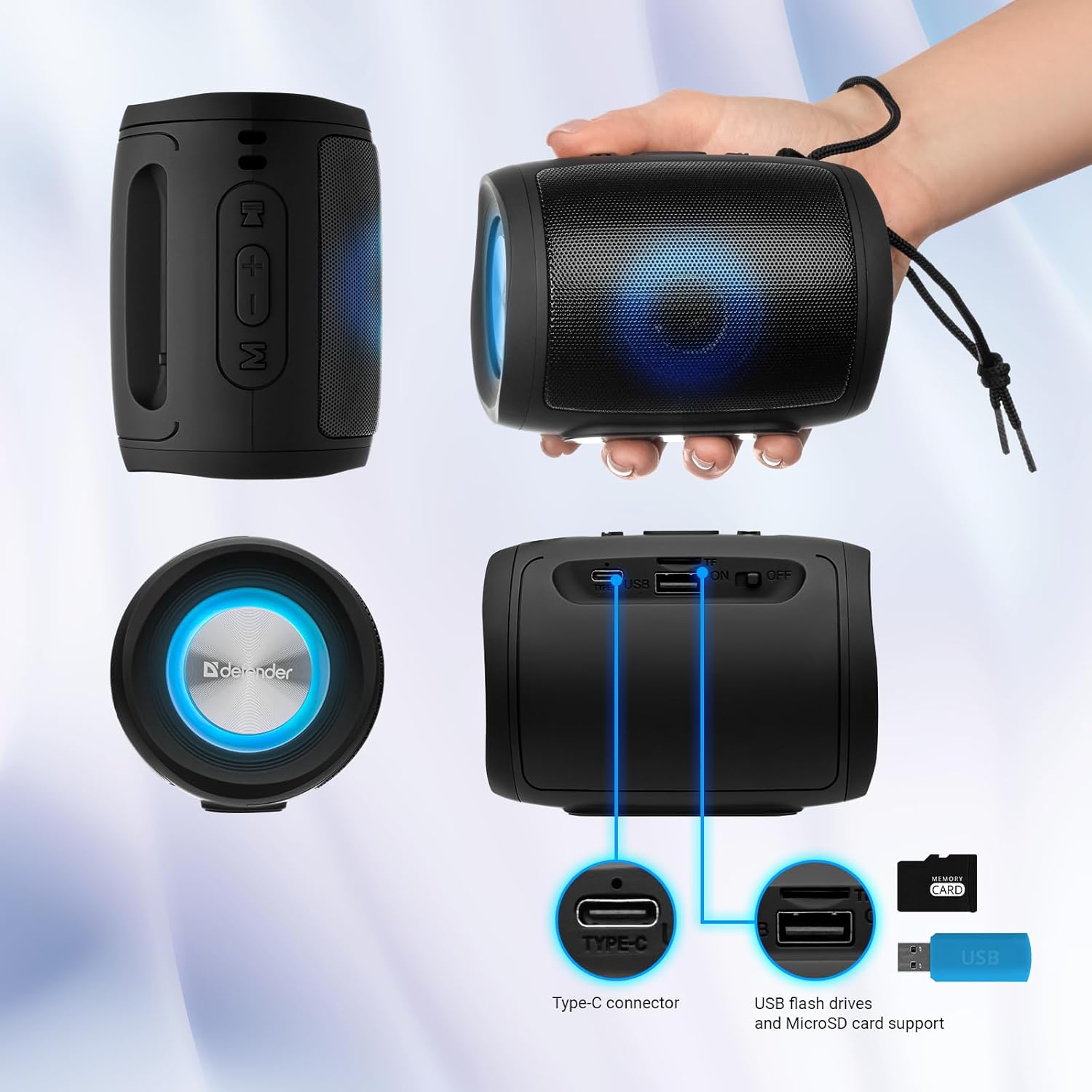
Image: A detailed diagram illustrating the Type-C connector, USB flash drive port, and MicroSD card slot on the Defender Enjoy S200 speaker.
4.5 Sejħiet mingħajr idejn
When connected to your smartphone via Bluetooth, the speaker's built-in microphone allows for hands-free calls.
- Irrispondi Sejħa: Agħfas qasir il-buttuna Play/Pause.
- Tmiem Sejħa: Agħfas qasir il-buttuna Play/Pause.
- Irrifjuta Sejħa: Agħfas fit-tul il-buttuna Play/Pause.
5. Manutenzjoni
- Tindif: Uża drapp artab u niexef biex tnaddaf il-wiċċ tal-ispiker. Tużax prodotti tat-tindif jew solventi li joborxu.
- Ħażna: Aħżen l-ispiker f'post frisk u niexef 'il bogħod mix-xemx diretta u minn temperaturi estremi.
- Reżistenza għall-Ilma: The speaker has an IP20 rating, meaning it is protected against solid objects larger than 12.5mm but has no protection against water. Avoid exposure to rain, splashes, or immersion in water.
- Kura tal-batterija: To prolong battery life, fully charge the speaker before first use and recharge it at least once every three months if not used regularly.
6 Issolvi l-problemi
- Ebda Qawwa: Ensure the speaker is charged. Connect the Type-C cable and allow it to charge for a few minutes before attempting to power on again.
- Ebda Ħsejjes: Check the volume levels on both the speaker and your connected device. Ensure the speaker is in the correct mode (Bluetooth, FM, USB, MicroSD).
- Kwistjonijiet ta' Tqabbil tal-Bluetooth: Ensure the speaker is in pairing mode. Turn off Bluetooth on your device and turn it back on. Try unpairing and re-pairing the speaker. Move closer to the speaker to ensure you are within the 10-meter range.
- Riċezzjoni tar-Radju FM Dgħajfa: Ensure you are in an area with good signal. The charging cable can sometimes act as an antenna; try connecting it for improved reception.
- USB/MicroSD Not Playing: Żgura l-awdjo files are in a compatible format (e.g., MP3). Check that the USB drive or microSD card is inserted correctly and is not corrupted.
7. Speċifikazzjonijiet
| Isem tal-Mudell | Igawdu S200 |
| Numru tal-Mudell tal-Oġġett | 65200 |
| Brand | Difensur |
| Teknoloġija tal-Konnettività | Bluetooth 5.3, USB |
| Teknoloġija tal-Komunikazzjoni mingħajr Fili | Bluetooth, Radio Frequency |
| Tip ta' Kelliem | Multimedia |
| Daqs tal-Kelliem | 2 Pulzier |
| Output ta 'Qawwa | 5 Watts |
| Modalità tal-Ħruġ tal-Awdjo | Stereo |
| Sors tal-Enerġija | Imħaddem bil-batterija (batterija waħda tal-jone tal-litju inkluża) |
| Karatteristiċi Speċjali | Integrated Microphone, USB Port, Portable Bluetooth, LED Light, FM Radio, MicroSD Card Support, TWS |
| Dimensjonijiet tal-Prodott (L x W x H) | 8 x 11 x 8 ċm |
| Piż | 330 gramma |
| Medda Massimu | 10 Meters |
| Klassifikazzjoni tal-IP | IP20 |
8. Garanzija u Appoġġ
8.1 Informazzjoni dwar Garanzija
Id-dettalji speċifiċi tal-garanzija tipikament jiġu pprovduti mad-dokumentazzjoni tax-xiri tiegħek jew fuq il-karta uffiċjali tal-manifattur. website. Please refer to these resources for information regarding warranty coverage and duration.
8.2 Appoġġ għall-Klijent
For technical assistance, troubleshooting beyond this manual, or inquiries about your Defender Enjoy S200 speaker, please contact Defender Global customer support. Contact information can usually be found on the product packaging, the manufacturer's webis-sit, jew l-irċevuta tax-xiri tiegħek.


