1. Introduzzjoni
The GVDA GD128PLUS Smart Rechargeable Digital Multimeter is an advanced, versatile tool designed for accurate and reliable electrical measurements. Featuring a 10000-count display, auto-ranging capabilities, and True RMS functionality, it is suitable for professionals and electronics enthusiasts alike. This manual provides essential information for safe and effective operation, setup, maintenance, and troubleshooting of your multimeter.
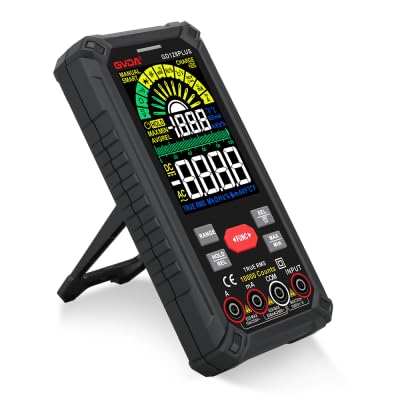
Figure 1.1: GVDA GD128PLUS Digital Multimeter with its integrated kickstand.
2. Informazzjoni dwar is-Sigurtà
Dejjem segwi l-prekawzjonijiet ta' sigurtà li ġejjin biex tevita korriment personali jew ħsara lill-multimetru:
- Do not exceed the maximum input limits for any measurement range.
- Oqgħod attent ħafna meta taħdem bil-voltag'il fuq minn 30V AC RMS, 42V peak, jew 60V DC. Dawn il-volumitages joħolqu periklu ta' xokk.
- Dejjem skonnettja l-enerġija miċ-ċirkwit u armi l-kurrent kollu ta' vultaġġ għoli.tagIl-kapaċitaturi e qabel ma twettaq testijiet tar-reżistenza, tal-kontinwità, jew tad-dijodi.
- Ensure the test leads are in good condition, without any damaged insulation.
- Tħaddimx il-multimetru jekk jidher li huwa bil-ħsara jew jekk il-kaxxa tkun miftuħa.
- Use the correct function and range for each measurement.
- Żomm subgħajk wara l-protezzjonijiet tas-swaba' fuq il-probes tat-test waqt il-kejl.
- Do not use the multimeter in wet environments or in the presence of explosive gases or dust.
- Il-Vol Mhux Kuntatttage (NCV) function is for indication only; always verify voltage presence with direct measurement.
3. Kontenut tal-Pakkett
Meta tiftaħ il-pakkett, ivverifika li l-oġġetti kollha elenkati hawn taħt huma preżenti u f'kundizzjoni tajba:
- 1 x GVDA GD128PLUS Digital Multimeter
- 1 x Par ta' Wavel tat-Test (Aħmar u Iswed)
- 1 x USB Iċċarġjar Cable
- 1 x K-type Thermocouple Probe
- 1 x Cloth Carrying Bag
- 1 x Manwal tal-Utent (dan id-dokument)
- 1 x Kaxxa tar-Rigali (ippakkjar)
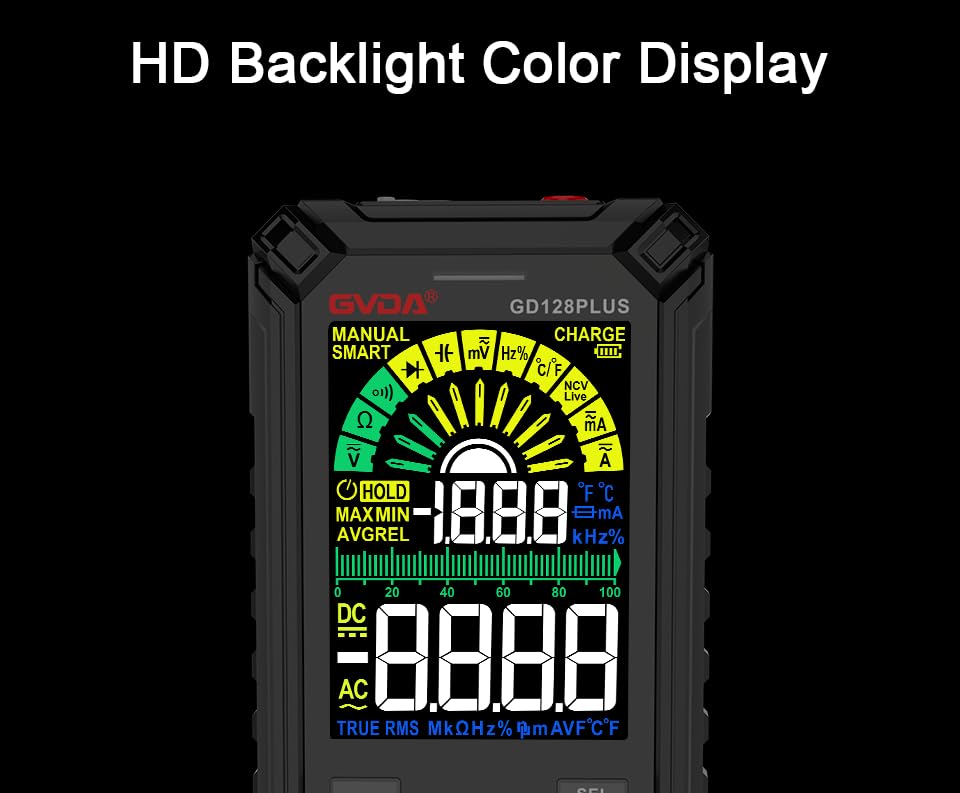
Figure 3.1: All components included in the GVDA GD128PLUS Multimeter package.
4. Karatteristiċi u Komponenti tal-Prodott
The GD128PLUS multimeter is equipped with a range of features for comprehensive electrical testing:
- Wiri ta' 10000 Għadd: Jipprovdi riżoluzzjoni għolja għal kejl preċiż.
- Medda awtomatika: Automatically selects the appropriate measurement range, simplifying operation.
- RMS Veru: Jiżgura qari preċiż għal forom ta' mewġ AC mhux sinusoidali.
- Batterija tal-litju rikarikabbli: Built-in 3.7V battery for convenience and portability.
- HD Backlight Color Display: Clear and easy-to-read display in various lighting conditions.
- Mhux Kuntatt VoltagSejbien ta' e (NCV): Safely detects the presence of AC voltage mingħajr kuntatt dirett.
- Flashlight LED: Dawl integrat biex idawwal żoni tax-xogħol mudlama.
- Żamma tad-Data (HOLD): Jiffriża l-qari attwali fuq id-displej.
- Relative Measurement (REL): Displays the difference between a stored reference value and the current reading.
- MAX/MIN Measurement: Records the maximum and minimum values during a measurement session.
- Input Jack LED Indication: Guides correct test lead connection for selected function.
- Protezzjoni ta' tagħbija żejda: Protects the device from damage due to excessive input.
4.1. Multimeter Layout

Figure 4.1: Key components and input jacks of the GVDA GD128PLUS Multimeter.
Refer to Figure 4.1 for the location of the following components:
- Wiri: HD Backlight Color LCD for readings and indicators.
- Buttuni tal-Funzjoni: RANGE, HOLD/REL, FUNC, SEL, MAX/MIN.
- Ġakkijiet tad-dħul:
- COM Jack: Input komuni (negattiv) għall-kejl kollu.
- VΩHzCap°C/°F Jack: Positive input for Voltage, Resistance, Frequency, Capacitance, and Temperature measurements.
- mAμA Jack: Input pożittiv għal milliampere u mikroampkejl tal-kurrent ere.
- Ġakk 10A: Input pożittiv għal 10 Ampkejl tal-kurrent ere.
- Buttuna mixgħul/mitfi: Jinsab fit-tarf ta' fuq.
- Charge Jack: USB-C port for recharging the internal battery.
- Flashlight Key: Button to activate the integrated LED flashlight.
- Indikatur ta' Twissija: LED light for safety alerts.
- Parentesi: Integrated kickstand on the back for hands-free viewing.
5. Setup
5.1. Iċċarġjar Inizjali
Before first use, it is recommended to fully charge the multimeter's internal lithium battery. Connect the provided USB charging cable to the multimeter's charge jack and to a standard USB power adapter (not included) or a computer USB port. The display will indicate charging status. A full charge typically takes a few hours.

Figure 5.1: The multimeter's rechargeable lithium battery can be charged directly using a USB cable.
5.2. Attaching Test Leads
For most measurements, connect the black test lead to the COM jack and the red test lead to the appropriate positive input jack (VΩHzCap°C/°F, mAμA, or 10A) depending on the desired measurement function. The input jack LED indicators will illuminate to guide correct connection.
6. Istruzzjonijiet Operattivi
6.1. Power On/Off
Agħfas u żomm il- Qawwa mixgħul/mitfi button (located on the top edge) to turn the multimeter on or off. The device features an auto-power-off function to conserve battery life after a period of inactivity.
6.2. Modi ta 'Kejl
The GD128PLUS offers various measurement modes, accessible via the rotary dial and function buttons:
6.2.1. TitjiratagKejl elettroniku (AC/DC)
- Dawwar l-arloġġ li jdur lejn il- V position. The multimeter will automatically detect AC or DC voltage.
- Qabbad iċ - ċomb iswed tat - test mal - COM jack u l-wajer tat-test aħmar għall- VΩHzCap°C/°F jack.
- Qabbad il-probi tat-test b'mod parallel maċ-ċirkwit jew il-komponent li qed jiġi ttestjat.
- Aqra l-voltagIl-valur fuq il-wiri.
6.2.2. Kejl tal-Kurrent (AC/DC)
- Dawwar l-arloġġ li jdur lejn il- mA/μA or 10A position depending on the expected current.
- Qabbad iċ - ċomb iswed tat - test mal - COM jack. Connect the red test lead to the mAμA jack for small currents or the 10A jack for larger currents.
- Qabbad il-multimetru f'serje maċ-ċirkwit. Kun żgur li ċ-ċirkwit ma jkunx enerġizzat qabel ma tikkonnettja.
- Applika l-enerġija liċ-ċirkwit u aqra l-valur tal-kurrent.
- Attenzjoni: Never connect the multimeter in parallel for current measurement, as this can damage the device and the circuit.
6.2.3. Kejl tar-Reżistenza (Ω)
- Dawwar l-arloġġ li jdur lejn il- Ω pożizzjoni.
- Qabbad iċ - ċomb iswed tat - test mal - COM jack u l-wajer tat-test aħmar għall- VΩHzCap°C/°F jack.
- Kun żgur li ċ-ċirkwit ma jkollux l-enerġija u li l-kapaċitaturi kollha jkunu skarikati qabel ma tkejjel ir-reżistenza.
- Qabbad il-probi tat-test mal-komponent li għandu jitkejjel.
- Aqra l-valur tar-reżistenza.
6.2.4. Kejl tal-Kapaċità (F)
- Dawwar l-arloġġ li jdur lejn il- Kap pożizzjoni.
- Qabbad iċ - ċomb iswed tat - test mal - COM jack u l-wajer tat-test aħmar għall- VΩHzCap°C/°F jack.
- Ensure the capacitor is fully discharged before connecting the probes.
- Qabbad is-sondi tat-test madwar il-kapaċitatur.
- Aqra l-valur tal-kapaċitanza.
6.2.5. Kejl tal-Frekwenza (Hz)
- Dawwar l-arloġġ li jdur lejn il- Hz pożizzjoni.
- Qabbad iċ - ċomb iswed tat - test mal - COM jack u l-wajer tat-test aħmar għall- VΩHzCap°C/°F jack.
- Connect the test probes in parallel to the signal source.
- Aqra l-valur tal-frekwenza.
6.2.6. Diode Test and Continuity Test
- Dawwar l-arloġġ li jdur lejn il- Dajowd/Kontinwità pożizzjoni. Uża l- SEL button to toggle between diode test and continuity test.
- Qabbad iċ - ċomb iswed tat - test mal - COM jack u l-wajer tat-test aħmar għall- VΩHzCap°C/°F jack.
- Test tad-Diode: Qabbad is-sonda ħamra mal-anodu u s-sonda sewda mal-katodu tad-dijodu. Volum 'il quddiemtage drop will be displayed. Reverse the probes; an open circuit (OL) should be displayed.
- Test ta' Kontinwità: Connect the probes across the circuit or component. A continuous beep indicates a low resistance (continuity).
6.2.7. Mhux ta' Kuntatt Voltage (NCV) Sejbien
- Dawwar l-arloġġ li jdur lejn il- NCV pożizzjoni.
- Move the top end of the multimeter near the conductor suspected of having AC voltage.
- The multimeter will emit an audible beep and the warning indicator will flash, with the display showing signal strength, if AC voltage jiġi skopert.
- Nota: This function is for preliminary detection only. Always use direct contact measurement for precise voltage verifika.
6.2.8. Kejl tat-Temperatura (°C/°F)
- Dawwar l-arloġġ li jdur lejn il- ° C / ° F pożizzjoni.
- Connect the K-type thermocouple probe to the COM u VΩHzCap°C/°F ġakkijiet, josservaw il-polarità.
- Poġġi l-ponta tat-termokoppja fuq jew viċin l-oġġett li trid titkejjel it-temperatura tiegħu.
- Read the temperature on the display. Use the SEL buttuna biex taqleb bejn Celsius u Fahrenheit.
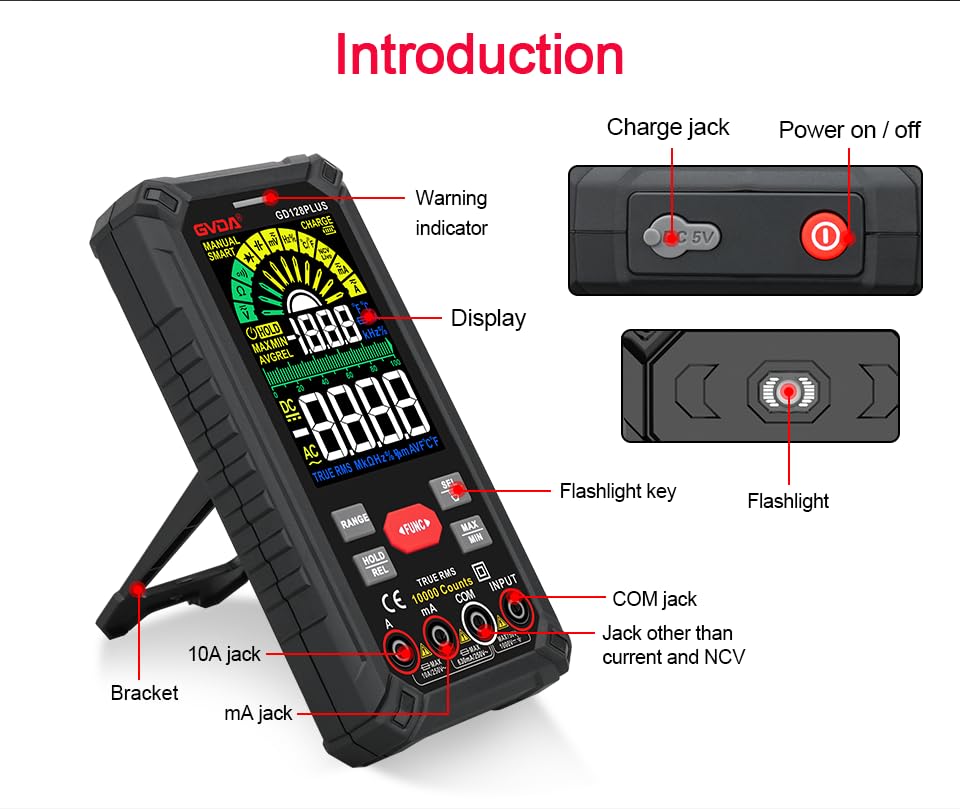
Figure 6.1: The multimeter can perform temperature tests using the included K-type thermocouple probe.
6.3. Funzjonijiet Speċjali
- Buttuna firxa: In manual range mode, press to cycle through available ranges. In auto range mode, press to switch to manual range.
- Buttuna HOLD/REL:
- Short press: Activates Data Hold, freezing the current reading. Press again to release.
- Long press: Activates Relative Measurement (REL). The current reading becomes the reference, and subsequent readings show the difference from this reference. Long press again to exit.
- Buttuna MAX/MIN: Press to enter MAX/MIN recording mode. The display will show the maximum, minimum, and average values detected since activation. Press again to cycle through MAX, MIN, AVG. Long press to exit.
- Buttuna FUNC: Used to switch between different functions within the same rotary dial position (e.g., AC/DC voltage, Dajowd/Kontinwità).
- Flashlight: Press the dedicated flashlight key on the side to turn the LED flashlight on or off.
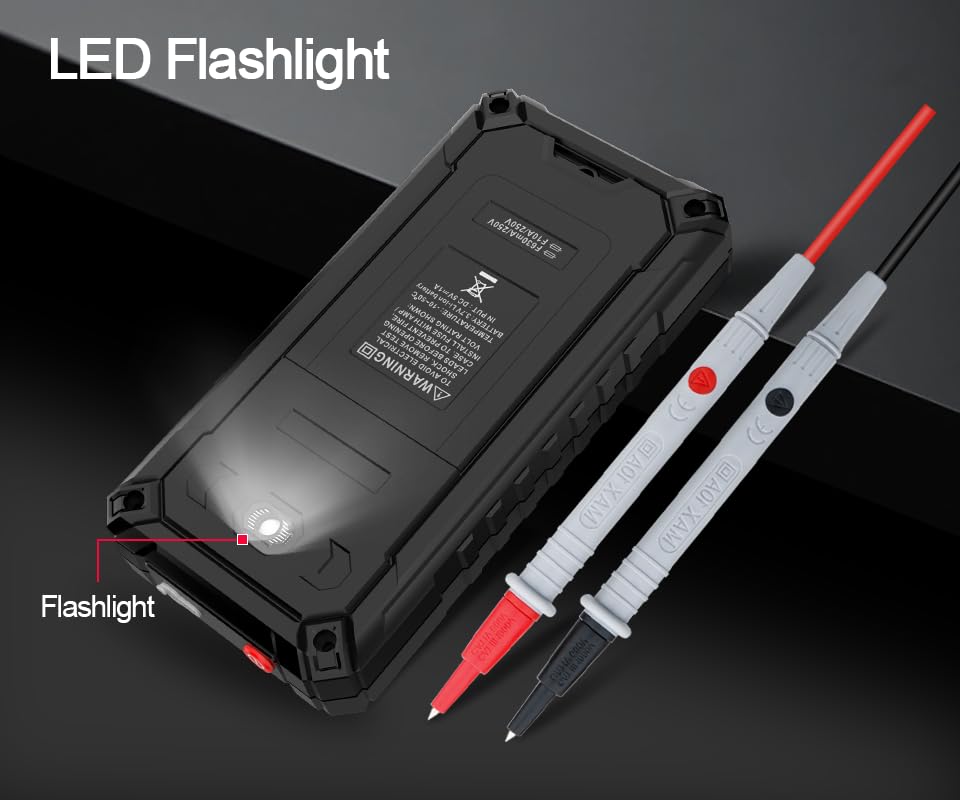
Figure 6.2: The multimeter features a convenient LED flashlight for illuminating work areas.
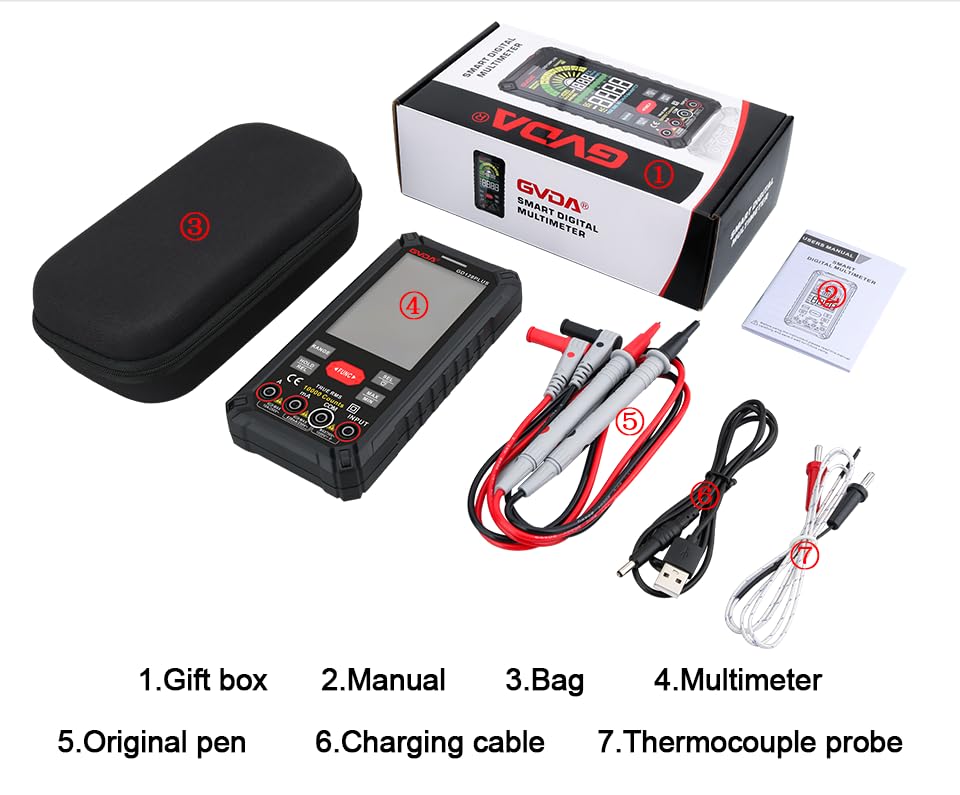
Figure 6.3: The HD Backlight Color Display provides clear and comprehensive measurement information.
7. Manutenzjoni
7.1. Tindif
Imsaħ il-każ bl-adamp cloth and mild detergent. Do not use abrasives or solvents. Ensure the multimeter is off and disconnected from any circuits before cleaning.
7.2. Iċċarġjar tal-Batterija
The multimeter is equipped with a rechargeable lithium battery. When the low battery indicator appears on the display, connect the multimeter to a USB power source using the provided charging cable. Avoid fully discharging the battery frequently to prolong its lifespan.
7.3. Ħażna
When not in use for extended periods, store the multimeter in a cool, dry place, away from direct sunlight and extreme temperatures. It is advisable to charge the battery periodically (e.g., every 3-6 months) to maintain its health.
8 Issolvi l-problemi
| Problema | Kawża Possibbli | Soluzzjoni |
|---|---|---|
| Il-multimetru ma jixgħelx. | Batterija baxxa jew eżawrita. | Charge the multimeter using the USB cable. |
| Jintwera "OL" (Tagħbija żejda). | Il-kejl jaqbeż il-medda magħżula jew il-kapaċità massima tal-miter. | Switch to a higher range (if in manual range) or ensure the measurement is within the meter's specifications. |
| Qari mhux preċiż. | Incorrect function/range selected; poor test lead connection; external interference. | Verify function and range; ensure test leads are securely connected; move away from strong electromagnetic fields. |
| L-ebda ħoss ta' kontinwità. | Circuit is open; multimeter not in continuity mode. | Check the circuit for breaks; ensure the multimeter is set to continuity mode (use SEL button if necessary). |
9. Speċifikazzjonijiet
| Parametru | Valur |
|---|---|
| Wiri | 10000 Counts, HD Backlight Color LCD |
| Li jvarjaw | Medda Awtomatika / Manwali |
| RMS Veru | Iva |
| DC Voltage Firxa | Sa 1000V |
| AC Voltage Firxa | Sa 750V |
| Medda tal-Kurrent DC | Sa 10A |
| Medda tal-Kurrent AC | Sa 10A |
| Firxa tar-reżistenza | Yes (Ohm) |
| Firxa tal-kapaċità | Yes (Farad) |
| Medda ta' Frekwenzi | Yes (Hz) |
| Firxa tat-Temperatura | -40°C sa 1000°C / -40°F sa 1832°F |
| Test tad-Diode | Iva |
| Test ta' Kontinwità | Yes (with buzzer) |
| NCV (Vol. Mingħajr Kuntatttage) | Iva |
| Provvista tal-Enerġija | 3.7V Batterija tal-litju rikarikabbli |
| SampRata tal-linarda | Appross. 3 darbiet kull sekonda |
| Dimensjonijiet | 166mm x 83mm x 29mm (madwar 6.5 x 3.3 x 1.1 pulzieri) |
| Piż | Approx. 1.26 Pounds (0.57 kg) |
| Ambjent Operattiv | 0-40°C, relative humidity <80% |
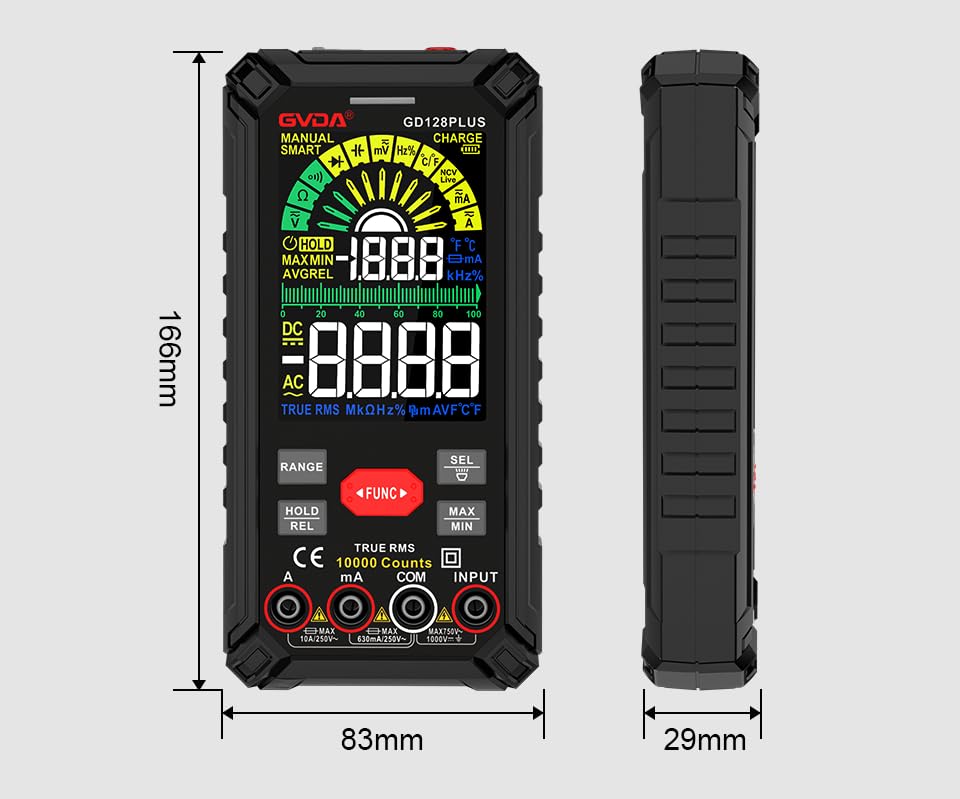
Figure 9.1: Physical dimensions of the GVDA GD128PLUS Multimeter.
10. Garanzija u Appoġġ
This GVDA GD128PLUS Digital Multimeter is designed for reliability and performance. For warranty information, technical support, or service inquiries, please refer to the contact details provided by your retailer or visit the official GVDA websit. Jekk jogħġbok żomm il-prova tax-xiri tiegħek għal talbiet ta' garanzija.


