Introduzzjoni
Thank you for choosing the ExtreLife MagSafe Wallet. This innovative wallet combines secure card storage with advanced Apple Find My technology, ensuring you never lose track of your essentials. It also features an adjustable stand for convenient phone viewing and strong magnetic attachment. This manual provides detailed instructions for setup, operation, and maintenance to help you get the most out of your new wallet.

Image: The ExtreLife MagSafe Wallet securely attached to the back of an iPhone, demonstrating its slim profile and integrated stand. The adjacent screen displays the Apple Find My app, highlighting the wallet's tracking capabilities.
Karatteristiċi tal-Prodott
- Integrazzjoni Sib Tiegħi ta' Apple: Real-time Bluetooth tracking, Play Sound Alert, Left Behind notifications, and Lost Mode. (Nota: L-apparati Android mhumiex appoġġjati.)
- Privacy Flap: Secures personal information and prevents cards from sliding or falling out.
- Stand aġġustabbli: Robust hinge allows for intuitive viewing in both portrait and landscape modes, adjustable over a wide range of angles.
- Smart Card Storage: Two individual card slots comfortably hold up to 7 cards.
- RFID Blocking: Provides an extra layer of security for your cards.
- Strong Magnetic Power: Features up to 4200 Gauss magnetic force for a secure and reliable hold.
- Batterija rikarikabbli: Easy Type-C charging (cable not included). Battery lasts up to 3 months on a single charge.

Image: A visual representation highlighting the superior magnetic strength of the ExtreLife wallet, indicating a 600% enhancement compared to standard magnetic wallets.

Image: A person holding the wallet near a payment terminal, with an overlay indicating the RFID blocking security feature, emphasizing protection against unauthorized scans.
X'hemm fil-Kaxxa
- ExtreLife MagSafe Wallet with Find My (x1)
- Manwal għall-Utent (x1)
Kompatibilità
The ExtreLife MagSafe Wallet is designed for use with the following iPhone models and cases:
- iPhone 16, 16 Plus, 16 Pro, 16 Pro Max
- iPhone 15, 15 Pro, 15 Plus, 15 Pro Max
- iPhone 14 Pro Max, 14 Plus, 14 Pro, 14
- iPhone 13 Pro Max, 13 Pro, 13
- iPhone 12, 12 Pro, 12 Max
- Official MagSafe Cases or other magnetic cases.
Mhux kompatibbli ma':
- iPhone 13 mini, iPhone 12 mini
- Non-magnetic cases

Image: A visual guide illustrating compatible iPhone models (iPhone 12 series, 13, 14, 15, 16 series) and the requirement for a MagSafe compatible phone or case. It also shows incompatible models like iPhone 13/12 mini and non-magnetic cases.
Gwida ta' Setup
Iċċarġjar Inizjali
Before first use, it is recommended to fully charge your ExtreLife MagSafe Wallet. The wallet is equipped with a rechargeable battery designed to last up to 3 months on a single charge.
- Locate the Type-C charging port on the wallet.
- Connect a Type-C charging cable (not included) to the port and a power source.
- Id-dawl indikatur tal-iċċarġjar jixgħel. Ladarba jkun iċċarġjat kompletament, id-dawl jista’ jibdel il-kulur jew jintefa.

Image: The ExtreLife MagSafe Wallet connected to a Type-C charging cable on a desk, illustrating its convenient rechargeable battery feature.
Tqabbil ma' Apple Find My
To utilize the Find My functionality, follow these steps:
- Enable Two-Factor Authentication: Ensure Two-Factor Authentication is turned on for your Apple ID.
- Turn on Find My & Bluetooth: On your iPhone, go to Settings and ensure "Find My" and Bluetooth are enabled.
- Power On Wallet: Press your Find Wallet Stand's power button once to turn it on.
- Add Item in Find My App: Open the "Find My" app on your iPhone. Tap "Items" at the bottom, then tap the "+" icon. Select "Add Other Supported Item" and follow the on-screen prompts to complete the pairing process.

Image: A step-by-step visual guide demonstrating how to pair the ExtreLife MagSafe Wallet with the Apple Find My app, from enabling settings to adding the device.
Istruzzjonijiet Operattivi
Attaching to iPhone
Align the ExtreLife MagSafe Wallet with the MagSafe ring on the back of your compatible iPhone or MagSafe case. The strong magnets will securely snap the wallet into place.
Ħażna tal-Kard
The wallet features two individual card slots. Gently slide your cards into the slots. The privacy flap provides additional security, keeping your cards protected and preventing them from falling out.

Immaġni: Dettaljata views of the wallet's card slots and the privacy flap, illustrating how cards are securely stored and protected.

Image: A hand demonstrating the process of sliding a card into and out of the wallet's slot, highlighting the ease of access while maintaining security.
Using the Adjustable Stand
The wallet's hinge allows it to transform into a versatile phone stand. Simply fold the wallet to create an A-frame shape. You can adjust the angle to your preferred viewing position for both portrait and landscape orientations.

Image: A person using the wallet as an adjustable stand for their iPhone, showcasing both portrait and landscape viewing angles for hands-free use.
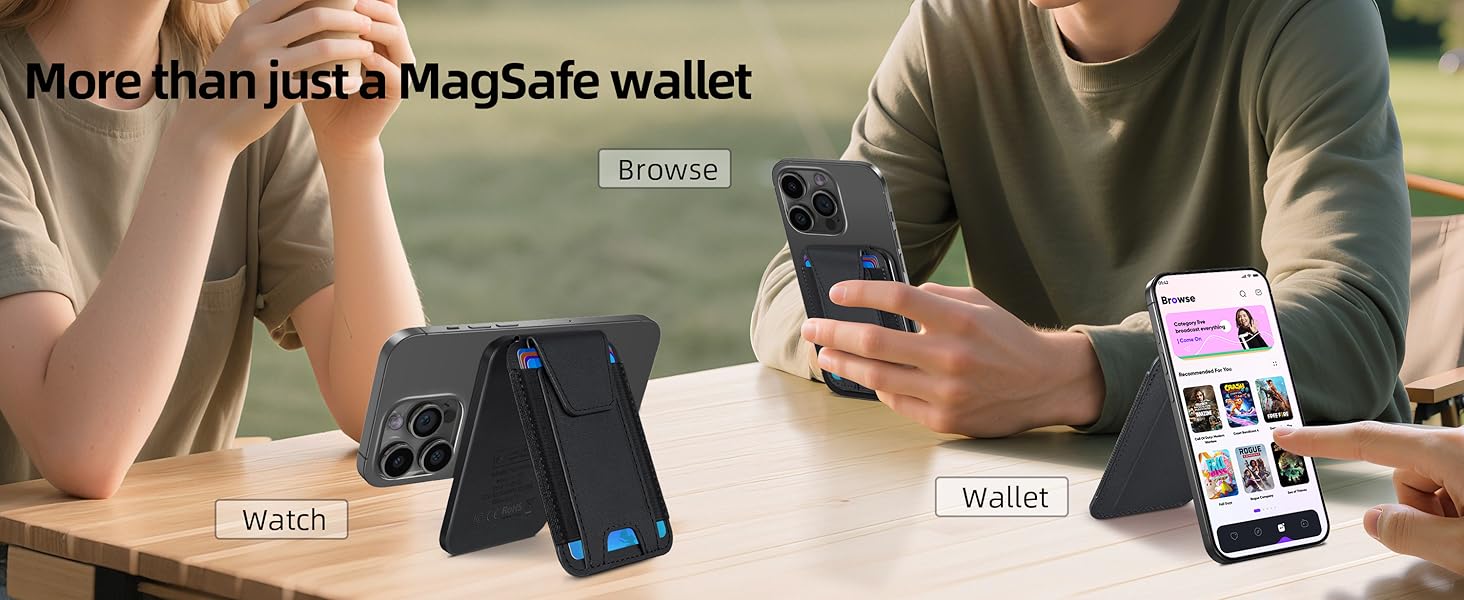
Image: The wallet acting as a versatile stand for an iPhone, enabling hands-free viewing for watching videos or browsing content, highlighting its multi-functional design.
Using Find My Features
- Locate Your Wallet: Open the "Find My" app on your iPhone. Select the ExtreLife Wallet from your items list to see its current location on a map.
- Play Sound Alert: If your wallet is nearby but out of sight, tap "Play Sound" in the Find My app. The wallet will emit an audible alert to help you locate it.
- Left Behind Notifications: Configure "Notify When Left Behind" in the Find My app to receive an alert on your iPhone if you leave your wallet behind at a known location.
- Modalità mitlufa: If your wallet is lost, activate "Lost Mode" in the Find My app. You can leave a message and contact number for anyone who finds it.

Image: A person using their iPhone to locate the ExtreLife MagSafe Wallet on a map within the Apple Find My app, demonstrating its global positioning capability.

Image: An iPhone screen displaying the "Play Sound" option within the Find My app, with sound waves emanating from the wallet icon, indicating the audible alert feature.

Image: A notification bubble on a table indicating "Wallet left behind," demonstrating the proactive alert system of the Find My feature.
Manutenzjoni
- Tindif: Wipe the wallet with a soft, damp drapp. Evita kimiċi ħarxa jew prodotti tat-tindif li joborxu.
- Ħażna: Store the wallet in a cool, dry place away from direct sunlight and extreme temperatures.
- Ħajja tal-batterija: Recharge the wallet every 3 months to maintain optimal battery performance, even if not in regular use.
Issolvi l-problemi
| Problema | Kawża Possibbli | Soluzzjoni |
|---|---|---|
| Wallet not connecting to Find My. | Bluetooth is off; Wallet battery is low; Incorrect pairing steps; Android device. |
|
| Cards are difficult to insert/remove. | Too many cards inserted; New wallet stiffness. |
|
| Il-kartiera ma titwaħħalx sew mal-iPhone. | Non-MagSafe phone/case; Misalignment. |
|
| Sound alert is too quiet. | Environmental noise; Wallet obstructed. |
|
Speċifikazzjonijiet
- Numru tal-Mudell: MF07
- Dimensjonijiet: 3.94 x 3.94 x 3.94 pulzieri
- Piż tal-oġġett: 3.52 uqija
- Materjal: Ġilda Faux
- Qawwa Manjetika: Up to 4200 Gauss
- Batterija: 1 Lithium Ion (inkluż)
- Port tal-Iċċarġjar: Tip-Ċ
- Ħajja tal-batterija: Sa 3 xhur għal kull ħlas
- Kapaċità tal-Karta: Max 7 cards
- Karatteristiċi Speċjali: Anti-Magnetic Lining, Compact, Find My functionality, Phone Holder, RFID Protected
Garanzija u Appoġġ
ExtreLife offers a Garanzija ta '365 jum from the date of purchase for your MagSafe Wallet. This warranty covers manufacturing defects and issues arising from normal use.
For any questions, concerns, or warranty claims, please contact ExtreLife customer service via the Amazon message center. Our customer service team aims to respond within 24 hours.
We are committed to providing high-quality products and excellent customer support.


