1. Prodott Aktarview
This product is a replacement OEM LCD screen and digitizer full assembly designed for the Infinix Hot 20 and Infinix Hot 20 Play X6825 mobile phone models. It is intended to replace a broken, cracked, or unusable screen, restoring your device's display functionality and appearance.
Each assembly is inspected to ensure good condition before shipment, providing a reliable solution for screen replacement.
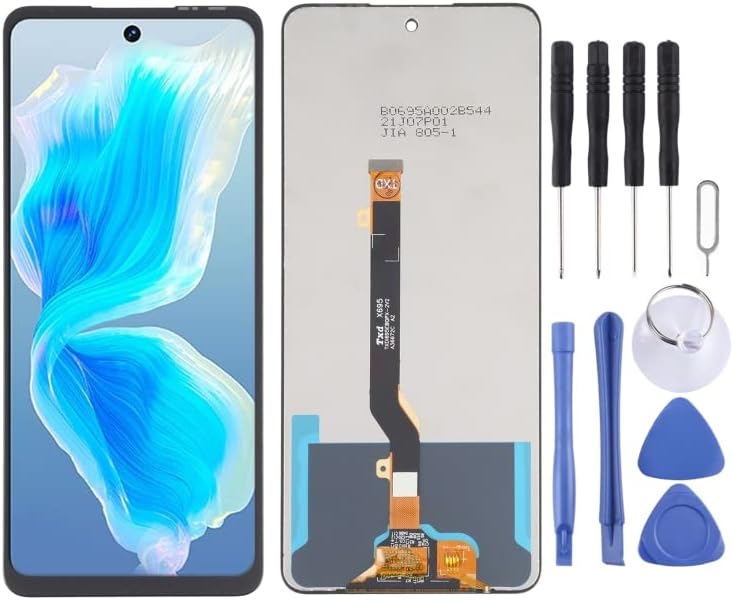
Image: The replacement LCD screen assembly for Infinix Hot 20 / Hot 20 Play X6825 is shown alongside a set of repair tools including screwdrivers, pry tools, a suction cup, and plastic opening picks.
2. Important Pre-Installation Notes
Careful preparation and testing are crucial for a successful screen replacement. Please read the following notes thoroughly before beginning any installation.
2.1. Test Before Installation
- Tneħħix xi film protettiv jew tags from the new screen until you have fully tested it and confirmed it is working correctly.
- Static Electricity Precaution: Before attempting any repair, ensure you ground yourself with an ESD (Electrostatic Discharge) strap. This prevents static electricity from damaging the sensitive electronic components within the phone.
- Protezzjoni tal-għajnejn: Always wear eye protection during the repair process. Use caution to avoid cutting your fingers with glass splinters from the old screen.
2.2. Simulated Testing Procedure
Screen replacement is a very fragile product. We strongly recommend performing a simulated test before full installation.
- Carefully disassemble your mobile phone.
- Connect the new replacement LCD screen and digitizer assembly to the motherboard's display and touch connectors.
- Power on the phone (without fully installing the screen).
- Test all functions of the screen, including display quality, touch responsiveness across the entire surface, and any other relevant features.
- If the test is successful, proceed with the full installation. If any issues arise, contact customer support immediately. Do not force the screen into the mobile phone if it is not functioning correctly during testing.
2.3. Cable Handling
Ensure the LCD cable is not over-bent. Bending the cable beyond 90 degrees can cause permanent damage, leading to a black display or other malfunctions.
3. Linji Gwida għall-Installazzjoni
Professional installation is highly recommended for this product. If you are not confident in your ability to perform the repair, please seek assistance from a qualified technician.
Before starting, ensure you have the correct tools and a clean, static-free workspace. Refer to online repair guides or videos specific to the Infinix Hot 20 / Hot 20 Play X6825 for detailed step-by-step instructions on disassembling and reassembling your device.
3.1. General Steps (Consult specific device guides for details)
- Power off your device completely and remove the SIM tray.
- Carefully open the phone's back cover and disconnect the battery.
- Disconnect all flex cables connected to the old screen assembly.
- Gently remove the old, damaged screen. Heat may be required to loosen adhesive.
- Clean any remaining adhesive or glass fragments from the phone frame.
- Perform the simulated test with the new screen as described in Section 2.2.
- If the test is successful, apply new adhesive to the phone frame.
- Carefully position and secure the new LCD screen assembly into the frame.
- Reconnect all flex cables and the battery.
- Reassemble the phone, ensuring all screws and components are correctly placed.
4. Post-Installation and Operating
After successful installation, power on your device and perform a thorough check of all screen functionalities:
- Kwalità tal-Wiri: Check for dead pixels, discoloration, or uneven backlighting.
- Funzjonalità Touch: Test touch response across the entire screen, including multi-touch gestures.
- Aġġustament tal-luminożità: Ensure the screen brightness can be adjusted correctly.
- Sensor ta' Prossimità: Test if the screen turns off during calls when held to the ear.
If all functions are satisfactory, your device is ready for normal use.
5. Manutenzjoni u Kura
To ensure the longevity of your new screen, follow these care guidelines:
- Protettur tal-iskrin: Consider applying a high-quality screen protector to prevent scratches and minor impacts.
- Tindif: Use a soft, lint-free cloth (microfiber is ideal) to clean the screen. For stubborn smudges, lightly dampLaħlaħ id-drapp bl-ilma jew b'soluzzjoni tat-tindif speċifika għall-iskrin. Evita kimiċi ħarxa.
- Evita Pressjoni: Do not apply excessive pressure to the screen, especially when carrying the phone in a pocket or bag.
- Temperatura Estremi: Avoid exposing your device to extreme temperatures, which can affect screen performance and lifespan.
6 Issolvi l-problemi
Jekk tiltaqa' ma' problemi wara l-installazzjoni, ikkunsidra dan li ġej:
- Ebda Wiri / Skrin Iswed:
- Check if the LCD flex cable is securely connected to the motherboard.
- Ensure the LCD cable is not over-bent or damaged.
- Verify the battery is connected and charged.
- Touch Not Working / Unresponsive:
- Check if the digitizer flex cable is securely connected.
- Ensure there are no foreign objects or debris between the screen and the frame.
- Perform a hard reset of the device.
- Display Anomalies (Lines, Spots, Discoloration):
- This may indicate a damaged screen. Re-check connections or contact support if the issue persists after re-seating cables.
Jekk il-passi għas-soluzzjoni tal-problemi ma jsolvux il-problema, jekk jogħġbok irreferi għat-taqsima tal-Garanzija u l-Appoġġ.
7. Speċifikazzjonijiet tal-Prodott
| Tip ta' Prodott | OEM LCD Screen and Digitizer Full Assembly |
| Kompatibilità | Infinix Hot 20 / Hot 20 Play X6825 |
| Brand | Daguys |
| Piż tal-oġġett | 13.4 uqija |
| Manifattur | Spare Parts |
| ASIN | B0CKGLKQTM |
8. Garanzija u Appoġġ
This product undergoes inspection to ensure good condition before shipment. If you have any questions regarding quality assurance or require after-sales service, please contact the seller directly through your purchase platform.
Jekk jogħġbok żomm il-prova tax-xiri tiegħek għal kwalunkwe talba ta' garanzija jew mistoqsijiet ta' appoġġ.


