1. Introduzzjoni
Thank you for choosing the Member's Mark Extending Tilt TV Wall Mount. This manual provides detailed instructions for the safe and proper installation, operation, and maintenance of your TV wall mount. Please read all instructions carefully before beginning installation to ensure optimal performance and safety.
This wall mount is designed to securely hold flat-panel televisions, offering tilt adjustment and post-installation leveling for an enhanced viewing esperjenza.
2. Informazzjoni dwar is-Sigurtà
- Kapaċità tal-piż: Teċċedix il-kapaċità massima tal-piż ta' 150 lbs (68 kg). Jekk taqbeż dan il-limitu jista' jirriżulta fi korriment serju jew ħsara lill-proprjetà.
- Kompatibbiltà tad-Daqs tat-TV: This mount is designed for TVs between 32 and 90 inches. Ensure your TV's VESA pattern is compatible with the mount.
- Tip ta' Ħajt: This mount is intended for installation on solid concrete walls, brick walls, or wood stud walls. Do not install on drywall alone.
- Installazzjoni professjonali: Jekk m'intix ċert dwar il-proċess tal-installazzjoni jew l-adegwatezza tal-ħajt tiegħek, ikkonsulta installatur professjonali kwalifikat.
- Ħardwer: Use only the provided mounting hardware. Do not substitute with other hardware unless explicitly instructed.
- Tfal: Żomm il-partijiet żgħar u l-materjali tal-ippakkjar 'il bogħod mit-tfal, għax jistgħu joħolqu periklu ta' fgar.
- Kontrolli regolari: Periodically check that the mount and all connections are secure and free from damage.
3. Kontenut tal-Pakkett
Verify that all components are present and undamaged before installation. If any parts are missing or damaged, do not proceed with installation and contact customer support.
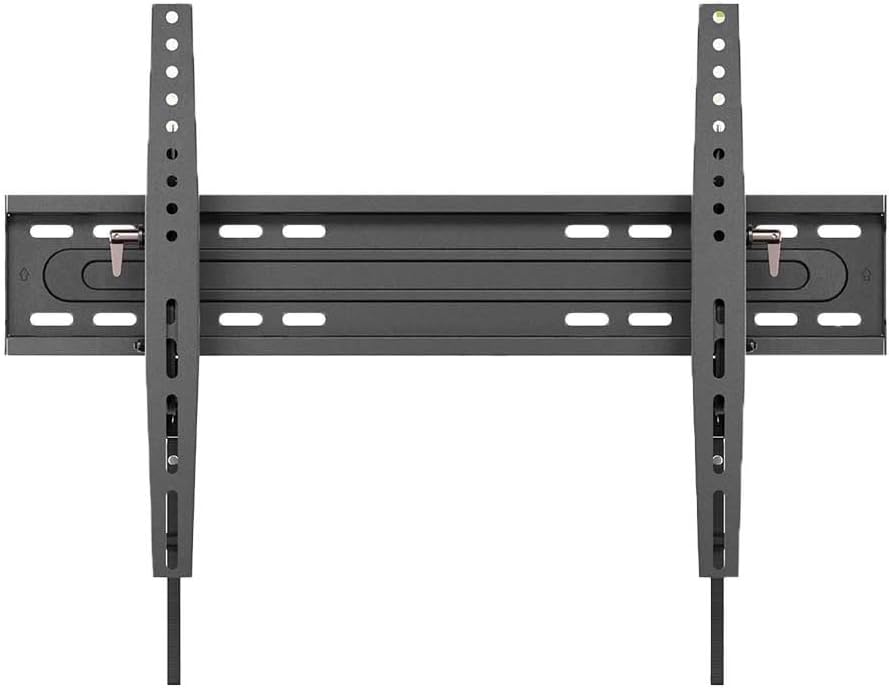
An fuqview of the main components of the Member's Mark Extending Tilt TV Wall Mount, including the wall plate and the two vertical TV brackets.
- Assemblea tal-Pjanċa tal-Ħajt
- TV Bracket (x2)
- Kit tal-Ħardwer tal-Immuntar (viti, ankri, woxers, spacers)
- Manwal ta' Istruzzjoni
4. Għodod Meħtieġa (Mhux Inklużi)
- Lapes
- Stud Finder (għall-installazzjoni ta' studs tal-injam)
- Drill bi drill bits xierqa
- Livell
- Tornavit tar-ras Phillips
- Ċavetta tas-Sokit jew Ċavetta Aġġustabbli
- Tejp tal-Kejl
5. Setup u Installazzjoni
Step 5.1: Determine TV Compatibility and Capacity
Ensure your television meets the size and weight requirements for this mount. This mount supports TVs from 32 to 90 inches and up to 150 lbs.

This image illustrates the Member's Mark Extending Tilt TV Wall Mount, highlighting its compatibility with 32-90 inch televisions and a maximum weight capacity of 150 pounds.
Pass 5.2: Waħħal il-Parentesi tat-TV mat-TV
- Poġġi t-TV tiegħek b'wiċċu 'l isfel bir-reqqa fuq wiċċ artab u nadif biex tevita li tagħmel ħsara lill-iskrin.
- Identifika t-toqob tal-immuntar tal-VESA fuq wara tat-TV tiegħek.
- Agħżel il-viti, il-woxers, u l-ispejsers xierqa mill-kit tal-ħardwer li jaqblu mat-toqob tal-immuntar tat-TV tiegħek.
- Attach the two vertical TV brackets to the back of your TV, ensuring they are centered and level. Do not overtighten.
Step 5.3: Mark and Drill Pilot Holes on Wall
- Determine the desired height for your TV. Use a pencil to mark the center of where the wall plate will be mounted.
- For wood stud installation: Use a stud finder to locate the edges of the wood studs. Mark the center of the studs. The wall plate must be mounted to at least two wood studs.
- For concrete/brick wall installation: Mark the desired drill points.
- Hold the wall plate against the wall, aligning it with your marks, and use a level to ensure it is perfectly horizontal. Mark the drill points through the wall plate holes.
- Drill pilot holes at the marked locations using the appropriate drill bit size for your wall type and chosen hardware.
Pass 5.4: Immunta l-Pjanċa tal-Ħajt mal-Ħajt
- Align the wall plate with the drilled pilot holes.
- Insert the appropriate wall anchors (if using for concrete/brick) and then secure the wall plate to the wall using the lag bolts and washers.
- Tighten all bolts firmly, but do not overtighten.
Pass 5.5: Iddendel it-TV fuq il-Pjattaforma tal-Ħajt
- Bl-għajnuna, erfa’ t-TV bir-reqqa bil-parentesi mwaħħla.
- Waħħal il-parentesi tat-TV mat-tarf ta’ fuq tal-pjanċa tal-ħajt.
- Baxxi t-TV bil-mod sakemm il-parentesi jkunu bilqiegħda għalkollox fuq il-pjanċa tal-ħajt.
- Engage the safety locking mechanisms on the bottom of the TV brackets to secure the TV to the wall plate. Refer to the specific locking mechanism design on your mount.
6. Istruzzjonijiet Operattivi
This mount features both tilt adjustment and post-installation leveling.
6.1 Aġġustament tal-Mejjel
The mount allows for tilting the TV up to 15 degrees downwards. This feature helps reduce glare and optimize viewangoli.

A diagram demonstrating the multi-view angle adjustment of the TV mount, showing a distance from the wall ranging from 2.76 to 6.06 inches and a tilt capability of up to 15 degrees.

A dettaljata view of the tilt locking mechanism on the Member's Mark TV mount, indicating a tilt range of +0 to -15 degrees for comfortable viewing.
- To adjust the tilt, loosen the tilt locking knobs or bolts located on the side of the TV brackets.
- Mejjel it-TV bir-reqqa għall-angolu mixtieq tiegħek.
- Once the desired angle is achieved, firmly tighten the tilt locking knobs or bolts to secure the TV in place.
6.2 Livellar wara l-Installazzjoni
The mount allows for minor horizontal adjustments (+/- 1 degree) after installation to ensure your TV is perfectly level.

An illustration of the post-installation leveling feature of the TV mount, allowing for fine adjustments of +/- 1 degree to ensure the television is perfectly level after mounting.
- If your TV appears slightly unlevel after installation, locate the leveling adjustment screws on the TV brackets.
- Using a screwdriver or wrench, turn the adjustment screws incrementally to raise or lower one side of the TV until it is perfectly level.
- Use a level tool to verify the TV's horizontal position.
7. Manutenzjoni
- Tindif: Imsaħ il-muntatura b'ċarruta ratba u niexfa. Tużax prodotti tat-tindif jew solventi li joborxu.
- Kontrolli perjodiċi: Every few months, check all screws and bolts to ensure they remain tight and secure. Re-tighten if necessary.
- Ħsara: If any part of the mount becomes damaged, discontinue use and contact customer support for replacement parts or advice.
8 Issolvi l-problemi
- It-TV mhux livellat: Use the post-installation leveling feature as described in Section 6.2. Ensure the wall plate was installed level initially.
- Il-muntatura tħossha maħlula: Re-check all mounting bolts on the wall plate and TV brackets. Ensure they are securely tightened. If the issue persists, consult a professional.
- Difficulty tilting TV: Ensure the tilt locking knobs/bolts are sufficiently loosened before attempting to adjust the tilt.
- Partijiet neqsin: Do not proceed with installation. Contact customer support for assistance.
9. Speċifikazzjonijiet
| Karatteristika | Speċifikazzjoni |
|---|---|
| Brand | MARKA TAL-MEMBRU |
| Mudell | Extending Tilt TV Wall Mount |
| Tip ta 'Immuntar | Mount Wall |
| Tip ta' Moviment | Mejjel |
| Materjal | Azzar Liga |
| Daqsijiet tat-TV Kompatibbli | 32 - 90 pulzieri |
| Kapaċità massima tal-piż | 150 lbs (68 kg) |
| Angolu ta 'Mejjel Massimu | 15 Degrees (downward) |
| Distanza għall-Ħajt | 2.76 - 6.06 pulzieri |
| Invellar ta' wara l-installazzjoni | +/- 1 Degree |
| Piż tal-oġġett | 10 liri |
| UPC | 193968335045 |
10. Garanzija u Appoġġ
For warranty information or technical support, please refer to the product packaging or contact Member's Mark customer service. Keep your purchase receipt for warranty claims.
Servizz tal-Klijent: Please visit the official Member's Mark webis-sit jew irreferi għall-informazzjoni ta' kuntatt ipprovduta mal-prodott tiegħek għal appoġġ.


