1. Prodott Aktarview
The VISULAPEX U1 Projector is designed for home cinema and professional presentations, offering advanced features for an enhanced viewing experience. Key features include automatic focus and keystone correction, high brightness, and versatile connectivity options.
- Fokus Awtomatiku u Keystone Awtomatiku: Automatic image adjustment for clarity and shape.
- High Brightness & Contrast: 20000 Lumens with 18000:1 contrast ratio for vivid images.
- Appoġġ Nattiv ta' 1080P u 4K: Delivers sharp Full HD resolution, supporting 4K video input via HDMI.
- Konnettività WiFi 6: Faster and more stable wireless screen mirroring for iOS, Android, and Windows devices.
- Bluetooth 5.0 bidirezzjonali: Connects to external audio devices or functions as a standalone Bluetooth speaker.
- Digital Zoom (100%-50%): Adjust projection size without moving the projector.
- Office Document Playback: Directly display Excel, Word, PDF, and PPT filepermezz tal-USB.
- Fully Sealed Optical Engine: Prevents dust accumulation, extending product lifespan.
- Buttuni tat-Tmiss: LED-illuminated touch controls for easy operation in low light.
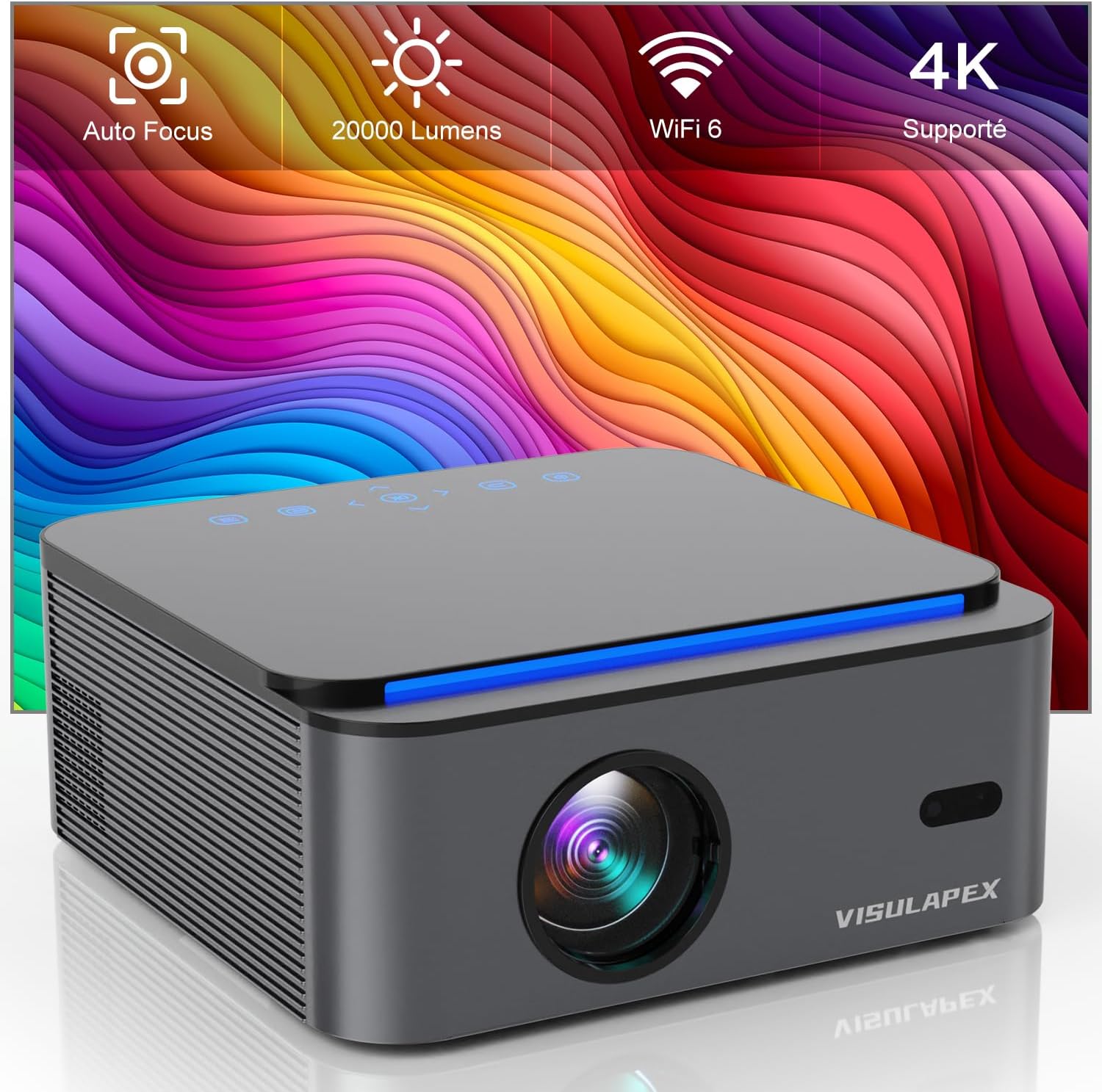
Image 1.1: The VISULAPEX U1 Projector, showcasing its compact design and key features like Auto Focus, 20000 Lumens, WiFi 6, and 4K support.
2. Istruzzjonijiet tas-Sigurtà
Jekk jogħġbok aqra l-istruzzjonijiet kollha tas-sigurtà bir-reqqa qabel ma tuża l-proġettur biex tiżgura prestazzjoni sikura u ottimali.
- Tħarisx direttament fil-lenti tal-proġettazzjoni meta tkun qed taħdem.amp hija mixgħula.
- Żgura ventilazzjoni xierqa madwar il-proġekter biex tevita sħana żejda.
- Uża biss l-adapter tal-enerġija pprovdut mal-proġettazzjoni.
- Avoid placing the projector in unstable locations or near water.
- Żomm il-proġettur 'il bogħod mix-xemx diretta, minn sorsi ta' sħana, u minn temperaturi estremi.
- Tippruvax tiżżarma jew timmodifika l-proġettur. Irreferi għal kull manutenzjoni f'idejn persunal kwalifikat.
- Żomm fejn ma jintlaħaqx mit-tfal.
3. Kontenut tal-Pakkett
Ivverifika li l-oġġetti kollha huma preżenti fil-pakkett:
- VISULAPEX U1 Projector
- Adapter tal-Enerġija
- Kontroll mill-bogħod
- Cable HDMI
- Manwal għall-Utent
- Drapp tat-Tindif
4. Dijagramma tal-Prodott
Iffamiljarizza ruħek mal-komponenti u l-portijiet tal-proġettazzjoni.
Quddiem View
- Lenti tal-Projezzjoni: Joħroġ l-immaġni.
- Auto Focus Sensor: Detects projection distance for automatic focus adjustment.
Fuq View
- Touch Control Panel: Power, navigation, and input selection buttons with LED indicators.
Wara View / Ġenb View
- Port tal-Enerġija: Tqabbad mal-adapter tal-enerġija.
- Portijiet HDMI (x2): Connect to HDMI-enabled devices (laptops, gaming consoles, streaming sticks).
- Portijiet USB (x2): Connect USB drives for media playback or office document display.
- Ħruġ tal-Awdjo (Ġakk ta' 3.5mm): Qabbad ma' kelliema jew headphones esterni.
- Riċevitur IR: Għal sinjali ta' kontroll mill-bogħod.
- Gradilji tal-ventilazzjoni: Għad-dissipazzjoni tas-sħana.
5. Setup
5.1 Tqegħid
Place the projector on a stable, flat surface or mount it according to your preference (table, ceiling, wall, tripod). Ensure the lens is facing the projection surface (screen or wall) and there are no obstructions to the ventilation grilles.
- Distanza ta' Projezzjoni: The optimal projection distance ranges from 1 meter (35 inches) to 4 meters (200 inches).
- Daqs tal-Projezzjoni: The projector can produce images from 35 to 200 inches diagonally.

Image 5.1: Illustration of various projection sizes from 35 to 200 inches at different distances.
5.2 Konnessjoni tal-Enerġija
- Qabbad l-adapter tal-enerġija mal-port tal-enerġija tal-proġettazzjoni.
- Ipplaggja l-adapter tal-enerġija fi żbokk tad-dawl.
- Agħfas il-buttuna tal-qawwa fuq il-proġettazzjoni jew fuq il-kontroll remot biex tixgħelu.
5.3 Initial Setup: Auto Focus and Keystone Correction
Upon powering on, the VISULAPEX U1 Projector will automatically adjust the focus and correct the image shape (keystone) within approximately 5 seconds. This eliminates the need for complex manual adjustments.

Image 5.2: The projector automatically adjusting focus and keystone for a clear, rectangular image.
5.4 Manual Focus Adjustment
If further focus adjustment is desired, you can use the 'F+' and 'F-' buttons on the remote control to manually fine-tune the lens focus until the image is perfectly clear.
6. Operazzjoni
6.1 Apparat li jgħaqqad
Il-proġettazzjoni tappoġġja diversi sorsi ta' input:
- HDMI: Connect laptops, gaming consoles, Blu-ray players, or streaming devices (e.g., Fire TV Stick) using an HDMI cable. Select the corresponding HDMI input from the projector's source menu.
- USB: Daħħal flash drive USB f'port USB biex tilgħab il-midja files (videos, photos, music) or display office documents (Excel, Word, PDF, PPT).
- Ħruġ tal-Awdjo (3.5mm): Qabbad kelliema esterni jew headphones għal awdjo mtejjeb.
6.2 Konnettività bla fili
6.2.1 Konnessjoni WiFi 6
The projector features WiFi 6 technology for a faster and more stable wireless connection. Navigate to the WiFi settings in the projector's menu, select your network, and enter the password.

Image 6.1: Comparison of WiFi 5G and WiFi 6 connection speeds for streaming content.
6.2.2 Mirroring tal-Iskrin mingħajr Fili
Mirror the screen of your iOS, Android, or Windows device wirelessly to the projector. Ensure both the projector and your device are connected to the same WiFi network. Follow the on-screen instructions for your specific device's mirroring function (e.g., AirPlay for iOS, Miracast for Android/Windows).

Image 6.2: Wireless screen mirroring from various devices including iOS, Android, and Windows.
6.3 Funzjonalità tal-Bluetooth
The bidirectional Bluetooth 5.0 allows you to:
- Connect to External Audio: Pair with Bluetooth speakers or headphones for a more immersive audio experience.
- Standalone Bluetooth Speaker: Use the projector's built-in dual 5W speakers as a standalone Bluetooth speaker by connecting your smartphone or other audio source directly to the projector via Bluetooth.

Image 6.3: The projector's dual high-fidelity stereo speakers providing rich audio.
6.4 Aġġustament tal-Projezzjoni
6.4.1 Żum Diġitali
Use the digital zoom function to resize the projected image from 100% down to 50% without physically moving the projector. This is useful for fitting the image precisely onto your screen.
6.4.2 Korrezzjoni Keystone Manwali
While the projector offers automatic keystone correction, you can also manually adjust the 4-point keystone correction (up to ±45°) through the settings menu for precise image alignment.
6.5 Office Document Playback
Insert a USB drive containing office files (Excel, Word, PDF, PPT) into the projector's USB port. Navigate to the file browser on the projector's interface to select and display your documents directly.

Image 6.4: The projector displaying an office presentation directly from a USB drive, suitable for small meetings.
7. Manutenzjoni
7.1 Tindif tal-Lenti
Gently wipe the projector lens with the provided cleaning cloth or a soft, lint-free cloth. Do not use abrasive cleaners or solvents.
7.2 Tindif ta' barra
Imsaħ il-barra tal-proġettazzjoni b'ċarruta ratba u niexfa. Għal marki persistenti, neħħi ftit.ampAħsel id-drapp bl-ilma, imbagħad imsaħ niexef.
7.3 Prevenzjoni tat-Trab
The VISULAPEX U1 Projector features a fully sealed optical engine, which prevents approximately 90% of dust from entering the projector. This design helps to reduce black spots on the image and prolong the lifespan of the device. Regular cleaning of external vents is still recommended to ensure optimal airflow.
8 Issolvi l-problemi
Jekk tiltaqa' ma' problemi bil-proġettur tiegħek, irreferi għall-problemi u s-soluzzjonijiet komuni li ġejjin:
| Problema | Kawża Possibbli | Soluzzjoni |
|---|---|---|
| Ebda Qawwa | Power cable disconnected; Power outlet fault; Projector off. | Iċċekkja l-konnessjoni tal-kejbil tal-enerġija; Ipprova sokit differenti; Agħfas il-buttuna tal-enerġija. |
| Ebda Immaġni | Incorrect input source; Device not connected; Cable fault. | Select correct input source (HDMI1/HDMI2/USB); Ensure device is connected and powered on; Try a different cable. |
| Immaġni mċajpra | Out of focus; Incorrect keystone. | Allow auto-focus to complete; Use 'F+'/'F-' buttons on remote for manual focus; Adjust keystone in settings. |
| Ebda Ħoss | Volume too low; Muted; External audio not connected/selected. | Increase volume; Unmute; Check external audio connection or Bluetooth pairing. |
| Il-Kontroll Remot Mhux Jaħdem | Batteries low/dead; Obstruction; Not pointing at IR receiver. | Replace batteries; Remove obstructions; Point remote directly at the projector's IR receiver. |
| Problemi ta' Konnessjoni tal-WiFi | Incorrect password; Router too far; Interference. | Verify WiFi password; Move projector closer to router; Reduce interference from other devices. |
9. Speċifikazzjonijiet
Detailed technical specifications for the VISULAPEX U1 Projector:
| Karatteristika | Dettall |
|---|---|
| Brand | VISULAPEX |
| Numru tal-Mudell | Proġekter U1 |
| Kulur | Griż |
| Teknoloġija tal-Wiri | LCD |
| Riżoluzzjoni Nattiva | 1920 x 1080 (Full HD) |
| Riżoluzzjoni Massima tal-Wiri | 4K Ultra HD (Supported) |
| Luminożità | 20000 Lumens |
| Proporzjon ta' Kuntrast | 18000:1 |
| Daqs tal-Projezzjoni | 35-200 Pulzier |
| Teknoloġija tal-Konnettività | Bluetooth, HDMI, 3.5mm Jack, USB, Wi-Fi |
| Konnettività bla fili | WiFi 6 |
| Verżjoni Bluetooth | 5.0 (Bidirectional) |
| Karatteristiċi Speċjali | Auto Focus, Integrated Cooling System, Built-in Wi-Fi, Dust-proof |
| Apparati Kompatibbli | Game Console, Speaker, Laptop, Smartphone, Tablet |
| Portijiet USB totali | 2 |
| Dimensjonijiet tal-Prodott | 38.5L x 31.5W x 15H ċentimetri |
| Fattur tal-Formola | Desktop |
| Tip ta 'Immuntar | Table Mount, Ceiling Mount, Wall Mount, Tripod Mount |
10. Garanzija u Appoġġ
VISULAPEX is committed to providing excellent customer service and technical support for your U1 Projector.
- Politika ta' Ritorn ta' 30 Jum: Enjoy a 30-day no-reason return period.
- Appoġġ Tekniku: Dedicated technical support is available to assist you with any product-related inquiries or issues.
- Servizz tal-Klijent 24 siegħa: Our customer service team is available 24 hours to provide assistance.
Informazzjoni ta' Kuntatt:
For support, please contact us via email:
Email: customerservice-visulapex@outlook.com

Image 10.1: VISULAPEX customer support information, including email, 24-hour service, 30-day return, and technical support.


