1. Introduzzjoni
The Imou ZR1 Smart Indoor Wireless Siren and Chime is designed to enhance your home security system. It functions as an alarm siren and chime, integrating seamlessly with Imou detectors and the Imou Alarm Hub (required, sold separately). When triggered by a connected sensor, the siren emits an 85 dB alarm and can provide visual alerts, effectively deterring intruders and notifying occupants. Its compact design and flexible installation options make it suitable for various indoor environments.

Image: The Imou ZR1 wireless sound and flash alarm siren, designed to better protect your home.
2. Informazzjoni dwar is-Sigurtà
- Aqra l-istruzzjonijiet kollha bir-reqqa qabel l-użu.
- Żomm l-apparat 'il bogħod mill-ilma u l-umdità.
- Tippruvax tiżżarma jew issewwi l-apparat int stess. Irreferi għal persunal kwalifikat għas-servizz.
- Ensure the device is installed in a stable location to prevent accidental falls.
- Use only the specified power supply (12 Volts) for the device.
- The siren produces a loud sound (85 dB). Avoid prolonged exposure to the sound at close range.
- Dan l-apparat huwa ddisinjat għall-użu fuq ġewwa biss.
3. Kontenut tal-Pakkett
Jekk jogħġbok iċċekkja l-kontenut tal-pakkett malli tiftaħ biex tiżgura li l-oġġetti kollha huma preżenti:
- Imou ZR1 Smart Indoor Wireless Siren and Chime Unit
- Aċċessorji tal-Immuntar (viti, tappijiet tal-ħajt)
- Manwal għall-Utent (dan id-dokument)
- Power Adapter (if included, otherwise powered by hub)
4. Prodott Aktarview
Familiarize yourself with the components of your Imou ZR1 siren.

Image: Diagram showing the indicator light, volume adjustment & network access button, and power interface of the Imou ZR1 siren.
- Dawl Indikatur: Provides status feedback (e.g., pairing mode, alarm active).
- Volume Adjustment & Network Access Button: Used for pairing with the Imou Alarm Hub and adjusting the siren volume.
- Interface tal-Enerġija: Connects to the power adapter for continuous operation.
- Kontra t-tamper Iswiċċ: Triggers an alarm if the device is moved or tampered with after installation.
- Buttuna mixgħul/mitfi: Jixgħel jew jitfi l-apparat.

Image: Detailed diagram illustrating the LED Indicator, Buzzer, Volume Button, Anti-tamper Switch, On/Off Button, and Power Port.
5. Setup
The Imou ZR1 siren requires an Imou Alarm Hub (sold separately) to function as part of a security system.

Image: The Imou ZR1 siren held in hand, demonstrating its compact size and ease of handling for installation.
5.1 Initial Pairing with Imou Alarm Hub
- Qawwa Mixgħul: Connect the Imou ZR1 siren to a power source using the provided adapter.
- Activate Pairing Mode on Hub: Follow the instructions for your Imou Alarm Hub to put it into pairing mode. This usually involves pressing a button on the hub or initiating it through the Imou Life app.
- Pair Siren: Press and hold the Network Access Button on the Imou ZR1 siren until the indicator light flashes, indicating it's in pairing mode.
- Konferma: Once successfully paired, the indicator light on the siren will change (e.g., turn solid green), and the Imou Life app will confirm the addition of the device.
5.2 Immuntar tas-Sirena
The ZR1 supports flexible installation, including wall or ceiling mounting.
- Agħżel Post: Select a central location where the siren's sound can be heard throughout the desired area. Ensure it's within range of your Imou Alarm Hub.
- Immarka l-Punti tat-Tħaffir: Use the mounting bracket (if applicable) to mark the positions for drilling.
- Drill toqob: Drill holes at the marked positions and insert wall plugs if mounting on drywall or masonry.
- Bracket Sikur: Attach the mounting bracket to the wall/ceiling using screws.
- Attach Siren: Securely attach the Imou ZR1 siren to the mounting bracket. Ensure the anti-tamper switch is properly engaged if you wish to utilize this feature.
6. Istruzzjonijiet Operattivi
The Imou ZR1 siren operates primarily in conjunction with the Imou Alarm Hub and connected sensors.
6.1 Alarm Triggering
When any Imou detector (e.g., motion sensor, door/window contact sensor) connected to your Imou Alarm Hub detects an intrusion or specified event, the hub will send a signal to the ZR1 siren, causing it to activate.
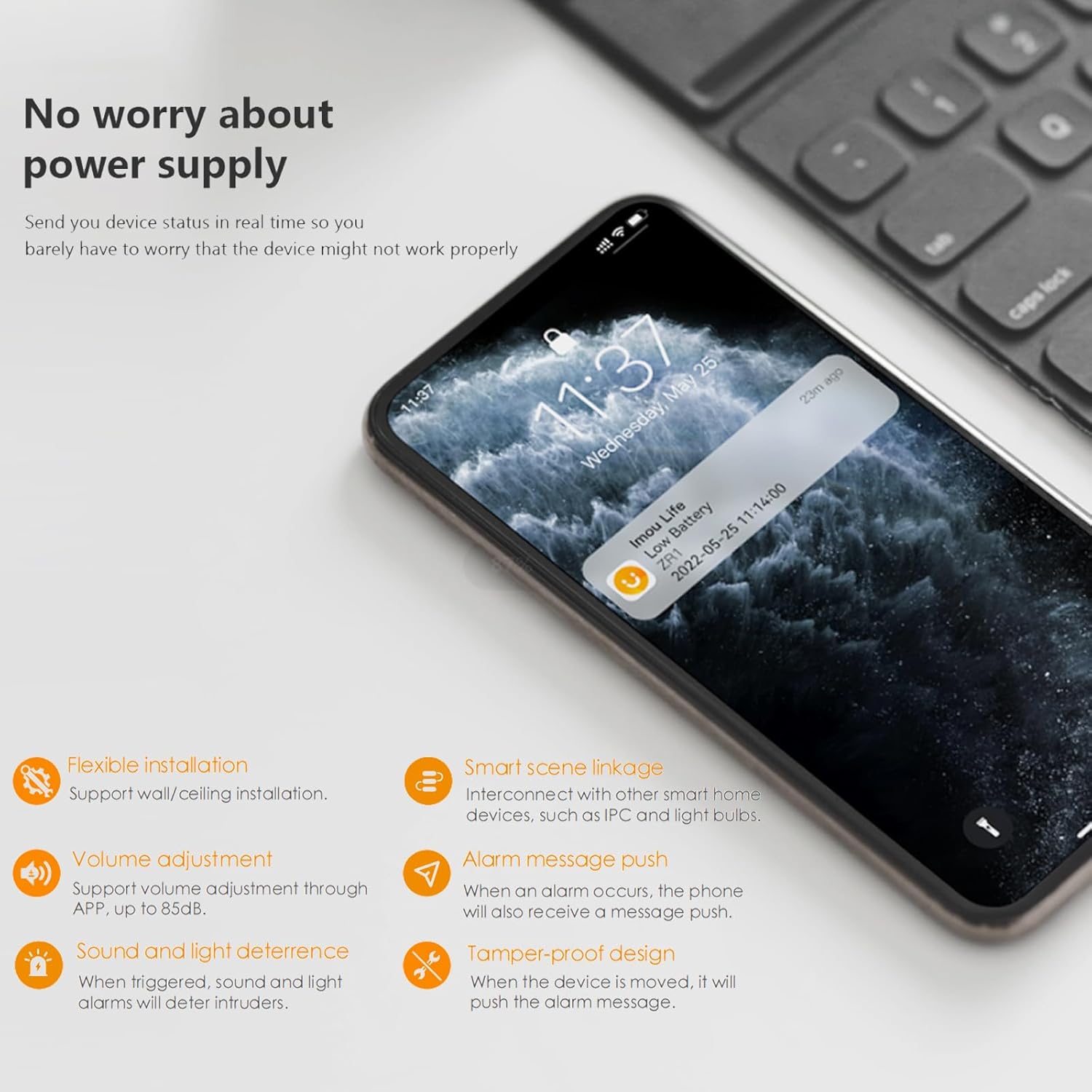
Image: Flow diagram illustrating how a message from the Imou Alarm Hub triggers the 85dB alarm on the siren, providing a loud deterrent.
6.2 Aġġustament tal-Volum
The siren's volume can be adjusted through the Imou Life application. Navigate to the device settings for the ZR1 siren within the app to modify the sound level, up to 85 dB.
6.3 Disarming the Alarm
The alarm can be disarmed or muted in several ways:
- Via Imou Life App: Use the Imou Life app to disarm the alarm system or mute the siren directly.
- Via Alarm Hub: Some Imou Alarm Hubs may have a physical button to disarm the system.
- Local Mute: The siren may have a button to locally mute the sound, as indicated in the product overview.


Image: Screenshots of the Imou Life app showing Home Mode settings and options to set modes for sensors, which control alarm behavior.
6.4 Notifiki
The Imou Life app provides real-time notifications when the alarm is triggered or when the device status changes (e.g., low battery). This ensures you are always aware of your home's security status.

Image: A smartphone displaying an Imou Life app notification for a low battery status on the ZR1 device, ensuring timely awareness of device health.
7. Manutenzjoni
The Imou ZR1 siren requires minimal maintenance to ensure optimal performance.
- Tindif: Gently wipe the device with a soft, dry cloth to remove dust. Do not use liquid cleaners or abrasive materials.
- Aġġornamenti tal-Firmware: Periodically check the Imou Life app for available firmware updates for your siren and alarm hub. Keeping the firmware updated ensures the best performance and security.
- Provvista tal-Enerġija: Ensure the siren is continuously powered. The Imou Life app will notify you of any power supply issues or low battery status if applicable.
- Tamper-Proof Check: Occasionally check that the siren is securely mounted and the anti-tamper switch is functioning correctly.
8 Issolvi l-problemi
If you encounter issues with your Imou ZR1 siren, refer to the following common problems and solutions:
| Problema | Kawża Possibbli | Soluzzjoni |
|---|---|---|
| Is-sirena ma tinstema'x meta tiġi attivata l-allarm. |
|
|
| Siren indicator light is off. |
|
|
| Cannot pair siren with hub. |
|
|
| Siren triggers unexpectedly. |
|
|
9. Speċifikazzjonijiet
Technical specifications for the Imou ZR1 Smart Indoor Wireless Siren and Chime:
| Karatteristika | Dettall |
|---|---|
| Mudell | ZR1 |
| Brand | Imou |
| Livell tal-ħoss | 85 dB |
| Voltage | 12 Volts |
| Konnettività | Wireless (requires Imou Alarm Hub) |
| Firxa | Up to 150m (from entry point to alarm device) |
| Karatteristiċi | Tamper-proof design, Sound and light deterrence, Real-time notifications, Flexible installation (wall/ceiling) |
| Materjal | Flame retardant material on cover |
10. Garanzija u Appoġġ
10.1 Informazzjoni dwar Garanzija
Imou products typically come with a limited warranty. Please refer to the warranty card included with your product or visit the official Imou websit għal termini u kundizzjonijiet dettaljati tal-garanzija speċifiċi għar-reġjun tiegħek. Żomm l-irċevuta tax-xiri tiegħek bħala prova tax-xiri għal talbiet ta' garanzija.
10.2 Appoġġ għall-Klijent
For technical assistance, troubleshooting beyond this manual, or warranty inquiries, please contact Imou customer support through one of the following channels:
- Uffiċjali ta' Imou Websit: Żur www.imoulife.com għal FAQs, artikli ta' appoġġ, u informazzjoni ta' kuntatt.
- L-App tal-Ħajja Imou: The app often includes a support section where you can submit inquiries or find help.
- Appoġġ bl-Email: Refer to the Imou website for the appropriate support email address for your region.
When contacting support, please have your product model (ZR1) and serial number ready.


