1. Introduzzjoni
This manual provides comprehensive instructions for the setup, operation, and maintenance of your AULA F2023 Wired USB Gaming Keyboard. Please read this manual carefully to ensure proper use and to maximize your gaming and typing experience.

Image 1.1: The AULA F2023 Wired USB Gaming Keyboard, showcasing id-disinn sħiħ tiegħu u d-dawl ta' wara RGB.
2. Kontenut tal-Pakkett
Kun żgur li l-oġġetti kollha huma preżenti fil-pakkett:
- AULA F2023 Wired USB Gaming Keyboard
- Keycap Puller
- Manwal għall-Utent (dan id-dokument)
3. Istruzzjonijiet ta' Setup
- Ħoll it-Tastiera: Oħroġ bir-reqqa t-tastiera u l-aċċessorji kollha mill-imballaġġ.
- Qabbad mal-Kompjuter: Locate an available USB-A port on your computer. Insert the USB connector of the AULA F2023 keyboard into the USB-A port.
- Installazzjoni tas-sewwieq: The keyboard is plug-and-play. Your operating system (Windows, macOS, Linux) should automatically detect and install the necessary drivers. No additional software installation is typically required.
- Pjazzament: Position the keyboard comfortably on your desk. The integrated phone holder can be used to conveniently place your smartphone.
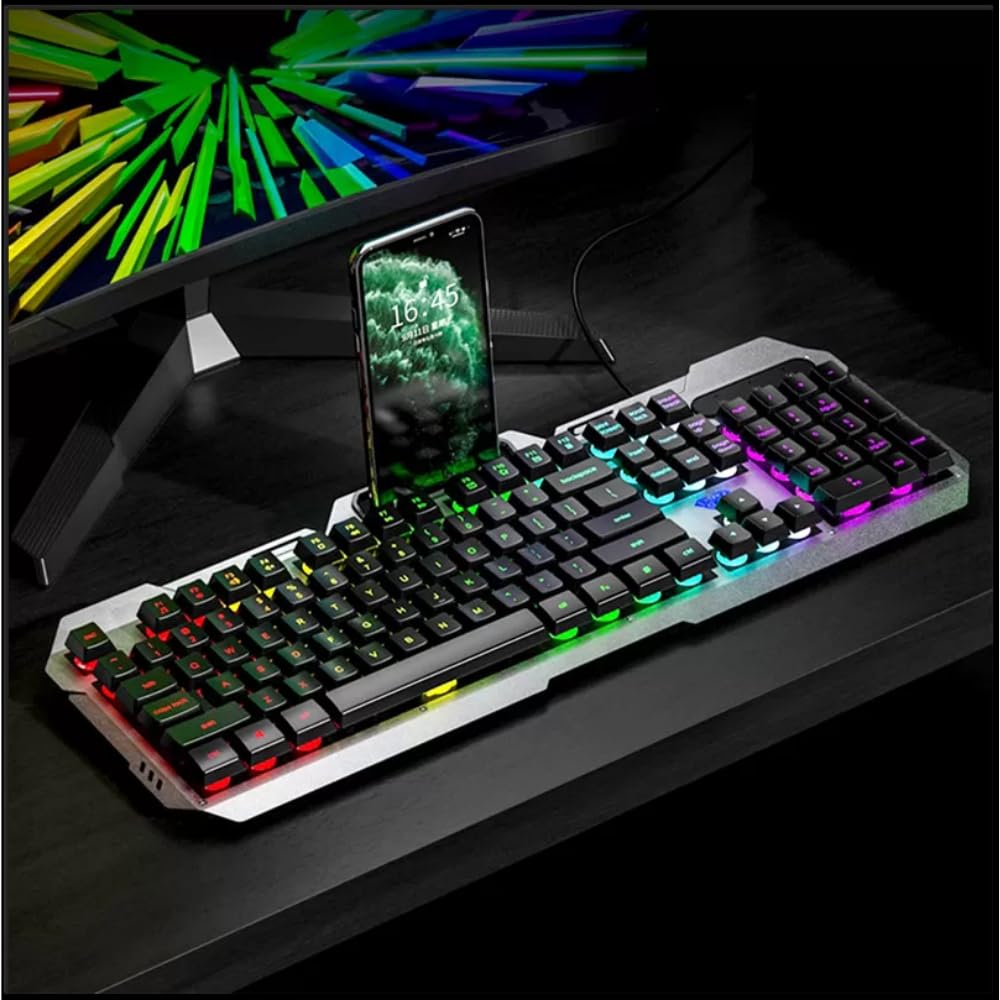
Image 3.1: The AULA F2023 keyboard in use, demonstrating the integrated smartphone holder for convenience.
4. Istruzzjonijiet Operattivi
4.1. Multimedia Controls
The AULA F2023 keyboard features dedicated function keys for multimedia control. Press the Fn key in combination with the corresponding F-key:
- Fn+F2: Volum 'l isfel
- Fn+F3: Volum Up
- Fn+F4: Mute
- Fn+F5: Waqqaf il-Daqq
- Fn+F6: Track Preċedenti
- Fn+F7: Play/Pawsa
- Fn+F8: Track li jmiss
4.2. Kontroll tad-dawl ta 'wara
The keyboard features customizable RGB rainbow backlighting. Adjust the lighting effects and brightness using the following key combinations:
- Fn + PgUp: Increase Brightness / Frequency of lighting effect.
- Fn + PgDn: Decrease Brightness / Frequency of lighting effect.
- Fn + 1: Activates lighting mode, allowing adjustment between 3 types of light effects.

Immaġni 4.1: Close-up view of the keyboard's function keys, highlighting the Fn key and its role in activating lighting modes and other functions.
4.3. Anti-Ghosting and Win Lock
- 26-Key Rollover Anti-Ghosting: This technology ensures that up to 26 keys pressed simultaneously are registered accurately, which is crucial for intense gaming scenarios.
- Win Lock Function: The Win Lock function prevents accidental presses of the Windows key during gaming or typing, avoiding interruptions.

Immaġni 4.2: Stampa dettaljata view of the keyboard's keys, illustrating the design that supports 26-key rollover for enhanced gaming performance.
4.4. Kompatibilità
The AULA F2023 keyboard is compatible with a wide range of operating systems and devices:
- Sistemi Operattivi: Windows XP / Vista / 7 / 8 / 10, macOS, Linux
- Apparati: PC, Laptop, Google TV, Smart TV, PS4, Xbox One
5. Manutenzjoni
To ensure the longevity and optimal performance of your AULA F2023 keyboard, follow these maintenance guidelines:
- Tindif: Regularly clean the keyboard with a soft, dry cloth. For deeper cleaning, use a can of compressed air to remove dust and debris from between the keys.
- Tneħħija tal-Għatu taċ-Ċwievet: Use the included keycap puller to carefully remove keycaps for thorough cleaning. Avoid excessive force to prevent damage.
- Evita Likwidi: Tesponix it-tastiera għal likwidi. F'każ ta' tixrid aċċidentali, skonnettja t-tastiera immedjatament u ħalliha tinxef kompletament qabel ma terġa' tqabbadha.
- Ħażna: Aħżen it-tastiera f'post frisk u niexef 'il bogħod mix-xemx diretta u minn temperaturi estremi meta ma tkunx qed tużaha għal perjodi twal.
6 Issolvi l-problemi
If you encounter issues with your AULA F2023 keyboard, refer to the following common solutions:
- It-Tastiera Mhux Tirrispondi:
- Kun żgur li l-kejbil USB huwa konness sew kemm mat-tastiera kif ukoll mal-kompjuter.
- Ipprova qabbad it-tastiera ma' port USB differenti fuq il-kompjuter tiegħek.
- Ibda mill-ġdid il-kompjuter tiegħek.
- Ittestja t-tastiera fuq kompjuter ieħor biex tiddetermina jekk il-problema hijiex fit-tastiera jew fil-kompjuter.
- Id-Dawl ta' Wara Mhux Jaħdem jew Mhux Ċar:
- Iċċekkja jekk il-luminożità tad-dawl ta' wara hijiex issettjata għall-massimu billi tuża Fn + PgUp.
- Ensure no software or system settings are overriding the keyboard's backlight controls.
- Iċ-Ċwievet Mhux qed Jirreġistraw Korrett:
- Clean the affected keys and surrounding areas to remove any debris that might be obstructing key presses.
- If using a KVM switch or USB hub, try connecting the keyboard directly to the computer.
- Keyboard Enters Sleep Mode: The keyboard is designed to automatically enter sleep mode after 5 minutes of inactivity. Press any key to wake it up.
7. Speċifikazzjonijiet
Detailed technical specifications for the AULA F2023 Wired USB Gaming Keyboard:
| Karatteristika | Dettall |
|---|---|
| Brand | AULA |
| Numru tal-Mudell | F2023 |
| Teknoloġija tal-Konnettività | USB-A (Bil-fili) |
| Deskrizzjoni tat-Tastiera | Logħob, Membrana |
| Materjal | Top-grade Aluminium Alloy Panel |
| Kulur | Iswed |
| Kontra l-Ghosting | Rollover ta' 26 Ċavetta |
| Dawl ta' wara | RGB Rainbow Backlight |
| Dimensjonijiet tal-Prodott (LxWxH) | 45.7 x 16.6 x 2.8 ċm |
| Piż tal-oġġett | 562 g |
| Kompatibilità tas-Sistema Operattiva | Linux, Windows XP, Vista, 7, 8, 10, macOS |
| Komponenti Inklużi | Keycap Puller |

Image 7.1: A visual representation of the AULA F2023 keyboard's dimensions, indicating its length, width, and height.
8. Informazzjoni dwar Garanzija
The AULA F2023 Wired USB Gaming Keyboard comes with a 1 Snin Garanzija mid-data tax-xiri. Din il-garanzija tkopri difetti fil-manifattura u malfunzjonijiet taħt użu normali. Ma tkoprix ħsara kkawżata minn użu ħażin, inċidenti, modifiki mhux awtorizzati, jew xedd u kedd normali.
Jekk jogħġbok żomm il-prova tax-xiri tiegħek għal pretensjonijiet ta' garanzija.
9. Appoġġ
For further assistance, technical support, or warranty inquiries, please contact your retailer or the official AULA support channels. Refer to the product packaging or the AULA official websit għad-dettalji tal-kuntatt.


