Introduzzjoni
Thank you for choosing the Sharp Digital Alarm Clock. This manual provides detailed instructions for setting up, operating, and maintaining your new alarm clock. Designed for clarity and convenience, this clock features an easy-to-read LCD display with an optional always-on backlight, dual alarm settings, and a USB charging port for your devices. Please read this manual thoroughly before use to ensure optimal performance and longevity of your product.

Quddiem view of the Sharp Digital Alarm Clock, displaying time, month, date, day, and temperature on its colorful LCD screen.
Informazzjoni dwar is-Sigurtà
Please observe the following safety precautions to prevent damage to the unit or personal injury:
- Tesponix l-unità għal temperaturi estremi, dawl tax-xemx dirett, jew umdità għolja.
- Evita li twaqqa' l-unità jew li tissottomettiha għal impatti qawwija.
- Tħallatx batteriji qodma u ġodda, jew tipi differenti ta 'batteriji.
- Neħħi l-batteriji jekk l-unità ma tkunx se tintuża għal perjodu estiż biex tevita t-tnixxija.
- Żomm l-unità 'l bogħod mill-ilma u likwidi oħra.
- Tippruvax tiżżarma jew issewwi l-unità int stess. Irreferi għal kull manutenzjoni f'idejn persunal kwalifikat.
Kontenut tal-Pakkett
Ivverifika li l-oġġetti kollha huma preżenti fil-pakkett:
- Sharp Digital Alarm Clock (Model SPC5028AMZ)
- Manwal għall-Utent (dan id-dokument)
Note: 3 x AAA batteries are required and not included.
Prodott Overview
Wiri ta 'Quddiem

Diagram illustrating key features of the alarm clock, including atomic accuracy, 1.5-inch tall time display, on/off display nightlight, indoor temperature display, calendar display, bright color display, wall mountable or tabletop viewing, and battery operation (3x AAA batteries).
The front of the clock features a clear LCD display that shows the time, month, date, day of the week, and indoor temperature. The main time display is approximately 1.5 inches tall for easy readability.
Panel ta 'wara u Kontrolli

Dettaljati view of the clock's rear panel, showing the location of the battery compartment, various control buttons (Calendar, Time, Alarm, 12/24, Up, °C/°F, Down, Wave), the ON/OFF switch for the nightlight, and the backstand for tabletop viewing. Dimensions (6.45"W x 5"H) are also indicated.
- CALENDAR Set Button: Used to set the date and year.
- TIME Set Button: Used to set the time manually.
- ALARM Set & ON/OFF Button: Used to set and activate/deactivate alarms.
- Buttuna 12/24: Jaqleb bejn il-formati tal-ħin ta' 12-il siegħa u 24 siegħa.
- Buttuna UP: Adjusts settings upwards.
- Buttuna °C/°F: Jaqleb il-wiri tat-temperatura bejn Celsius u Fahrenheit.
- Buttuna 'l isfel: Aġġusta s-settings 'l isfel.
- WAVE (Atomic Search) Button: Initiates a manual search for the atomic time signal.
- ON/OFF Switch (Nightlight): Controls the always-on backlight feature.
- Kompartiment tal-batterija: Iżomm 3 batteriji AAA.
- Backstand: For tabletop viewing.
- Toqba għall-Immuntar mal-Ħajt: Biex tiddendel l-arloġġ mal-ħajt.
Setup
Installazzjoni tal-batterija
- Iftaħ l-għatu tal-kompartiment tal-batterija fuq wara tal-arloġġ.
- Daħħal żewġ batteriji AAA ġodda, waqt li tiżgura l-polarità korretta (+ u -).
- Agħlaq l-għatu tal-kompartiment tal-batterija sew.
Qawwa Inizjali Mixgħula
Upon battery installation, the clock will power on and attempt to synchronize with the atomic time signal.
Atomic Time Synchronization (WWVB)
The Sharp Digital Alarm Clock is designed to automatically synchronize with the WWVB atomic time signal broadcast from Fort Collins, Colorado, ensuring precise timekeeping.

Map of the United States showing the WWVB radio broadcast signal originating from Fort Collins, Colorado, which the atomic clock uses for synchronization.
- The clock will automatically attempt to receive the signal daily, typically overnight when electronic interference is minimal.
- For optimal reception, place the clock near a window and orient its front or rear panel towards Fort Collins, Colorado.
- A signal strength indicator (antenna icon) on the display will show the reception status.
- To manually initiate a signal search, press the MEWĠA buttuna fuq il-pannell ta’ wara.

Graphic depicting a full moon, with text 'LESS ELECTRONIC INTERFERENCE AT NIGHT SET BY MORNING', indicating optimal atomic clock synchronization occurs during nighttime hours.
Setting Time Zone
Even with atomic synchronization, you must manually select your local time zone for the correct hourly time display.
- Agħfas u żomm il- ĦIN button until the time zone indicator flashes.
- Uża l- UP or 'L isfel buttons to select your desired time zone (e.g., PST, MST, CST, EST).
- Agħfas il- ĦIN buttuna għal darb'oħra biex tikkonferma u toħroġ.
Issettjar Manwali tal-Ħin u d-Data
If atomic synchronization is not desired or available, you can set the time and date manually.
- Biex tissettja l-ħin: Agħfas u żomm il- ĦIN button until the hour flashes. Use UP/'L isfel biex taġġusta. Agħfas ĦIN to move to minutes, then adjust. Press ĦIN mill-ġdid biex issalva.
- Biex tissettja d-data: Agħfas u żomm il- KALENDARJU button until the year flashes. Use UP/'L isfel biex taġġusta. Agħfas KALENDARJU to move to month, then day, adjusting each. Press KALENDARJU mill-ġdid biex issalva.
- Format 12/24 Siegħa: Agħfas il- 12/24 buttuna biex taqleb bejn il-formati ta' 12-il siegħa (bl-indikatur AM/PM) u 24 siegħa.
Istruzzjonijiet Operattivi
Adjusting Display Brightness and Backlight
The clock features an optional always-on backlight with adjustable brightness for optimal viewing f'diversi kundizzjonijiet tad-dawl.
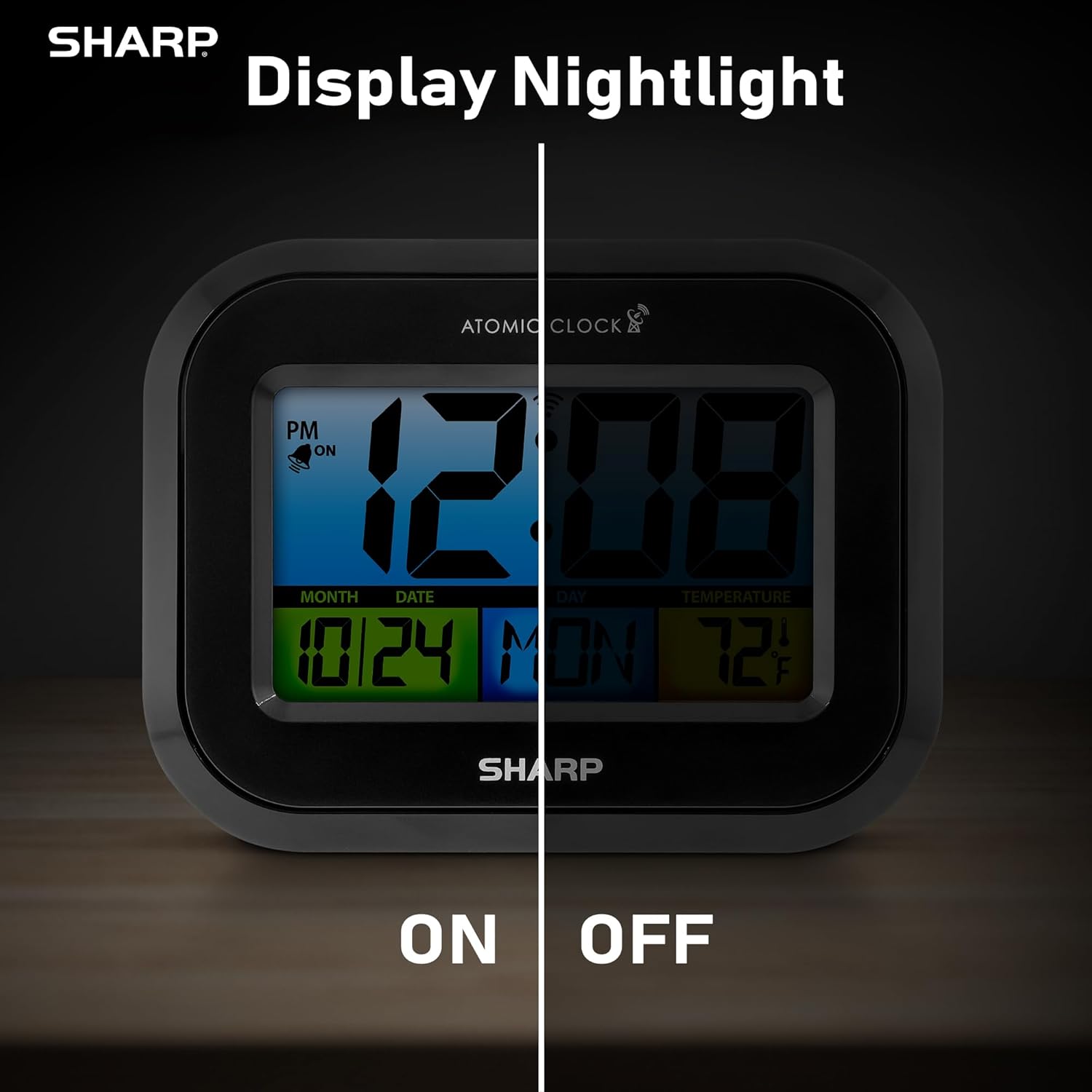
Comparison image showing the clock's display with the nightlight off (dim) and on (illuminated) in both day and night settings.
- Always-On Backlight: Uża l- Swiċċ ON/OFF on the rear panel to activate or deactivate the continuous backlight. When ON, the display will have a soft glow.
- Backlight On-Demand: Even if the always-on backlight is OFF, you can momentarily illuminate the display by pressing the DAWL TA’ KONTROLL button (usually located on the top edge, though not explicitly labeled in the provided image, it's a common feature). This provides a brighter illumination for a few seconds.

Image highlighting the physical ON/OFF switch on the rear of the clock for controlling the display nightlight, indicating its function for soft glowing backlight in the dark.
Setting Dual Alarms
The clock supports two independent alarm settings.
- Agħfas il- ALLARM button once to select Alarm 1. Press again for Alarm 2.
- Waqt li jkun qed jintwera l-ħin tal-allarm, agħfas u żomm il-buttuna ALLARM Agħfas il-buttuna sakemm it-teptep tas-siegħa.
- Uża l- UP or 'L isfel buttuni biex taġġusta s-siegħa. Agħfas ALLARM to move to minutes, then adjust.
- Agħfas ALLARM again to save the alarm time.
- Biex tattiva/tiddiżattiva allarm, agħfas il-buttuna ALLARM button repeatedly until the alarm icon (bell) appears/disappears for the desired alarm.
Bl-użu tal-USB Charging Port
The clock includes a USB charging port for convenient charging of small electronic devices. Locate the USB port on the side or rear of the unit (specific location not detailed in provided images, but implied by feature bullets). Connect your device's USB cable to this port to begin charging.
Temperature Display (°C/°F)
The clock displays the indoor temperature. To switch between Celsius and Fahrenheit, press the ° C / ° F buttuna fuq il-pannell ta’ wara.
Viewing Angle Optimization
Like most LCD screens, this display is best viewed from the front or slightly above. Visibility may appear reduced at sharp side or low angles. For the best viewing experience, use the built-in kickstand to position the clock to face you.

Illustration demonstrating the optimal viewing angle for the LCD display, showing that the clock is best viewed from above or straight on, with a built-in kickstand to position it.
Wall Mounting and Tabletop Use
The clock is designed for versatile placement. Use the integrated backstand for tabletop viewing or the wall mount hole on the rear for hanging it on a wall.

The Sharp Digital Alarm Clock displayed in a home office setting, showing its versatility for both wall mounting and tabletop placement.
Manutenzjoni
Tindif
Imsaħ l-arloġġ b'ċarruta ratba u niexfa. Tużax prodotti tat-tindif jew solventi li joborxu, għax jistgħu jagħmlu ħsara lill-wiċċ.
Sostituzzjoni tal-batterija
When the display becomes dim or the clock stops functioning, it's time to replace the batteries. Follow the battery installation steps in the Setup section. It is recommended to replace all three AAA batteries at the same time with new ones.
Issolvi l-problemi
| Problema | Soluzzjoni Possibbli |
|---|---|
| Id-displej huwa mudlam jew vojt. | Check battery polarity and ensure batteries are fresh. Replace all 3 AAA batteries. Ensure the backlight ON/OFF switch is in the 'ON' position if continuous illumination is desired. |
| Atomic time not synchronizing. | Ensure the clock is placed near a window and oriented towards Fort Collins, Colorado. Avoid placing near electronic devices that may cause interference. Try initiating a manual search by pressing the WAVE button. Synchronization is often best overnight. |
| Time or date is incorrect after battery change. | Manually set the time zone. Allow time for atomic synchronization, or manually set the time and date using the TIME and CALENDAR buttons. |
| Display is hard to read from certain angles. | This is a characteristic of LCD technology. Adjust the clock's position using the kickstand to ensure it is viewed straight-on or from slightly above eye level. |
| L-allarm ma jdoqqx. | Ensure the alarm is set and activated (bell icon visible). Check battery level. |
Speċifikazzjonijiet
| Proprjetà | Valur |
|---|---|
| Brand | Sharp |
| Numru tal-Mudell | SPC5028AMZ |
| Tip ta 'Wiri | LCD |
| Kulur | Iswed |
| Dimensjonijiet tal-Prodott | 6.45"W x 5"Għ |
| Piż tal-oġġett | 10.8 uqija (0.31 Kilogrammi) |
| Sors tal-Enerġija | Battery Powered (3 x AAA, not included) |
| Mod ta' Operazzjoni | Atomika |
| Karatteristiċi Speċjali | Cordless, Dual Alarm, USB Charging Port, Indoor Temperature Display, Always-On Backlight |
| Tip ta 'Immuntar | Wall Mount, Mejda |
| Materjal tal-qafas | Plastik |
Garanzija u Appoġġ
Sharp products are manufactured to the highest quality standards. For warranty information or technical support, please refer to the documentation included with your purchase or visit the official Sharp websit. Żomm l-irċevuta tax-xiri tiegħek bħala prova tax-xiri għal talbiet ta' garanzija.

Sharp Time Solutions


