1. Introduzzjoni
Thank you for choosing the MASINGO Cantando C2 Portable Karaoke Machine. This manual provides essential information for setting up, operating, and maintaining your device to ensure optimal performance and enjoyment. Please read this manual thoroughly before use and retain it for future reference.

Image 1.1: The MASINGO Cantando C2 Portable Karaoke Machine, showcasing its compact design, integrated LED ring light, and two wireless microphones.
2. X'hemm fil-Kaxxa
Ivverifika li l-komponenti kollha huma preżenti meta tiftaħ il-kaxxa:
- 1x M.ASINGO Cantando C2 Karaoke Machine
- 2x Mikrofoni Wireless
- Kejbil AUX 1x 3.5 mm
- 1x 3.5 mm AUX-RCA TV Cable
- 1x USB-C għal USB-A Cable tal-Iċċarġjar
- 1x Manwal għall-Utent

Image 2.1: All items included in the MASINGO Cantando C2 package, laid out for inspection.
3. Setup
3.1 Iċċarġjar inizjali
Before first use, fully charge the karaoke machine using the provided USB-C to USB-A charging cable. The charging port is located on the rear panel. A full charge typically takes 3-4 hours.
3.2 Installazzjoni tal-Batterija tal-Mikrofonu
Each wireless microphone requires 2x AA batteries (not included). Unscrew the bottom part of each microphone to insert the batteries, ensuring correct polarity. The microphones will automatically connect to the karaoke machine when powered on.
3.3 Attaching Microphone Holders
Insert the two plastic microphone holders into the designated slots on the sides of the karaoke machine for convenient storage.
4. Istruzzjonijiet Operattivi
4.1 Power On/Off
Locate the power switch on the rear panel of the karaoke machine. Slide it to the 'ON' position to power on the device. To power off, slide the switch to the 'OFF' position.
4.2 Konnettività Bluetooth
Upon powering on, the machine will automatically enter Bluetooth pairing mode. Activate Bluetooth on your smartphone or other device and select 'MASINGO C2' from the list of available devices. A voice prompt will confirm successful pairing.
4.3 Użu tal-Mikrofonu
Press and hold the power button on each wireless microphone to turn it on. The microphones will automatically connect to the karaoke machine. Use the '+' and '-' buttons on the microphone to adjust its individual volume. To turn off a microphone, press and hold its power button until the indicator light turns off.

Image 4.1: Close-up of the two wireless microphones, highlighting their power and volume adjustment buttons.
4.4 Wirja tad-Dawl LED
The Cantando C2 features a mesmerizing ring light LED. Press the 'LED' button on the control panel to cycle through five pre-installed light patterns or turn them off.
4.5 Versatile Connectivity Options
The karaoke machine supports multiple input sources:
- Bluetooth: Qabbad mingħajr fili mal-ismartphone jew it-tablet tiegħek.
- AUX: Use the provided 3.5mm AUX cable to connect external audio devices.
- USB: Daħħal USB drive bil-mużika files fil-port USB.
- MicroSD (TF Card): Insert a MicroSD card with music files fis-slot tal-biljett TF.
- Radju FM: Switch to FM Radio mode to tune into local radio stations.
- Konnessjoni tat-TV: Use the included Aux to RCA cable to connect to your TV for audio output.

Image 4.2: The top control panel of the Cantando C2, illustrating the various ports (USB, AUX, TF Card) and control buttons for mode selection, volume, and LED lights.
4.6 Voice Changer and Echo Effects
The karaoke machine offers voice distortion and echo effects. Experiment with the 'Voice' and 'ECH' (Echo) buttons on the control panel to modify your vocal output. The 'EQ' button allows for equalization adjustments.
4.7 Portable Design
The Cantando C2 is designed for portability with a removable handle and lightweight build. This allows for easy transport to various locations.

Image 4.3: The portable design of the Cantando C2, featuring a convenient carrying handle.
4.8 Dynamic Sound Output
The Cantando C2 delivers 25W of powerful sound through a 4-inch front speaker and dual 2-inch side speakers, ensuring clear audio for all performances.
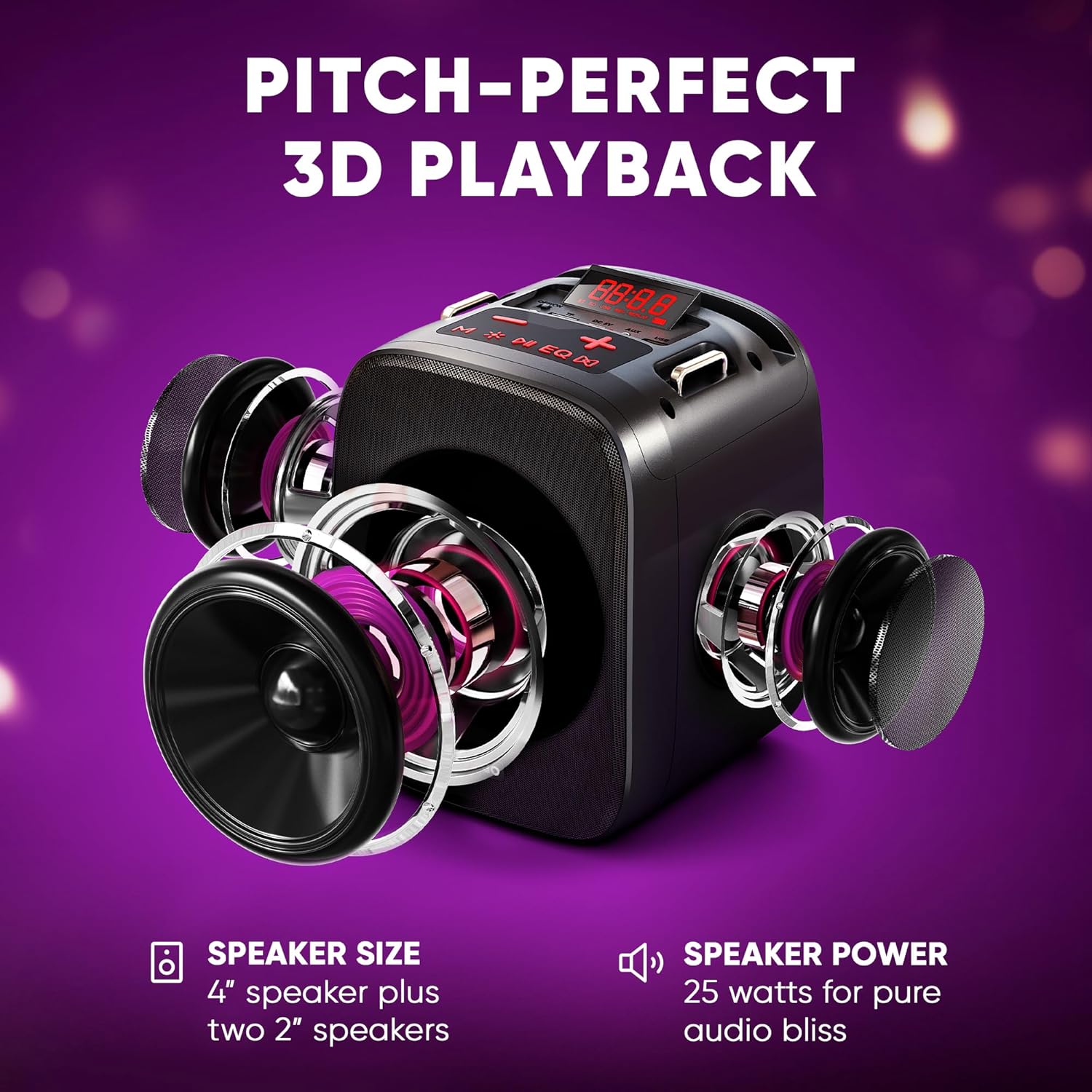
Immaġni 4.4: Sploda view illustrating the three-speaker system (one 4-inch, two 2-inch) for dynamic sound output.
4.9 Konnessjoni mat-TV
The Cantando C2 can be connected to a TV via Bluetooth or the provided Aux to RCA cable. This allows for displaying lyrics on the TV screen while using the karaoke machine for enhanced audio.

Image 4.5: The Cantando C2 connected to a TV, demonstrating how lyrics can be displayed for a full karaoke experience.
4.10 Prodott Fuqview Video
Video 4.6: An official product video from MASINGO, introducing the Cantando C2 karaoke machine and its key features.
5. Manutenzjoni
- Żomm l-apparat nadif billi timsaħ b'ċarruta ratba u niexfa.
- Evita li tesponi l-apparat għall-ilma jew umdità eċċessiva.
- Store the karaoke machine and microphones in a cool, dry place when not in use.
- Neħħi l-batteriji mill-mikrofoni jekk se taħżinhom għal perjodi twal biex tevita t-tnixxija.
6 Issolvi l-problemi
| Problema | Kawża Possibbli | Soluzzjoni |
|---|---|---|
| Ebda qawwa | Batterija baxxa; Swiċċ tal-enerġija mitfi | Charge the machine; Turn on the power switch |
| Mikrofonu mhux qed jaħdem | Low microphone batteries; Microphone not paired | Replace AA batteries; Power on microphone and ensure it pairs automatically |
| L-ebda ħoss mill-kelliem | Volum baxx wisq; Modalità ta' input mhux korretta; Apparat mhux imqabbad | Increase volume; Select correct input mode (Bluetooth, AUX, USB, TF); Ensure device is properly connected |
| Tqabbil Bluetooth falla | Device too far; Bluetooth not enabled on source device | Move device closer; Enable Bluetooth on source device and re-scan |
7. Speċifikazzjonijiet
- Piż tal-oġġett: 4.74 liri
- Dimensjonijiet tal-Prodott: 10.24 x 6.93 x 10.63 pulzieri
- Numru tal-Mudell tal-Oġġett: C2
- Batteriji: 1 Lithium Ion battery required (included for machine), 2 AA batteries per microphone (not included)
- Kulur: Ebony
- Apparati Kompatibbli: Smartphone
- Tip ta' Konnettur: 3.5 mm Jack
- Għadd ta' kelliema: 1 (main) + 2 (side)
- Tip ta 'batterija: Jonju tal-litju
- Format tal-Midja: WAV
- Sors tal-Enerġija: Mħaddma bil-batterija
- Voltage: 3.7 Volts (DC)
- Wattage: 15 watts (total 25W dynamic output)
8. Garanzija u Appoġġ
For warranty information or technical support, please refer to the contact details provided in the packaging or visit the official MASINGO websit. Żomm l-irċevuta tax-xiri tiegħek bħala prova tax-xiri.


