Introduzzjoni
Grazzi tax-xiriasing the Kogan MX10 Pro Cordless Stick Vacuum Cleaner. This manual provides important information regarding the safe operation, maintenance, and troubleshooting of your new appliance. Please read this manual thoroughly before use and retain it for future reference.
The Kogan MX10 Pro is designed for efficient cleaning of various surfaces, featuring powerful suction, a brushless motor, and a HEPA filtration system for a cleaner home environment.
Istruzzjonijiet tas-Sigurtà
To reduce the risk of fire, electric shock, or injury, always observe basic safety precautions when using an electrical appliance.
- Aqra l-istruzzjonijiet kollha qabel tuża l-apparat.
- Tużax barra jew fuq uċuħ imxarrbin.
- Tħallix li tintuża bħala ġugarell. Attenzjoni mill-qrib hija meħtieġa meta jintuża minn jew ħdejn it-tfal.
- Uża biss kif deskritt f'dan il-manwal. Uża biss l-aċċessorji rakkomandati mill-manifattur.
- Tużax b'korda jew plagg bil-ħsara. Jekk l-apparat mhux qed jaħdem kif suppost, ikun waqa’, saritlu ħsara, jitħalla barra, jew waqa’ fl-ilma, erġa’ lura f’ċentru ta’ servizz.
- Tiġbedx jew iġorrux bil-korda, uża korda bħala manku, agħlaq bieb fuq korda, jew iġbed korda madwar truf jew kantunieri li jaqtgħu. Tmexxix l-apparat fuq il-korda. Żomm il-korda 'l bogħod minn uċuħ imsaħħna.
- Tneħħix il-plagg billi tiġbed il-korda. Biex tneħħi l-plagg, aqbad il-plagg, mhux il-korda.
- M'għandekx timmaniġġja l-plagg jew l-apparat b'idejhom imxarrbin.
- Tpoġġi l-ebda oġġett fil-fetħiet. Tużax b'xi ftuħ imblukkat; żomm ħieles minn trab, lint, xagħar, u kull ħaġa li tista 'tnaqqas il-fluss ta' l-arja.
- Żomm ix-xagħar, il-ħwejjeġ maħlula, is-swaba’, u l-partijiet kollha tal-ġisem 'il bogħod mill-fetħiet u l-partijiet li jiċċaqilqu.
- Tiġborx xi ħaġa li tkun qed taħraq jew tpejjep, bħal sigaretti, lofarini, jew irmied jaħraq.
- Tużax biex tiġbor likwidi li jaqbdu jew kombustibbli, bħall-gażolina, jew tuża f'żoni fejn jistgħu jkunu preżenti.
- Uża attenzjoni żejda meta tnaddaf it-taraġ.
- Tużax mingħajr tazza tat-trab u/jew filtri f'posthom.
- Prevenzjoni tal-bidu mhux intenzjonat. Kun żgur li l-iswiċċ ikun fil-pożizzjoni mitfi qabel ma tikkonnettja mal-pakkett tal-batterija, tieħu jew iġorr l-apparat.
- Iċċarġja mill-ġdid biss bil-ċarġer speċifikat mill-manifattur. Ċarġer li huwa adattat għal tip wieħed ta' pakkett ta' batterija jista' joħloq riskju ta' nar meta jintuża ma' pakkett ta' batterija ieħor.
- Taħt kundizzjonijiet abbużivi, likwidu jista 'jinħareġ mill-batterija; evita kuntatt. Jekk iseħħ kuntatt aċċidentalment, laħlaħ bl-ilma. Jekk il-likwidu jikkuntattja l-għajnejn, fittex ukoll għajnuna medika. Likwidu li joħroġ mill-batterija jista 'jikkawża irritazzjoni jew ħruq.
Prodott Overview & Komponenti
Familiarize yourself with the parts of your Kogan MX10 Pro Cordless Stick Vacuum Cleaner.

Figure 1: Fully assembled Kogan MX10 Pro Cordless Stick Vacuum Cleaner, showing the main unit, extension wand, and motorized brush head.

Figure 2: Kogan MX10 Pro with icons indicating 25000Pa suction power, up to 45 minutes battery life, dust detection & adaptive suction, motorized roller brush, and touchscreen display.
Kontenut tal-Pakkett:
- Main Vacuum Unit (with dust bin and motor)
- Bastun ta 'Estensjoni
- Kap tal-Pinzell Motorizzat
- Detachable Li-ion Battery (2000mAh)
- Adapter/Ċarġer tal-Enerġija
- Baċir immuntat mal-ħajt
- Għodda tal-Xquq
- Għodda tal-Pinzell 2-in-1
- Manwal għall-Utent
Setup
Assemblea:
- Insert the extension wand into the main vacuum unit until it clicks securely into place.
- Attach the motorized brush head to the other end of the extension wand, ensuring it clicks securely.
- Insert the detachable Li-ion battery into the battery slot on the main unit until it locks.
Iċċarġjar tal-batterija:
- Connect the power adapter to the charging port on the battery or the wall-mounted dock.
- Plug the adapter into a power outlet. The LCD touchscreen will display the charging status.
- For first use, fully charge the battery (approximately 4-5 hours).
Wall-Mounted Dock Installation:
- Choose a suitable location near a power outlet for convenient storage and charging.
- Mark the drilling points for the dock on the wall.
- Agħmel toqob u daħħal tappijiet tal-ħajt (jekk meħtieġ).
- Secure the wall-mounted dock using screws.
- Place the vacuum cleaner onto the dock for storage and charging.
Istruzzjonijiet Operattivi
Tixgħel/Jitfi:
- Press the power button on the handle to turn the vacuum cleaner on.
- Agħfas il-buttuna tal-qawwa mill-ġdid biex itfiha.
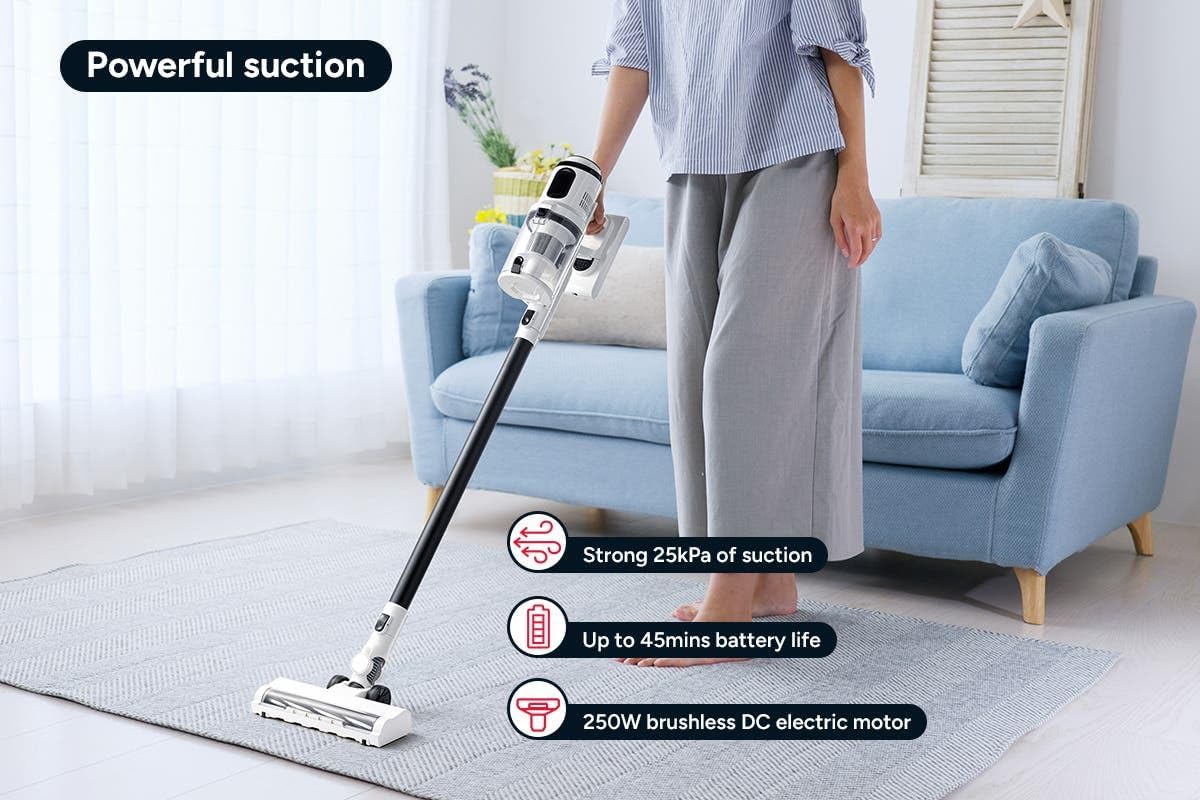
Figure 3: The Kogan MX10 Pro in use, highlighting its powerful 25kPa suction, long battery life, and efficient 250W brushless motor.
Suction Modes & LCD Touchscreen:

Figure 4: The LCD touchscreen provides real-time information on battery level, suction mode, and other operational indicators.
- The LCD touchscreen displays battery status, current suction level, and other relevant information.
- Tap the mode button on the touchscreen to switch between different suction modes (e.g., Eco, Standard, Max).
- The vacuum features dust detection, which automatically adjusts suction power based on the amount of dirt detected.

Figure 5: The brush head detecting dust on a hard floor, demonstrating the automatic suction adjustment feature.
L-użu tal-Annessi:
- Ras tal-Pinzell Motorizzat: Ideal for carpets and hard floors, providing powerful agitation to lift dirt.
- Għodda tal-qsim: Perfect for narrow gaps, corners, and hard-to-reach areas.
- Għodda tal-Pinzell 2 f'1: Use the brush for dusting delicate surfaces or slide the brush back for upholstery and larger debris.
- To change attachments, press the release button on the current attachment and pull it off. Then, push the desired attachment onto the main unit or extension wand until it clicks.
Manutenzjoni
Manutenzjoni regolari tiżgura prestazzjoni ottimali u testendi l-ħajja tal-vacuum cleaner tiegħek.
Tbattil tal-Bin tat-Trab:
- It is recommended to empty the dust bin after each use or when the MAX fill line is reached.
- Hold the main unit over a rubbish bin.
- Press the dust bin release button to open the bottom flap and allow debris to fall out.
- The ejection mechanism ensures dirt and dust are removed in a singular motion.

Figure 6: Demonstrating the easy bin emptying process by pressing the release button to open the dust bin flap.
Filtri tat-Tindif:
The Kogan MX10 Pro features a cyclone filter system and a washable HEPA filter to ensure maximum performance and trap fine dust and allergens.

Figure 7: The HEPA filter captures up to 99.97% of fine dust and allergens.
- Twist and pull to remove the filter assembly from the dust bin.
- Separate the HEPA filter and the metal mesh filter.
- Rinse the HEPA filter and metal mesh filter under cold running water.
- Allow all filter components to air dry completely for at least 24 hours before reassembling and placing back into the vacuum. Important: Ensure all parts are completely dry before reinstallation to prevent damage.
Tindif tar-ras tal-pinzell:
- Periodically check the brush head for tangled hair or debris.
- To remove the brush roll, locate the release tab on the side of the brush head and open it.
- Carefully pull out the brush roll.
- Uża imqass jew għodda tat-tindif biex taqta’ u tneħħi kwalunkwe xagħar jew fibri mħabbla.
- Slide the brush roll back into place and secure the release tab.
Issolvi l-problemi
| Problema | Kawża Possibbli | Soluzzjoni |
|---|---|---|
| Il-vakwu ma jixgħelx | Battery not charged; Battery not properly installed; Power button not pressed correctly. | Charge the battery fully; Ensure battery is securely clicked into place; Press the power button firmly. |
| Qawwa baxxa ta 'ġbid | Dust bin full; Filters clogged; Blockage in nozzle, wand, or hose; Brush roll tangled. | Empty the dust bin; Clean or replace filters; Check for and remove any blockages; Clean the brush roll. |
| Roll pinzell mhux għażil | Brush roll tangled with hair/debris; Brush roll not properly installed; Obstruction in brush head. | Clean the brush roll; Reinstall brush roll correctly; Remove any obstructions. |
| Il-batterija mhix qed tiċċarġja | Charger not properly connected; Power outlet not working; Damaged charger or battery. | Ensure charger is securely plugged into battery/dock and outlet; Test outlet with another device; Contact Kogan support if charger or battery is damaged. |
Speċifikazzjonijiet
| Karatteristika | Dettall |
|---|---|
| Brand | Kogan |
| Mudell | MX10 Pro (KAVACSTM10P) |
| Qawwa tal-ġbid | 25kPa |
| Mutur | 250W Brushless Mutur |
| Batterija | 2000mAh Detachable Li-ion |
| Livell ta' Storbju | 80 dB |
| Tip ta 'filtru | HEPA (Washable) |
| Karatteristiċi Speċjali | Lightweight, Cordless, LCD Touchscreen, Dust Detection, Cyclone Filter System |
| Piż tal-oġġett | 3.47 kg |
| Wiċċ Rakkomandat | Art iebes, Tapit |
Garanzija u Appoġġ
For warranty information, technical support, or any inquiries regarding your Kogan MX10 Pro Cordless Stick Vacuum Cleaner, please visit the official Kogan website or contact Kogan customer support directly.
You can find more information and contact details on the Kogan store page: Kogan Official Store


