1. Introduzzjoni
The Zebronics Astra 30 is a portable Bluetooth speaker designed for a versatile audio experience. It features 14W output, dual 52mm drivers, dual passive radiators for enhanced bass, and multiple connectivity options including Bluetooth v5.3, FM radio, AUX, USB, and mSD card support. This manual provides instructions for setting up, operating, and maintaining your speaker.
2. Kontenut tal-Pakkett
Jekk jogħġbok iċċekkja l-pakkett għall-oġġetti li ġejjin:
- Speaker - 1 unit
- Charging cable - 1 unit
- User manual - 1 unit
3. Prodott Aktarview
Iffamiljarizza ruħek mal-komponenti u l-kontrolli tal-ispiker.

Stampa 3.1: Quddiem view of the Zebronics Astra 30 speaker, showcasing its sleek black design and speaker grille.
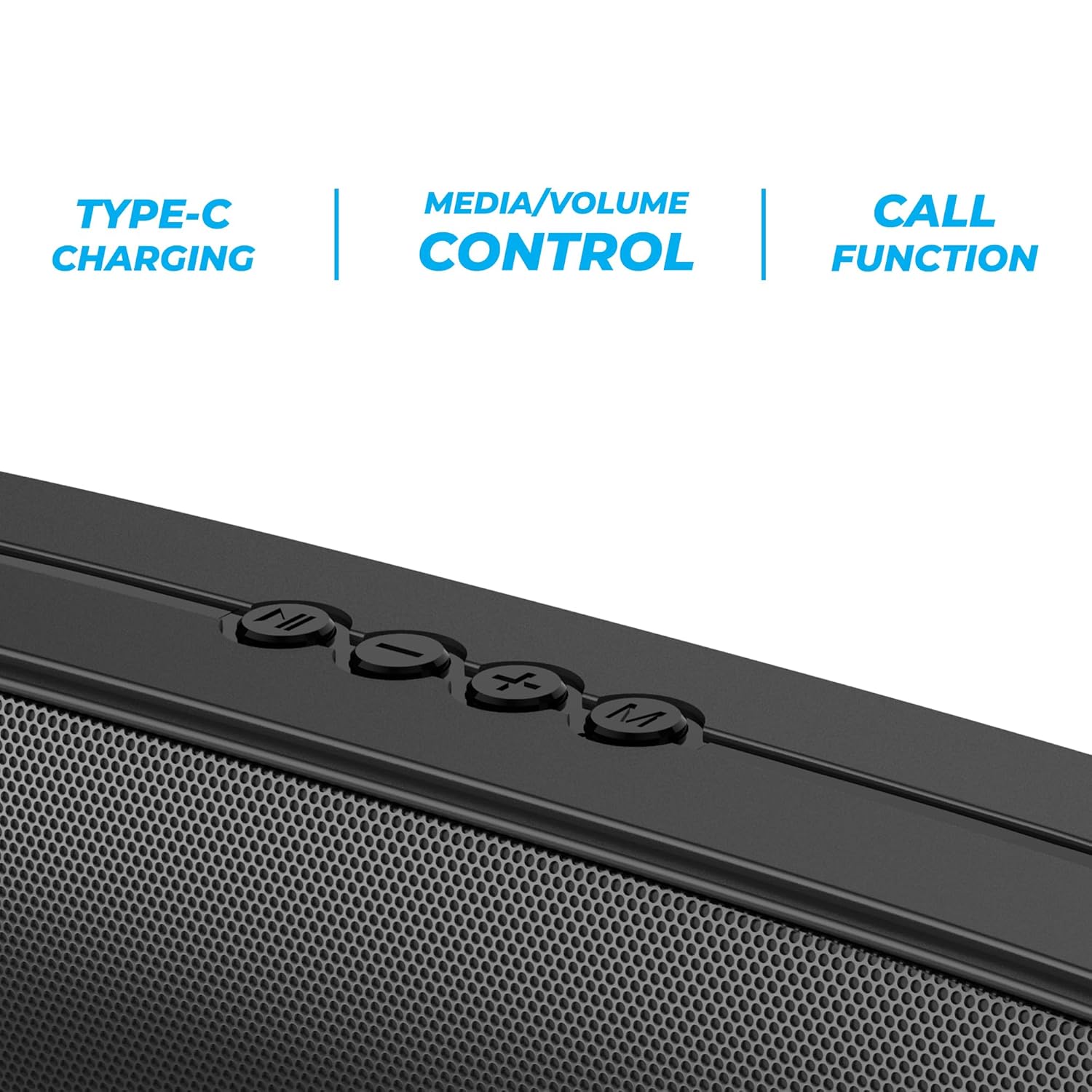
Stampa 3.2: Close-up of the control panel buttons on the top of the speaker, including power, volume, and mode controls.

Stampa 3.3: Wara view of the speaker showing the multi-connectivity ports: USB, Micro SD slot, AUX input, and Type-C charging port.
4. Setup
4.1 Iċċarġjar tal-Ispeaker
Before initial use, fully charge the speaker. The Zebronics Astra 30 features a built-in rechargeable battery with Type-C charging.
- Qabbad il-kejbil tal-iċċarġjar tat-Tip Ċ ipprovdut mal-port tal-iċċarġjar fuq l-ispiker.
- Qabbad it-tarf l-ieħor tal-kejbil ma' adapter tal-enerġija USB (mhux inkluż) jew mal-port USB tal-kompjuter.
- The charging indicator will illuminate during charging and turn off once fully charged.
A full charge takes approximately 4 hours and provides up to 12 hours of playback time at 50% volume.

Stampa 4.1: Illustration indicating the speaker's 12-hour playback capability on a single charge.
4.2 Tixgħel/Jitfi
To power on or off the speaker, press and hold the power button located on the control panel until you hear an audible prompt or see the indicator light change.
5. Istruzzjonijiet Operattivi
5.1 Tqabbil tal-Bluetooth
The Zebronics Astra 30 uses Bluetooth v5.3 for wireless audio streaming.
- Ixgħel l-ispiker. Dan jidħol awtomatikament fil-modalità ta' tqabbil Bluetooth, indikat minn LED li jteptep.
- Ippermetti l-Bluetooth fuq l-ismartphone, it-tablet, jew apparat ieħor tiegħek.
- Fittex għal "ZEB-ASTRA 30" in the list of available Bluetooth devices.
- Select "ZEB-ASTRA 30" to connect. Once paired, the speaker will confirm with an audible tone, and the LED will stop flashing.
- Jekk tintalab għal password, daħħal "0000".
5.2 Funzjoni Stereo Veru Mingħajr Fili (TWS)
Connect two Zebronics Astra 30 speakers for a true wireless stereo experience.
- Ensure both ZEB-ASTRA 30 speakers are powered on and not connected to any Bluetooth device.
- On one of the speakers (this will be the primary speaker), press and hold the TWS button (often combined with the Mode button) until you hear a pairing tone.
- Iż-żewġ kelliema jikkonnettjaw ma' xulxin awtomatikament. Ladarba jkunu konnessi, tisma' ton ta' konferma.
- Now, connect your device to the primary speaker via Bluetooth as described in Section 5.1. Audio will play in stereo through both speakers.

Stampa 5.1: Visual representation of two Zebronics Astra 30 speakers connected via TWS for stereo sound.
5.3 Modalità tar-Radju FM
Biex tuża r-radju FM integrat:
- Qawwa fuq il-kelliem.
- Press the 'M' (Mode) button to switch to FM radio mode.
- Biex tiskennja awtomatikament u ssalva l-istazzjonijiet FM disponibbli, agħfas u żomm il-buttuna Play/Pause. L-ispiker se jiskennja u jaħżen l-istazzjonijiet awtomatikament.
- Use the Previous/Next track buttons to navigate between saved stations.
- For optimal reception, ensure the charging cable is connected as an antenna.
5.4 Modalità tad-Dħul AUX
Connect external audio devices using the AUX input:
- Qawwa fuq il-kelliem.
- Press the 'M' (Mode) button to switch to AUX mode.
- Qabbad tarf wieħed ta' kejbil awdjo ta' 3.5mm (mhux inkluż) mal-port AUX fuq l-ispiker.
- Qabbad it-tarf l-ieħor mal-output tal-awdjo tat-tagħmir tiegħek (eż., smartphone, MP3 player).
- L-awdjo issa se jindaqq permezz tal-ispiker mit-tagħmir konness tiegħek.
5.5 USB and Micro SD Card Playback
Play awdjo files directly from a USB pen drive or Micro SD card:
- Qawwa fuq il-kelliem.
- Insert a USB pen drive (up to 32GB) or a Micro SD card into the respective slot.
- L-ispiker awtomatikament jiskopri l-apparat tal-ħażna u jibda jdoqq l-awdjo files. If not, press the 'M' (Mode) button to switch to USB or SD card mode.
- Uża l-buttuni Play/Pause u Preċedenti/Li Jmiss it-trakka biex tikkontrolla l-plejbek.
5.6 Funzjoni tas-Sejħa
Meta jkun imqabbad permezz tal-Bluetooth ma' smartphone, l-ispiker jista' jintuża għal sejħiet hands-free.
- Tweġiba/Tmiem Sejħa: Agħfas il-buttuna Play/Pause darba.
- Irrifjuta Sejħa: Agħfas u żomm il-buttuna Play/Pause.
- Isemmi mill-ġdid l-Aħħar Numru: Agħfas darbtejn il-buttuna Play/Pause.
5.7 Volume and Media Control
The speaker features integrated controls for audio playback:
- Volum 'il fuq: Agħfas il-buttuna '+'.
- Volum 'l isfel: Agħfas il-buttuna '-'.
- Track li jmiss: Agħfas u żomm il-buttuna '+'.
- Track preċedenti: Agħfas u żomm il-buttuna '-'.
- Play/Pawsa: Agħfas il-buttuna Play/Pause.
6. Manutenzjoni
- Naddaf l-ispiker b'ċarruta ratba u niexfa. Tużax kimiċi ħarxa jew prodotti tat-tindif li joborxu.
- Keep the speaker away from extreme temperatures, direct sunlight, and moisture.
- Evita li twaqqa’ jew tissuġġetta lill-kelliem għal impatti qawwija.
- Aħżen l-ispiker f'post frisk u niexef meta ma jkunx qed jintuża għal perjodi twal.
- The speaker is rated as waterproof. However, avoid submerging it in water for prolonged periods. Ensure the port cover is securely closed to maintain water resistance.
7 Issolvi l-problemi
| Problema | Soluzzjoni Possibbli |
|---|---|
| L-ispiker ma jixgħelx. | Kun żgur li l-batterija hija ċċarġjata. Qabbad l-ispiker ma' sors ta' enerġija billi tuża l-kejbil tat-Tip Ċ. |
| Ma tistax tqabbad permezz tal-Bluetooth. |
|
| L-ebda ħoss jew volum baxx. |
|
| Ir-riċeviment tar-radju FM huwa fqir. | Ensure the Type-C charging cable is connected to act as an antenna. Try repositioning the speaker. |
| It-tqabbil tat-TWS ifalli. |
|
8. Speċifikazzjonijiet
| Karatteristika | Dettall |
|---|---|
| Isem tal-Mudell | ZEB-ASTRA 30 |
| Qawwa tal-Ħruġ | 14 Watts |
| Daqs tas-Sewwieq | Doppju ta' 52mm |
| Verżjoni Bluetooth | v5.3 |
| Għażliet ta' Konnettività | Bluetooth, FM, AUX, USB, Micro SD |
| USB/Micro SD Max Capacity | 32GB |
| Ħajja tal-batterija | Sa 12 sigħat (b'50% volum) |
| Ħin tal-Iċċarġjar | 4 sigħat |
| Tip ta 'ċċarġjar | Tip-Ċ |
| Reżistenza għall-Ilma | Waterproof |
| Dimensjonijiet tal-Prodott (P x W x H) | 5.7 x 35.4 x 6.5 Ċentimetru |
| Piż tal-oġġett | 645 Gramm |
| Impedenza | 3 Ohms |
| Sinjal-mal-ħoss Ratio | 75 dB |

Stampa 8.1: Graphic highlighting the 14W RMS output and dual 52mm drivers of the Zebronics Astra 30 speaker.
9. Garanzija u Appoġġ
The Zebronics Astra 30 speaker comes with a Garanzija Limitata ta' Sena mid-data tax-xiri. Jekk jogħġbok żomm l-irċevuta tax-xiri tiegħek għal talbiet ta' garanzija.
For technical support, service, or warranty inquiries, please contact Zebronics customer service. Contact details can typically be found on the official Zebronics webis-sit jew fuq l-imballaġġ tal-prodott tiegħek.
Manufacturer: Zebronics India Private Limited
Address: 13/7, Smith Road, Royapettah, Chennai-600002


