
Introduzzjoni
This manual provides comprehensive instructions for the operation and maintenance of your ATTOP X-PACK 18 Drone with Camera. Please read this manual thoroughly before operating the drone to ensure safe and optimal performance. The ATTOP X-PACK 18 is a foldable drone equipped with a 1080P 120° wide-angle FPV Wi-Fi camera, offering features like one-key take-off/landing, headless mode, 3-speed modes, 360° flip, emergency stop, one-key return, and various APP-controlled functions including gesture, voice, and gravity control, as well as flight path mode.

Image: ATTOP Drone with remote control, batteries, and carrying case.
X'hemm fil-Kaxxa
Ivverifika li l-komponenti kollha huma preżenti fil-pakkett:
- ATTOP X-PACK 18 Drone
- Kontroll mill-bogħod
- 2 x 3.7V / 1100mAh Rechargeable Batteries
- Kawża tal-Ġarr
- Xfafar ta 'Spare
- Cable tal-Iċċarġjar tal-USB
- Tornavit
- Detentur tat-Telefon

Image: Visual representation of the drone, remote, batteries, and accessories included in the package.
Gwida ta' Setup
Tiżvolġi d-Drone
Carefully unfold the drone arms until they are fully extended. Ensure all arms click into place securely.

Image: Illustration of the drone's foldable design and dimensions.
Installazzjoni tal-batterija
Insert the fully charged battery into the designated compartment on the drone. Ensure it is securely latched.
Telefon Clamp Installation (for Remote Control)
Waħħal it-telefon clamp to the remote control. Secure your smartphone into the clamp for FPV viewing and APP control.
Image: Close-up of the remote control with a smartphone mounted in the clamp.
Qawwa Mixgħul
Press and hold the power button on the drone until the indicator lights illuminate. Power on the remote control.
Tqabbil
After powering on both the drone and remote, push the left control stick on the remote fully up and then fully down to pair the devices. The drone lights will stop flashing once paired.
Kalibrazzjoni
If playing for the first time, press the calibration button on the remote control. This ensures stable flight.
Tniżżil u Konnessjoni tal-APP
Download the "ATTOP CLUB" APP from your device's app store. Connect your phone to the drone's Wi-Fi network (e.g., "X-PACK 18-XXXXXX"). Open the APP and select "X-PACK 18" to connect and access advanced features and FPV view.
Video: Demonstrates the ATTOP CLUB APP download, Wi-Fi connection, and interface display for the X-PACK 18 drone.
Istruzzjonijiet Operattivi
Familiarize yourself with the drone's controls and features for an optimal flight experience.
Video: Comprehensive guide demonstrating drone setup, basic flight controls, and advanced features like 360° stunts and headless mode.
Kontrolli Bażiċi tat-Titjira:
- Tlugħ/Inżul b'Ċavetta waħda: Press the dedicated button on the remote or APP for automatic take-off or landing.
- Ascend & Descend: Use the left control stick to adjust the drone's altitude.
- Altitude Holding: The drone maintains a stable hover at a set altitude, ideal for capturing steady photos and videos.
- Tirqim: Adjust the drone's flight path to correct any drifting.
- Flying Forward/Backward: Use the right control stick to move the drone in the desired direction.
- Tidwir Xellug/Lemin: Rotate the drone left or right using the left control stick.
- Left/Right Side Flight: Move the drone sideways using the right control stick.
Karatteristiċi Avvanzati:
- 360° Stunt (Flip): Execute impressive aerial flips with a single button press.
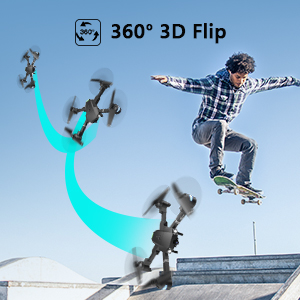
Image: Sequence showing the drone executing a 360-degree flip.
- Modi ta 'Veloċità: Switch between 3 different speeds (30%, 60%, 100%) to match your skill level and environment.
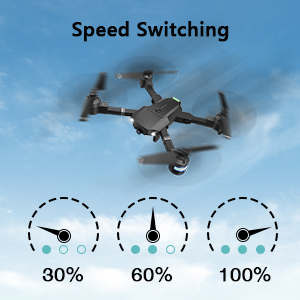
Image: Visual representation of the three-speed modes (30%, 60%, 100%).
- Modalità bla ras: Simplifies flight by orienting the drone relative to the pilot, regardless of the drone's actual front direction.
- Ċirku Fly: The drone can perform circular flight patterns.
- Taking Pictures & Videos: Use the dedicated buttons on the remote or APP to capture 1080P HD photos and videos.
Image: Close-up of the drone's 1080P HD camera.
- Waqfien ta' Emerġenza: Instantly stop the drone in case of an emergency to prevent damage or injury.
- Ritorn b'ċavetta waħda: The drone will automatically return to its take-off point.
APP-Controlled Functions:
- Kontroll tal-ġesti: Perform specific hand gestures to trigger photo or video capture.
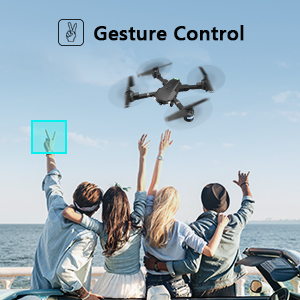
Image: People making a "V" gesture to activate the drone camera.
- Kontroll tal-Vuċi: Command the drone using voice commands for various flight actions (e.g., "Take off", "Landing", "Forward").

Immaġni: Eżamples of voice commands like "Take off" and "Right side" for drone control.
- Kontroll tal-Gravità: Control the drone's movement by tilting your smartphone, utilizing its built-in G-sensor.
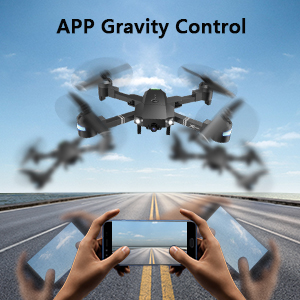
Image: Hands holding a smartphone, demonstrating how tilting controls the drone's direction.
- Flight Path Mode: Draw a desired flight path on your smartphone screen, and the drone will automatically follow it.
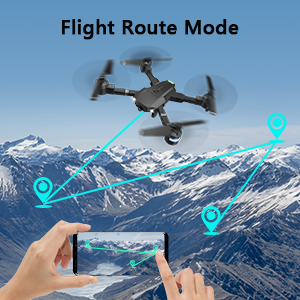
Image: A smartphone screen displaying a drawn flight path for the drone to follow.
- Modalità VR: Compatible with VR glasses for an immersive first-person view flight experience.
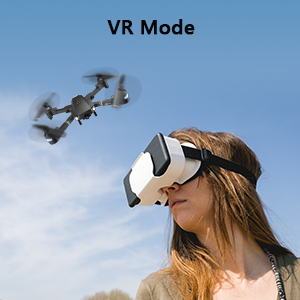
Image: A person wearing VR glasses, experiencing the drone's first-person view.
Manutenzjoni
Manutenzjoni regolari tiżgura l-lonġevità u l-prestazzjoni ottimali tad-drone tiegħek.
- Tindif: Uża drapp artab u niexef biex tnaddaf il-qafas tad-drone u l-lenti tal-kamera. Evita li tuża kimiċi ħarxa.
- Spezzjoni tal-Iskrun: Regularly check propellers for any damage (cracks, bends). Replace damaged propellers immediately using the provided spare blades and screwdriver.
- Kura tal-batterija: Aħżen il-batteriji f'post frisk u niexef. Tiċċarġjahomx iżżejjed jew tiskarikahomx iżżejjed. Jekk taħżinhom għal perjodi twal, iċċarġjahom sa madwar 50% tal-kapaċità tagħhom.
- Kura tal-Mutur: Żomm il-muturi ħielsa mit-trab u l-fdalijiet. Evita li tħaddemhom f'ambjenti ramlija jew bit-trab.
- Ħażna: When not in use, fold the drone and store it in its carrying case to protect it from dust and physical damage.
Issolvi l-problemi
| Problema | Kawża Possibbli | Soluzzjoni |
|---|---|---|
| Id-drone ma jirrispondix għall-kontroll mill-bogħod. | Mhux imqabbad, batterija baxxa, interferenza. | Ensure drone and remote are powered on and paired correctly. Recharge batteries. Move away from sources of interference. |
| Id-drone jittajjar waqt it-titjira. | Not calibrated, uneven surface for take-off, wind. | Perform calibration on a flat surface. Use trimming functions to correct drift. Avoid flying in strong winds. |
| Camera not working or FPV feed is unstable. | Wi-Fi not connected, APP issue, low drone battery. | Ensure phone is connected to drone's Wi-Fi. Restart APP and drone. Charge drone battery. |
| Ħin qasir tat-titjira. | Il-batterija mhix iċċarġjata għalkollox, batterija qadima. | Fully charge batteries before each flight. Consider replacing old batteries. |
| Drone crashes frequently. | Lack of experience, environmental factors, damaged propellers. | Practice in open areas. Avoid obstacles. Check and replace damaged propellers. |
Speċifikazzjonijiet
| Karatteristika | Dettall |
|---|---|
| Brand | ATTOP |
| Isem tal-Mudell | PAKKETT X 18 |
| Karatteristiċi Speċjali | 360 Degree Flip, Speed Adjustment, Foldable, First Person View (FPV), Long Battery Life |
| Firxa ta' Età (Deskrizzjoni) | 96 xhur u aktar |
| Kulur | Ġett Iswed |
| Riżoluzzjoni tal-Qbid tal-Vidjo | 1080p |
| Teknoloġija tal-Konnettività | Wi-Fi |
| Livell ta' Ħiliet | Kollha |
| Kapaċità tal-batterija | 1100 mAh (għal kull batterija) |
| Ħin tat-Titjira | Sa 20 minuta (b'2 batteriji)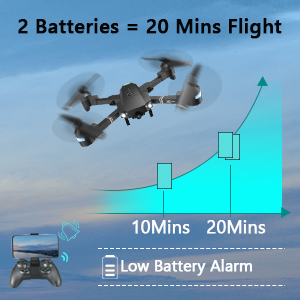 Image: Graph showing flight time with two batteries. |
| Format tal-Qbid tal-Vidjo | MP4 |
| Teknoloġija tal-Kontroll mill-bogħod | Wi-Fi |
| Tip ta' Kontroll | Kontroll mill-bogħod |
| Medda Massimu | 80 Meters |
| Materjal | Plastic or Reinforced Plastic |
| Dimensjonijiet tal-Prodott | 13.8"T x 12.6"W x 2.76"Għ |
| Piż tal-oġġett | 1.76 liri |
| Data ta' Rilaxx | 12 ta’ Novembru, 2023 |
Garanzija u Appoġġ
ATTOP provides customer support and assistance for your drone. For any questions or to inquire about extended warranty, please refer to the following:
- Appoġġ bl-Email: support@atttoptoys.com
- Appoġġ onlajn: Skennja l-kodiċi QR hawn taħt jew żur attop.afterservice.vip għal assistenza u informazzjoni dwar il-garanzija.

Image: QR code for quick access to ATTOP customer service and extended warranty information.


