1. Introduzzjoni
The Phomemo M08F Wireless Thermal Tattoo Stencil Printer is a portable, inkless device designed for creating high-quality tattoo stencils. It offers wireless connectivity to various devices, simplifying the stencil creation process for both professional tattoo artists and beginners. This manual provides detailed instructions for setup, operation, and maintenance to ensure optimal performance.

Image: The Phomemo M08F printer actively producing a tattoo stencil, demonstrating its compact size and wireless capability with a smartphone displaying the design.
2. Prodott Aktarview
The M08F printer utilizes advanced thermal technology for inkless printing, eliminating the need for ink cartridges and reducing maintenance. Its lightweight and compact design makes it highly portable, ideal for various work environments. The device supports multiple operating systems and offers versatile connectivity options.

Immaġni: Aktar minnview of the Phomemo M08F printer, emphasizing its core features such as high-quality output, inkless operation, ease of use, Bluetooth connectivity, rechargeable battery, portability, and specialization for monochrome tattoo printing.
Karatteristiċi ewlenin:
- Portabbli u Ħfief: Weighs only 2 pounds, 60% smaller than traditional stencil makers.
- Kompatibbiltà qawwija: Compatible with smartphones, tablets, laptops, and desktop computers (Android, iOS, Windows, MacOS, ChromeOS).
- Powerful Phomemo APP: Allows easy image and document printing, with regular updates of tattoo patterns.
- High-Quality Inkless Printing: Advanced thermal technology for precise designs and lines. Designed for simple monochrome patterns.
- Conveniently Rechargeable: 1200mAh battery, capable of printing up to 140 pages on a single charge.
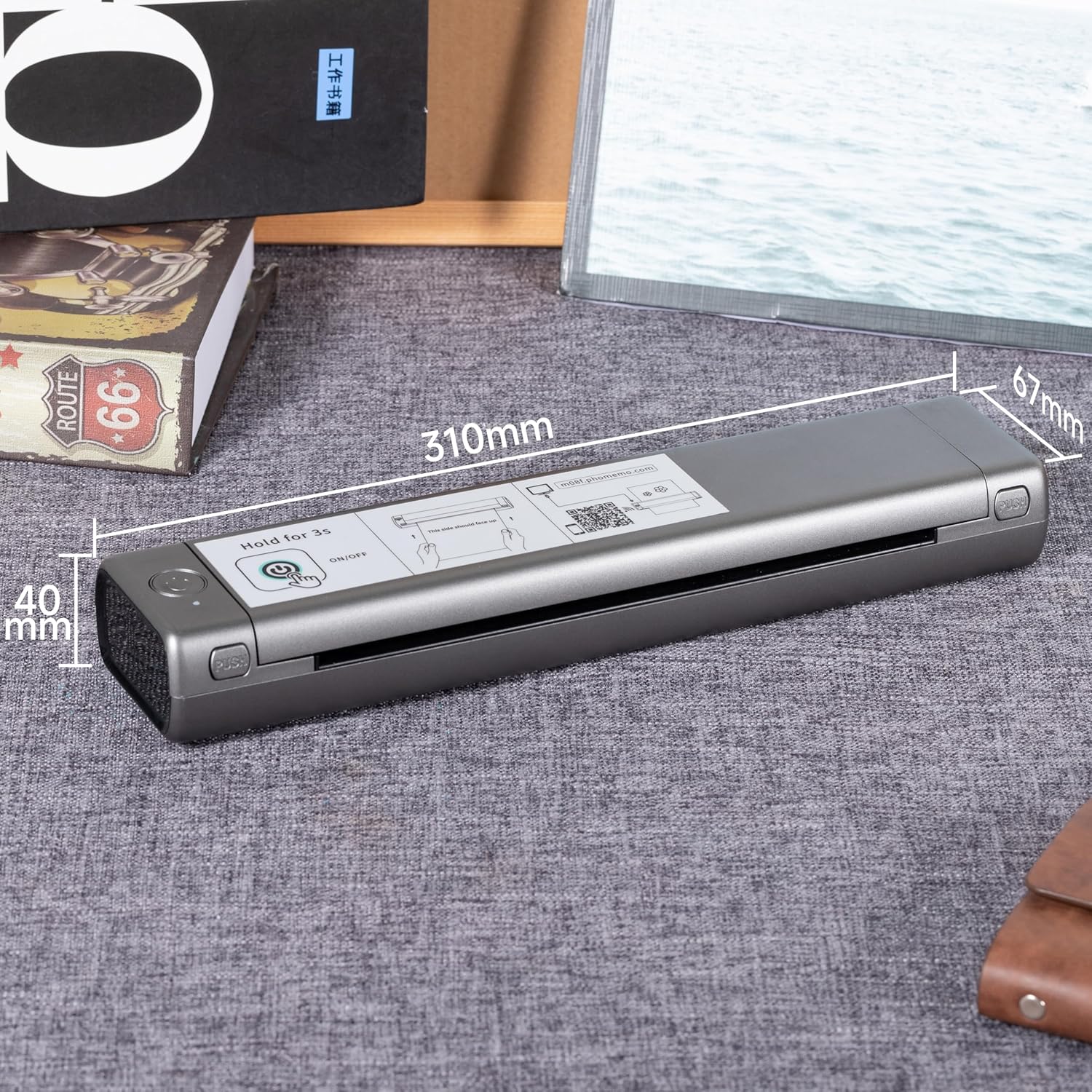
Immaġni: Dettaljata view of the Phomemo M08F printer with its physical dimensions (length, width, height) clearly indicated, showcasing its compact form factor.
3. X'hemm fil-Kaxxa
- 1 x M08F Wireless Tattoo Transfer Stencil Printer (Grey)
- 10 Sheets x Tattoo Transfer Paper
- 1 x Soft Storage Pouch
- 1 x USB-A to USB-C charging cable (80cm)
- 1 x Manwal ta 'Istruzzjoni
4. Setup
4.1 Tixgħel
To turn on the printer, press and hold the power button for 3 seconds. The indicator light will illuminate.
Vidjo: Preċedenza qasiraview demonstrating how to power on the Phomemo M08F printer by pressing and holding the power button.
4.2 Loading Transfer Paper
- Remove the transparent paper from the transfer sheet.
- Peel off the yellow backing paper.
- Lay the transfer paper flat in the printer with the carbon side facing down. Ensure it is centered.

Image: Visual instructions detailing the process of preparing and loading tattoo transfer paper into the printer, including removing the transparent and yellow backing sheets, and correctly inserting the paper.
4.3 Connecting to Mobile Device (Phone/Tablet)
- Ixgħel il-Bluetooth tat-telefon tiegħek.
- Download the "Phomemo" App from your device's app store.
- Open the Phomemo App.
- Tap the printer icon in the upper left corner.
- Find your printer (M08F) and connect. Note: Connect within the app, not in your phone's Bluetooth settings.

Image: The Phomemo M08F printer connected wirelessly via Bluetooth to a tablet, illustrating the app-based connection process for mobile devices.
Video: A detailed demonstration of how to connect and operate the Phomemo M08F printer using a mobile phone and the Phomemo app.
4.4 Connecting to PC (Windows/MacOS)
- Żur tattoo.phomemo.com to download the appropriate driver for your operating system (Windows, MacOS, ChromeOS, Linux).
- Connect the printer to your computer using the provided USB-A to USB-C charging cable.
- Segwi l-istruzzjonijiet fuq l-iskrin biex tinstalla s-sewwieq.
- Once installed, you can select the printer from your computer's print dialogue.

Image: The Phomemo M08F printer connected to a laptop via USB, with the laptop screen displaying the Phomemo driver download page for various operating systems.
Video: An operational guide demonstrating how to connect and use the Phomemo M08F printer with a Windows computer.
Video: A step-by-step tutorial on how to connect and operate the Phomemo M08F printer with a MacOS device.
5. Joperaw
5.1 Printing Guidelines
The M08F printer is specifically designed for printing simple monochrome patterns. For best results, use high-resolution images and avoid overly shaded or excessively colored designs, as these may not transfer clearly.

Image: A visual guide differentiating between optimal and suboptimal designs for thermal tattoo stencil printing, advising on image selection for clear results.
5.2 Achieving Clearer Prints
For optimal print clarity, ensure the carbon paper is on top and remove the transfer paper first. Incorrect paper orientation (carbon paper on the bottom, removing transfer paper first) can lead to unclear results.

Image: A comparison illustrating the correct paper setup for clearer tattoo templates versus an incorrect setup that yields poor results.
Video: A brief tutorial providing tips on how to achieve clearer printing results with the Phomemo M08F tattoo stencil printer.
5.3 Applying Stencils
- Wipe off the skin with wet wipes or alcohol to clean the area.
- Apply tattoo transfer cream or gel evenly to the skin.
- Carefully stick the printed stencil onto the prepared skin.
- Let it dry for a few minutes to ensure proper transfer.

Image: Visual instructions demonstrating the correct procedure for transferring a tattoo stencil onto the skin, from preparation to final application.
6. Manutenzjoni
To ensure the longevity and optimal performance of your Phomemo M08F printer, keep it clean and free from dust. Store it in the provided soft storage pouch when not in use. Avoid exposing the printer to extreme temperatures or direct sunlight.
7 Issolvi l-problemi
If you encounter any issues with your printer, please refer to the troubleshooting section in the full instruction manual or contact Phomemo customer support. Common issues may include connectivity problems, paper feeding errors, or print quality concerns.
8. Speċifikazzjonijiet
| Speċifikazzjoni | Dettall |
|---|---|
| Isem tal-Mudell | M08F-WS |
| Brand | Phomemo |
| Teknoloġija tal-Konnettività | USB, Wi-Fi |
| Teknoloġija tal-Istampar | Termali |
| Output Printer | Monokromu |
| Max Printspeed Monokromu | 12 ppm |
| Riżoluzzjoni Massima tal-Istampar bl-Iswed u l-Abjad | 300 dpi |
| Kapaċità Massima tal-Folja tal-Input | 140 |
| Daqs tal-Folja | 8.27x11.69-il pulzier |
| Piż tal-oġġett | 2.17 libbra (985.7 Gramm) |
| Dimensjonijiet tal-Prodott | 13.78 x 2.56 x 1.38 pulzieri (2.3"D x 10.4"W x 1.2"Għ) |
| Batteriji | 1 Batteriji tal-Lithium Polymer meħtieġa (inklużi) |
| Wattage | 1200 milliamp_sigħat |
| Kapaċità tal-Ħżin tal-Memorja | 64 MB |
| Apparati Kompatibbli | Laptops, PC, Smartphones, Tablets |
| Metodu ta' Kontroll | App |
9. Garanzija u Appoġġ
The Phomemo M08F printer comes with a Limited Warranty. For detailed warranty information or technical support, please visit the official Phomemo websit jew ikkuntattja lis-servizz tal-konsumatur tagħhom.


