1. Introduzzjoni
The SHX SHXA700 Infrared Heating Panel is designed to provide efficient and comfortable heating for your living spaces. Featuring a modern, frameless design with a white carbon crystal surface, it seamlessly integrates into any room. This 700W panel offers WiFi connectivity, remote control operation, and a programmable thermostat for optimal energy saving and comfort. This manual provides essential information for the safe and effective use of your heating panel.

Figure 1: SHX SHXA700 700W WiFi Infrared Heating Panel, front view. A clean, white rectangular infrared heating panel, showcasing id-disinn minimalista tiegħu.
2. Istruzzjonijiet tas-Sigurtà
Please read all safety instructions carefully before installation and use. Failure to follow these instructions may result in electric shock, fire, or personal injury.
- Tiżgura l-provvista tal-enerġija voltage jaqbel mat-tikketta tal-klassifikazzjoni fuq l-apparat.
- Do not operate the heater with a damaged cord or plug. If the cord is damaged, it must be replaced by the manufacturer, its service agent, or similarly qualified persons to avoid a hazard.
- Tgħattix il-ħiter. Jekk tgħatti l-ħiter jista' jikkawża sħana żejda.
- Maintain a minimum distance of 100 cm from the front of the heater to any objects, and 20 cm from the sides and top to walls or other surfaces.
- This appliance is rated IP44, making it suitable for use in bathrooms. However, it must not be installed directly above a bath, shower, or swimming pool.
- Daħħalx oġġetti fil-fetħiet tal-ħiter.
- The heater is equipped with overheating protection. If the heater overheats, it will automatically shut off. Unplug the heater and allow it to cool down before restarting.
- Żomm it-tfal u l-annimali domestiċi 'l bogħod mill-ħiter waqt it-tħaddim.
- Always unplug the heater before cleaning or maintenance.
3. Kontenut tal-Pakkett
Carefully unpack the box and ensure all items are present and undamaged. If any items are missing or damaged, contact your retailer.
- Pannell tat-Tisħin bl-Infrared
- Manwal għall-Utent
- Kontroll mill-bogħod
- Screws and Dowels for wall mounting
- Optional Feet for freestanding placement
4. Karatteristiċi tal-prodott
The SHX SHXA700 Infrared Heating Panel offers a range of features designed for convenience and efficiency:
- Powerful 700W Output: Provides effective heating for rooms up to 14 m².
- Integrated WiFi Functionality: Control your heater remotely via a smartphone app.
- Kontroll mill-bogħod: Convenient operation with the included remote.
- Timer ta' 24 siegħa: Program specific operating times for energy saving.
- Termostat aġġustabbli: Żomm it-temperatura mixtieqa tal-kamra.
- Protezzjoni ta' sħana żejda: Enhanced safety feature.
- Klassifikazzjoni IP44: Adattat għall-użu f'damp ambjenti bħall-kmamar tal-banju.
- Disinn Modern: Frameless white carbon crystal surface for aesthetic integration.
- Display LCD: Clear display for settings and status.

Figure 2: SHX Infrared Heating Panel features. An infographic highlighting the main features of the SHX SHXA700 infrared heating panel, including WiFi connectivity, remote control, 24-hour timer, adjustable thermostat, and overheating protection. It also indicates suitability for up to 14m² rooms.
5. Setup u Installazzjoni
The SHX SHXA700 heating panel can be installed either wall-mounted or freestanding using the optional feet.
5.1 Immuntar tal-ħajt
- Choose a suitable location on a wall, ensuring sufficient clearance from other objects (refer to Safety Instructions).
- Mark the drilling points on the wall using the provided template or by measuring the panel's mounting holes.
- Drill holes and insert the provided dowels.
- Waħħal il-parentesi tal-immuntar mal-ħajt billi tuża l-viti pprovduti.
- Carefully hang the heating panel onto the mounting brackets, ensuring it is securely seated.
- Ipplaggja l-korda tad-dawl fi żbokk elettriku adattat.
5.2 Freestanding Placement
- Attach the optional feet to the bottom of the heating panel using the provided screws.
- Place the panel on a stable, level surface, ensuring it is not easily tipped over.
- Ensure sufficient clearance from other objects (refer to Safety Instructions).
- Ipplaggja l-korda tad-dawl fi żbokk elettriku adattat.

Figure 3: SHX Infrared Heating Panel in various room settings. A collage of four images demonstrating the SHX infrared heating panel's versatile placement options in different rooms: a living room, a bedroom, a bathroom, and an office, illustrating its modern design integration.

Figure 4: SHX SHXA700 Infrared Heating Panel dimensions. A diagram illustrating the physical dimensions of the SHX SHXA700 infrared heating panel, showing its width (1200mm), height (500mm), and depth (45mm), along with its weight (2.9 kg).
6. Istruzzjonijiet Operattivi
The heating panel can be operated using the integrated control panel on the back or the included remote control.
6.1 Control Panel Overview
The control panel is located on the back of the unit and includes buttons for power, WiFi, temperature adjustment, timer, and an LCD display.
6.2 Operazzjoni Bażika
- Power On/Off: Agħfas il-buttuna tal-qawwa fuq il-pannell tal-kontroll jew fuq il-kontroll remot biex tixgħel jew titfi l-ħiter.
- Aġġustament tat-temperatura: Use the '+' and '-' buttons to set your desired temperature. The LCD display will show the current and target temperatures.
- Funzjoni Timer: Press the timer button to activate and set the 24-hour timer. Follow the on-screen prompts to program the desired operating duration.

Figure 5: SHX Infrared Heating Panel control panel and remote control. A close-up view of the heating panel's integrated control unit on the side, featuring power, WiFi, LCD display, 24-hour timer, and indicator light buttons, alongside the included remote control for easy operation.
7. WiFi Connectivity & App Control
The SHX SHXA700 heating panel features integrated WiFi, allowing for smart control via your smartphone.
- Niżżel l-App: Download the "Tuya Smart" app from your smartphone's app store (available for iOS and Android).
- Irreġistra/Idħol: Create an account or log in to your existing Tuya Smart account.
- Żid Apparat: Follow the in-app instructions to add your SHX heating panel. This typically involves putting the heater into pairing mode (refer to the app's guide for specific steps, usually by holding the WiFi button on the control panel).
- Qabbad mal-WiFi: Select your home WiFi network and enter the password.
- Kontroll: Once connected, you can control the heater's power, temperature, timer, and other settings directly from the app.
- Integrazzjoni tad-Dar Intelliġenti: The Tuya Smart app supports integration with voice assistants like Amazon Alexa and Google Home, allowing for voice control of your heating panel.

Figure 6: SHX Infrared Heating Panel WiFi and integrated timer features. An image showing the heating panel's WiFi symbol and a smartphone displaying the "Tuya Smart" app interface, along with logos for Alexa and Google Home, indicating smart home compatibility and a 24-hour timer function.
8. Manutenzjoni
Regular cleaning and maintenance will ensure the longevity and optimal performance of your heating panel.
- Tindif: Always unplug the heater and allow it to cool completely before cleaning. Wipe the surface with a soft, damp drapp. Tużax prodotti tat-tindif li joborxu, solventi, jew kimiċi ħarxa, għax dawn jistgħu jagħmlu ħsara lill-wiċċ.
- Ħażna: Jekk se taħżen il-ħiter għal perjodu twil ta' żmien, kun żgur li jkun nadif u niexef. Aħżnu f'post frisk u niexef, preferibbilment fl-imballaġġ oriġinali tiegħu.
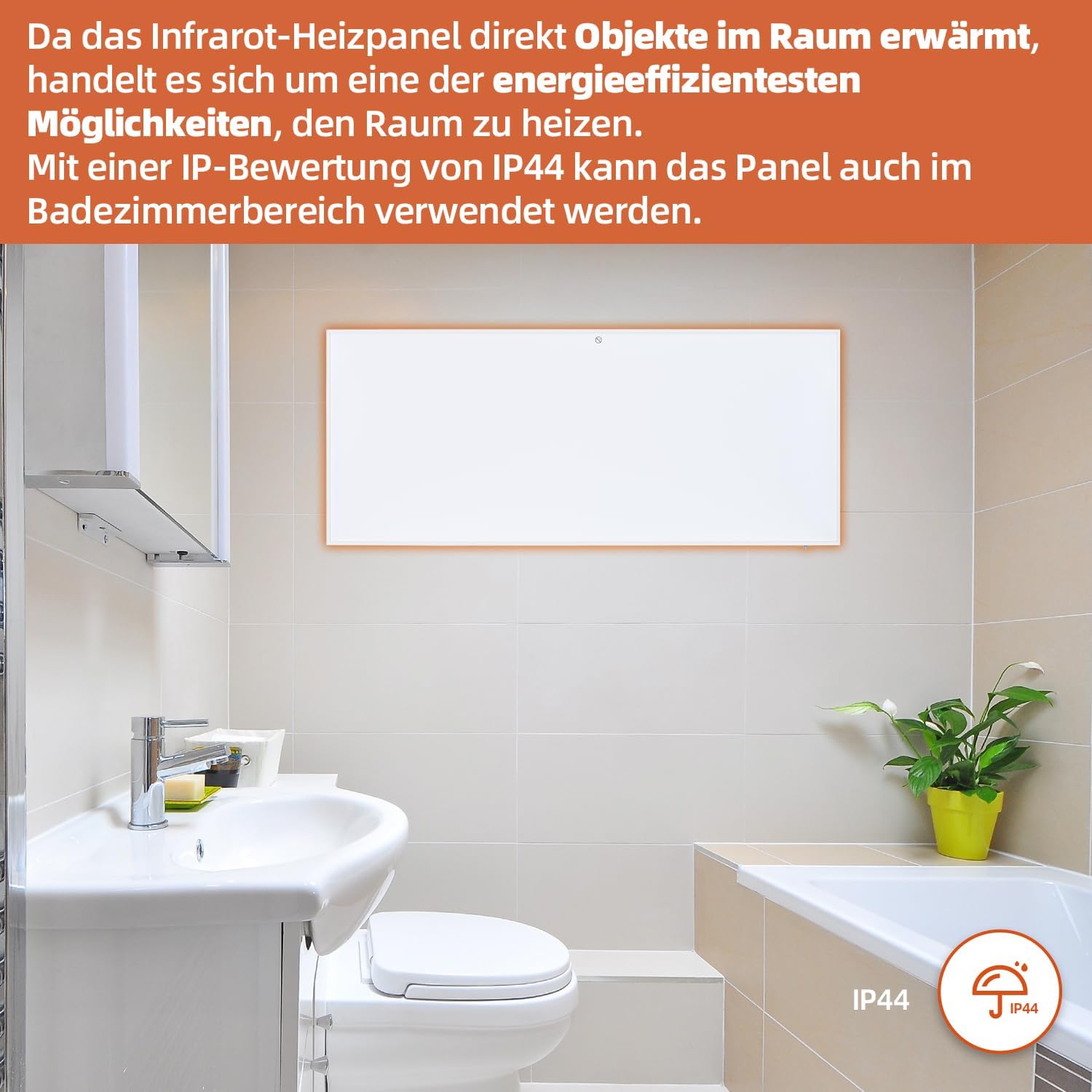
Figure 7: SHX Infrared Heating Panel with IP44 rating. The infrared heating panel mounted in a modern bathroom setting, emphasizing its IP44 water resistance rating, making it safe for use in damp ambjenti.
9 Issolvi l-problemi
If you encounter any issues with your SHX heating panel, refer to the following common problems and solutions:
| Problema | Kawża Possibbli | Soluzzjoni |
|---|---|---|
| Il-heater ma jixgħelx. | No power supply. Overheating protection activated. | Check if the power cord is securely plugged in and the outlet is functional. Unplug the heater, allow it to cool for 30 minutes, then plug it back in. |
| WiFi connection fails. | Incorrect WiFi password. Heater not in pairing mode. Router issues. | Ensure correct WiFi password. Put the heater into WiFi pairing mode (refer to app instructions). Restart your WiFi router. Ensure the heater is within WiFi range. |
| Il-kontroll mill-bogħod ma jaħdimx. | Batteries are dead or incorrectly inserted. Obstruction between remote and heater. | Replace the batteries in the remote control (requires 2 AAA batteries). Ensure there is a clear line of sight between the remote and the heater's receiver. |
| Il-ħiter mhux qed jisħon b'mod effettiv. | Temperature setting too low. Room size exceeds heater capacity. Drafts. | Increase the target temperature. Ensure the room size is within the recommended range (up to 14 m²). Seal any drafts in the room. |
10. Speċifikazzjonijiet
| Speċifikazzjoni | Valur |
|---|---|
| Brand | SHX |
| Numru tal-Mudell | SHXA700-WiFi |
| Kulur | Abjad |
| Dimensjonijiet tal-Prodott (L x W x H) | 120 x 50 x 4.5 ċm |
| Piż | 2.9 Kilogrammi |
| Qawwa | 700 Watts |
| Voltage | 220 Volts (AC) |
| Klassi tal-Effiċjenza tal-Enerġija | A sa G |
| Livell ta' Storbju | 1 Deċibel |
| Karatteristiċi Speċjali | WiFi Compatible, Overheating Protection, Programmable Thermostat, Remote Control, Energy Efficient |
| Sors tal-Enerġija | Corded Elettriku |
| Metodu tat-Tisħin | Radjanti |
| Użu Rakkomandat | Ġewwa, Dar |
| Tip ta 'Immuntar | Wall Mount, Floor Mount (with optional feet) |
| Batteriji Meħtieġa għal Remote | 2 batteriji AAA |
| Pajjiż ta' Oriġini | Iċ-Ċina |
11. Garanzija u Appoġġ
The SHX SHXA700 Infrared Heating Panel comes with a garanzija ta 'sena mid-data tax-xiri. Jekk jogħġbok żomm il-prova tax-xiri tiegħek għal talbiet ta' garanzija.
For technical support, warranty claims, or any questions regarding your product, please contact your retailer or the manufacturer's customer service. Contact information can typically be found on the product packaging or the manufacturer's official websit.


