Introduzzjoni
Welcome to the user manual for your new Cecotec DrumFit Indoor Bike. This manual provides essential information for the safe assembly, operation, maintenance, and troubleshooting of your indoor cycling equipment. Please read this manual thoroughly before using the product to ensure proper function and longevity.
The DrumFit Indoor Bike is designed for effective indoor cardio training, featuring a 6 kg inertia flywheel, variable resistance, and an LCD display to track your progress. Its robust carbon steel construction ensures stability for users up to 120 kg.

Image: The Cecotec DrumFit Indoor Bike, showcasing its sleek black design, flywheel, and adjustable components.
Informazzjoni dwar is-Sigurtà
- Dejjem ikkonsulta ma' professjonist fil-qasam tal-kura tas-saħħa qabel tibda xi programm ġdid ta' eżerċizzju.
- Kun żgur li l-boltijiet u l-ġewż kollha huma ssikkati sew qabel kull użu.
- Place the bike on a flat, stable surface. Use a mat underneath to protect flooring and reduce noise.
- Żomm it-tfal u l-annimali domestiċi 'l bogħod mir-rota waqt l-operazzjoni.
- Ilbes żraben u ħwejjeġ atletiċi xierqa.
- Taqbiżx il-piż massimu tal-utent ta' 120 kg.
- Use the emergency stop button (red knob) to quickly halt the flywheel if needed.
Setup u Assemblea
The DrumFit Indoor Bike requires some assembly. Follow these steps carefully:
- Spakkjar: Carefully remove all components from the packaging. Verify all parts are present against the included parts list.
- Stabbilizzaturi tal-Bażi: Attach the front and rear stabilizer bars to the main frame using the provided bolts and tools. Ensure they are firmly secured for stability.
- Pedali: Identifika l-pedali tax-xellug (L) u tal-lemin (R). Daħħal il-pedala tax-xellug kontra l-arloġġ u l-pedala tal-lemin kontra l-arloġġ fid-dirgħajn tal-krank. Issikka sew.
- Installazzjoni tas-Sarġ: Insert the saddle post into the main frame. Adjust the height and horizontal position of the ergonomic saddle for comfort, then tighten the adjustment knob.
- Installazzjoni tal-manubriju: Insert the handlebar post into the main frame. Adjust the height of the handlebars to your preferred position and secure with the adjustment knob.
- LCD Display and Device Holder: Mount the LCD display onto the handlebar assembly. Connect any necessary sensor cables. Attach the device holder to the handlebars, ensuring it is stable for your smartphone or tablet.
- Detentur tal-flixkun: Attach the bottle holder to the frame in the designated location.

Immaġni: Close-up view of the adjustable saddle and handlebars, highlighting the comfort-fit design and adjustment points.
Istruzzjonijiet Operattivi
Adjusting Your Riding Position
- Għoli tas-Sarġ: Adjust the saddle so that your leg has a slight bend at the knee when the pedal is at its lowest point.
- Saddle Fore/Aft: Position the saddle so your knee is directly above the pedal spindle when the pedals are horizontal.
- Għoli tal-manubriju: Adjust handlebars for a comfortable upper body posture, avoiding excessive strain on your back or wrists.
Using the Resistance System
The DrumFit Indoor Bike features variable manual resistance. The resistance is controlled by a knob located on the frame, typically near the handlebars.
- Żid ir-Reżistenza: Turn the resistance knob clockwise to increase the intensity of your workout.
- Naqqas ir-Reżistenza: Turn the resistance knob counter-clockwise to decrease the intensity.
- Waqfien ta' Emerġenza: Push down firmly on the resistance knob to engage the emergency brake and quickly stop the flywheel.

Image: A hand demonstrating the use of the red "PUSH TO STOP" emergency brake knob, located on the bike's frame.
Nifhmu l-Display LCD
The LCD display provides real-time feedback on your workout. It typically shows:
- ĦIN: Tul tat-taħriġ attwali tiegħek.
- SPD (Veloċità): Il-veloċità attwali tiegħek taċ-ċikliżmu.
- DST (Distance): Distanza totali koperta matul it-taħriġ attwali.
- CAL (kaloriji): Kaloriji stmati maħruqa.
- ODO (Odometru): Total accumulated distance (resets only when battery is removed).
- SKANJA: Awtomatikament jiċċikla bejn il-funzjonijiet kollha tal-wiri.
Use the button on the display to switch between modes or to reset values (hold the button for a few seconds to reset current workout data).

Image: A close-up of the LCD display panel, showing the digital readouts for workout metrics and the control button.
Using the Device Holder
The integrated device holder allows you to place your smartphone, tablet, or book for entertainment or guided workouts during your session.

Image: A user engaging with a tablet placed on the bike's device holder, demonstrating its hands-free functionality.

Image: A man actively exercising on the DrumFit Indoor Bike in a modern home environment, showcasing the bike in use.
Manutenzjoni
Regular maintenance ensures the longevity and safe operation of your DrumFit Indoor Bike.
- Tindif: Imsaħ ir-rota bl-adamp Ċarruta wara kull użu biex tneħħi l-għaraq u t-trab. Tużax prodotti tat-tindif jew solventi li joborxu.
- Inspecting Bolts and Nuts: Periodically check all bolts, nuts, and moving parts for tightness. Retighten as necessary.
- Sistema ta' Sewqan taċ-Ċinturin: The BeltRide system is designed for low maintenance. Keep the area around the flywheel and belt clean and free of debris.
- Pedali: Kun żgur li l-pedali huma mwaħħlin sew u jduru liberament.
- Ħażna: Store the bike in a dry, cool place away from direct sunlight and extreme temperatures. The integrated wheels allow for easy transport.
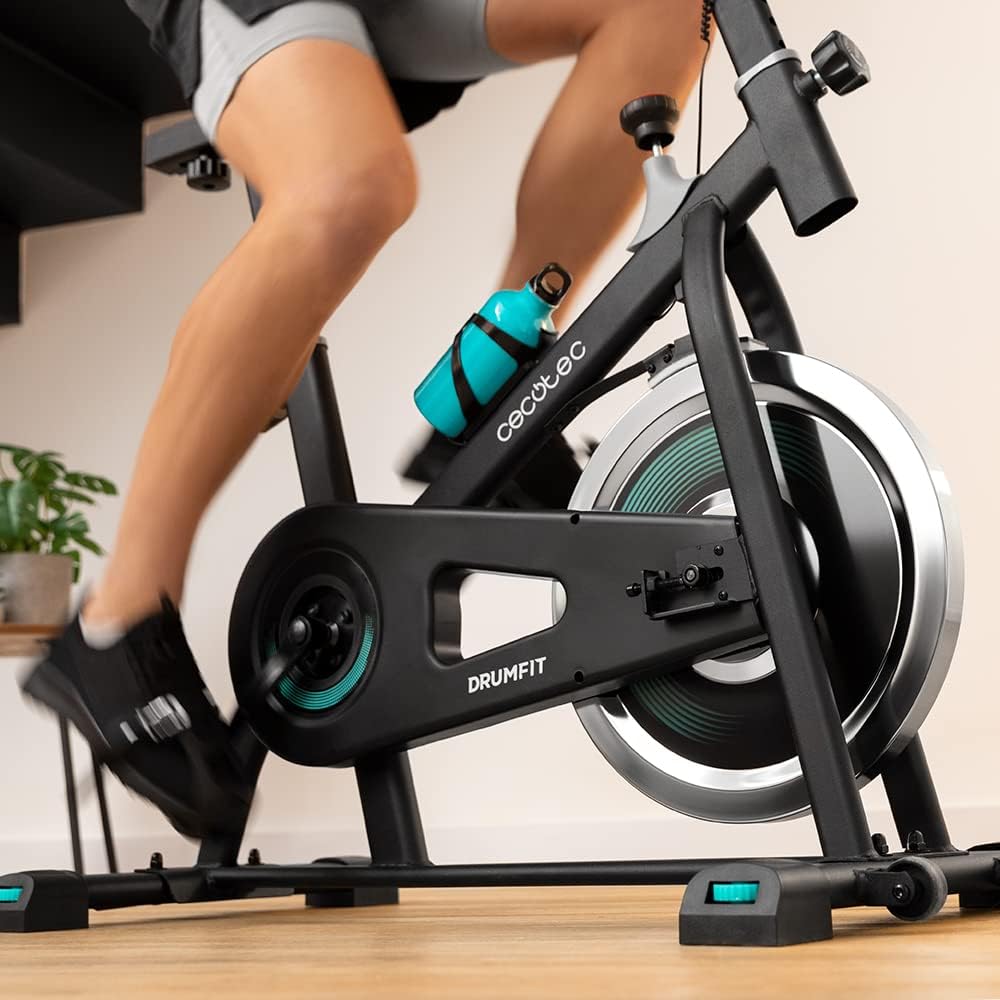
Immaġni: Dettaljata view of the bike's pedals and the 6 kg inertia flywheel, highlighting the belt drive system.
Issolvi l-problemi
| Problema | Kawża Possibbli | Soluzzjoni |
|---|---|---|
| LCD Display not working | Low or dead battery; Loose sensor connection. | Replace batteries (if applicable). Check and secure all sensor cables. |
| Storbju mhux tas-soltu waqt it-tħaddim | Loose bolts; Friction from resistance pads; Debris in flywheel area. | Check and tighten all assembly bolts. Inspect resistance pads for wear. Clean any debris from around the flywheel. |
| Ir-reżistenza ma tinbidilx | Resistance knob mechanism issue; Worn resistance pads. | Ensure the resistance knob is properly engaged. Contact customer support if the mechanism feels faulty or pads are worn. |
| Ir-rota tħossha instabbli | Uneven floor; Loose stabilizer bolts. | Ensure the bike is on a flat, level surface. Check and tighten all bolts on the stabilizer bars. |
Speċifikazzjonijiet
- Ditta: Cecotec
- Isem tal-Mudell: DrumFit Indoor 6000 Forcis
- Numru tal-Mudell: 07094
- Piż tal-flywheel: 6 Kilogrammi
- Mekkaniżmu ta' Reżistenza: Manual Fluid Resistance
- Sistema tas-sewqan: Belt Drive (BeltRide)
- Dimensjonijiet tal-Prodott (LxWxH): 28.82"D x 8.11"W x 36.22"Għ (73.2 x 20.6 x 92 ċm)
- Piż tal-oġġett: 6 Kilograms (Package Weight: 23.8 Kilograms)
- Materjal: Azzar tal-Karbonju
- Piż Massimu tal-Utent: 120 Kilogrammi
- Maximum User Height: 185 Ċentimetru
- Karatteristika Speċjali: Distance Travelled Monitor, Device Holder, Bottle Holder
- Kulur: Iswed/Abjad
Garanzija u Appoġġ
Il-prodotti Cecotec huma manifatturati skont standards ta’ kwalità għolja. Għal informazzjoni dwar il-kopertura tal-garanzija, jekk jogħġbok irreferi għall-karta tal-garanzija inkluża mal-prodott tiegħek jew żur is-sit uffiċjali ta’ Cecotec. websit.
For technical support, spare parts, or any inquiries not covered in this manual, please contact Cecotec customer service through their official channels. Have your model number (07094) and purchase details ready when contacting support.
Tipikament tista' ssib informazzjoni ta' kuntatt għall-appoġġ fuq il-websajt tal-manifattur. websit: www.cecotec.com


