Manwal tal-Istruzzjonijiet tal-Kontroll mill-Bogħod Oriġinali ta' 24 Ċavetta OPT7 Aura B
Model: FBA-AURA-24-KEY-REMOTE-B
Introduzzjoni
This manual provides instructions for the OPT7 Aura Original 24 Key Remote B, a replacement remote control designed for specific OPT7 Aura LED Lighting Kits. It covers compatibility, setup, operation, and troubleshooting to ensure proper functionality with your existing lighting system.

Immaġni: Quddiem u wara view of the OPT7 Aura Original 24 Key Remote B. The front shows 24 buttons for color and mode selection, while the back displays a 'B' indicating its type.
Kompatibilità
The Aura Original 24 Key Remote B is specifically designed for use with certain OPT7 Aura LED Lighting Kits. It is crucial to verify compatibility before use.
Verifying Compatibility:
Locate the letter on the sticker on the back of your existing remote or control box. This remote is compatible only if that letter is 'B'.

Image: A visual guide demonstrating where to find the compatibility letter 'B' on the back of an OPT7 control box or remote control. This letter ensures the correct remote type is used.
Nota Importanti:
- This Aura Original Remote is MHUX compatible with the Aura Pro Bluetooth Control Box.
- Aura Remotes use a specific frequency. If you are unsure about your kit's frequency, contact OPT7 customer support for assistance.

Image: An illustration highlighting that the Aura Original 24 Key Remote B is not compatible with app-controlled lighting kits, such as those using the OPT7 Connect app.
Compatible Aura LED Lighting Kits:
- Aura LED Lighting Kit for Motorcycle Cruiser (B00SUNH7GY)
- Aura LED Lighting Kit for Sportbike (B01K3T1CK4 / B092CRV1CQ)
- Aura LED Lighting Kit for Golf Cart (B07M5YZPX6 / B00ZJ6TOZC)
- Aura LED Lighting Kit for ATV/UTV (B00ZJ6TH4U)
- Aura LED Lighting Kit for Snowmobile (B00ZJ6TKVU / B07MDB2VPL)
Setup u Użu Inizjali
This remote is designed as a direct replacement. No complex pairing is typically required if your existing control box is compatible (Type B). Simply insert the battery (if not pre-installed) and begin operation.
Installazzjoni tal-batterija:
- Sib il-kompartiment tal-batterija fuq wara tal-remote.
- Iftaħ l-għatu tal-kompartiment.
- Insert the appropriate battery, ensuring correct polarity.
- Agħlaq l-għatu tal-kompartiment sew.
Istruzzjonijiet Operattivi
The OPT7 Aura Original 24 Key Remote B provides comprehensive control over your Aura LED lighting kit. Familiarize yourself with the button layout for optimal use.

Image: A user's hand holding the remote, demonstrating its compact size and ease of use. The background shows a snowmobile illuminated by various LED colors, illustrating the remote's capabilities. Key functions are listed alongside.
Funzjonijiet tal-buttuna:
| Buttuna | Funzjoni |
|---|---|
| ON / MITFI | Turns the LED lighting kit on or off. |
| Brightness Up / Down | Adjusts the intensity of the LED lights. |
| R, G, B, W | Directly selects Red, Green, Blue, or White colors. |
| Color Selection Buttons (16 circles) | Selects from 16 vivid pre-set colors. |
| COLOR STROBE | Activates a strobing effect with the current color. |
| KULUR FADE | Initiates a gradual fading transition between colors. |
| ĊIKLU TAL-KULUR | Cycles through all available colors. |
| TAĦĦAT | Activates a sound-activated mode, where lights respond to audio (if supported by the control box). |
The remote allows for personalization with endless color selections, brightness dimmer selections, Color-Strobe, Color-Cycle, and Color-Fade Modes.
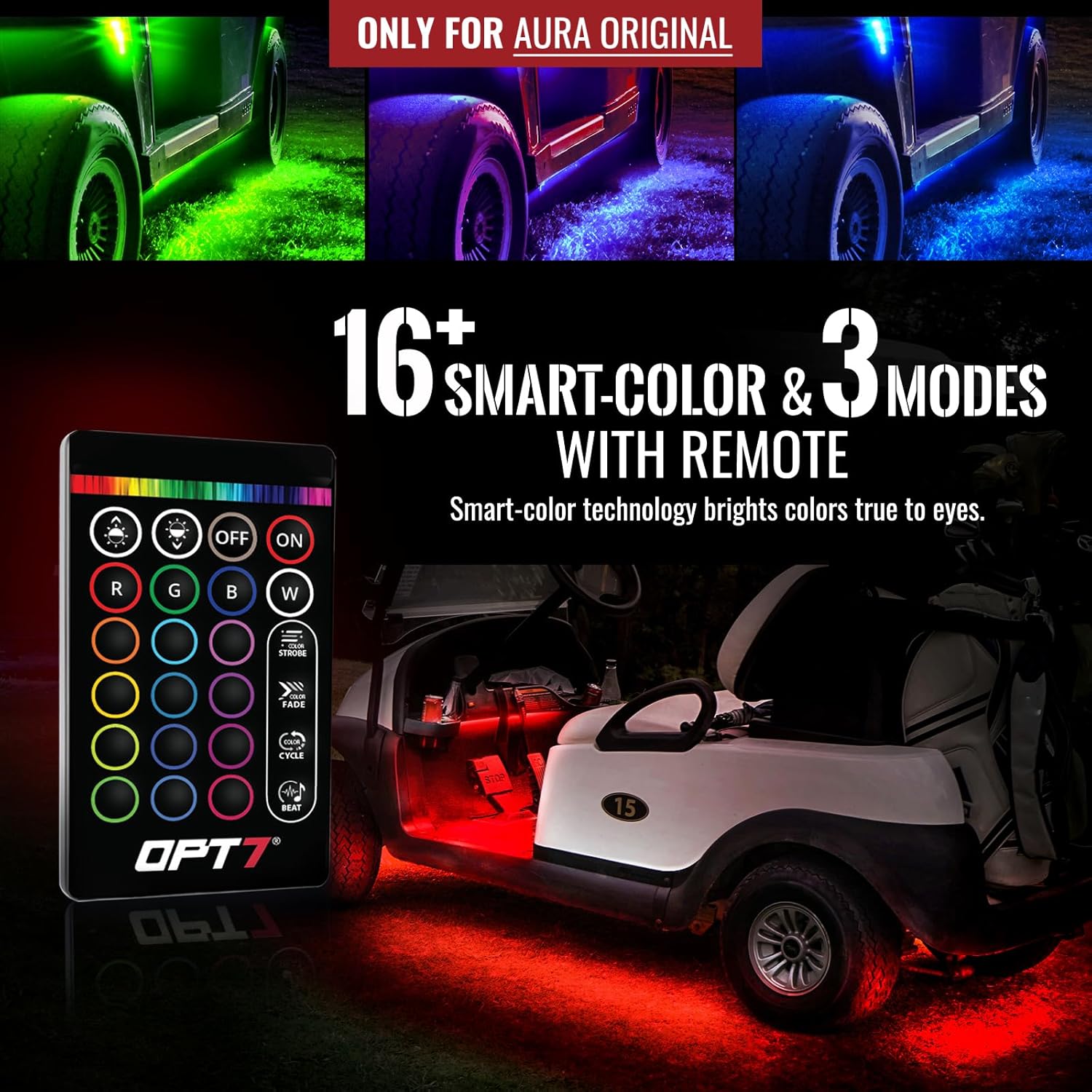
Image: Golf cart showcasing red LED underglow, controlled by the remote.

Image: Motorcycle showcasing blue LED underglow, controlled by the remote.

Image: ATV/UTV showcasing red LED underglow, controlled by the remote.
Manutenzjoni
Biex tiżgura l-lonġevità u l-funzjonament xieraq tal-kontroll remot tiegħek, segwi dawn il-linji gwida ta' manutenzjoni:
- Tindif: Wipe the remote with a soft, dry cloth. Avoid using harsh chemicals or abrasive cleaners.
- Sostituzzjoni tal-batterija: If the remote's range decreases or buttons become unresponsive, replace the battery. Refer to the "Battery Installation" section for instructions.
- Ħażna: Aħżen ir-remote f'post niexef, 'il bogħod minn temperaturi estremi u dawl tax-xemx dirett.
- Evita l-umdità: Do not expose the remote to water or excessive humidity, as this can damage internal components.
Issolvi l-problemi
If you encounter issues with your OPT7 Aura Original 24 Key Remote B, refer to the following common problems and solutions:
- Remote Mhux Jirrispondi:
- Iċċekkja l-batterija. Kun żgur li hija installata sew u li għandha biżżejjed ċarġ. Ibdelha jekk meħtieġ.
- Verify compatibility. Ensure your lighting kit's control box is a 'Type B' system. This remote is not compatible with Aura Pro Bluetooth control boxes.
- Kun żgur li m'hemm l-ebda ostaklu bejn ir-remote u l-kaxxa tal-kontroll.
- Medda Limitata:
- Ibdel il-batterija b'waħda ġdida.
- Ensure you are within reasonable operating distance of the control box.
- Lights Not Changing Colors/Modes:
- Confirm the remote is compatible with your specific Aura kit (Type B).
- Check if the control box is receiving power and functioning correctly.
If problems persist after attempting these troubleshooting steps, please contact OPT7 customer support for further assistance.
Speċifikazzjonijiet
| Karatteristika | Dettall |
|---|---|
| Brand | OPT7 |
| Mudell | FBA-AURA-24-KEY-REMOTE-B |
| Piż tal-oġġett | 0.634 uqija |
| Dimensjonijiet tal-Prodott | 3.5 x 2 x 0.25 pulzieri |
| Karatteristika Speċjali | Ergonomiku |
| Numru Massimu ta' Apparat Appoġġjat | 1 |
| Numru ta' Buttuni | 24 |
Garanzija u Appoġġ
This product includes a 30-day warranty, starting from the order date. For any questions or concerns regarding your OPT7 Aura Original 24 Key Remote B, please contact the US-based OPT7 customer support team. They are available to assist with compatibility inquiries, troubleshooting, and warranty claims.
Informazzjoni ta' Kuntatt: Refer to the official OPT7 webis-sit jew id-dokumentazzjoni tax-xiri tiegħek għad-dettalji ta' kuntatt tal-appoġġ għall-klijenti l-aktar aġġornati.


