Introduzzjoni
Dan il-manwal jipprovdi informazzjoni essenzjali għas-setup, it-tħaddim, il-manutenzjoni, u s-soluzzjoni tal-problemi tal-Istampatur Termali Dirett Star Micronics mC-Label3 MCL32CBI tiegħek. Jekk jogħġbok aqra dan il-manwal bir-reqqa qabel ma tuża l-istampatur biex tiżgura tħaddim xieraq u sikur.
Kontenut tal-Pakkett
Iċċekkja li l-oġġetti kollha elenkati hawn taħt huma inklużi fil-pakkett tiegħek:
- Printer Multifunzjonali mC-Label3
- Adapter AC
- Kejbil tal-Enerġija
- Kejbils USB (CC 1.0m u CA 1.8m)
- Kejbil LAN (1m)
- Gwida tas-Sigurtà tal-Folja ta' Setup Sempliċi

Immaġni: Quddiem view tal-istampatur Star Micronics mC-Label3, wirjaasing id-disinn kompatt tiegħu u s-slott tal-ħruġ tat-tikketti.
Setup
1. Konnessjoni tal-Printer
L-istampatur mC-Label3 MCL32CBI joffri diversi għażliet ta' konnettività:
- USB-C: Qabbad il-printer direttament mal-PC, l-apparat Android, jew l-iOS tiegħek billi tuża l-kejbils USB-C għal USB-C jew USB-C għal USB-A pprovduti.
- Ethernet (LAN): Għall-konnettività tan-netwerk, qabbad il-printer mar-router jew mas-swiċċ tan-netwerk tiegħek billi tuża l-kejbil LAN fornut.
- Bluetooth: Il-mudell MCL32CBI jappoġġja l-konnettività Bluetooth għal apparati iOS u Android. Kun żgur li l-Bluetooth huwa attivat fuq l-apparat tiegħek u qabbad mal-istampatur.

Immaġni: Wara view tal-istampatur mC-Label3, li jenfasizza l-portijiet LAN, USB, u tal-enerġija għal diversi tipi ta' konnessjoni.
2. Tagħbija tal-Midja
L-istampatur jappoġġja diversi tipi ta' midja, inklużi tikketti mingħajr liner, tikketti maqtugħin bil-magna, tikketti kontinwi, u karta termali għall-irċevuti.
- Iftaħ l-għatu ta' fuq tal-istampatur billi tneħħi l-lukkett.
- Poġġi r-romblu tal-midja fil-kompartiment tal-midja, filwaqt li tiżgura li t-tarf ta' quddiem joħroġ minn fuq.
- Iġbed ammont żgħir ta' midja 'l barra mir-ras tal-istampar u agħlaq l-għatu ta' fuq sew.
- Kun żgur li l-midja hija allinjata sew fil-gwidi.

Immaġni: Minn fuq għal isfel view tal-istampatur mC-Label3 bl-għatu miftuħ, li juri l-mekkaniżmu intern għat-tagħbija ta' karta termali jew rombli tat-tikketti.
Istruzzjonijiet Operattivi
1. Tixgħil / Mitfi
Qabbad il-kejbil tal-enerġija mal-istampatur u ma' sokit tal-enerġija. Agħfas il-buttuna tal-enerġija li tinsab fuq quddiem tal-istampatur biex tixgħelha. Id-dawl indikatur tal-istatus se jixgħel.
2. Stampar ta' Tikketti u Riċevuti
L-istampatur mC-Label3 MCL32CBI huwa ddisinjat għall-istampar effiċjenti ta' tikketti u riċevuti. Jappoġġja diversi applikazzjonijiet u servizzi tal-cloud.
- Kompatibilità tas-Softwer: Jaħdem bla xkiel ma' applikazzjonijiet tal-PC, Android, u iOS.
- Servizzi Cloud: Uża s-Servizzi tal-Cloud ta' Star Micronics biex tiddisinja u timmaniġġja t-tikketti.
- Tikketta b'Messaġġ Wieħed: Din il-karatteristika tippermetti l-ħażna ta' riċevuti u tikketti magħmula minn qabel għal stampar faċli u malajr direttament mill-istampatur.
Immaġni: Id tagħfas il-buttuna tat-tmigħ fuq il-printer mC-Label3, li turi l-istampar ta' tikketta ta' 'Grazzi'.

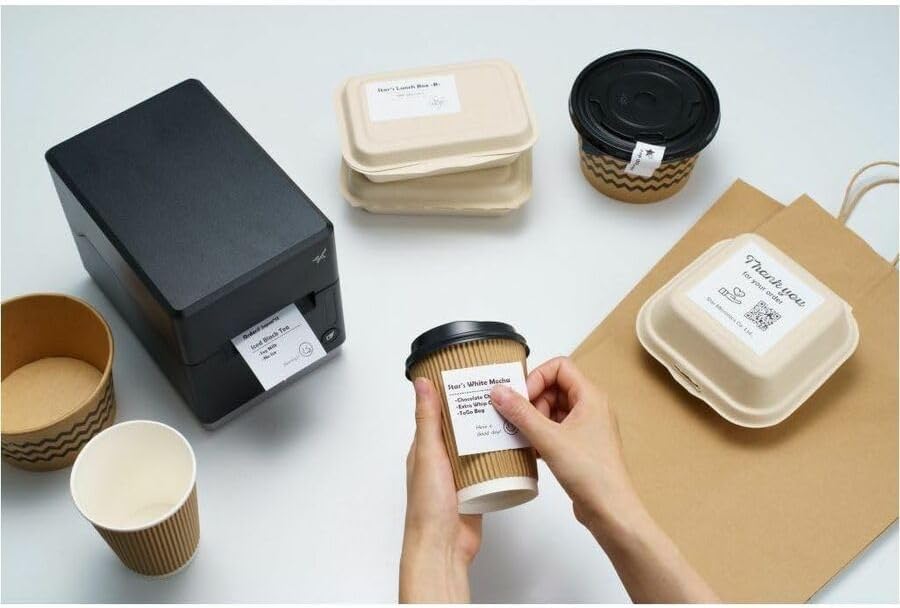
Immaġni: L-istampatur mC-Label3 muri f'ambjent prattiku, jistampa tikketti għal kontenituri tal-ikel u tazzi tal-kafè, u juri l-versatilità tiegħu.
Manutenzjoni
1. Tindif tal-Istampatur
Tindif regolari jiżgura prestazzjoni ottimali u jestendi l-ħajja tal-istampatur tiegħek.
- Uża drapp ratba u mingħajr ħelu dampImxarrab bl-alkoħol isopropiliku biex tnaddaf ir-ras tal-istampar.
- Imsaħ il-parti ta' barra tal-istampatur b'ċarruta ratba u niexfa.
- Evita li tuża tindif jew solventi li joborxu.
2. Sostituzzjoni tal-Midja
Meta r-romblu tal-midja jkun eżawrit, segwi l-istruzzjonijiet tat-tagħbija tal-midja fit-taqsima tas-Setup biex tissostitwih.
3. Tiswijiet bla Sforz
L-mC-Label3 hija ddisinjata għal tiswijiet mingħajr sforz, mingħajr għodda u b'manutenzjoni minima, u b'hekk tissimplifika kwalunkwe sostituzzjoni meħtieġa ta' komponenti.
Issolvi l-problemi
Din it-taqsima tipprovdi soluzzjonijiet għal kwistjonijiet komuni li tista’ tiltaqa’ magħhom.
| Problema | Kawża Possibbli | Soluzzjoni |
|---|---|---|
| Il-printer mhux qed jixgħel | Kejbil tal-enerġija mhux imqabbad; Problema fis-sokit tal-enerġija | Kun żgur li l-kejbil tal-enerġija huwa konness sew; Ipprova sokit tal-enerġija differenti. |
| L-ebda output tal-istampar | Bla midja; Il-midja ġiet mgħobbija ħażin; Problema bis-sewwieq | Tella' midja ġdida; Erġa' tagħbija l-midja b'mod korrett; Erġa' installa d-drajvers tal-printer. |
| Kwalità fqira tal-istampar | Ras tal-istampar maħmuġa; Midja ta' kwalità baxxa | Naddaf ir-ras tal-istampar; Uża l-midja termali rakkomandata. |
| Kwistjonijiet ta' konnettività | Konnessjoni tal-kejbil mhux korretta; Bluetooth mhux imqabbad; Konfigurazzjoni tan-netwerk | Iċċekkja l-kejbils tal-USB/Ethernet; Erġa' qabbad il-Bluetooth; Ivverifika s-settings tan-netwerk. |
Speċifikazzjonijiet
| Karatteristika | Dettall |
|---|---|
| Isem tal-Mudell | mC-Label3 |
| Numru tal-Mudell tal-Oġġett | MCL32CBI |
| Teknoloġija tal-Istampar | Termali Diretti |
| Output Printer | Monokromu |
| Veloċità Max Stampa Monokroma | 23 ppm |
| Riżoluzzjoni Massima tal-Istampar bl-Iswed u l-Abjad | 203 DPI (203 x 203 DPI) |
| Midja Stampata | Tikketti (Mingħajr Inforra, Maqtugħin bil-Forma, Kontinwi), Irċevuta Termali |
| Teknoloġija tal-Konnettività | Bluetooth, Bil-fili (USB, Ethernet) |
| Interface tal-Ħardwer | USB-Ethernet |
| Apparati Kompatibbli | PC, Android, iOS |
| Tip ta' Kontrollur | iOS, Android |
| Dimensjonijiet tal-Prodott | 6.7"D x 5.6"W x 8.3"Għ (17.0 x 14.2 x 21.1 ċm) |
| Piż tal-oġġett | 7.2 liri (3.27 kg) |
| Kapaċità tal-Ħżin tal-Memorja | 64 MB |
| Kulur | Iswed |
| Manifattur | STAR MICRONICS |
| Pajjiż ta' Oriġini | Iċ-Ċina |
Informazzjoni dwar Garanzija
L-istampatur Star Micronics mC-Label3 MCL32CBI jiġi b'garanzija tal-manifattur. Għal termini u kundizzjonijiet speċifiċi, jekk jogħġbok irreferi għall-karta tal-garanzija inkluża fil-pakkett tiegħek jew żur is-sit uffiċjali ta' Star Micronics. websit.
Tip ta' Garanzija: Manifattur
Appoġġ
Għal aktar assistenza, appoġġ tekniku, jew biex tniżżel l-aħħar sewwieqa u firmware, jekk jogħġbok żur is-sit uffiċjali tal-appoġġ ta' Star Micronics. websit jew ikkuntattja lis-servizz tal-konsumatur tagħhom.
Uffiċjali ta' Star Micronics Websit: www.starmicronics.com
Link ta' Appoġġ: www.starmicronics.com/support


