Introduzzjoni
Thank you for choosing the MEGATEK Portable CD Player. This device is designed to provide a versatile and high-quality audio experience, supporting various media formats and offering multiple connectivity options. Please read this manual carefully to ensure proper use and maintenance of your new CD player.

Image: The MEGATEK Portable CD Player, showcasing its compact design, integrated speakers, control buttons, and included accessories like headphones and USB-C charging cables.
Informazzjoni dwar is-Sigurtà
Biex tiżgura tħaddim sikur u tevita ħsara, jekk jogħġbok osserva l-prekawzjonijiet li ġejjin:
- Tesponix l-apparat għal temperaturi estremi, umdità, jew dawl tax-xemx dirett.
- Evita li twaqqa’ jew tissuġġetta l-apparat għal impatti qawwija.
- Tiżżarmax jew tippruvax issewwi l-apparat int stess. Irreferi għal kull manutenzjoni f'idejn persunal kwalifikat.
- Uża biss il-kejbil tal-iċċarġjar ipprovdut u adapter tal-enerġija kompatibbli.
- Żomm l-apparat 'il bogħod mill-ilma u likwidi oħra.
- Naddaf l-apparat b'ċarruta ratba u niexfa. Tużax prodotti tat-tindif jew solventi li joborxu.
- Smigħ fit-tul f'livelli għoljin ta' volum jista' jikkawża ħsara fis-smigħ. Aġġusta l-volum għal livell sigur.
Kontenut tal-Pakkett
Ivverifika li l-oġġetti kollha huma preżenti fil-pakkett:
- MEGATEK Portable CD Player - Black
- Headphones bil-fili
- Cable tal-Iċċarġjar tal-USB-C
- Manwal tal-Utent

Image: A visual representation of the package contents, including the CD player, headphones, USB-C cable, and user manual.
Prodott Overview
Familiarize yourself with the various parts and controls of your MEGATEK Portable CD Player.
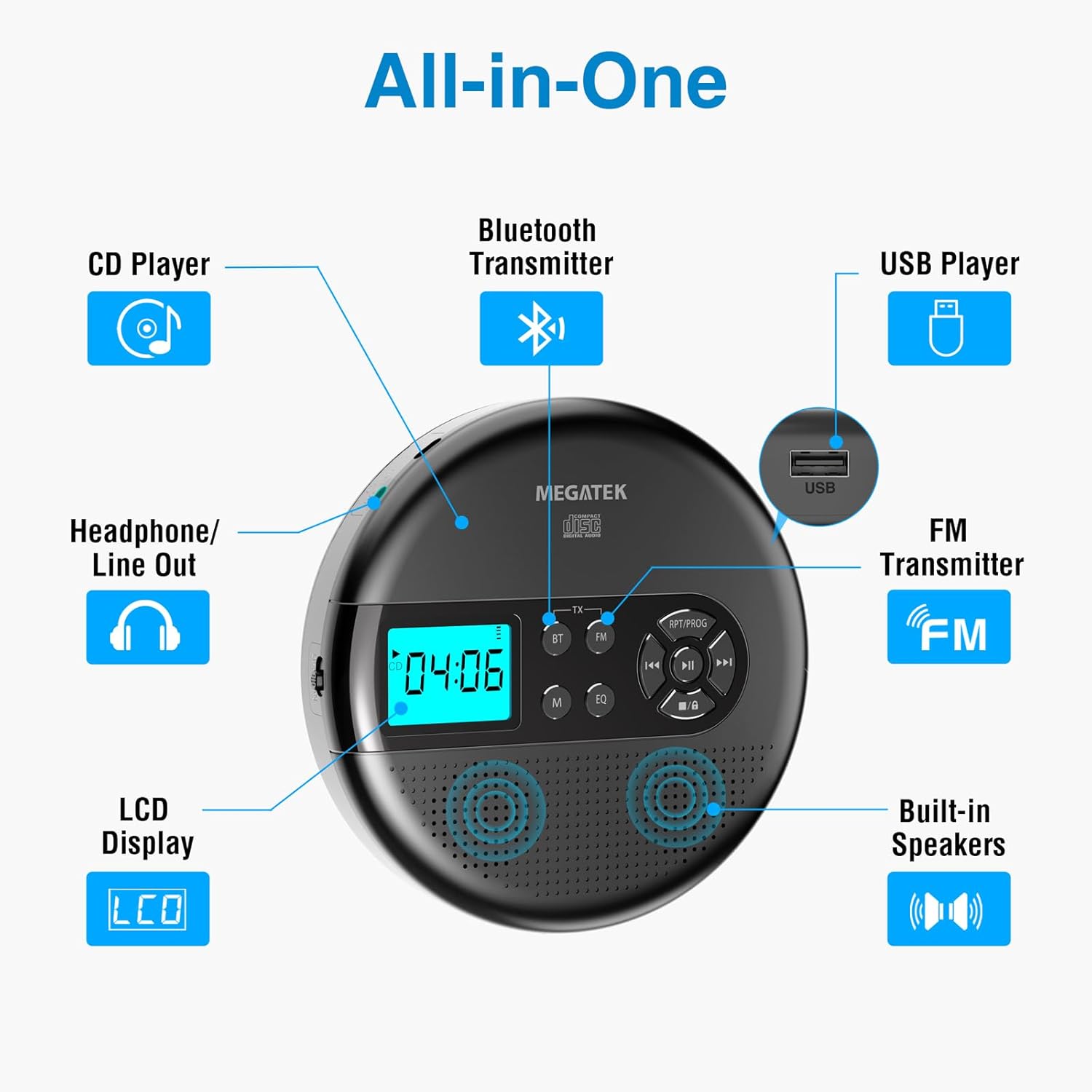
Image: An "All-in-One" diagram highlighting key features such as the CD Player, Bluetooth Transmitter, USB Player, FM Transmitter, Built-in Speakers, LCD Display, and Headphone/Line Out port.
Kontrolli u Portijiet:
- Display LCD: Juri n-numru tat-trakka, il-ħin, il-mod, u l-istatus tal-batterija.
- Buttuna Play/Pause: Jibda jew iwaqqaf il-plejbek.
- Buttuni Preċedenti/Li Jmiss: Jaqbeż it-traċċi jew jimxi 'l quddiem/lura malajr.
- Buttuna Waqqaf: Jieqaf daqq.
- RPT/PROG Button: Controls repeat modes and programming tracks.
- Buttuna BT: Activates Bluetooth transmission mode.
- Buttuna FM: Activates FM transmission mode.
- Buttuna M (Modalità): Switches between CD, USB, Bluetooth, and FM modes.
- Buttuna EQ: Iċċikla bejn il-presets tal-ekwalizzatur.
- Kontroll tal-Volum: Jaġġusta l-livell tal-ħruġ tal-awdjo.
- Port USB: Għad-daqq tal-awdjo files minn USB drive.
- Port tal-Iċċarġjar tat-Tip C: Għall-iċċarġjar tal-batterija interna.
- 3.5mm Audio Out Jack: Għall-konnessjoni ta' headphones jew kelliema esterni.
- Kelliema Stereo inkorporati: Għal daqq dirett tal-awdjo.
Setup
Iċċarġjar tal-batterija:
The device is equipped with a built-in 2000mAh rechargeable Li-ion battery. Before first use, fully charge the player.
- Connect the provided USB-C charging cable to the Type-C charging port on the player.
- Qabbad it-tarf l-ieħor tal-kejbil USB-C ma' adapter tal-enerġija USB (mhux inkluż) jew mal-port USB tal-kompjuter.
- The battery indicator on the LCD display will show charging status. A full charge provides up to 15 hours of playtime at medium volume.

Image: The portable CD player connected to a power source via its USB-C cable, resting on a nightstand next to a bed.
Daħħal CD:
- Locate the CD compartment latch/button on the side of the player and slide/press it to open the lid.
- Poġġi s-CD bir-reqqa fuq il-fus taċ-ċentru bin-naħa tat-tikketta tħares 'il fuq.
- Agħfas is-CD bil-mod 'l isfel sakemm tikklikkja f'postu.
- Agħlaq l-għatu tal-kompartiment tas-CD sew sakemm jissakkar.

Image: The portable CD player with its lid open, showing a blue CD disc inserted into the compartment, ready for playback.
Istruzzjonijiet Operattivi
Daqq tas-CD:
- Insert a CD as described in the Setup section.
- Agħfas il- Play/Pawsa buttuna biex tibda daqq.
- Uża l- Preċedenti/Li jmiss buttons to navigate between tracks. Hold to fast-forward or rewind.
- Agħfas il- RPT/PROG button to cycle through repeat modes (repeat one, repeat all, random) or to program a custom playback order.
- Agħfas il- Waqqaf buttuna biex ittemm il-plejbek.
- Adjust volume using the dedicated volume control.
Daqq USB:
The player supports MP3, WMA, and WAV audio files minn USB drive.
- Daħħal flash drive tal-USB fil-port tal-USB.
- Agħfas il- M (Modalità) buttuna biex taqleb għall-modalità USB.
- Uża l- Play/Pawsa, Preċedenti/Li jmiss, u RPT/PROG buttuni bħalma tagħmel għad-daqq ta' CD.
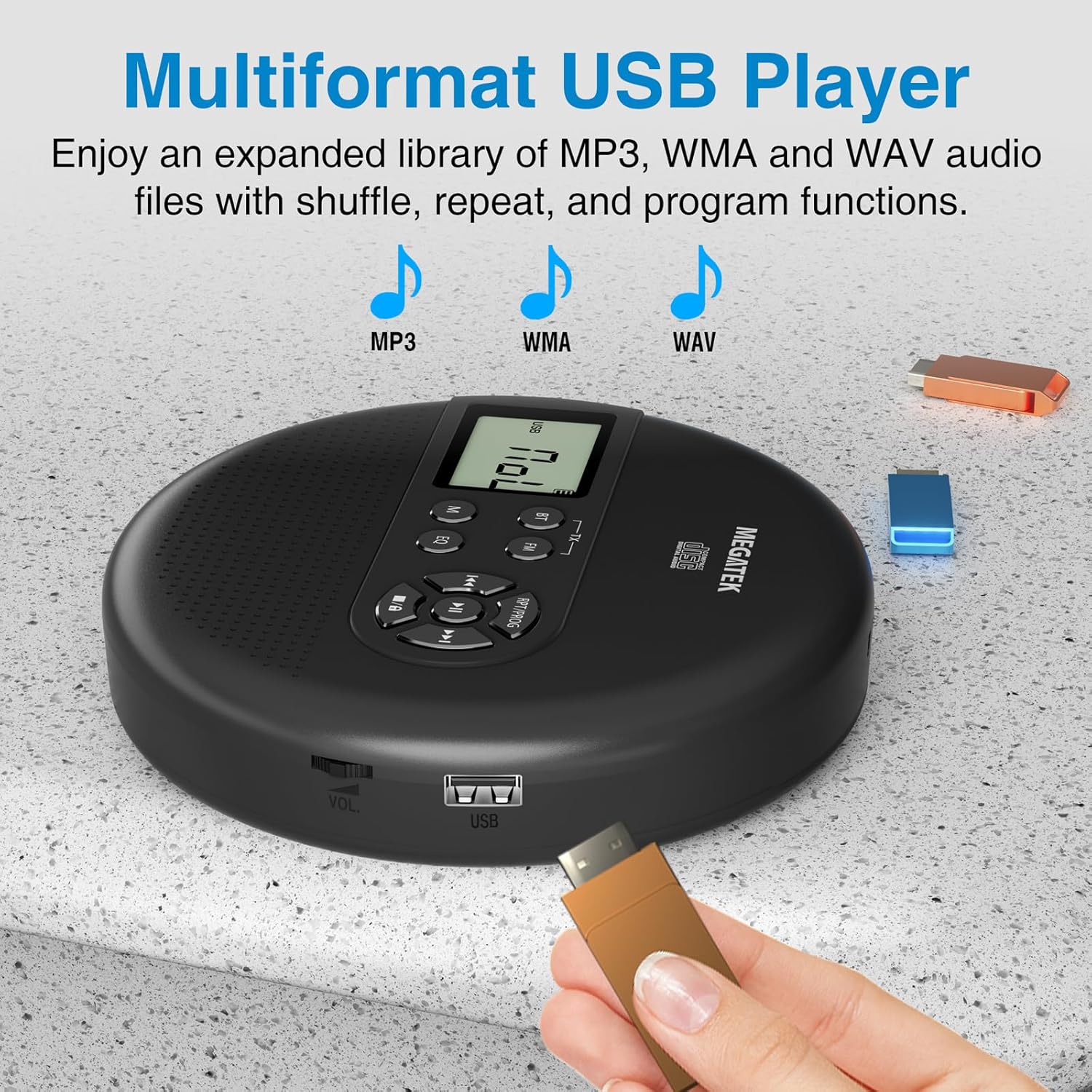
Image: The portable CD player with a USB flash drive inserted into its side port, illustrating its multi-format USB playback capability.
Trażmissjoni Bluetooth:
Stream audio wirelessly to Bluetooth-enabled headphones or speakers. Note: This feature does not support connections to car stereo systems.
- Kun żgur li l-headphones jew l-ispiker Bluetooth tiegħek jinsabu fil-modalità ta' tqabbil.
- Fuq il-plejer tas-CD, agħfas il-buttuna BT button. The Bluetooth indicator on the display will flash.
- The player will automatically search for and connect to nearby Bluetooth devices. Once connected, the indicator will stop flashing.

Image: The portable CD player wirelessly transmitting audio to two external Bluetooth speakers, demonstrating its Bluetooth transmission capability.
Trażmissjoni FM:
Transmit audio signals to nearby FM radios, including car FM stereos and home stereo systems.
- Agħfas il- FM button on the CD player. The display will show an FM frequency.
- Tune your FM radio (car stereo, home stereo) to the same frequency displayed on the CD player.
- Adjust the frequency on the CD player using the Preċedenti/Li jmiss buttons if interference occurs or to find a clearer channel.

Image: The portable CD player placed on a car dashboard, transmitting audio to the car's FM stereo system, indicated by an FM frequency on the car's display.
Using Headphones/External Speakers:
For private listening or connecting to wired audio systems:
- Plug the included wired headphones into the 3.5mm audio out jack.
- Alternatively, connect an audio cable (not included) from the 3.5mm audio out jack to the AUX input of external speakers or an audio system.
- The built-in speakers will automatically mute when headphones or external speakers are connected.

Image: A close-up of the portable CD player, visually representing sound waves emitting from its dual stereo speakers, emphasizing the built-in audio capability.
Manutenzjoni
- Tindif: Use a soft, dry, lint-free cloth to clean the exterior of the player. For the CD lens, use a specialized CD lens cleaner. Do not use liquids or aerosol cleaners directly on the device.
- Ħażna: When not in use for extended periods, store the player in a cool, dry place, away from direct sunlight and extreme temperatures.
- Kura tal-batterija: Biex ittawwal il-ħajja tal-batterija, evita li tiċċarġja kompletament il-batterija ta' spiss. Iċċarġja l-apparat regolarment, anke jekk ma jkunx qed jintuża b'mod attiv.
Issolvi l-problemi
| Problema | Kawża Possibbli | Soluzzjoni |
|---|---|---|
| Il-plejer ma jixgħelx. | Il-batterija hija eżawrita. | Charge the player using the USB-C cable. |
| L-ebda ħoss mill-ispikers/headphones. | Volume is too low; headphones not fully plugged in; incorrect mode selected. | Increase volume; ensure headphones are securely connected; press the M (Modalità) buttuna biex tagħżel is-sors korrett. |
| CD skipping or not playing. | CD is dirty, scratched, or inserted incorrectly; anti-skip function overwhelmed. | Clean the CD; ensure CD is properly seated; avoid strong vibrations. |
| Kwistjonijiet ta 'konnessjoni Bluetooth. | Device not in pairing mode; too far from player; interference. | Ensure receiving device is in pairing mode; move closer to the player; restart both devices. |
| FM transmission static/poor quality. | Interference; incorrect frequency. | Adjust the FM frequency on the player and receiver to find a clear channel. |
Speċifikazzjonijiet
| Karatteristika | Dettall |
|---|---|
| Numru tal-Mudell | CP27BR |
| Dimensjonijiet tal-Prodott | 5.91 x 5.91 x 1.32 pulzieri |
| Piż tal-oġġett | 10.9 uqija |
| Batterija | 2000mAh Lithium Ion (rikarikabbli) |
| Ħin tal-logħob | Sa 15-il siegħa (f'volum medju) |
| Supported CD Formats | CD, CD-R/RW, MP3 CD, Audio Book CD |
| Formati USB Appoġġjati | MP3, WMA, WAV |
| Protezzjoni kontra l-Skip | 60 sekonda |
| Konnettività | USB, Bluetooth Transmitter, FM Transmitter, 3.5mm Audio Out |
| Karatteristiċi Speċjali | Built-in Stereo Speakers, Resume Play, Shuffle, Repeat, Program Functions, 5 EQ Options |
Garanzija u Appoġġ
MEGATEK offers comprehensive support for its products:
- Sostituzzjoni ta' 12-il Xahar: In case of product defects or issues within 12 months of purchase.
- Appoġġ Tekniku tul il-ħajja: Assistance with product usage, troubleshooting, and general inquiries.
- Servizz tal-Klijent 24/7: Available through Amazon buyer-seller messaging.
For any questions or problems, please contact MEGATEK customer service via the Amazon platform or refer to the contact information provided in the product packaging.
Image: A graphic detailing MEGATEK's customer support, including 12-month replacement, lifetime technical support, and 24/7 Amazon buyer-seller messaging, alongside an image of customer service representatives.


