1. Introduzzjoni
This manual provides detailed instructions for the installation, operation, and maintenance of your JOOAN 3MP Wireless Security Camera System. This system offers high-definition surveillance with advanced features designed for reliable home and business security. Please read this manual thoroughly before setting up and operating the system.

Image 1.1: JOOAN 3MP Wireless Security Camera System overview, showing the NVR unit and four wireless cameras.
2. Karatteristiċi tal-prodott
The JOOAN 3MP Wireless Security Camera System is equipped with a range of features to ensure comprehensive surveillance:
- Riżoluzzjoni Ultra HD ta' 3MP: Jipprovdi foo video ċara u dettaljatatage (1296P, clearer than 1080P).
- NVR ta' 8-il Kanali: Supports up to 8 cameras, allowing for future expansion (system includes 4 cameras, can add 4 more).
- Konnettività Wireless: Cameras connect wirelessly to the NVR for flexible placement.
- Awdjo f'direzzjoni waħda: Built-in microphone on cameras allows for audio monitoring of the surveillance area.
- Klassifikazzjoni IP67 li ma jgħaddix ilma minnha: Cameras are designed for outdoor use, resistant to dust and water.
- Viżjoni bil-Lejl Kbira: Enhanced night vision capabilities for clear monitoring in low-light or no-light conditions.
- Sejbien tal-Bniedem AI: Advanced motion detection specifically identifies human shapes, reducing false alarms.
- Multiple Alert Options: Receive NVR buzzer, email alerts, and APP notifications upon motion detection.
- Kompressjoni tal-Vidjo H.265+: Efficient video compression technology saves storage space and bandwidth.
- Aċċess mill-bogħod: View foo ħajtage and playback recordings from anywhere using the Eseecloud mobile app or software.
- Auto Pair & Plug N Play: Simplified setup with automatic camera pairing to the NVR.
- Signal Extension (Cascade Technology): Use one camera as a repeater to extend wireless signal range.

Image 2.1: The system provides 24/7 protection, suitable for various environments including home, outdoor, day, night, and in rainy conditions.
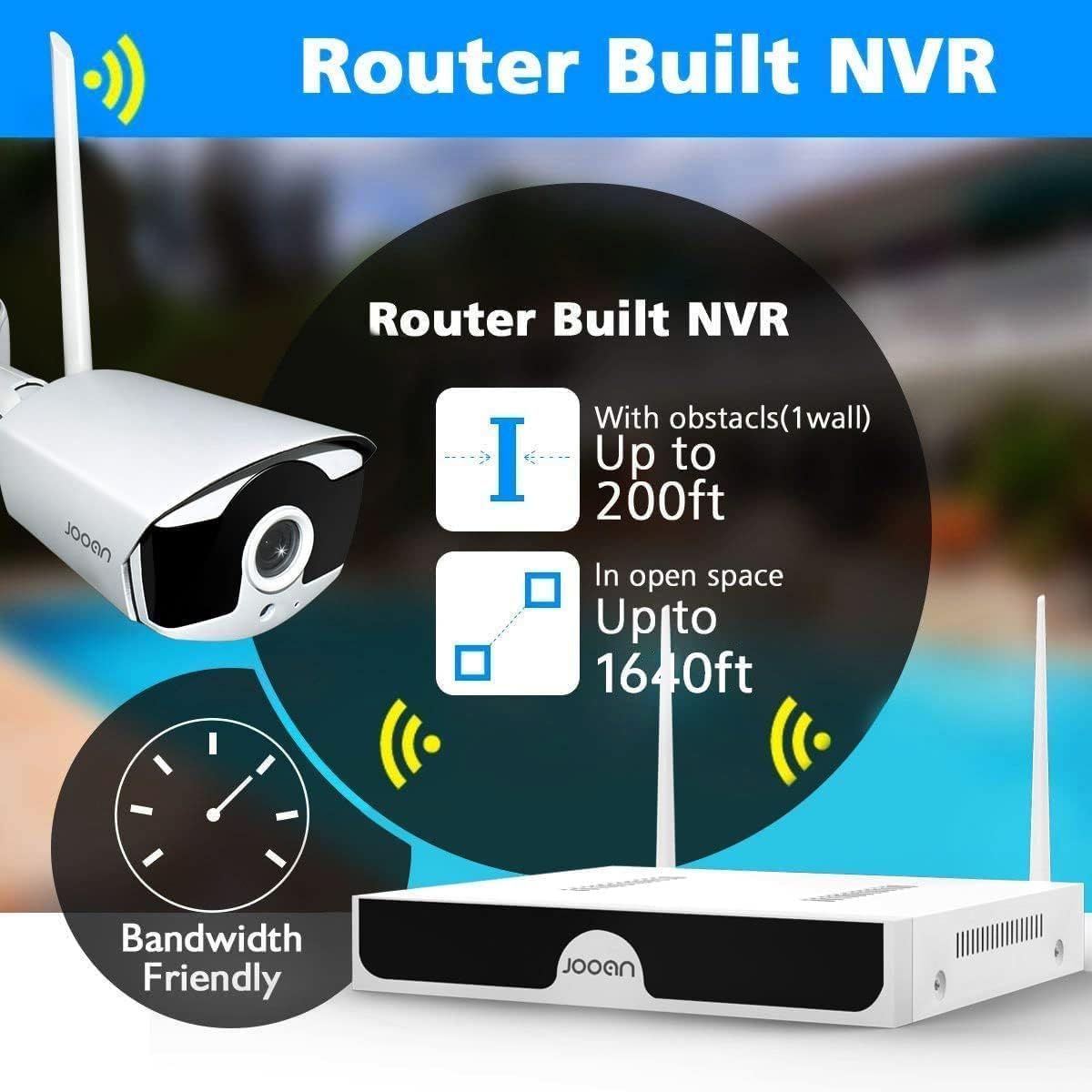
Image 2.2: The NVR features a built-in router, offering wireless range up to 200ft with one wall obstacle and up to 1640ft in open space.
3. Kontenut tal-Pakkett
Jekk jogħġbok iċċekkja l-kontenut tal-pakkett meta tiftaħ il-kaxxa biex tiżgura li l-komponenti kollha huma preżenti:
- 1 x 8-Channel Wireless NVR (No HDD included)
- 4 x Kameras IP bla fili ta' 3MP
- 1 x Adapter tal-Enerġija NVR
- 4 x Adapters tal-Enerġija tal-Kamera
- 1 x USB Mouse
- 1 x Cable Ethernet
- Viti u Plugs tal-Immuntar għall-Kameras
- Manwal għall-Utent (dan id-dokument)
- Stiker ta' Twissija

Image 3.1: All components included in the JOOAN 3MP Wireless Security Camera System package.
4. Gwida ta' Setup
The JOOAN system is designed for easy setup with its auto-pairing feature.
4.1 Setup Inizjali
- Qabbad l-NVR:
- Connect the NVR to a power outlet using the provided NVR power adapter.
- Connect the NVR to a monitor or TV via HDMI or VGA cable (not included) to view l-interface.
- Qabbad il-maws USB mal-NVR għan-navigazzjoni.
- (Optional) Connect the NVR to your router using the Ethernet cable for internet access and remote viewing.
- Ixgħel il-Kameras:
- Connect each camera to a power outlet using its respective power adapter.
- The cameras will automatically pair with the NVR within a few moments. You should see the camera feeds appear on the monitor connected to the NVR.
- Hard Drive Installation (Optional):
- Jekk tixtieq tirrekordja l-ikeltage, install a 3.5-inch SATA hard drive (not included) into the NVR. Refer to the detailed PDF user guide for installation steps.

Image 4.1: The system features auto-pairing for easy plug-and-play setup, connecting cameras wirelessly to the NVR.
4.2 Installazzjoni tal-Kamera
Choose suitable locations for your cameras, considering coverage area, power access, and wireless signal strength.
- Mount cameras securely using the provided screws and plugs.
- Aġġusta l-angolu tal-kamera biex tkopri ż-żona mixtieqa.
- Ensure cameras are within the NVR's wireless range. For extended range, consider using the cascade technology (see Section 6.3).
- The cameras are IP67 waterproof, suitable for outdoor installation.

Image 4.2: Cameras can be mounted on ceilings or walls, offering flexible installation options.
5. Istruzzjonijiet Operattivi
5.1 Ħaj View u Daqq
Ladarba s-sistema tkun issettjata, tista' view live feeds and playback recorded footage through the NVR's connected monitor or via the mobile application.
- Interfaċċja tal-NVR: Use the USB mouse to navigate the NVR's on-screen menu. Right-click to access main menu options like Live View, Playback, System Setup, etc.
- Daqq: Select the 'Playback' option from the main menu. Choose the date and time to review avvenimenti rreġistrati.
5.2 One-Way Audio Function
Each camera is equipped with a microphone, allowing you to hear audio from the surveillance area.
- Waqt live viewing or playback, ensure the audio output on your monitor/TV or mobile device is enabled and volume is adjusted.
- The system records video and audio simultaneously, allowing for comprehensive event review.
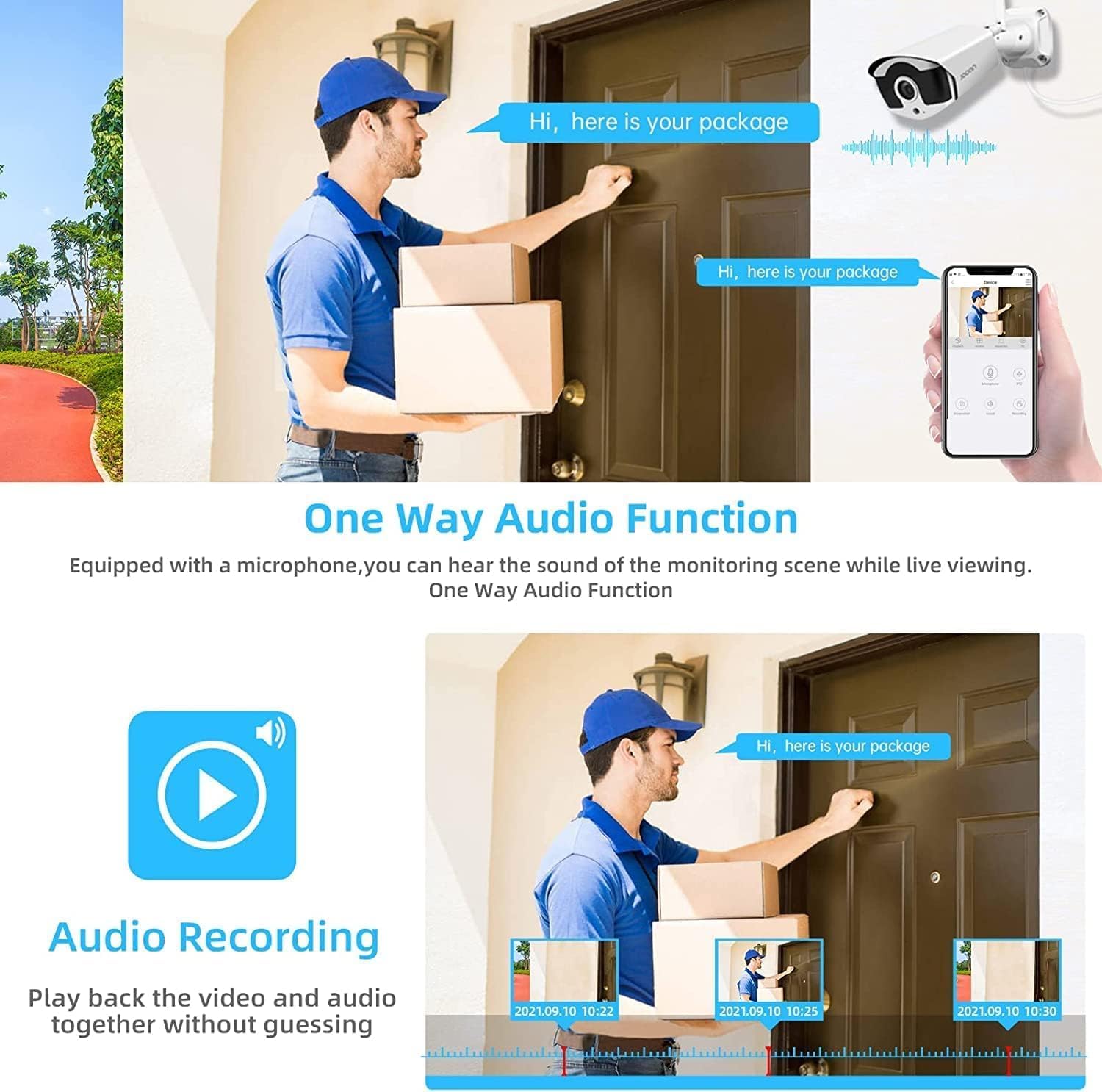
Image 5.1: The system supports one-way audio, allowing users to hear sound from the monitoring scene during live viewing u daqq.
6. Karatteristiċi Avvanzati
6.1 AI Human Detection & Alerts
The system utilizes advanced AI algorithms to distinguish human shapes from other moving objects, significantly reducing false alarms caused by pets, vehicles, or swaying branches.
- When a human is detected, the system can trigger various alerts:
- NVR Buzzer: An audible alarm from the NVR.
- Email Alert: An email notification sent to a configured address.
- APP Notification: A push notification to your mobile device via the Eseecloud app.
- Configure detection zones and sensitivity settings via the NVR menu or mobile app.

Image 6.1: AI Human Detection minimizes false alerts, and the system provides NVR buzzer, email, and app notifications.
Kompressjoni tal-Vidjo 6.2 H.265+
The system employs advanced H.265+ video compression technology, which significantly reduces bandwidth usage and storage requirements compared to older H.264 or H.265 standards. This allows for longer recording times and smoother streaming with less data.

Image 6.2: H.265+ compression reduces storage occupation by up to 50% compared to H.264, while maintaining clear picture quality.
6.3 Wireless Signal Extension (Cascade Technology)
To overcome wireless range limitations, the system supports "Cascade Technology," allowing one camera to act as a repeater for another. This extends the effective wireless coverage.
- Position a camera strategically between the NVR and a distant camera to boost the signal.
- Refer to the NVR's system settings for configuring cascade mode.

Image 6.3: Cascade Technology allows one camera to serve as a repeater, extending the wireless signal for other cameras.
7. Mobile App and Remote Access
The Eseecloud app provides convenient remote access to your security system from anywhere.
7.1 Tniżżil u Installazzjoni tal-App
- Fittex għal "Eseecloud" in the Apple App Store (for iOS devices) or Google Play Store (for Android devices).
- Niżżel u installa l-app fuq l-ismartphone jew it-tablet tiegħek.
7.2 Connecting to Your NVR
- Open the Eseecloud app and create an account or log in.
- Add your NVR by scanning the QR code displayed on the NVR's monitor (found in System Info) or by manually entering the device ID.
- Ensure your NVR is connected to the internet via an Ethernet cable.
7.3 Karatteristiċi tal-App
- Live View: Watch live feeds from all connected cameras.
- Daqq: Aċċess u riview irreġistrat footage stored on the NVR's hard drive.
- Notifiki: Receive instant push notifications for motion detection events.
- Settings: Adjust camera and NVR settings remotely.
- Aċċess Aqsam: Share access to your system with family members.

Image 7.1: The Eseecloud app allows remote access to your security system from various devices, including smartphones, tablets, and laptops.
8. Manutenzjoni
Regular maintenance helps ensure the longevity and optimal performance of your security system.
- Tindif tal-Lenti tal-Kamera: Naddaf il-lentijiet tal-kamera perjodikament b'drapp artab u dryer.amp drapp biex tneħħi t-trab, il-ħmieġ, jew tbajja’ ta’ ilma li jistgħu jostakolaw viewTużax kimiċi ħarxa.
- Iċċekkja l-Konnessjonijiet: Ensure all power adapters and cables are securely connected to prevent power interruptions or signal loss.
- Aġġornamenti tal-Firmware: Check the JOOAN official website or the Eseecloud app for any available firmware updates for your NVR and cameras. Keeping firmware updated can improve performance and add new features.
- Saħħa tal-Hard Drive: If a hard drive is installed, monitor its health through the NVR's system settings to prevent data loss.
- Konsiderazzjonijiet Ambjentali: While cameras are IP67 rated, avoid directing high-pressure water jets directly at them. Ensure proper ventilation for the NVR unit.
9 Issolvi l-problemi
Din it-taqsima tindirizza kwistjonijiet komuni li tista’ tiltaqa’ magħhom.
| Problema | Kawża Possibbli | Soluzzjoni |
|---|---|---|
| No image on monitor/TV from NVR. |
|
|
| Cameras not showing on NVR. |
|
|
| No remote access via Eseecloud app. |
|
|
| Allarmi foloz frekwenti. |
|
|
10. Speċifikazzjonijiet
| Karatteristika | Dettall |
|---|---|
| Mudell | JOOAN 8CH 1296P Wireless Security Camera System |
| Riżoluzzjoni tal-vidjo | 3MP (1296P) |
| Kanali NVR | 8 Kanali |
| Kompressjoni tal-vidjo | H.265 + |
| Awdjo | One-Way Audio (Built-in Microphone) |
| Klassifikazzjoni tat-temp | IP67 |
| Viżjoni bil-lejl | Iva |
| Sejbien tal-Moviment | Sejbien tal-Bniedem AI |
| Ħażna | Supports 3.5" SATA HDD (not included) |
| Konnettività | Wireless (Auto Pair), Ethernet |
| Remote Access App | Eseecloud (iOS & Android) |
| Temperatura operattiva | -35°C sa 60°C (-31°F sa 140°F) |

Image 10.1: The cameras are IP67 waterproof and can operate in temperatures ranging from -35°C (-31°F) to 60°C (140°F).

Immaġni 10.2: Eż.ample of the system's clear night vision capabilities.
11. Garanzija u Appoġġ
Għal informazzjoni dwar il-garanzija u appoġġ tekniku, jekk jogħġbok irreferi għall-JOOAN uffiċjali websit jew ikkuntattja lis-servizz tal-konsumatur tagħhom.
- Gwida Uffiċjali għall-Utent: A detailed PDF user guide is available for download at https://manuals.plus/m/8b300119d4784c8e0500e9c84e9766aa0d73934fd41381c88615f272c2a079f5.
- Servizz tal-Klijent: For further assistance, troubleshooting, or warranty claims, please contact JOOAN customer support through the contact information provided on their official webis-sit jew permezz tal-pjattaforma tax-xiri tiegħek.


