Introduzzjoni
This manual provides comprehensive instructions for the setup, operation, and maintenance of your Brady M511 Portable Wireless Industrial Label Printer. The M511 is designed for industrial applications, offering robust performance and wireless connectivity for efficient label creation.
Please read this manual thoroughly before using the device to ensure proper functionality and to prevent damage.
X'inhu Inkluż
Upon unboxing, verify that all components listed below are present in your Brady M511 Printer Kit:
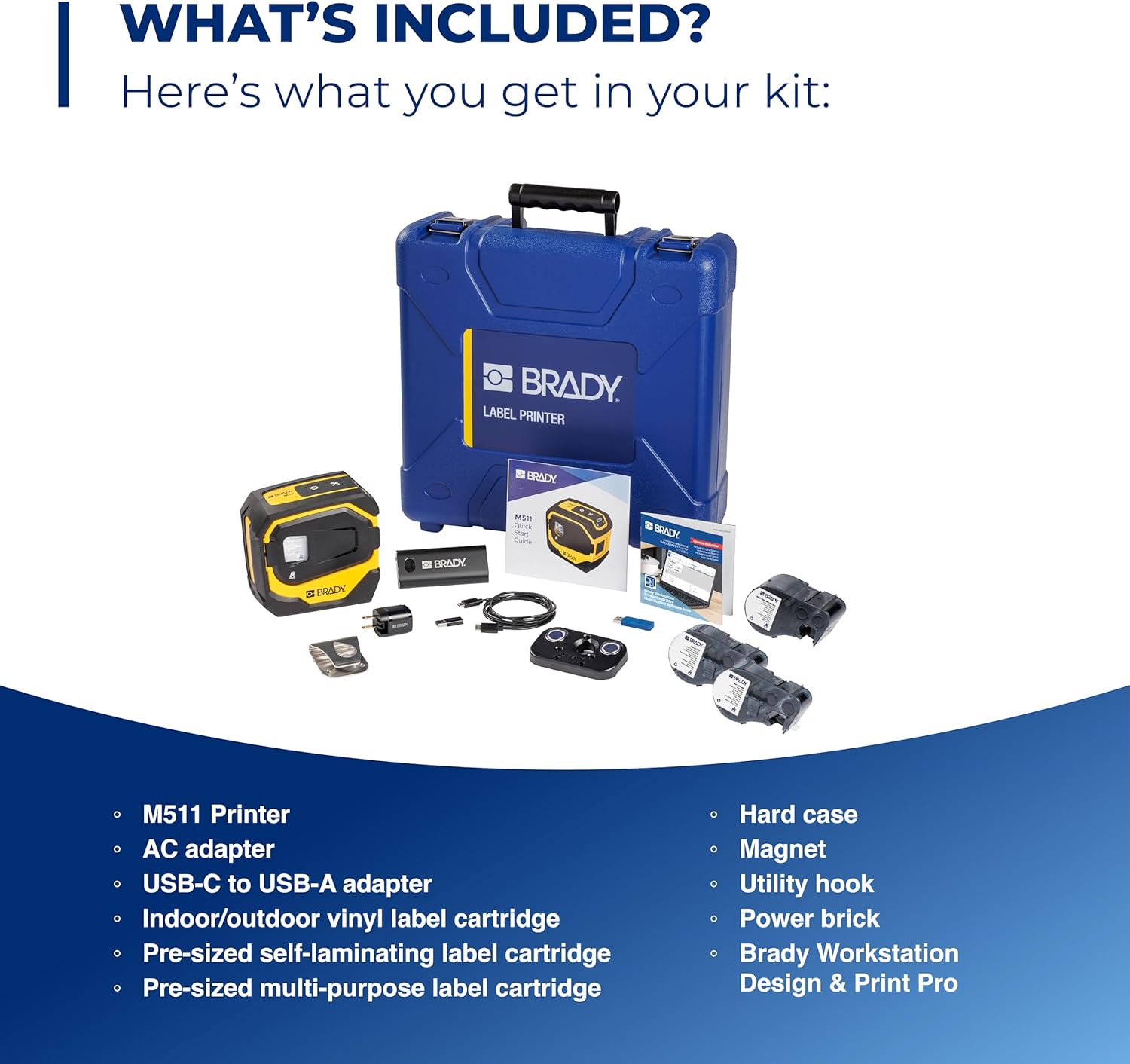
Image: Contents of the Brady M511 Printer Kit. This image displays the M511 printer, a blue hard case, an AC adapter, a USB-C to USB-A adapter, three label cartridges (indoor/outdoor vinyl, self-laminating, multi-purpose), a power brick, a magnet, and a utility hook.
- Brady M511 Printer
- Każ iebes
- Adapter AC
- Adapter USB-C għal USB-A
- Briks tal-Qawwa
- Indoor/Outdoor Vinyl Label Cartridge
- Pre-sized Self-Laminating Label Cartridge
- Pre-sized Multi-Purpose Label Cartridge
- Kalamita
- Ganċ tal-Utilità
- Brady Workstation Design & Print Pro Software (download access)
Karatteristiċi Ewlenin
The Brady M511 printer is engineered with features to enhance efficiency and durability in industrial environments:

Image: A detailed diagram of the M511 printer, pointing out its key features including the convenient USB-C charger, internal Li-ION battery for longer life, ability to connect 5 users simultaneously, Bluetooth printing via mobile app or PC, automatic cutter, high-resolution print quality, less label waste, ability to print labels up to 1.5 inches wide, and military-grade shock resistance (withstands 6-foot drops).
- Kapaċità tal-Istampar: Ideal for larger applications, capable of printing labels up to 1.5 inches wide.
- Stampar effiċjenti: Designed for less waste, allowing edge-to-edge printing of text, graphics, and barcodes.
- Ħajja tal-batterija: Equipped with an internal Li-ION battery providing over 8 hours of work or 1,000 labels on a single charge.
- Durabilità: Resists 6-foot drops, 250-pound crushes, and blowing sand and dust (MIL-STD-810G compliant), ensuring military-grade shock resistance.
- Konnettività: Features Bluetooth 5.0 with a 65-foot range, allowing connection for up to 5 users simultaneously.
- Kompatibilità tas-Softwer: Utilizes the Express Labels app via Bluetooth on a phone/tablet and Brady Workstation on a PC for label creation.
- Effiċjenza tad-Disinn: Includes an auto label cutter and can print upright or on its side, saving time and space.

Image: This image showcases over 250 cartridge options available for the M511 printer, capable of printing labels up to 1.5 inches wide. Examples include self-laminating labels for wire identification, flag labels for cables, cryogenic labels for laboratory use, and multi-purpose labels for general industrial applications.

Image: The Brady M511 printer being used in different jobsite scenarios: for wire and asset identification, in a laboratory setting, for electrical labeling, and for safety and facility marking.
Gwida ta' Setup
1. Iċċarġjar Inizjali
- Connect the provided AC adapter to the printer's USB-C port.
- Ipplaggja l-adapter fi żbokk tad-dawl.
- Allow the printer to charge fully before first use. The battery indicator on the printer will show charging status.
2. Installazzjoni tas-softwer
- For Mobile Devices (Smartphones/Tablets): Download the "Express Labels" app from your device's app store (iOS App Store or Google Play Store).
- Għall-PCs: Install "Brady Workstation" software. Access to this software is included with your printer kit. Follow the instructions provided with your kit for download and installation.
3. Tqabbil tal-Bluetooth
- Ensure the M511 printer is powered on.
- On your mobile device or PC, enable Bluetooth.
- Open the Express Labels app or Brady Workstation.
- Follow the on-screen prompts to search for and connect to your M511 printer. The printer will typically appear as "Brady M511" or similar in the list of available devices.
- Ikkonferma t-tqabbil fuq iż-żewġ apparati jekk tintalab.
Istruzzjonijiet Operattivi
1. Loading Label Cartridges
The M511 printer features easy changeovers for label cartridges:

Image: A hand demonstrating the process of inserting a label cartridge into the open compartment of the Brady M511 printer. The image highlights the simplicity of the "Open. Insert. Close. Print." process.
- Miftuħ: Gently open the front cover of the printer.
- Daħħal: Align the label cartridge with the slot and push it firmly until it clicks into place. Ensure the label material feeds correctly into the printer mechanism.
- Agħlaq: Agħlaq il-qoxra ta' quddiem sew.
- Stampa: The printer is now ready for printing.
2. Ħolqien u Stampar ta' Tikketti
- Using Express Labels App (Mobile):
- Open the Express Labels app and ensure it's connected to your M511 printer via Bluetooth.
- Select the desired label template or create a new label design.
- Enter your text, add symbols, barcodes, or graphics as needed.
- Preview it-tikketta biex tiżgura l-eżattezza.
- Tap the print icon to send the job to the printer.
- Using Brady Workstation (PC):
- Launch Brady Workstation and confirm connection to your M511 printer.
- Choose the appropriate application (e.g., Custom Designer, Wire & Cable ID) for your label needs.
- Design your label using the available tools and features.
- Utilize the print preview funzjoni.
- Click the print button to initiate printing.
3. Automatic Cutter
The M511 printer is equipped with an automatic cutter. After each print job, the printer will automatically cut the label, providing a clean and precise finish. No manual cutting is required.
Manutenzjoni
1. Tindif tal-Istampatur
- Imsaħ il-barra tal-istampatur perjodikament b'ċarruta ratba u nadifa.amp drapp. Tużax kimiċi ħarxa jew tindif li joborxu.
- For the print head and platen roller, refer to the detailed cleaning instructions within the Brady Workstation software or the Express Labels app, or consult the Brady support websit.
- Kun żgur li l-istampatur ikun mitfi u skonnettjat qabel ma tnaddaf.
2. Kura tal-batterija
- Biex timmassimizza l-ħajja tal-batterija, evita li tiċċarġja kompletament il-batterija ta' spiss.
- Aħżen il-printer f'post frisk u niexef meta ma tkunx qed tużah għal perjodi twal.
- Recharge the battery regularly, even if the printer is not in active use, to maintain battery health.
3. Ħażna
When storing the M511 printer, especially for long durations, it is recommended to:
- Remove any label cartridges.
- Store the printer in its hard case to protect it from dust, moisture, and physical impact.
- Żommha 'l bogħod minn temperaturi estremi.
Issolvi l-problemi
This section addresses common issues you might encounter with your Brady M511 printer. For more complex problems, please refer to the Brady support websit jew ikkuntattja lis-servizz tal-konsumatur.
| Problema | Kawża Possibbli | Soluzzjoni |
|---|---|---|
| Il-printer mhux qed jikkonnettja permezz tal-Bluetooth | Bluetooth is off on device; printer is off; out of range; interference. | Ensure Bluetooth is enabled. Turn printer off and on. Move closer to printer. Restart app/software. |
| Poor print quality (faded, lines, incomplete) | Low battery; dirty print head; incorrect label type; damaged cartridge. | Charge battery. Clean print head (refer to manual/app). Ensure correct label cartridge is used. Replace cartridge if damaged. |
| It-tikketti ma jidħlux jew jimblukkaw | Cartridge not inserted correctly; label path obstructed; incorrect label size. | Re-insert cartridge firmly. Check for debris in label path. Ensure label size is compatible with printer. |
| Il-printer mhux qed jixgħel | Battery fully discharged; power button issue. | Connect to power adapter and charge for at least 30 minutes. If still unresponsive, contact support. |
Speċifikazzjonijiet
Technical specifications for the Brady M511 Portable Wireless Industrial Label Printer:
| Attribut | Dettall |
|---|---|
| Brand | Brady |
| Isem tal-Mudell | M511 |
| Teknoloġija tal-Konnettività | Bluetooth 5.0 |
| Teknoloġija tal-Istampar | Trasferiment termiku |
| Karatteristika Speċjali | Portable, Industrial-grade durability |
| Kulur | Isfar/Iswed |
| Output Printer | Monokromu |
| Veloċità Massima tal-Istampar (Monokromu) | 1.33-il pulzier kull sekonda |
| Wisa' Massima tat-Tikketta | 1.5 pulzieri |
| Piż tal-oġġett | 4 Liri |
| Tip ta 'batterija | Internal Li-ION |
| Standards ta' Durabilità | MIL-STD-810G (6' drop, 250lb crush, blowing sand/dust) |
Garanzija u Appoġġ
For information regarding product warranty, technical support, or service, please visit the official Brady website or contact Brady customer service directly. Keep your purchase receipt and product serial number handy for any warranty claims or support inquiries.
Note: Specific warranty terms and conditions may vary by region and purchase date.


