1. Introduzzjoni
Thank you for choosing the ALLmeter Pinless Moisture Meter Model ALL019-DEFBA. This device is designed for non-invasive measurement of moisture content in various materials such as wood, walls, drywall, and masonry. Its advanced technology ensures accurate readings without causing damage to surfaces. This manual provides detailed instructions for the proper use, maintenance, and troubleshooting of your moisture meter to ensure optimal performance and longevity.
2. Informazzjoni Importanti dwar is-Sigurtà
- Aqra l-istruzzjonijiet kollha bir-reqqa qabel ma tħaddem l-apparat.
- Tippruvax tiftaħ jew timmodifika l-apparat. Ġewwa m'hemm l-ebda partijiet li jistgħu jiġu sservisjati mill-utent.
- Żomm l-apparat 'il bogħod mill-ilma u l-umdità għolja biex tevita l-ħsara.
- Evita li tesponi l-apparat għal temperaturi estremi jew dawl tax-xemx dirett għal perjodi twal.
- Remove batteries if the device will not be used for an extended period to prevent battery leakage.
- Armi l-batteriji u l-apparat skont ir-regolamenti lokali.
3. Kontenut tal-Pakkett
Iċċekkja li l-oġġetti kollha elenkati hawn taħt huma inklużi fil-pakkett tiegħek:
- ALLmeter Pinless Moisture Meter (Model ALL019-DEFBA)
- Batteriji AAA (3 biċċiet)
- Manwal għall-Utent
- Ġorru Borża

Image 3.1: The ALLmeter Pinless Moisture Meter package contents, showing the meter, three AAA batteries, a user manual, and a gray carry pouch.
4. Prodott Aktarview
4.1 Layout tal-Apparat

Stampa 4.1.1: Quddiem view of the ALLmeter Pinless Moisture Meter, highlighting its ergonomic design, large LCD display, and central control panel.
4.2 Buttuni tal-Kontroll
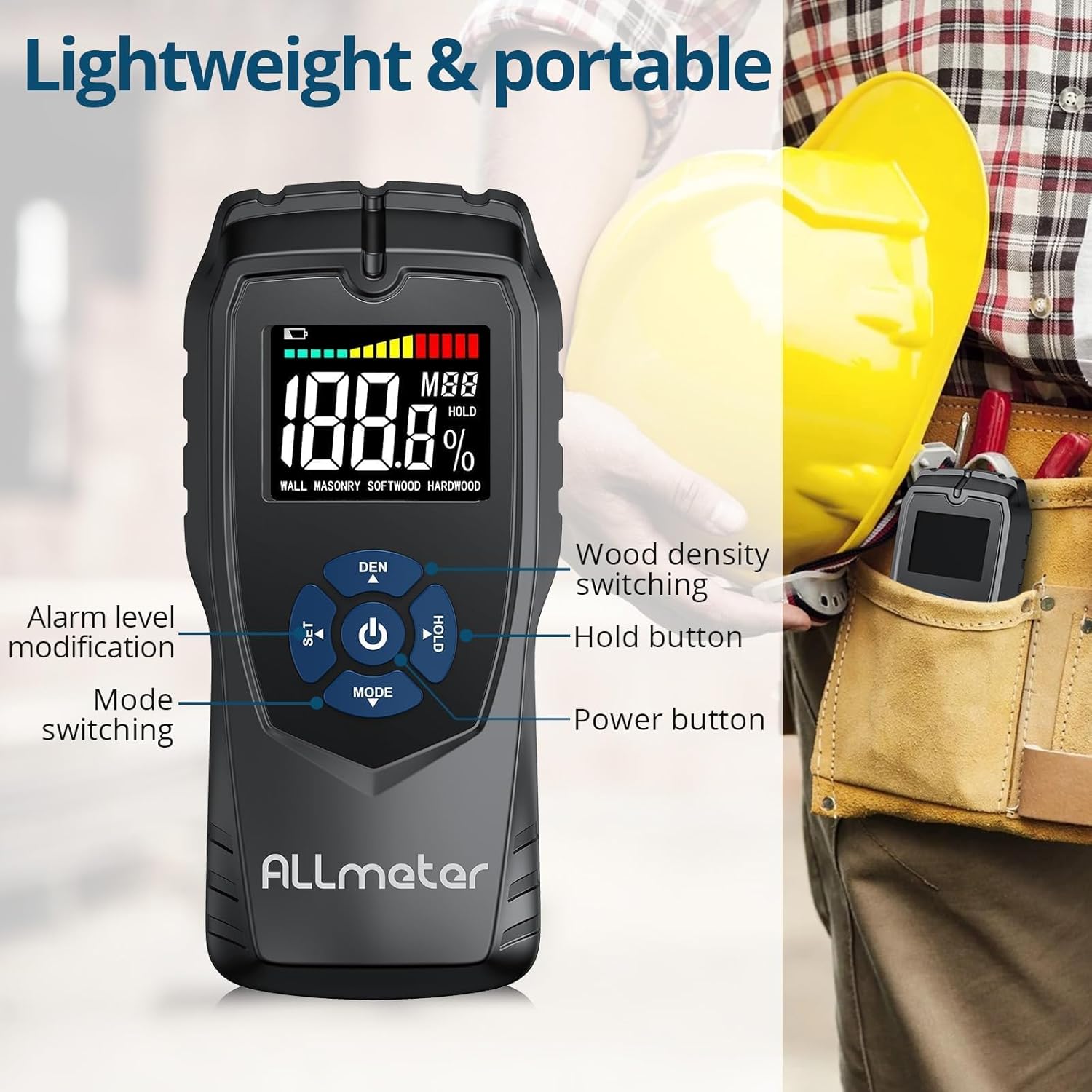
Immaġni 4.2.1: Dettaljata view of the control buttons on the ALLmeter Pinless Moisture Meter. These include SET (for alarm level modification), DEN (for wood density switching), Power, HOLD, and MODE (for switching measurement modes).
- Buttuna tal-Enerġija (⑂): Agħfas biex tixgħel jew titfi l-apparat.
- MODE Button (▼): Press to cycle through different measurement modes (WALL, MASONRY, SOFTWOOD, HARDWOOD).
- SET Button (▲): Used to adjust alarm levels or other settings.
- DEN Button (▲): Used to switch between different wood density grades when in wood measurement modes.
- Buttuna ŻOMM: Jiffriża l-qari attwali fuq id-displej. Agħfas mill-ġdid biex tirrilaxxa.
4.3 Elementi tal-Wiri

Image 4.3.1: The LCD display of the ALLmeter Pinless Moisture Meter, indicating low battery, moisture bar display, moisture value, wood density grade (MBB), data hold symbol (HOLD), and current measuring mode.
- Indikazzjoni Baxxa tal-Batterija: Icon appears when battery power is low.
- Moisture Bar Display: Graphical representation of moisture level.
- Moisture Value: Digital display of the measured moisture percentage.
- Wood Density Grade (MBB): Indicates the selected wood density setting.
- Data Hold Symbol (HOLD): Jidher meta l-funzjoni HOLD tkun attiva.
- Measuring Mode Indication: Displays the currently selected material mode (e.g., WALL, MASONRY, SOFTWOOD, HARDWOOD).
5. Setup
5.1 Installazzjoni tal-batterija
- Sib l-għatu tal-kompartiment tal-batterija fuq wara tal-apparat.
- Żerżaq jew neħħi l-għatu biex tiftaħ il-kompartiment.
- Insert three (3) AAA batteries, ensuring correct polarity (+/-) as indicated inside the compartment.
- Ibdel l-għatu tal-kompartiment tal-batterija b'mod sikur.
6. Istruzzjonijiet Operattivi
6.1 Power On/Off
- To turn on: Press the Power button (⑂). The display will illuminate.
- To turn off: Press and hold the Power button (⑂) for approximately 2 seconds. The device also features an auto power-off function to conserve battery life after a period of inactivity.
6.2 L-Għażla tal-Modalità tal-Kejl
- After powering on, press the MODE button (▼) repeatedly to cycle through the available material modes: WALL, MASONRY, SOFTWOOD, HARDWOOD.
- Select the mode that corresponds to the material you intend to measure.
6.3 Teħid ta 'Kejl
- Ensure the correct measurement mode is selected.
- Place the back of the meter (the sensing plate area) flat against the surface of the material you wish to measure. Ensure full contact.
- Il-qari tal-umdità se jintwera istantanjament fuq l-iskrin LCD.
- Move the meter across the surface to check for variations in moisture content.
6.4 Funzjoni HOLD
- While taking a measurement, press the HOLD button to freeze the current reading on the display. This is useful for reading measurements in hard-to-reach areas.
- Press the HOLD button again to release the reading and resume live measurement.
6.5 Audible Alarm Settings
- The device features an audible alarm that activates when the measured moisture level exceeds a preset threshold for the selected material.
- To adjust the alarm threshold, press the SET button (▲). Follow the on-screen prompts to increase or decrease the alarm percentage.
6.6 Wood Density Adjustment (DEN)
- When in SOFTWOOD or HARDWOOD mode, the DEN button (▲) can be used to cycle through different wood density grades (MBB) for more accurate readings based on the specific wood type. Refer to wood density charts for your material.
7. Modi u Firxiet ta' Kejl
The ALLmeter Pinless Moisture Meter provides distinct measurement ranges and visual indicators for different moisture levels across various materials.

Image 7.1: The visual moisture alarm system and a table detailing the 'Dry', 'Mid', and 'Wet' moisture percentage ranges for Wall, Masonry, Softwood, and Hardwood materials.
7.1 Moisture Level Indicators
- Aħdar: Indicates a Dry moisture level.
- Isfar: Indicates a Mid-range moisture level.
- Aħmar: Indicates a Wet moisture level, potentially requiring attention.
7.2 Measurement Ranges by Material
| Modalità tal-Kejl | Nixxef | Mid | Imxarrab |
|---|---|---|---|
| ĦAJT | <8% | 8-11.9% | ≥12% |
| ĠIBON | <17% | 17-19.9% | ≥20% |
| ARTAB | <13% | 13-17.9% | ≥18% |
| INJAM iebes | <12% | 12-15.9% | ≥16% |
7.3 Non-Invasive Measurement Principle
The ALLmeter Pinless Moisture Meter utilizes advanced inductive surveying technology. This method allows for moisture detection without penetrating the material surface, preventing damage. Unlike destructive surveying methods that require pins or probes, the pinless meter provides quick and clean readings.

Image 7.3.1: A visual comparison between inductive (pinless) surveying, which leaves no marks, and destructive (pin-type) surveying, which creates small holes in the material.
7.4 Applikazzjonijiet Multipli
This moisture meter is versatile and suitable for a wide range of applications in home inspection, construction, and woodworking:

Immaġni 7.4.1: Eż.amples of the meter's application on various materials including walls, masonry, softwood, and hardwood.
8. Manutenzjoni
- Tindif: Imsaħ l-apparat b'ċarruta ratba u niexfa. Tużax prodotti tat-tindif jew solventi li joborxu.
- Ħażna: Store the meter in its carry pouch in a cool, dry place when not in use. Avoid areas with extreme temperatures or high humidity.
- Sostituzzjoni tal-batterija: Ibdel il-batteriji meta jidher l-indikatur ta' batterija baxxa fuq id-displej.
9 Issolvi l-problemi
| Problema | Kawża Possibbli | Soluzzjoni |
|---|---|---|
| L-apparat ma jixgħelx | Batteriji mejta jew installati ħażin | Iċċekkja l-polarità tal-batterija; ibdel b'batteriji AAA ġodda. |
| Qari mhux eżatt | Incorrect measurement mode selected; poor contact with surface; device malfunction. | Ensure correct mode is selected for the material; press the meter firmly and flat against the surface; if problem persists, contact customer support. |
| Id-displej huwa vojt jew jitteptep | Batterija baxxa; apparat li ma jaħdimx sew. | Replace batteries; if problem persists, contact customer support. |
| L-allarm li jinstema' ma jaħdimx | Alarm disabled or volume too low; device malfunction. | Check alarm settings using the SET button; ensure moisture level exceeds threshold; if problem persists, contact customer support. |
10. Speċifikazzjonijiet Tekniċi
| Speċifikazzjoni | Valur |
|---|---|
| Numru tal-Mudell | ALL019-DEFBA |
| Brand | ALLmeter |
| Prinċipju tal-Kejl | Pinless, Inductive |
| Sensing Depth | 5 ċm |
| Sensing Plate Size | 5 x 6 ċm |
| Eżattezza | ±4% |
| Wiri | LCD Color Display with Analog Bar |
| Sors tal-Enerġija | 3 x Batteriji AAA |
| Tifi Awtomatiku | Iva |
| Allarm li jinstema' | Iva |
| Piż tal-oġġett | 231 g (0.23 Kilogrammi) |
| Dimensjonijiet tal-Pakkett | 19.4 x 8.8 x 4.2 ċm |
11. Garanzija u Appoġġ għall-Klijent
For warranty information, technical assistance, or customer support, please refer to the contact details provided with your purchase documentation or visit the official ALLmeter website. Please have your model number (ALL019-DEFBA) and purchase date available when contacting support.

