1. Introduzzjoni
This manual provides detailed instructions for the installation, operation, and maintenance of your COMMAX CDV-77M 7-inch Fine View Monitor. Please read this manual thoroughly before using the product to ensure proper function and safety. Keep this manual for future reference.
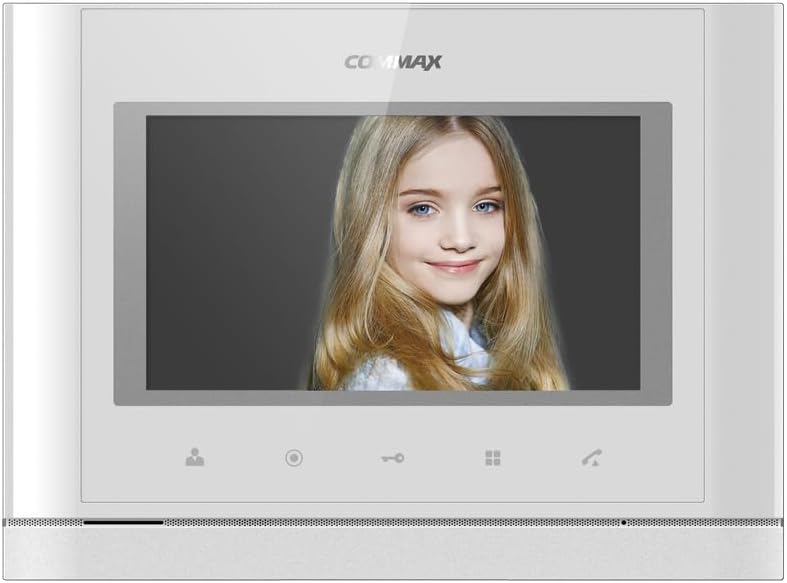
Quddiem view of the COMMAX CDV-77M monitor, showcasing its 7-inch TFT LCD screen and sleek design. The screen is active, displaying an image.
2. Karatteristiċi tal-prodott
- 7-inch TFT LCD screen for clear video display.
- Supports video communication and door lock release functions.
- Expandable system: Connects with up to 2 door cameras, 2 additional monitors, and 2 interphones.
- PAL/NTSC video format conversion capability.
- Hand-free operation for convenience.
- Wall-mounted design for easy installation.
3. Informazzjoni dwar is-Sigurtà
Please observe the following safety precautions to prevent damage to the product and ensure user safety:
- Tesponix l-unità għall-ilma jew għal umdità eċċessiva.
- Evita li tpoġġi l-unità fid-dawl tax-xemx dirett jew ħdejn sorsi ta’ sħana.
- Tippruvax tiftaħ jew issewwi l-unità int stess. Irreferi għal kull manutenzjoni f'idejn persunal kwalifikat.
- Kun żgur li s-sors tal-enerġija jaqbel mal-volum speċifikattage (AC 100-240V, 50/60Hz).
- Żomm l-unità 'l bogħod minn kampi manjetiċi qawwija.
- Operate within the specified temperature range of 0℃ to 40℃.
4. Installazzjoni
4.1 Kontenut tal-Pakkett
Ivverifika li l-komponenti kollha huma preżenti:
- COMMAX CDV-77M Monitor Unit
- Bracket tal-Immuntar mal-Ħajt
- Viti u Ankri tal-Immuntar
- Manwal għall-Utent (dan id-dokument)
- Kejbil tal-Enerġija
4.2 Immuntar tal-Monitor
The CDV-77M monitor is designed for wall-mounted installation. Choose a suitable location indoors, away from direct sunlight and moisture.
- Secure the wall mounting bracket to the desired location using the provided screws and anchors.
- Ensure the bracket is level and securely fastened.
- Refer to the dimensions diagram for proper spacing and fit:

Technical drawing showing the dimensions of the COMMAX CDV-77M monitor: 244 mm width and 180 mm height.
4.3 Konnessjonijiet tal-Wiring
Before making any connections, ensure the power supply is disconnected.
- Door Camera Connection: Connect the door camera using a 4-wire cable. The maximum recommended distance is 28 meters (using 0.5Ø wire).
- Interphone Connection: Connect the interphone unit using a 4-wire cable.
- Additional Monitor Connection: If connecting additional monitors, refer to the specific wiring diagram provided with your system.
- Konnessjoni tal-Enerġija: Connect the AC 100-240V, 50/60Hz power cable to the monitor and a suitable power outlet.
After all connections are made, carefully attach the monitor unit to the wall mounting bracket.
5. Istruzzjonijiet Operattivi
Familiarize yourself with the monitor's controls:

Detailed diagram illustrating the front panel of the COMMAX CDV-77M monitor, with labels for the TFT LCD, Speaker, Microphone, Power Switch, and control buttons: Monitoring, Interphone, Door Release, Menu, and Talk.
- Power On/Off: Use the Power Switch located on the side/bottom of the unit.
- Jirċievu Sejħa: When a visitor calls from the door camera, the monitor will display their image and ring. Press the Buttuna Talk to communicate.
- Monitoraġġ: Agħfas il- Buttuna ta 'Monitoraġġ biex view the feed from the connected door camera at any time.
- Rilaxx tal-Bieb: During a call or while monitoring, press the Buttuna tar-Rilaxx tal-Bieb to unlock the connected door.
- Interphone Communication: Agħfas il- Interphone Button to initiate communication with another connected interphone or monitor.
- Navigazzjoni fil-menu: Uża l- Buttuna tal-menu to access settings and adjustments for the monitor.
6. Manutenzjoni
- Tindif: Uża drapp artab u niexef biex tnaddaf l-iskrin tal-monitor u ċasing. Tużax prodotti tat-tindif jew solventi li joborxu.
- Tneħħija tat-Trab: Regularly dust the unit to prevent accumulation, especially around ventilation areas.
- Evita Likwidi: Tisprejjax likwidi direttament fuq il-monitor.
7 Issolvi l-problemi
| Problema | Kawża Possibbli | Soluzzjoni |
|---|---|---|
| No power to the monitor. | Power cable disconnected; power outlet faulty; power switch off. | Check power cable connection; test outlet with another device; ensure power switch is on. |
| No video from door camera. | Camera cable loose or damaged; camera faulty. | Check camera wiring connections; ensure camera is powered and functioning. |
| No audio during communication. | Microphone/speaker faulty; wiring issue. | Check audio wiring; ensure volume settings are appropriate. |
| Door lock not releasing. | Door lock wiring issue; lock mechanism faulty. | Verify door lock wiring; test door lock mechanism independently. |
Jekk il-problema tippersisti wara li tipprova dawn is-soluzzjonijiet, jekk jogħġbok ikkuntattja l-appoġġ għall-klijenti.
8. Speċifikazzjonijiet
| Karatteristika | Dettall |
|---|---|
| Mudell | CDV-77M |
| Daqs tal-Iskrin | 7 pulzier TFT LCD |
| Sors tal-Enerġija | AC 100-240V, 50/60Hz |
| Tip Muntaġġ | Tip ta 'ħajt immuntat |
| Temperatura operattiva | 0℃ ~ 40℃ |
| Wiring (Door Camera) | 4 wires (Distance: 28m with 0.5Ø wire) |
| Wiring (Interphone) | 4 wajers |
| Max. Konnessjonijiet | 2 Cameras, 2 Monitors, 2 Interphones |
| Konsum | Max. 15W / Standby 3W |
| Dimensjonijiet (W×H×D) | 244mm × 180mm × 18mm |
| Format tal-vidjo | PAL/NTSC convertible |
9. Garanzija u Appoġġ
For warranty information, please refer to the warranty card included with your product or contact your local COMMAX distributor. For technical support or service inquiries, please visit the official COMMAX websit jew ikkuntattja lid-dipartiment tas-servizz tal-konsumatur tagħhom.
Manifattur: COMMAX
Data L-Ewwel Disponibbli: 7 ta’ Awwissu 2023


