1. Prodott Aktarview
The ROOFULL External CD DVD Drive is a multifunctional device designed to provide comprehensive disc reading and writing capabilities, along with expanded connectivity options for modern laptops and computers. This 8-in-1 unit supports various disc formats and offers high-speed data transfer, making it an essential accessory for users without built-in optical drives or those requiring additional USB and card reader ports.

Figure 1.1: ROOFULL External CD DVD Drive and accessories.
2. X'hemm fil-Kaxxa
- 1 x ROOFULL External CD/DVD Drive (RF40-SU)
- 1 x USB Power Supply Cord
- 1 x Manwal għall-Utent

Figure 2.1: Package contents of the ROOFULL External CD DVD Drive.
3. Karatteristiċi
- Multifunzjonalità 8 f'1: Functions as a CD/DVD-ROM reader, CD/DVD burner, writer, rewriter, ripper, and recorder.
- True USB 3.0 & Dual Connectors: Supports up to 5 Gbps high-speed transfer with a full 9-wire cable and dedicated controller chip. Includes both USB Type-A and Type-C connectors for broad compatibility without adapters.
- Built-in Hub & SD Card Reader: Features multiple USB 3.0/2.0 Type-A ports and integrated SD/microSD card readers for connecting peripherals and importing media.
- Kompatibilità Wiesgħa: Supports Windows 11/10/8.1/7/Vista/XP, Linux PCs, and Apple MacBook Pro, Air, iMac, Mac Studio, and Mac Mini with macOS 10.16 or later.
- Plug & Play: No manual driver installation required; automatically recognized by compatible systems.
- Disinn Irqiq u Portabbli: Kompatt u ħafif għal trasport u ħażna faċli.

Figure 3.1: Key features of the ROOFULL External CD DVD Drive.

Figure 3.2: Illustration of True USB 3.0 technology.
4. Kompatibilità
The ROOFULL RF40-SU is designed for broad compatibility with various operating systems and devices:
- Sistemi Operattivi Appoġġjati: Windows 11, 10, 8.1, 7, Vista, XP; Linux OS; macOS 10.16 and later (for Apple MacBook Pro, Air, iMac, Mac Studio, Mac Mini).
- Apparat Appoġġjat: Laptops, Desktops, All-in-one PCs.
- Apparati Mhux Appoġġjati: Chromebooks (ChromeOS), smartphones, TVs, iPads, tablets, projectors, trucks, cars, some Surface models, Blu-ray/4K discs.

Figura 4.1: Kompatibilità wiesgħa ma' diversi sistemi operattivi.
5. Setup
Follow these steps for initial setup of your ROOFULL External CD DVD Drive:
- Iftaħ id-Drive mill-pakkett: Remove the drive and all accessories from the packaging.
- Locate the Data Cable: The main data cable is conveniently stored underneath the drive. Gently pull it out from its slot.
- Qabbad mat-Tagħmir Tiegħek: Plug the data cable into an available USB port on your laptop or computer. The cable features both USB Type-A and Type-C connectors for versatile connection.
- Power Supply (if needed): If your computer's USB port cannot provide sufficient power, connect the included USB power supply cord to the drive's USB-C power port (not data port) and plug the other end into a USB power source (e.g., power bank, wall adapter).
- Rikonoxximent Awtomatiku: The drive should be automatically recognized by your operating system. No manual driver installation is typically required.

Figure 5.1: Connecting the drive to a laptop.
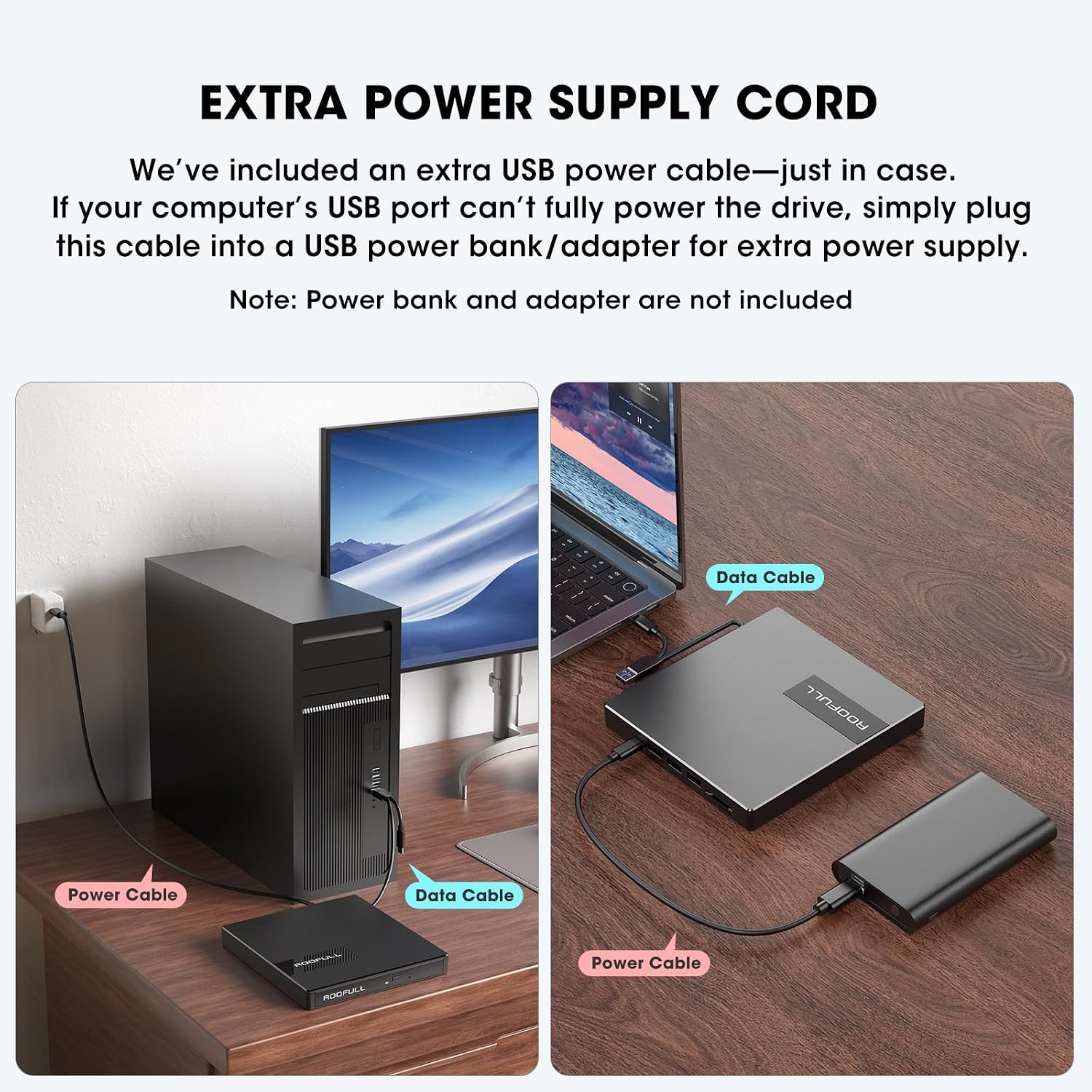
Figure 5.2: Using the extra power supply cord for stable operation.
DVD Region Code Setting
When inserting a DVD for the first time, your system may prompt you to select a DVD region. It is crucial to select the correct region corresponding to your DVD discs. Note that you can typically change the drive's region a limited number of times (e.g., 5 times). Refer to the map below for common DVD regions:

Figure 5.3: DVD Region Code Map.
| Reġjun | Geographical Area |
|---|---|
| Reġjun 1 | Il-Kanada, l-Istati Uniti |
| Reġjun 2 | Japan, Europe, South Africa, Middle East |
| Reġjun 3 | Southeast Asia, East Asia (including Hong Kong) |
| Reġjun 4 | Australia, New Zealand, Pacific Islands, Central America, Mexico, South America |
| Reġjun 5 | Eastern Europe, Russia, Indian Subcontinent, Africa, North Korea, and Mongolia |
| Reġjun 6 | Iċ-Ċina |
| Reġjun 7 | Reserved for unspecified special use |
| Reġjun 8 | Air and oceanic travel |
6. Joperaw
Using the CD/DVD Drive
- Iftaħ it-Trej tad-Diska: Agħfas il-buttuna tal-eject fuq quddiem tad-drajv biex tiftaħ it-trej tad-diska.
- Daħħal Diska: Carefully place your CD or DVD onto the tray, ensuring it is centered on the spindle.
- Agħlaq it-Trej: Imbotta t-trej bil-mod lura fid-drajv sakemm jinstema' ikklikkjar biex jingħalaq.
- Aċċess Kontenut: Your computer will typically recognize the disc automatically. Use your preferred media player software (e.g., Windows Media Player, VLC, iTunes) to play music CDs, movie DVDs, or access data discs. For burning or ripping, dedicated software is required (e.g., BurnAware, Nero, HandBrake).

Figure 6.1: Front panel features including Tray Loading Design, Indicator Light, Ejection Button, and Forced Ejection Hole.
Video 6.1: Official demonstration of the ROOFULL External CD DVD Drive, showing connection, disc insertion, and basic functions.
Using USB Ports and SD/TF Card Slots
The drive features additional ports for enhanced connectivity:
- Port USB 3.0: Located on the side, this port can be used for high-speed data transfer with USB 3.0 devices.
- 3 Portijiet USB 2.0: These ports allow you to connect various USB peripherals such as wired mice, keyboards, flash drives, or 2.4G receivers.
- SD Card Slot & Micro-SD (TF) Card Slot: Insert your SD or microSD cards to import photos, videos, or access other data. Note that SD and TF cards cannot be used simultaneously.

Figura 6.2: Ġenb view showing USB ports, SD/TF card slots, and USB-C power port.
7. Manutenzjoni
- Tindif: Use a soft, dry cloth to clean the exterior of the drive. Do not use liquid cleaners or abrasive materials.
- Kura tad-Diska: Dejjem immaniġġja d-diski mit-truf tagħhom biex tevita marki tas-swaba’ u grif. Aħżen id-diski f’kaxxi protettivi meta ma tkunx qed tużahom.
- Ħażna: When not in use, store the drive in a cool, dry place. Ensure the data cable is neatly tucked into its storage slot underneath the drive.
- Evita l-Impatt: Protect the drive from drops or impacts, as this can damage internal components.
8 Issolvi l-problemi
- Sewqan Mhux Rikonoxxut: Ensure the data cable is securely connected to both the drive and your computer. Try a different USB port. If using a desktop PC, connect to a rear USB port on the motherboard for a more stable power supply. If power is an issue, use the included extra power supply cord.
- Disc Not Reading/Burning: Check if the disc is clean and free of scratches. Ensure the disc is correctly placed on the tray. Verify that you have the necessary software installed for playing, burning, or ripping discs.
- Tray Cannot Be Opened via Button (macOS): Due to macOS limitations, the tray button may not function after playing or burning a disc. To eject a disc on a Mac, right-click the disc icon on your desktop and select "Eject," or go to "File" > "Eject" from the menu bar in the active application.
- Ebda Qawwa/Tħaddim Intermittenti: Connect the extra USB power supply cord to the drive and a reliable USB power source. Some USB ports (especially on older laptops or front panel desktop ports) may not provide enough power.
- Veloċitajiet ta' Trasferiment Baxxi: Ensure you are connected to a USB 3.0 port on your computer for optimal speed. Verify that the data cable is fully inserted.
- SD/TF Card Not Detected: Ensure only one card (either SD or TF) is inserted at a time, as they cannot be used simultaneously. Reinsert the card firmly.
9. Speċifikazzjonijiet
| Karatteristika | Dettall |
|---|---|
| Brand | Bejt |
| Numru tal-Mudell | RF40-SU |
| Tip ta' Drive ottiku | CD-ROM, CD-R, CD+/-RW, DVD-ROM, DVD+/-R, DVD+/-RW |
| Veloċità tal-Kitba tal-Ħażna Ottika | Max 24xCD / 8xDVD |
| Interface tal-Ħardwer | USB 3.0 Tip A, USB 3.0 Tip C |
| Numru ta 'USB 3.0 Ports | 1 |
| Kompatibilità tas-Sistema Operattiva | Windows 11/10/8/7, Mac, Linux |
| Pjattaforma tal-Ħardwer | Laptop, PC |
| Piż tal-oġġett | 10.6 uqija |
| Dimensjonijiet tal-Prodott (LxWxH) | 5.6 x 5.6 x 0.6 pulzieri |
| Pajjiż ta' Oriġini | Iċ-Ċina |
10. Garanzija u Appoġġ
ROOFULL is committed to producing quality external CD/DVD-RW drives and offers comprehensive after-sales service.
- Garanzija: The product comes with up to 2 years of comprehensive after-sales service.
- Appoġġ Tekniku: If you experience any issues or require technical assistance, please contact ROOFULL customer support. Contact information can typically be found on the product packaging or the official ROOFULL websit.
- Sostituzzjoni b'xejn: In case of product issues covered under warranty, a free replacement may be provided.


