1. Introduzzjoni
Welcome to the user manual for your KLIM Discover Portable CD Player. This device combines classic CD playback with modern features such as Bluetooth connectivity, FM radio, FM transmission, and SD card support. This manual will guide you through the setup, operation, and maintenance of your new portable CD player to ensure an optimal listening experience.

Image 1.1: The KLIM Discover Portable CD Player, showcasing its compact design and included headphones.
2. Kontenut tal-Pakkett
Jekk jogħġbok ivverifika li l-oġġetti kollha elenkati hawn taħt huma inklużi fil-pakkett tiegħek:
- KLIM Discover CD Player
- KLIM Fusion Wired Headphones
- Ear Accessories (various sizes)
- Cable tal-Iċċarġjar tal-USB-C
- Ġorru Borża

Image 2.1: All components included with the KLIM Discover Portable CD Player.
3. Prodott Aktarview
Familiarize yourself with the buttons and ports on your KLIM Discover CD Player:

Image 3.1: The KLIM Discover Portable CD Player, showing its front panel and connected headphones.
The KLIM Discover features a clear LCD display and intuitive controls on its front panel. Key components include:
- Display LCD: Shows track information, mode, battery status, and settings.
- Kontrolli tal-daqq: Buttons for Play/Pause, Stop, Next/Fast Forward, and Previous/Rewind.
- Buttuni tal-Modalità: Buttons for changing playback modes (e.g., Repeat, Random), activating FM Radio, FM Transmitter, and Bluetooth.
- EQ/Record Button: For cycling through equalizer presets and initiating recording.
- DIR/Speed Buttons: For changing directories on MP3 CDs and adjusting playback speed.
- Kontroll tal-Volum: A dedicated control for adjusting audio output.
- HOLD Switch: A physical switch, typically on the side, to lock all buttons.
Additional ports (typically on the side or back):
- Port tal-Iċċarġjar USB-C: Għall-konnessjoni tal-kejbil tal-iċċarġjar.
- 3.5mm Audio Output (Headphone Jacks): Two ports for connecting headphones or external speakers, allowing two users to listen simultaneously.
- Slot tal-Kard SD: For inserting an SD/TF memory card.
4. Setup
4.1. Iċċarġjar tal-Apparat
The KLIM Discover has a built-in rechargeable battery. Before first use, fully charge the device.
- Connect the supplied USB-C charging cable to the USB-C port on the player.
- Qabbad it-tarf l-ieħor tal-kejbil ma' adapter tal-enerġija USB (mhux inkluż) jew mal-port USB tal-kompjuter.
- The charging indicator on the display will show charging status. A full charge typically provides over 12 hours of playback.

Image 4.1: The KLIM Discover features a long-lasting rechargeable battery.
4.2. Tixgħil / Mitfi
To power on the device, slide the power switch (usually located on the side) to the "ON" position. To power off, slide it to "OFF".
4.3. Using the HOLD Function
The HOLD switch locks all buttons to prevent accidental operation. Slide the switch to "HOLD" to activate, and slide it back to deactivate.
5. Istruzzjonijiet Operattivi
5.1. CD Playback
- Iftaħ l-għatu tal-kompartiment tas-CD.
- Carefully place a CD (CD, CD-R, CD-RW, HDCD, MP3 CD) onto the spindle, label side up.
- Close the CD compartment cover firmly until it clicks.
- Agħfas il- Play/Pawsa buttuna biex tibda d-daqq.
- Uża l- Track li jmiss/Fast Forward u Track/Rewind Preċedenti buttuni biex jinnavigaw binarji.
- Aġġusta l-volum billi tuża l-kontroll tal-volum.
Protezzjoni Kontra x-Xokkijiet: The KLIM Discover features an anti-shock chip that buffers 100 seconds of audio to prevent interruptions during movement. This also helps protect your CDs from damage.
5.2. Konnettività Bluetooth
The KLIM Discover can connect to Bluetooth headphones or speakers.
- Kun żgur li l-headphones/speaker Bluetooth tiegħek jinsabu fil-modalità ta' tqabbil.
- Agħfas il- Bluetooth button on the KLIM Discover. The Bluetooth icon on the display will flash, indicating it's searching for devices.
- Once connected, the Bluetooth icon will become solid.
Note on Car Bluetooth: Bluetooth compatibility varies with car infotainment systems. While the device strives for broad compatibility, some car systems may experience connection issues due to software updates. If you encounter problems, consider using the FM Transmitter or AUX connection options.
5.3. Radju FM
- Agħfas il- FM Radio/Speed - buttuna biex tidħol fil-modalità tar-radju FM.
- Uża l- MODE/FM (+) u PROG/FM (-) buttons to tune to desired frequencies.
- The included headphones act as the antenna for better reception.
5.4. FM Transmitter (Car Connectivity)
The FM transmitter allows you to play audio from the KLIM Discover through your car's FM radio.
- Agħfas il- Trasmettitur FM button to activate the feature.
- The display will show an FM frequency.
- Tune your car's FM radio to the same frequency displayed on the KLIM Discover.
- Play your CD or SD card audio, and it will transmit wirelessly to your car's speakers.
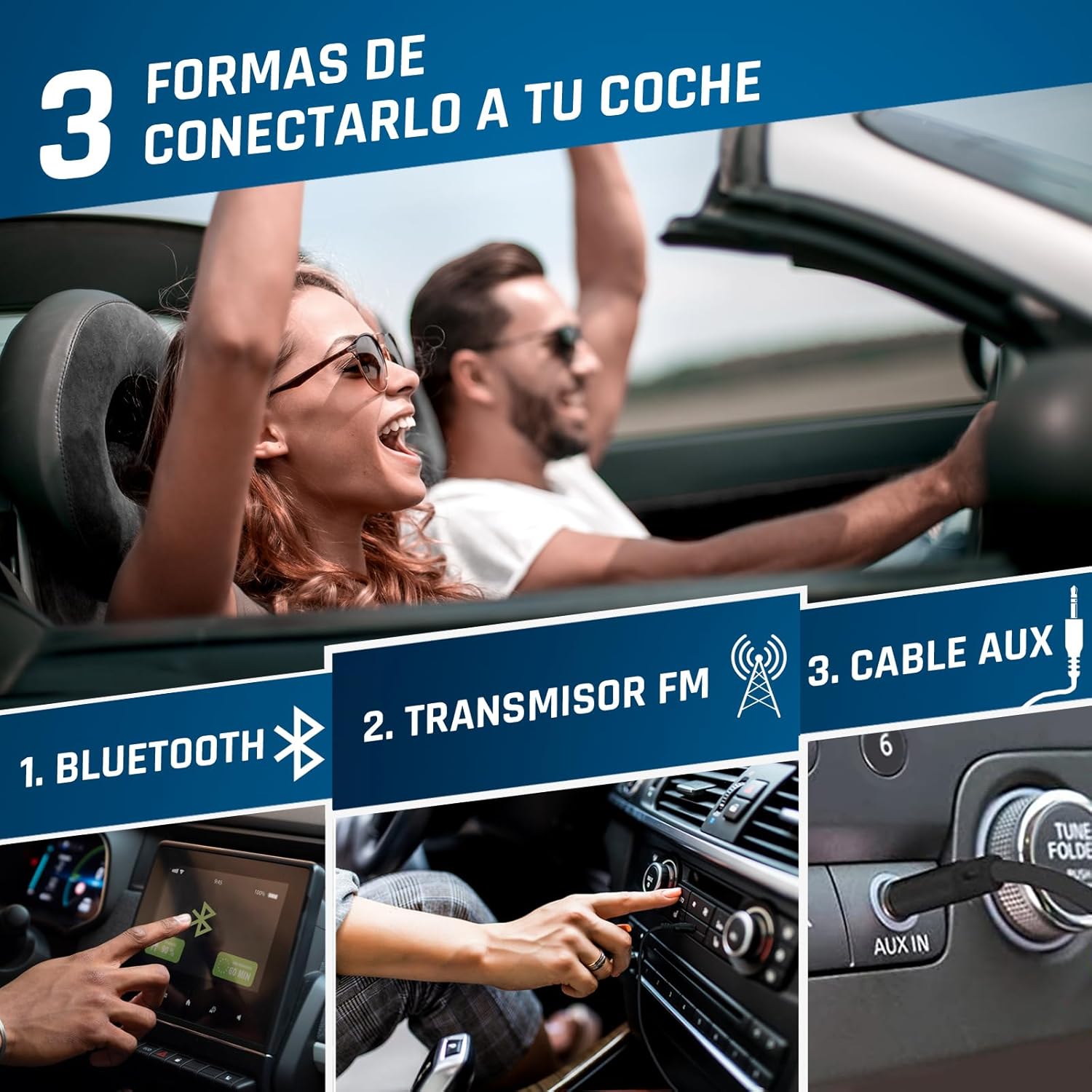
Image 5.1: Connection options for car audio systems: Bluetooth, FM Transmitter, and AUX cable.
Other Car Connection Options:
- Cable AUX: If your car has an AUX input, connect the KLIM Discover using a 3.5mm audio cable (not included).
- Bluetooth tal-Karozza: Attempt to pair the KLIM Discover with your car's Bluetooth system as described in section 5.2.
5.5. Daqq tal-Karta SD
- Insert a formatted SD/TF card (up to 32GB) into the SD card slot.
- The player will automatically switch to SD card mode or you may need to press the MODALITÀ buttuna biex tagħżelha.
- Supported audio formats include MP3 and WMA.
- Uża l-buttuni tan-navigazzjoni biex tagħżel u ddoqq it-traċċi.
5.6. Funzjoni ta' Reġistrazzjoni
The KLIM Discover supports recording audio onto an inserted SD card. Refer to the on-screen prompts or specific instructions for initiating recording using the EQ/Record buttuna.
5.7. Ekwalizzatur (EQ)
Agħfas il- EQ/Record button repeatedly to cycle through different equalizer presets (e.g., Pop, Jazz, Rock, Classic, Bass, Flat) to customize your audio experience.
5.8. Playback Speed Control
Uża l- DIR/Speed + u FM Radio/Speed - buttons to adjust the playback speed of your audio.
6. Manutenzjoni
- Tindif: Use a soft, dry cloth to clean the exterior of the player. For the lens inside the CD compartment, use a specialized CD lens cleaner.
- Ħażna: Aħżen il-plejer f'post frisk u niexef 'il bogħod mix-xemx diretta u minn temperaturi estremi.
- Kura tal-batterija: Biex ittawwal il-ħajja tal-batterija, evita li tiċċarġja kompletament il-batterija ta' spiss. Iċċarġjaha regolarment, anke jekk ma tkunx qed tużaha għal perjodi twal.
- CD Handling: Always handle CDs by their edges. Keep them clean and free of scratches to ensure optimal playback.
7 Issolvi l-problemi
| Problema | Kawża Possibbli | Soluzzjoni |
|---|---|---|
| L-apparat ma jixgħelx. | Batterija baxxa; Is-swiċċ tal-enerġija fil-pożizzjoni OFF. | Charge the device; Slide power switch to ON. |
| Is-CD ma jdoqqx jew jaqbeż. | CD is dirty, scratched, or inserted incorrectly; CD compartment not closed properly. | Clean the CD; Ensure CD is inserted correctly; Close compartment firmly. |
| L-ebda ħoss mill-headphones. | Headphones not connected; Volume too low; Headphones faulty. | Ensure headphones are fully plugged in; Increase volume; Test with different headphones. |
| Kwistjonijiet ta 'konnessjoni Bluetooth. | Device not in pairing mode; Target device too far or not in pairing mode; Car infotainment system incompatibility. | Ensure both devices are in pairing mode and close to each other; Refer to car manual; Use FM Transmitter or AUX as alternatives. |
| FM Transmitter not working. | Car radio not tuned to correct frequency; Interference. | Ensure car radio matches player's FM frequency; Try a different, clear frequency. |
| Il-karta SD mhux rikonoxxuta. | Card inserted incorrectly; Card not formatted or corrupted; Unsupported file format. | Reinsert card; Ensure card is formatted correctly (FAT32); Check for MP3/WMA files. |
If you continue to experience issues, please contact KLIM customer service for assistance.
8. Speċifikazzjonijiet
| Karatteristika | Dettall |
|---|---|
| Brand | KLIM |
| Isem tal-Mudell | Skopri |
| Numru tal-Mudell | KLIM Nomad (KLDIS5373) |
| Teknoloġija tal-Konnettività | Bluetooth |
| Karatteristiċi Speċjali | Bluetooth, FM radio, FM transmitter, SD card reader, Recorder |
| Tipi ta' Midja Kompatibbli | CD, SD Card, MP3, WMA |
| Formati Awdjo Appoġġjati | MP3, WMA |
| Kapaċità tal-Ħżin tal-Memorja | Up to 32 GB (SD/TF Card) |
| Teknoloġija Tuner | FM |
| Teknoloġija tal-Wiri | LCD |
| Tip ta 'Sors ta' Enerġija | Battery Powered (Rechargeable Lithium-Cobalt) |
| Ħajja Medja tal-Batterija | 12+ Siegħa |
| Dimensjonijiet tal-Prodott | 14 x 14 x 2.8 ċm |
| Piż tal-oġġett | 250 g |
| Komponenti Inklużi | KLIM Discover CD Player, KLIM Fusion Wired Headphones, Ear Accessories, USB-C Charging Cable, Carry Pouch |
9. Garanzija u Appoġġ
The KLIM Discover Portable CD Player comes with a Appoġġ għall-prodott ta' sena from KLIM Technologies. This ensures long-term assistance for any issues you may encounter.
Additionally, you are covered by a Tieqa ta' ritorn ta' 30 jum, allowing you to return the product for a full refund if you are not satisfied with your purchase.
For technical support, warranty claims, or any questions, please visit the official KLIM website or contact their customer service directly. Contact details can typically be found on the KLIM webis-sit jew fil-materjali tal-ippakkjar.


