Introduzzjoni
This manual provides detailed instructions for the safe and efficient operation of your CAIWEI X99+ 4K Smart Projector. Please read this manual thoroughly before using the projector and retain it for future reference.
Informazzjoni dwar is-Sigurtà
Biex tiżgura tħaddim sikur u tevita ħsara, osserva l-prekawzjonijiet li ġejjin:
- Do not place the projector in boxes or cabinets with poor ventilation properties. Ensure adequate airflow around the device to prevent overheating.
- Avoid direct exposure of the projector lens to sunlight.
- Timblokkax il-fetħiet tal-ventilazzjoni.
- Uża biss l-adapter tal-enerġija li jiġi mal-proġettur.
- Żomm il-proġettazzjoni 'l bogħod mill-ilma jew likwidi oħra.
- Tippruvax tiżżarma jew issewwi l-proġettur int stess. Ikkuntattja persunal tas-servizz kwalifikat għall-assistenza.
Kontenut tal-Pakkett
Ivverifika li l-oġġetti kollha huma preżenti fil-pakkett:
- CAIWEI X99+ Smart Projector
- Kontroll mill-bogħod
- Cable HDMI
- Power Cable (UK-plug)
- AV Cable
- Borża tal-Proġekter
- Manwal għall-Utent (dan id-dokument)
Prodott Overview
The CAIWEI X99+ is a smart projector designed for versatile entertainment and presentation needs. It features a native 1080P resolution with 4K support, 800 ANSI lumens brightness, and an integrated Android 9.0 operating system.

Figure 1: CAIWEI X99+ Smart Projector front view, wirjaasing id-disinn kompatt u l-karatteristiċi ewlenin tiegħu.
Karatteristiċi ewlenin:
- Teknoloġija tal-Wiri: Native 1920x1080P resolution, 4K support, 800 ANSI lumens, 15500:1 contrast ratio.
- OS intelliġenti: Android 9.0 with access to over 6000 authorized apps (Netflix, YouTube, Prime Video, etc.).
- Memorja: 2GB RAM + 16GB ROM.
- Konnettività Wireless: Dual 2.4G/5G WiFi, Airplay/DLNA/Miracast support, Bluetooth 5.0.
- Awdjo: Integrated 10W high-power stereo speakers, Dolby Audio support, 3.5mm audio output.
- Titjib tal-Immaġni: HDR10 processing, MEMC technology for smoother motion.
- Aġġustamenti: 4D and ±50° vertical/horizontal electronic keystone correction, 40% digital image zoom.
- Durabilità: Fully sealed optical engine for dust protection and extended lifespan.

Figure 2: Visual representation of the projector's color accuracy, brightness, and image quality in various lighting conditions.
Setup
1 Tqegħid
Position the projector on a stable, flat surface or mount it to the ceiling using the four screw holes. Ensure the projector is placed at an appropriate distance from the projection surface to achieve the desired screen size. Maintain adequate ventilation around the unit.
2. Konnessjoni tal-Enerġija
- Qabbad il-kejbil tal-enerġija mal-port tad-dħul tal-enerġija tal-proġettazzjoni.
- Ipplaggja t-tarf l-ieħor tal-kejbil tal-enerġija f'sokit elettriku adattat.
- Agħfas il-buttuna tal-qawwa fuq il-proġekter jew il-kontroll mill-bogħod biex tixgħel l-apparat.
3. Initial Focus and Keystone Adjustment
Upon initial power-on, the projected image may appear blurry or distorted. Adjust these settings for optimal clarity:
- Fokus: Dawwar iċ-ċirku tal-fokus fuq il-lenti tal-proġettazzjoni sakemm l-immaġni tkun qawwija u ċara.
- Korrezzjoni Keystone: Use the remote control to access the keystone correction settings. The projector supports 4D keystone correction and ±50° vertical/horizontal electronic correction to square the image if the projector is not perfectly perpendicular to the screen.
- Żum diġitali: Adjust the image size without moving the projector using the digital zoom function (40% zoom out/in).
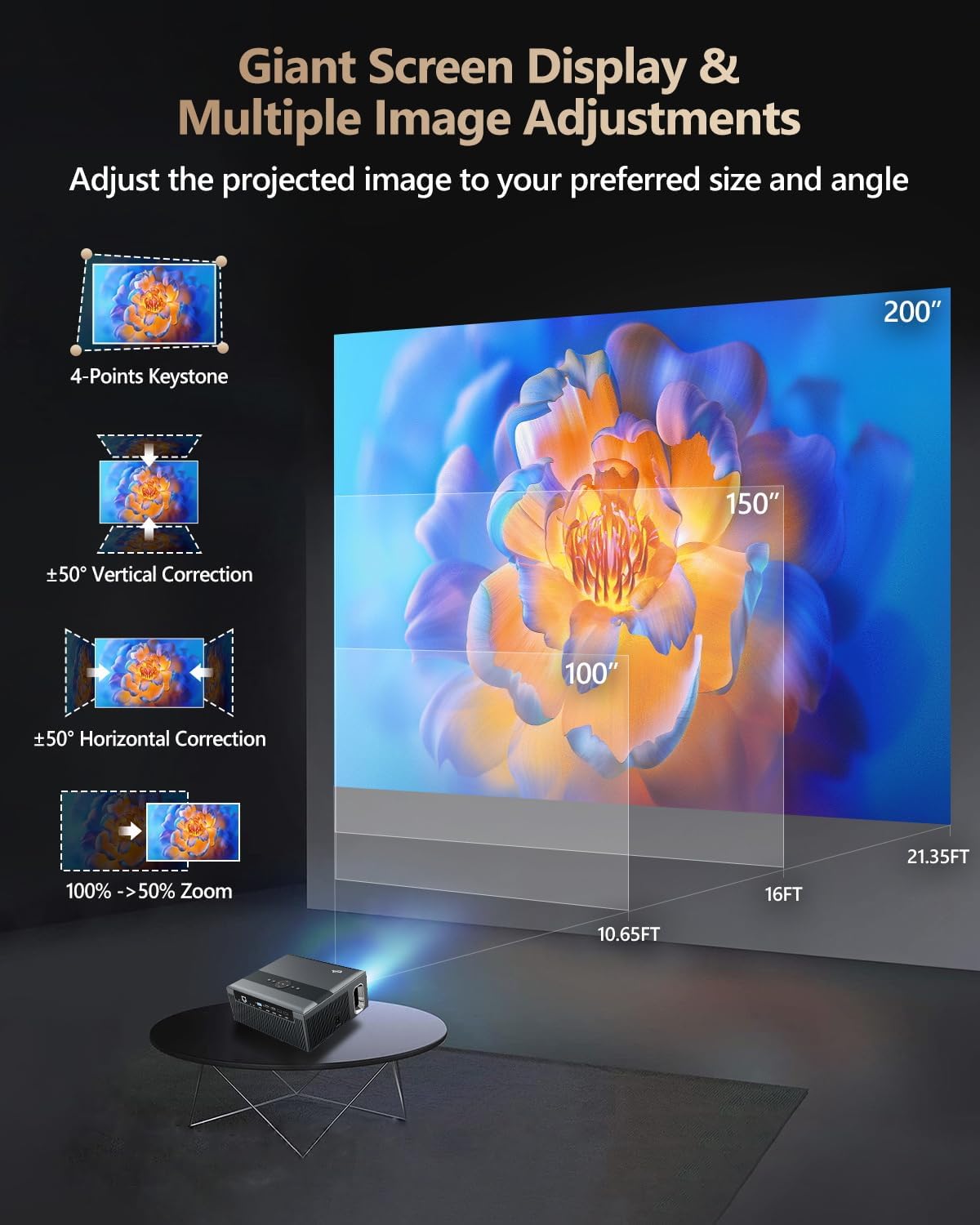
Figure 3: Image adjustment options including keystone correction and digital zoom.
4. Konnessjoni tan-Netwerk
Connect the projector to the internet for access to streaming apps and online content.
- Wi-Fi: Navigate to the network settings in the Android OS. Select your desired 2.4G or 5G Wi-Fi network and enter the password.
- LAN (Ethernet): Connect an Ethernet cable from your router to the RJ45 port on the projector for a wired internet connection.
5. Tqabbil tal-Bluetooth
Pair Bluetooth devices such as external speakers, headphones, mice, keyboards, or gamepads.
- Kun żgur li l-apparat Bluetooth ikun fil-modalità ta 'tqabbil.
- On the projector, go to Bluetooth settings within the Android OS.
- Select the desired device from the list and confirm pairing.

Figure 4: Wireless connectivity for streaming and audio.
Istruzzjonijiet Operattivi
1. Android TV OS Navigation
Use the remote control to navigate the Android 9.0 interface. The home screen provides access to installed applications, settings, and input sources.

Figure 5: Android TV 9.0 interface with pre-installed and accessible applications.
2. App Installation and Usage
The projector comes with pre-installed apps like Netflix, YouTube, and Prime Video. You can download additional authorized applications from the app store within the Android OS.
- Select an app icon from the home screen to launch it.
- Follow on-screen prompts for login or content selection.
3. Screen Mirroring (Airplay/DLNA/Miracast)
Synchronize your smartphone, tablet, or laptop screen wirelessly to the projector.
- Kun żgur li t-tagħmir tiegħek u l-proġettur huma konnessi mal-istess netwerk Wi-Fi.
- Select the appropriate mirroring function (Airplay for iOS, Miracast for Android/Windows, DLNA for compatible devices) on the projector's interface.
- Initiate screen mirroring from your source device.
4. Konnessjoni ta 'Tagħmir Estern
Il-proġettazzjoni toffri diversi portijiet għall-konnessjoni ta' diversi apparati esterni.

Figure 6: Available input and output ports for external devices.
- HDMI: Connect Blu-ray/DVD players, TV sticks, game consoles (PS5), PCs, or laptops using an HDMI cable. Select the corresponding HDMI input from the projector's source menu.
- USB: Insert USB flash drives or hard drives into the USB ports to play media files direttament.
- VGA: Qabbad PCs jew laptops eqdem billi tuża kejbil VGA.
- TA’: Use the AV cable to connect devices with composite video and stereo audio outputs.
5. Output tal-Awdjo
The projector features built-in 10W stereo speakers. For alternative audio experiences:
- Bluetooth: Pair with external Bluetooth speakers or headphones as described in the Setup section.
- 3.5mm Awdjo Out: Connect wired headphones or external speakers using a 3.5mm audio cable.

Figure 7: Projector's integrated audio system.
Manutenzjoni
1. Tindif
- Lenti: Uża drapp artab u mingħajr suf iddisinjat speċifikament għal lentijiet ottiċi. Tużax prodotti tat-tindif li joborxu.
- Barra: Imsaħ il-barra tal-proġettazzjoni b'ċarruta ratba u niexfa. Għal marki persistenti, neħħi ftit.ampmt id-drapp bl-ilma.
- Ftuħ tal-ventilazzjoni: Iċċekkja perjodikament u naddaf bil-mod il-fetħiet tal-ventilazzjoni biex tiżgura fluss tal-arja mingħajr ostakli.
2. Protezzjoni mit-Trab
The CAIWEI X99+ features a fully sealed optical engine and an air purifier filter, which significantly reduces dust accumulation and light decay, contributing to a longer service life.

Figure 8: Dust-proof design of the CAIWEI X99+ projector.
3. Ħażna
When not in use for extended periods, store the projector in a cool, dry place, preferably in its original packaging or the provided projector bag, to protect it from dust and physical damage.
Issolvi l-problemi
Jekk tiltaqa' ma' problemi bil-proġettur tiegħek, irreferi għall-problemi u s-soluzzjonijiet komuni li ġejjin:
| Problema | Kawża Possibbli | Soluzzjoni |
|---|---|---|
| L-ebda immaġni jew il-messaġġ "L-ebda Sinjal" | Sors ta' input mhux korrett magħżul; konnessjoni tal-kejbil maħlula; apparat mhux mixgħul. |
|
| Immaġini mċajpra | Focus not adjusted; keystone correction needed. |
|
| L-ebda ħoss | Volume too low; incorrect audio output selected; external device audio issue. |
|
| Kwistjonijiet ta 'konnessjoni Wi-Fi | Incorrect password; out of range; router issues. |
|
| Il-kontroll mill-bogħod ma jaħdimx | Batteriji mejta; ostruzzjoni; problema ta' tqabbil. |
|
Speċifikazzjonijiet
| Brand | CAIWEI |
| Mudell | X99+ |
| Riżoluzzjoni tal-Wiri | Native 1920 x 1080 (Supports 4K) |
| Luminożità | 800 ANSI Lumens (12000 LED Lumens) |
| Proporzjon ta' Kuntrast | 15500:1 |
| Sistema Operattiva | Android 9.0 |
| Memorja | 2GB RAM + 16GB ROM |
| Teknoloġija tal-Konnettività | Bluetooth 5.0, Dual-band Wi-Fi (2.4G/5G), USB, HDMI, VGA, AV, LAN (RJ45) |
| Karatteristiċi Speċjali | Built-In Wi-Fi, Portable, Wireless, HDR10, MEMC, Dolby Audio, Sealed Optical Engine, 4D Keystone Correction, Digital Zoom |
| Awdjo | 10W High Power Stereo Speakers, 3.5mm Audio Output |
| Dimensjonijiet tal-Prodott | 10.55 x 9.25 x 4.92 pulzieri |
| Piż tal-oġġett | 7.48 liri |
Garanzija u Appoġġ
For warranty information and technical support, please refer to the warranty card included with your product or visit the official CAIWEI websit. Ikkuntattja lis-servizz tal-konsumatur għal assistenza dwar kwalunkwe kwistjoni li mhix koperta f'dan il-manwal.
Manifattur: CAIWEI
Websit: CAIWEI Official Store on Amazon


