Introduzzjoni
The ULANZI ST-06S Phone Tripod Mount is a versatile accessory designed to securely hold your smartphone for various photography and videography needs. It features a robust metal construction, adjustable angles, and multiple mounting options for external accessories.
Karatteristiċi ewlenin:
- Dual Cold Shoe Mounts & 1/4" Screw: Attach microphones, LED lights, and other accessories.
- Adjustable Z-axis Angle: Fine-tune your pitch angle without needing a separate ball head.
- Sikura Clamp Disinn: Features a push-and-lock mechanism with thick non-slip silicone pads for phone protection.
- Rotazzjoni 360°: Easily switch between portrait and landscape modes for optimal shooting angles.
- Kompatibilità Wiesgħa: Accommodates smartphones from 2.36 inches to 3.54 inches wide, even with cases.
- Ħfief u Durabbli: Constructed from aircraft-grade aluminum alloy, weighing only 1.8 ounces.
Prodott Overview
Familiarize yourself with the components of your ULANZI ST-06S Phone Tripod Mount.

Figura 1: Dettaljati view of the ULANZI ST-06S Phone Tripod Mount, highlighting its key features including the 1/4" screw, cold shoe mounts, lock button, Z-axis design, and 360° rotating design.
- Telefon Clamp: Securely holds your smartphone. Features non-slip silicone pads.
- Buttuna Lock: Engages the push-and-lock mechanism for the phone clamp.
- 360° Rotation Mechanism: Allows seamless switching between portrait and landscape orientations.
- Z-axis Adjustment: Enables tilting the phone mount forward or backward.
- 1/4" Screw Hole: Located at the base for mounting onto tripods, monopods, or selfie sticks.
- Muntaturi taż-Żarbun Kiesaħ: Two standard cold shoe mounts on the sides for attaching external accessories like microphones or LED lights.
Setup Istruzzjonijiet
1. Attaching Your Smartphone:
- Press the red lock button on the side of the phone clamp to release the locking mechanism.
- Gently pull the top jaw of the clamp upwards to open it.
- Daħħal l-ismartphone tiegħek fil-clamp, ensuring it sits securely against the non-slip silicone pads.
- Push the top jaw downwards until it firmly grips your phone. The ratchet mechanism will click into place, securing the phone.
- Verify that the phone is held firmly and does not wobble.

Figura 2: Sikur clamping a smartphone into the mount using the push-and-lock mechanism and non-slip pads.
2. Mounting to a Tripod/Accessory:
- Locate the 1/4" screw hole at the bottom of the ULANZI ST-06S mount.
- Align this hole with the 1/4" screw on your tripod, monopod, or selfie stick.
- Rotate the ULANZI ST-06S mount clockwise onto the screw until it is firmly attached.
- Alternatively, if your tripod uses an Arca-Swiss quick release plate, the base of the ST-06S is compatible with this system. Slide the mount directly into the Arca-Swiss clamp u sigurha.

Figura 3: The 1/4" screw hole at the base of the mount for tripod attachment, alongside the dual cold shoe mounts.
Istruzzjonijiet Operattivi
1. Adjusting Phone Orientation (360° Rotation):
- To switch between portrait (vertical) and landscape (horizontal) modes, simply rotate the phone clamp sezzjoni.
- The 360° rotating design allows for smooth transitions to achieve your desired shooting angle.
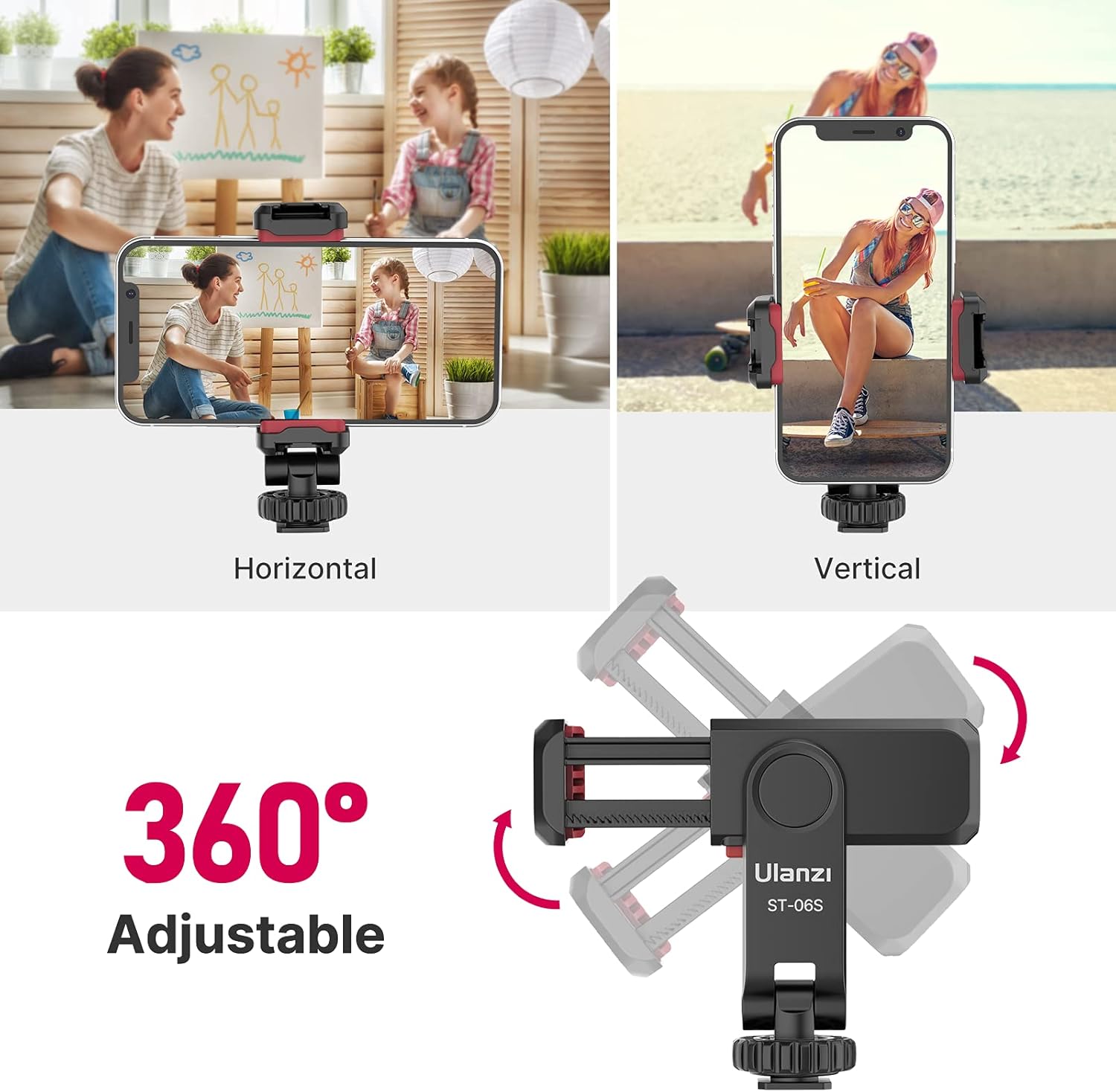
Figura 4: Visual representation of the 360° rotation capability and adjustable Z-axis angle for flexible phone positioning.
2. Adjusting Z-axis Angle:
- The mount features an adjustable Z-axis design, allowing you to tilt your phone forward or backward.
- This eliminates the need for a separate ball head for pitch adjustments.
- Gently adjust the angle to achieve the desired tilt for your shot. The mechanism is designed to hold its position firmly.
3. Using Cold Shoe Mounts:
- The ULANZI ST-06S has two standard cold shoe mounts located on its sides.
- Slide compatible accessories, such as external microphones, LED video lights, or other cold shoe-compatible gear, into these mounts.
- Ensure accessories are securely seated in the cold shoe slots.

Figura 5: Example setup for vlogging, showing a smartphone mounted with an external microphone and LED light using the cold shoe mounts.
Manutenzjoni
- Tindif: Imsaħ il-muntatura b'ċarruta ratba u niexfa biex tneħħi t-trab u d-debris. Evita li tuża kimiċi ħarxa jew materjali li joborxu.
- Ħażna: Store the mount in a dry, cool place away from direct sunlight when not in use.
- Spezzjoni: Periodically check all screws and moving parts to ensure they are secure and functioning correctly.
Issolvi l-problemi
- Phone not secure: Ensure the red lock button is fully engaged and the clamp jaws are tightened sufficiently around the phone. Check that the non-slip silicone pads are clean and intact.
- Rotation is stiff: If the 360° rotation feels stiff, gently rotate it back and forth a few times. Avoid excessive force.
- Mount wobbles on tripod: Ensure the 1/4" screw connection to the tripod is tightened securely.
Speċifikazzjonijiet
| Numru tal-Mudell | ST-06S (US2-2575-FBA) |
| Materjal | Liga tal-Aluminju ta' grad ta' ajruplan |
| Dimensjonijiet tal-Prodott | 1.97 x 4.72 x 1.57 pulzieri |
| Piż tal-oġġett | 1.8 uqija |
| Telefon Clamp Wisa' | 2.36 pulzier sa 3.54 pulzier |
| Għażliet ta 'Immuntar | 1/4" Screw Hole, Arca-Swiss Compatible Base |
| Accessory Mounts | 2 Standard Cold Shoe Mounts |
| Karatteristiċi Speċjali | Adjustable Z-axis, 360° Rotation, Non-slip Silicone Pads |
| Kulur | Iswed |
Garanzija u Appoġġ
For warranty information, technical support, or any inquiries regarding your ULANZI ST-06S Phone Tripod Mount, please contact ULANZI customer service through their official websit jew il-bejjiegħ bl-imnut minn fejn inxtara l-prodott.


