1. Introduzzjoni
Thank you for choosing the NOVOO 11-in-1 USB-C Docking Station. This device is designed to expand the connectivity of your USB-C enabled laptop, providing multiple ports for display, data transfer, networking, and power delivery. Please read this manual carefully to ensure proper setup and operation.

Image 1.1: The NOVOO 11-in-1 USB-C Docking Station with connected peripherals.
2. Prodott Aktarview
The NOVOO 11-in-1 USB-C Docking Station provides a comprehensive solution for expanding your laptop's connectivity. It features the following ports:
- 2 x HDMI Ports: For connecting external displays (HDMI 1: up to 4K@30Hz, HDMI 2: up to 4K@60Hz).
- 1 x VGA Port: For connecting external displays (up to 1080P@60Hz).
- 1 x Gigabit Ethernet Port (RJ45): For stable wired network connection (up to 1Gbps).
- 2 x USB-A 3.0 Ports: For high-speed data transfer (up to 5Gbps).
- 2 x USB-A 2.0 Ports: For connecting peripherals like keyboards and mice (up to 480Mbps).
- 1 x USB-C PD Port: For power delivery to your laptop (up to 100W).
- 1 x Qarrej tal-Kard SD: For accessing SD memory cards.
- 1 x TF (Micro SD) Card Reader: For accessing Micro SD memory cards.

Image 2.1: Labeled diagram of the 11-in-1 docking station ports.
3. Istruzzjonijiet ta' Setup
Follow these steps to set up your NOVOO 11-in-1 USB-C Docking Station:
- Ivverifika l-Kompatibbiltà tal-Laptop: Ensure your laptop's USB-C port supports video output (DisplayPort Alternate Mode) and power delivery. Refer to your laptop's manual or the port symbols shown below. Ports that only support charging or data transfer will not enable full docking station functionality.
- Qabbad mal-Laptop: Plug the integrated USB-C cable from the docking station into a compatible USB-C port on your laptop.
- Qabbad l-Adapter tal-Enerġija (Mhux obbligatorju iżda rakkomandat): For optimal performance, especially when using multiple peripherals or monitors, connect a 100W or higher-rated USB-C power adapter (not included) to the docking station's USB-C PD port. This ensures stable power delivery to your laptop and connected devices.
- Qabbad Displays Esterni: Connect your monitors to the HDMI and/or VGA ports on the docking station using appropriate cables.
- Ikkonnettja l-Periferali: Plug in your USB devices (keyboard, mouse, external drives, etc.) into the USB-A 3.0 and USB-A 2.0 ports. Insert SD or TF cards into their respective slots if needed.
- Qabbad il-Kejbil tal-Ethernet: Għal konnessjoni tan-netwerk bil-fili, waħħal kejbil Ethernet fil-port RJ45 fuq l-istazzjon tad-docking.

Image 3.1: USB-C port symbol guide for compatibility check.

Immaġni 3.2: Eż.ample setup of the docking station with a laptop and multiple displays.
4. Istruzzjonijiet Operattivi
4.1 Modi tal-Wiri
L-istazzjon tad-docking jappoġġja diversi konfigurazzjonijiet tad-displej skont is-sistema operattiva tiegħek.
Windows OS:
- Modalità mera: Displays the same content on all connected screens (laptop and external monitors).
- Modalità Estendi: Testendi d-desktop tiegħek fuq diversi skrins, u b'hekk tippermetti aktar spazju tax-xogħol.
- MST (Multi-Stream Transport) Mode: Allows for independent display output to multiple external monitors. This mode supports extending to up to 3 displays simultaneously, provided your laptop's USB-C port supports DP1.4 or Thunderbolt 3/4.
Resolution Support for Windows:
- Single Display: HDMI 1 (4K@30Hz), HDMI 2 (4K@60Hz), VGA (1920x1080@60Hz).
- Dual Display: Up to 4K@30Hz (HDMI 1) + 1080P@60Hz (HDMI 2 or VGA). May vary to dual 1080P@60Hz depending on monitor capabilities.
- Triple Display: Up to 1920x1080@60Hz on all three external displays (HDMI 1, HDMI 2, VGA). Requires DP1.4 or Thunderbolt 3/4.

Image 4.1: Single Display Configurations (Windows/Mac OS).

Image 4.2: Windows Dual Display Configurations.

Image 4.3: Windows Triple Display Configurations.
macOS:
Due to macOS system limitations, only screen mirroring is supported for multiple external displays. MST (Multi-Stream Transport) is not supported by macOS, resulting in identical images displayed on external monitors.
Resolution Support for macOS:
- Mirror & Extend Mode: Supports 4K@30Hz.
- Dual Display: Up to 4K@30Hz (HDMI 1) + 4K@30Hz (HDMI 2) or 1920x1080@60Hz (HDMI 1/2) + 1920x1080@60Hz (VGA).
- Triple Display: Up to 1920x1080@60Hz on all three external displays (HDMI 1, HDMI 2, VGA) in mirror or extend mode (extended desktop on all external monitors will show the same content).

Image 4.4: Mac OS Dual Display Configurations.

Image 4.5: Mac OS Triple Display Configurations.
4.2 Trasferiment tad-Data
Utilize the USB-A ports and card readers for efficient data management:
- USB-A 3.0: Connect external hard drives, USB flash drives, or other high-speed devices for data transfer up to 5Gbps.
- USB-A 2.0: Ideal for connecting standard peripherals like keyboards, mice, and printers.
- Qarrejja tal-Kards SD/TF: Daħħal il-memory cards tiegħek biex taċċessa malajr ir-ritratti u files.
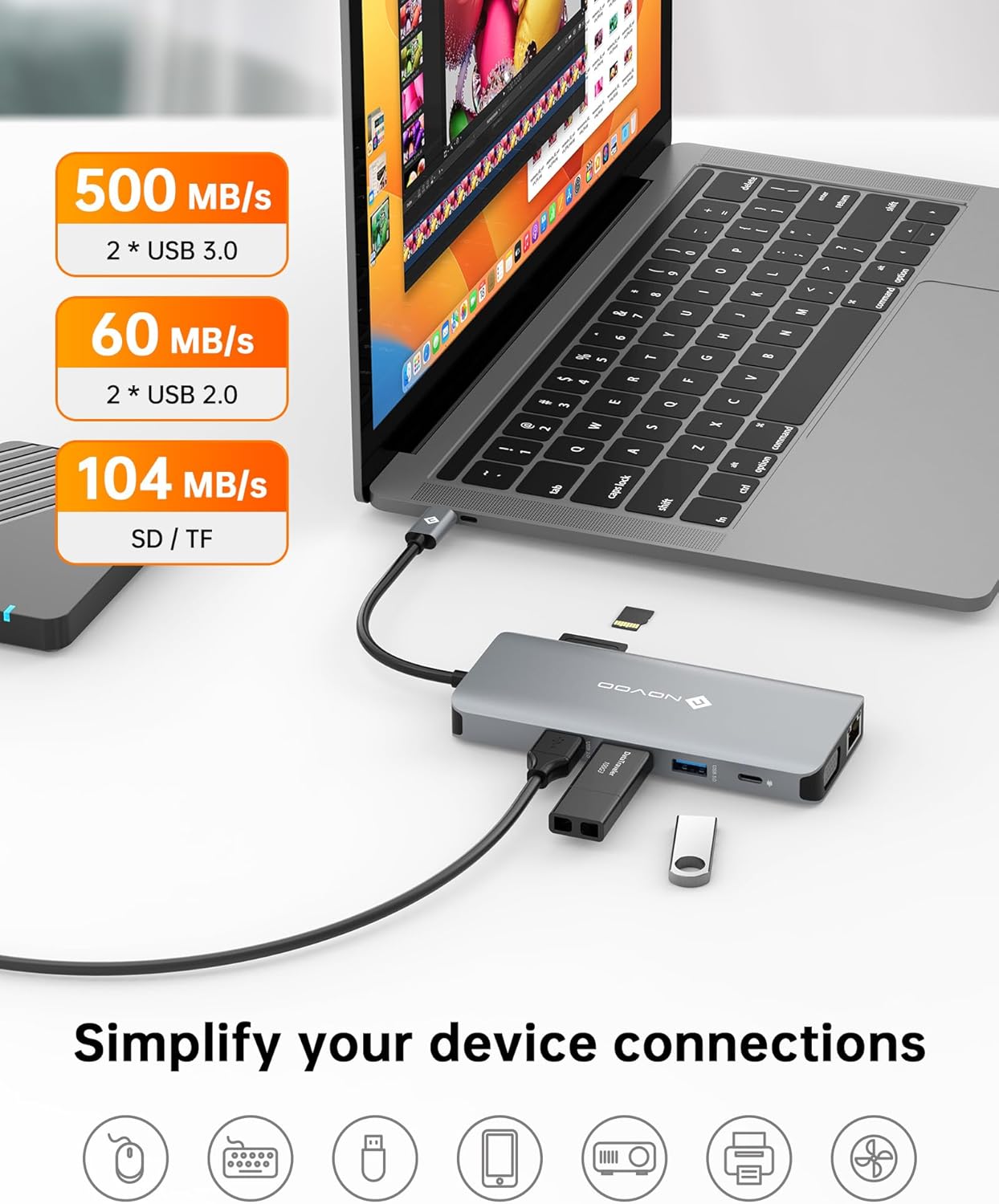
Image 4.6: Data transfer capabilities with USB 3.0, USB 2.0, and SD/TF card slots.
4.3 Konnettività tan-Netwerk
The Gigabit Ethernet port provides a reliable and fast internet connection:
- Connect an Ethernet cable to the RJ45 port for speeds up to 1Gbps, offering a more stable connection than Wi-Fi.

Image 4.7: Gigabit Ethernet port for stable internet connection.
4.4 Twassil tal-Enerġija
The USB-C PD port allows you to charge your laptop while using the docking station:
- Connect your laptop's original USB-C power adapter (or a compatible 100W+ USB-C PD charger) to the docking station's PD port. This will pass power through to your laptop, ensuring it remains charged during use.

Image 4.8: 100W Power Delivery feature.
5. Manutenzjoni
Biex tiżgura l-lonġevità u l-prestazzjoni ottimali tad-docking station tiegħek, segwi dawn il-linji gwida tal-manutenzjoni:
- Tindif: Uża drapp artab u niexef biex tnaddaf il-barra tal-istazzjon tad-docking. Evita prodotti tat-tindif likwidi jew materjali li joborxu.
- Ħażna: Aħżen l-istazzjon tad-docking f'post frisk u niexef 'il bogħod mix-xemx diretta u minn temperaturi estremi.
- Immaniġġjar: Evita li twaqqa' jew li tissottometti l-apparat għal impatti qawwija. Tippruvax tiżżarma l-unità.
- Ġestjoni tal-Kejbil: Kun żgur li l-kejbils mhumiex mgħawġa jew imġebbda żżejjed, għax dan jista' jwassal għal ħsara maż-żmien.
6 Issolvi l-problemi
Jekk tiltaqa' ma' problemi bid-docking station tiegħek, irreferi għall-problemi u s-soluzzjonijiet komuni li ġejjin:
| Problema | Kawża Possibbli | Soluzzjoni |
|---|---|---|
| No display output on external monitor(s). |
|
|
| External monitors are mirroring instead of extending (macOS). | macOS limitation. | This is expected behavior for macOS when connecting multiple external displays via a single MST-enabled hub. macOS does not support MST for extended displays. |
| Veloċitajiet baxxi tat-trasferiment tad-dejta. | Device connected to USB 2.0 port instead of USB 3.0. | Ensure high-speed devices are connected to the blue USB-A 3.0 ports. |
| Il-laptop mhux qed jiċċarġja jew qed jiċċarġja bil-mod. |
|
|
| Problemi bil-konnessjoni tal-Ethernet. |
|
|
7. Speċifikazzjonijiet
| Karatteristika | Dettall |
|---|---|
| Numru tal-Mudell | NHM11D-111S2 |
| Dimensjonijiet tal-Prodott | 2.2 x 0.6 x 5.1 pulzieri |
| Piż tal-oġġett | 3.84 uqija |
| Kulur | Griż tal-fidda |
| Interface tal-Ħardwer | USB Tip Ċ |
| Output HDMI 1 | Sa 4K@30Hz |
| Output HDMI 2 | Sa 4K@60Hz |
| Produzzjoni VGA | Sa 1080P@60Hz |
| USB-A 3.0 Data Transfer | Sa 5Gbps |
| USB-A 2.0 Data Transfer | Sa 480Mbps |
| Veloċità Ethernet | 10/100 / 1000Mbps (Gigabit) |
| Input USB-C PD | Sa 100W |
| Qarrej tal-Kard | SD/TF (Micro SD) |
| Apparati Kompatibbli | Laptops with full-function USB-C ports (DisplayPort Alt Mode, Power Delivery) |
| Manifattur | NOVOO |
8. Garanzija u Appoġġ
NOVOO provides a Servizz ta' wara l-bejgħ ta' sena for this product. If you encounter any issues or require assistance, please contact NOVOO customer support. We are committed to ensuring customer satisfaction.
For support, please refer to the contact information provided with your product packaging or visit the official NOVOO websit.


