1. Introduzzjoni
This manual provides detailed instructions for the setup, operation, and maintenance of your Logitech POP Mouse. The POP Mouse is a compact, wireless mouse designed for multi-device use with customizable features.

Image: The Logitech POP Mouse in Graphite, showcasing id-disinn kompatt u ergonomiku tiegħu.
2. Kontenut tal-Pakkett
- Logitech POP Wireless Mouse
- 1x AA Battery (pre-installed)
- Dokumentazzjoni tal-utent

Image: The Logitech POP Mouse and a single AA battery, representing the items included in the product package.
3. Istruzzjonijiet ta' Setup
3.1. Installazzjoni tal-batterija
- Gently remove the top cover of the mouse. The cover is magnetically attached.
- Daħħal il-batterija AA inkluża, waqt li tiżgura l-polarità korretta (+/-).
- Erġa' poġġi l-għatu ta' fuq, waqt li tiżgura li jidħol sew f'postu.
3.2. Konnessjoni permezz tal-Bluetooth
- Ixgħel il-maws billi tuża l-iswiċċ tal-enerġija li jinsab fil-qiegħ.
- Press and hold one of the Easy-Switch buttons (1, 2, or 3) on the bottom of the mouse until the LED indicator starts blinking rapidly. This indicates pairing mode.
- On your device (computer, tablet, or phone), open Bluetooth settings.
- Select "Logitech POP Mouse" from the list of available devices to complete the pairing process.
- The LED indicator will glow solid for a few seconds, then turn off, confirming a successful connection.

Image: The underside of the POP Mouse, highlighting the Easy-Switch buttons for multi-device pairing.
4. Istruzzjonijiet Operattivi
4.1. Funzjonijiet Bażiċi
- Ikklikkja Xellug: L-għażla u l-interazzjoni primarji.
- Ikklikkja bil-lemin: Aċċessa l-menus kuntestwali.
- Scroll Wheel: Jinnaviga vertikalment fid-dokumenti u web paġni.
4.2. Teknoloġija SilentTouch
The POP Mouse features SilentTouch Technology, which significantly reduces click noise, providing a quieter user experience without compromising tactile feedback.

Image: A hand operating the POP Mouse, illustrating the quiet operation provided by SilentTouch Technology.
4.3. Skrolljar bir-Rota Intelliġenti
L-SmartWheel jaqleb awtomatikament bejn żewġ modi:
- Mod ta 'preċiżjoni: For detailed, line-by-line navigation.
- Speed Scroll Mode: For rapid scrolling through long documents or web paġni.

Image: A user's hand demonstrating the use of the SmartWheel for efficient navigation.
5. Personalizzazzjoni
5.1. Customizable Top Button (Emoji Button)
The top button, located below the scroll wheel, is customizable. By default, it can be configured to open an emoji menu or assign other shortcuts.
- Download and install the Logitech Options+ Software from the official Logitech websit (logitech.com/optionsplus).
- Open the Logitech Options+ Software.
- Select your POP Mouse from the detected devices.
- Innaviga għas-settings tal-personalizzazzjoni tal-buttuni.
- Assign your desired function to the top button, such as an emoji shortcut, Snip Screen, Mic Mute, or Voice-to-Text.
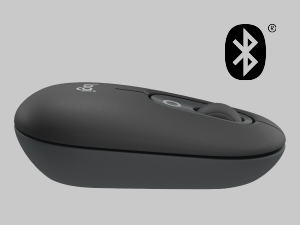
Image: A visual representation of the customizable top button on the POP Mouse, showing its function to access an emoji menu on a connected computer.
6. Konnettività bejn Apparati Multipli
The Logitech POP Mouse can connect to up to three different devices simultaneously using Bluetooth. You can easily switch between these devices.
6.1. Apparat tal-Qlib
To switch between paired devices, press the Easy-Switch button (1, 2, or 3) on the bottom of the mouse corresponding to the desired device. The LED indicator will briefly light up to confirm the selected channel.
6.2. Logitech FLOW (Advanced Feature)
For seamless control across multiple computers, install Logitech Options+ Software on all devices. With Logitech FLOW enabled, you can move your mouse cursor across screens as if they were a single desktop, even copying and pasting text, images, and files bejniethom.
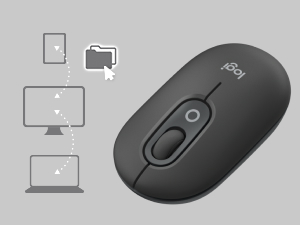
Image: A diagram showing how the POP Mouse can control multiple devices, illustrating the FLOW feature for cross-device interaction.
7. Manutenzjoni
7.1. Sostituzzjoni tal-batterija
The POP Mouse operates on a single AA battery with an estimated life of up to 24 months. When the battery is low, the LED indicator on the bottom of the mouse may flash. Replace the battery by following the steps in Section 3.1.
7.2. Tindif
Biex tnaddaf il-maws tiegħek, uża drapp artab u mingħajr suf. Għal ħmieġ iebes, nixxef ftit.ampLaħlaħ id-drapp bl-ilma. Evita li tuża kimiċi ħarxa jew materjali li joborxu.
8 Issolvi l-problemi
| Problema | Soluzzjoni |
|---|---|
| Mouse does not turn on. | Ensure the power switch on the bottom of the mouse is in the 'ON' position. Check and replace the AA battery if necessary. |
| Mouse not connecting via Bluetooth. |
|
| Cursor movement is erratic or unresponsive. |
|
| Custom button not working. | Ensure Logitech Options+ Software is installed and running on your computer, and the button is correctly configured. |
9. Speċifikazzjonijiet
| Karatteristika | Dettall |
|---|---|
| Numru tal-Mudell | 910-007165 |
| Konnettività | Bluetooth 5.1 |
| Firxa Wireless | Sa 10 metri (32.81 pied) |
| Teknoloġija tas-Sensers | Logitech High Precision Optical Tracking |
| Numru ta' Buttuni | 4 (Left/Right click, Scroll wheel click, Top customizable button) |
| Tip ta 'batterija | 1 x batterija AA |
| Ħajja tal-batterija | Sa 24 xahar (jista' jvarja skont l-użu) |
| Dimensjonijiet (LxWxH) | 14.12 x 2.34 x 1.38 pulzieri (35.86 x 5.94 x 3.51 ċm) |
| Piż | 2.89 ounces (82g with battery) |
| Kompatibilità tas-Sistema Operattiva | Windows 10 jew aktar tard, macOS 10.15 jew aktar tard, iPadOS, Chrome OS, Android |

Image: Technical drawing displaying the length, width, and height measurements of the Logitech POP Mouse.
10. Garanzija u Appoġġ
Għal informazzjoni dwar il-garanzija u appoġġ tekniku, jekk jogħġbok żur is-sit uffiċjali tal-appoġġ ta' Logitech. website or refer to the user documentation included in your product package.
- Appoġġ onlajn: support.logi.com
- Reġistrazzjoni tal-Prodott: Registering your product can help you receive faster support and updates.


