1. Introduzzjoni
This manual provides detailed instructions for the installation, operation, and maintenance of your Tiandy TC-C32XN 2MP Fixed IP Dome Turret Camera. Please read this manual thoroughly before using the product to ensure correct usage and optimal performance. Keep this manual for future reference.
2. Informazzjoni dwar is-Sigurtà
- Ensure the power supply matches the camera's requirements to prevent damage.
- Tesponix il-kamera għal temperaturi estremi, umdità, jew ambjenti korrużivi.
- Avoid pointing the camera directly at strong light sources for extended periods, as this may damage the image sensor.
- Handle the camera with care. Do not drop or subject it to strong vibrations.
- All installation and service should be performed by qualified personnel.
- Skonnettja l-enerġija qabel ma tnaddaf jew tagħmel manutenzjoni.
3. Kontenut tal-Pakkett
Ivverifika li l-oġġetti kollha huma preżenti fil-pakkett tiegħek:
- Tiandy TC-C32XN 2MP Fixed IP Dome Turret Camera
- Adapter
- Viti tal-Immuntar u Plugs tal-Ħajt
- Gwida ta' Bidu Mgħaġġel (jekk inkluża)
4. Prodott Aktarview
The Tiandy TC-C32XN is a 2MP Fixed IP Dome Turret Camera designed for reliable surveillance. It features Smart IR for clear night vision up to 30 meters, a built-in microphone, and an SD card slot for local storage.

Figura 4.1: Quddiem view of the Tiandy TC-C32XN camera, showing the lens and IR illuminators.
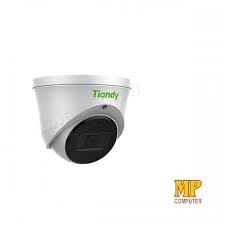
Figura 4.2: Ġenb view of the Tiandy TC-C32XN camera, highlighting its dome turret form factor.
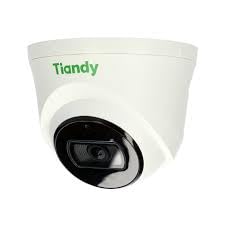
Figura 4.3: Angolat view of the Tiandy TC-C32XN camera, showcasing id-disinn kompatt tiegħu.
5. Setup u Installazzjoni
5.1 Immuntar
- Agħżel Post: Choose a suitable outdoor or indoor location (IP67 rated for outdoor use) that provides the desired viewing angle and is within reach of power and network connections. The camera is designed for protruding mounting.
- Drill toqob: Use the provided mounting template (if applicable) to mark and drill holes for the mounting screws.
- Sikura l-Kamera: Attach the camera base securely to the mounting surface using the provided screws and wall plugs.
5.2 Wajers
- Konnessjoni tal-Enerġija: Connect the provided adapter to the camera's power input and then to a power outlet. The camera operates on corded electric power.
- Konnessjoni tan-Netwerk: Connect an Ethernet cable from your network router or PoE switch to the camera's Ethernet port. This camera supports Ethernet connectivity for data transmission.
5.3 Konfigurazzjoni Inizjali
- Qawwa Mixgħul: Once wired, power on the camera.
- Network Discovery: Use the Tiandy client software or a network scanner tool to discover the camera's IP address on your local network.
- Access Camera: Iftaħ a web il-browser u daħħal l-indirizz IP tal-kamera biex taċċessaha web interface. Log in using the default credentials (refer to the quick start guide for default username/password).
- Ibdel il-Password Predefinita: For security, immediately change the default password upon first login.
- NVR Integration: If using with an NVR, add the camera to your NVR system following the NVR's instructions. This camera is compatible with all brand NVRs.
- Setup tal-App mobbli: Download the official Tiandy mobile application (available for Android and iOS) and follow the in-app instructions to add your camera for remote viewing u kontroll.
6. Istruzzjonijiet Operattivi
6.1 Ħaj View u Reġistrazzjoni
Access the camera's live view permezz tal- web interface, NVR, or mobile app. Configure recording schedules and methods (continuous, motion-triggered) via the camera's settings.
6.2 Smart IR and Night Vision
The camera features Smart IR technology, which automatically adjusts the intensity of its infrared LEDs to prevent overexposure of objects close to the camera, ensuring clear images in low-light conditions up to 30 meters. It also supports 'Night Color' low light technology for enhanced visibility.
6.3 Sejbien tal-Mozzjoni u Twissijiet
Configure motion detection zones and sensitivity in the camera settings. The camera supports 'Motion Only' alert types. When motion is detected, the camera can trigger recordings, send notifications to your mobile device, or activate other configured actions. It also supports advanced features like tripwire and perimeter intrusion detection.
6.4 Funzjonalità tal-Awdjo
The built-in microphone allows for audio monitoring of the surveillance area. Audio settings can be adjusted in the camera's web interface or NVR.
6.5 SD Card Storage
Insert a compatible SD card into the camera's SD card slot for local storage of recordings. Ensure the card is formatted correctly via the camera's settings. The camera supports SD flash memory type.
6.6 Buttuna Irrisettja
A reset button is included for restoring the camera to its factory default settings. Consult the quick start guide for the exact location and procedure for your model.
7. Manutenzjoni
- Tindif: Imsaħ il-lenti u l-qafas tal-kamera bil-mod b'ċarruta ratba u niexfa. Tużax kimiċi ħarxa jew prodotti tat-tindif li joborxu.
- Aġġornamenti tal-Firmware: Regularly check the Tiandy official website for firmware updates. Keeping your camera's firmware up-to-date ensures optimal performance and security.
- Spezzjoni tal-Cable: Periodically inspect all cables for signs of wear or damage, especially for outdoor installations.
8 Issolvi l-problemi
- Ebda Qawwa: Ensure the power adapter is securely connected and the power outlet is functional.
- L-ebda Vidjo: Check network cable connections. Verify the camera's IP address and network settings. Ensure the camera is properly added to your NVR or viewsoftwer ing.
- Kwalità Fqira tal-Immaġni: Clean the camera lens. Adjust focus if applicable. Check lighting conditions and camera placement.
- Kwistjonijiet ta' Konnessjoni man-Netwerk: Verify router and network cable functionality. Restart the camera and network devices.
- Ma nistax naċċessa Web Interface: Ensure your computer is on the same network segment as the camera. Verify the camera's IP address. Try resetting the camera to factory defaults if necessary (this will erase all settings).
9. Speċifikazzjonijiet
| Karatteristika | Speċifikazzjoni |
|---|---|
| Mudell | TC-C32XN |
| Riżoluzzjoni Għadha Effettiva | 2 MP (1920x1080) |
| Frame Rata | 30 frejm kull sekonda |
| Teknoloġija tas-Sensor tar-Ritratti | CMOS (1/2.8") |
| Medda tal-Viżjoni Lejl | 30 Metres (Smart IR) |
| Teknoloġija tad-Dawl Baxx | Kulur bil-lejl |
| Zoom ottiku | 3 x |
| Mikrofonu inkorporat | Iva |
| Slot tal-Kard SD | Yes (Flash Memory Type: SD) |
| Tip ta 'Twissija | Motion Only (supports tripwire and perimeter) |
| Teknoloġija tal-Konnettività | Wireless (IR), Ethernet |
| Sors tal-Enerġija | Corded Elettriku |
| Klassifikazzjoni tal-Protezzjoni Internazzjonali | IP67 |
| Fattur tal-Formola | Dome Turret |
| Tip ta 'Immuntar | Jisporġu 'l barra |
| Kompatibilità tas-Sistema Operattiva | Android, iOS |
| Dimensjonijiet tal-Prodott (L x W x H) | 50 x 50 x 70 Millimetru |
| Piż tal-oġġett | 20 Gramm |
| Komponenti Inklużi | Adapter |
| Kulur | Abjad |
10. Garanzija u Appoġġ
For warranty information and technical support, please refer to the warranty card included with your product or visit the official Tiandy website. Contact the seller or manufacturer directly for assistance with product issues or inquiries.


