1. Introduzzjoni u Fuqview
This manual provides essential information for the safe and efficient operation of your new Samsung 653 L Side-by-Side AI Enabled Smart Refrigerator. Please read these instructions thoroughly before using the appliance and retain them for future reference. Your refrigerator features a 653-liter capacity, a 3-star energy rating, and advanced technologies like Convertible 5-in-1 modes, Twin Cooling Plus, and Wi-Fi connectivity via the SmartThings App.
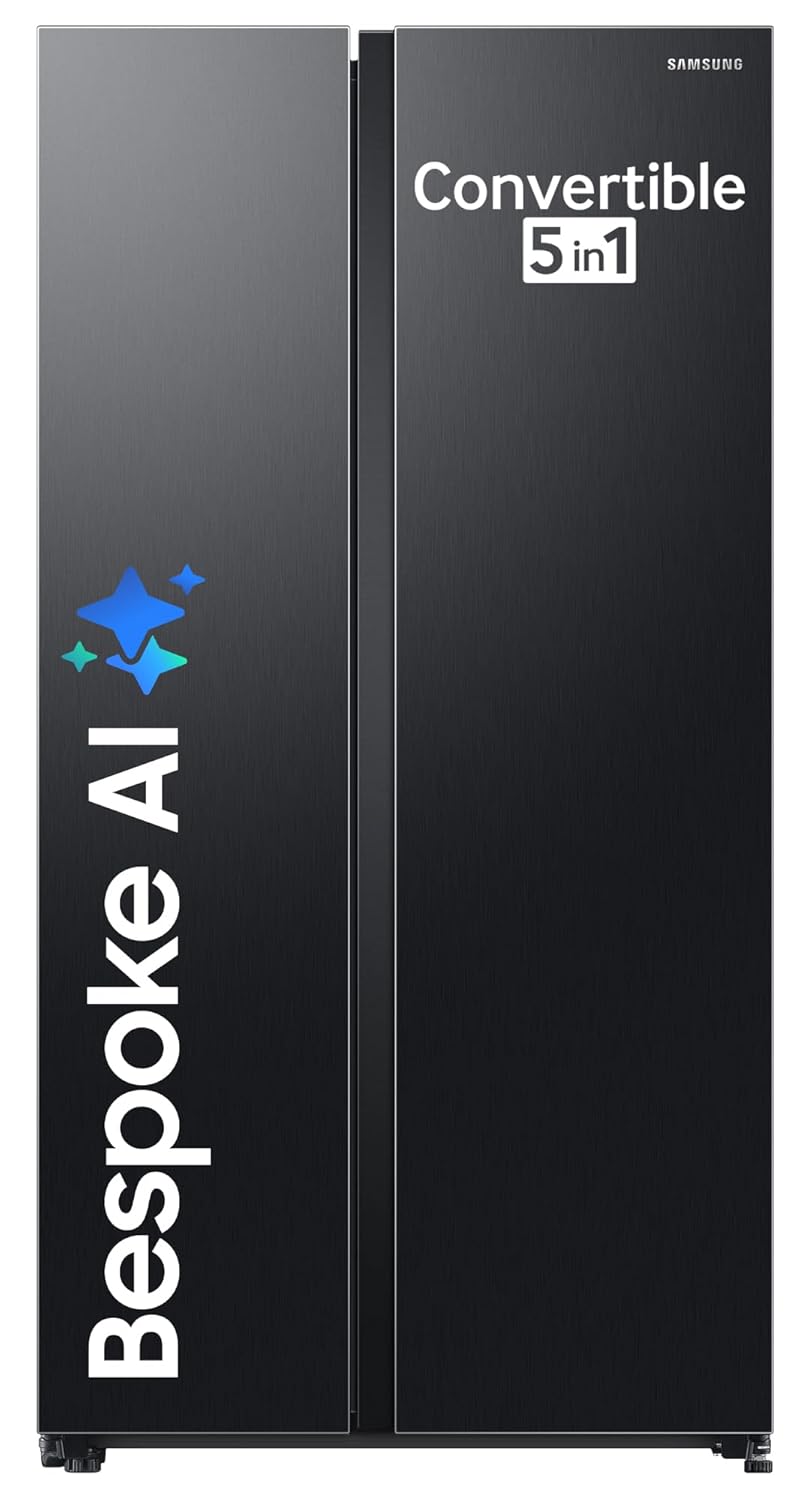
Figura 1: Quddiem view of the Samsung RS76CG8003B1HL Side-by-Side Refrigerator.
2. Informazzjoni dwar is-Sigurtà
To prevent personal injury or property damage, observe all safety precautions. This appliance is designed for household use only. Ensure proper grounding and do not use adapters or extension cords. Keep ventilation openings clear of obstruction. Do not store explosive substances such as aerosol cans with flammable propellants in this appliance.
- Sigurtà Elettrika: Always plug the refrigerator into a dedicated, grounded electrical outlet. Do not overload the circuit.
- Sigurtà tat-Tfal: Issorvelja lit-tfal biex tiżgura li ma jilagħbux bl-apparat. Żomm il-materjali tal-ippakkjar fejn ma jintlaħqux mit-tfal.
- Materjali li jaqbdu: Taħżinx jew tużax gażolina jew fwar u likwidi oħra li jaqbdu fil-viċinanza ta' dan jew kwalunkwe apparat ieħor.
- Manutenzjoni: Skonnettja l-provvista tal-enerġija qabel ma tnaddaf jew tagħmel xi manutenzjoni.
3. Installazzjoni
Installazzjoni xierqa hija kruċjali għal prestazzjoni u sigurtà ottimali.
3.1 Disimballaġġ
Carefully remove all packaging materials, including tape and protective films. Inspect the refrigerator for any damage. Retain packaging for potential future transport.
3.2 Tqegħid
Choose a location with a level, stable floor that can support the refrigerator's weight. Ensure adequate clearance around the appliance for proper ventilation (at least 5 cm on sides and back, 10 cm on top). Avoid direct sunlight or heat sources. The dimensions are 71.6 cm (D) x 91.2 cm (W) x 178 cm (H).

Figure 2: Refrigerator dimensions for installation planning.
3.3 Konnessjoni Elettrika
Connect the power cord to a dedicated 230V, 50Hz, AC outlet. This refrigerator supports stabilizer-free operation within a voltage firxa ta '100V - 300V.
3.4 Invellar u Allinjament tal-Bieb
Use the adjustable feet to level the refrigerator. Ensure both doors align properly and seal tightly when closed. Adjust the front feet to slightly tilt the refrigerator backward for easier door closing.

Figura 3: Eżample of a properly installed refrigerator with a built-in look.
4. Karatteristiċi
Your Samsung refrigerator is equipped with several innovative features to enhance food preservation and convenience.
4.1 Modi Konvertibbli 5-f'1
This feature allows you to optimize storage based on your needs:
- Modalità Normali: Standard refrigerator and freezer operation.
- Modalità Friġġ Extra: Converts the freezer compartment into additional refrigerator space.
- Modalità Staġjonali: Adjusts cooling for seasonal requirements.
- Modalità Vacation: Minimizes energy consumption when you are away.
- Modalità Waħdek fid-Dar: Optimizes cooling for minimal usage.

Figure 4: Visual representation of the Convertible 5-in-1 modes.
4.2 Twin Cooling Plus™
Two independent cooling systems ensure optimal temperature and humidity in both the refrigerator and freezer compartments, preventing odor mixing and keeping food fresh for longer.

Figure 5: Illustration of the Twin Cooling Plus technology.
4.3 AI Energy Mode & SmartThings App
Connect your refrigerator to the SmartThings App via Wi-Fi to monitor and control settings remotely. The AI Energy Mode learns your usage patterns to optimize compressor operation and save up to 10% on energy consumption.
Video 1: Demonstration of SmartThings App connectivity and remote control features.
4.4 Power Cool & Power Freeze
Activate Power Cool to rapidly chill items in the refrigerator or Power Freeze to quickly freeze food in the freezer compartment.

Figure 6: Visuals representing the Power Cool and Power Freeze features.
4.5 Kompressur Inverter Diġitali
The Digital Inverter Compressor provides higher energy efficiency, less noise, and long-lasting performance by adjusting its speed in response to cooling demand.

Figure 7: Information on the Digital Inverter Compressor technology.
4.6 Tqassim Intern
The refrigerator features a well-organized interior with 4 toughened glass shelves, 2 vegetable bins, and multiple door pockets on each side. Bright LED lighting illuminates the interior.

Figura 8: Dettaljat view of the refrigerator's interior, highlighting shelves, bins, and door pockets.
Video 2: A quick tour of the refrigerator's interior compartments and features.
4.7 Allarm tal-Bieb
An audible alarm will sound if the refrigerator door is left open for an extended period, helping to conserve energy and maintain optimal temperatures.

Figure 9: Visual representation of the door alarm function.
5. Istruzzjonijiet Operattivi
Iffamiljarizza ruħek mal-pannell tal-kontroll u l-operazzjonijiet bażiċi.
5.1 Panel tal-Kontroll
The internal display panel allows you to adjust temperatures for both the refrigerator and freezer compartments, activate special modes, and manage other settings.

Figure 10: Close-up of the internal LED control panel.
5.2 Aġġustament tat-Temperatura
Press the 'Fridge' or 'Freezer' buttons on the control panel to cycle through available temperature settings. The recommended temperature for the refrigerator is 3°C and for the freezer is -19°C.
5.3 Using Convertible Modes
To change the mode of the freezer compartment (e.g., to Extra Fridge), press and hold the 'Freezer' button or navigate through the SmartThings App until the desired mode is selected.
5.4 SmartThings App Usage
Download the Samsung SmartThings App from your device's app store. Follow the in-app instructions to connect your refrigerator. Once connected, you can:
- Monitor energy usage and activate AI Energy Mode.
- Adjust temperatures and modes remotely.
- Receive alerts, such as an open door notification.
- Access SmartThings Home Care and SmartThings Cooking features.
6. Manutenzjoni u Tindif
Regular cleaning and maintenance ensure the longevity and efficiency of your refrigerator.
6.1 Tindif ta' barra
Imsaħ l-uċuħ ta’ barra b’ċarruta ratba dampened with mild detergent and water. For the Black Matte finish, use a non-abrasive cleaner to avoid scratches. The surface is fingerprint resistant.
6.2 Tindif Intern
Remove all food items, shelves, and drawers. Wash removable parts with warm, soapy water. Wipe the interior walls with a solution of baking soda and water (1 tablespoon baking soda to 2 cups water). Rinse and dry thoroughly before replacing items.
6.3 Gaskets tal-Bieb
Clean door gaskets regularly with a soft cloth and warm, soapy water to ensure a tight seal. A dirty or sticky gasket can prevent the door from closing properly.
6.4 Defrosting
This is a frost-free refrigerator, so manual defrosting is not required. The system automatically prevents ice buildup.
7 Issolvi l-problemi
Before contacting service, try these basic troubleshooting steps.
| Problema | Kawża Possibbli | Soluzzjoni |
|---|---|---|
| Il-friġġ ma jkessaħx | Qawwa outage, unplugged, temperature setting too high, door left open. | Check power connection, adjust temperature, ensure doors are closed. |
| Ħsejjes mhux tas-soltu | Refrigerator not level, items vibrating inside, normal compressor sounds. | Level the appliance, rearrange items, normal operation may produce some sounds. |
| Tnixxija ta' ilma minn ġewwa/barra | Drain hose clogged, door gasket not sealing, excessive humidity. | Clear drain hose, clean/adjust door gasket, ensure proper ventilation. |
| L-allarm tal-bieb idoqq ta’ spiss | Door not fully closed, door gasket dirty/damaged, heavy items blocking closure. | Ensure door is fully closed, clean gasket, remove obstructions. |
8. Speċifikazzjonijiet
Detailed technical specifications for your Samsung refrigerator.
- Isem tal-Mudell: RS76CG8003B1HL
- Kapaċità: 653 Liters (Fresh Food: 409 L, Freezer: 244 L)
- Klassifikazzjoni tal-Enerġija: 3 Star
- Konsum Annwali tal-Enerġija: 547 Kilowatt Siegħa Fis-Sena
- Dimensjonijiet (D x W x H): 71.6 x 91.2 x 178 Ċentimetru
- Piż: 100 kg
- Sistema ta' Defrost: Ħieles Ġlata
- Tip ta' kompressur: Inverter Diġitali
- Refriġerant: R-600A
- Voltage: 230 Volts (Stabilizer Free Operation: 100V - 300V)
- Numru ta' Bibien: 2 (Side-by-Side)
- Tip ta' xkaffa: Ħġieġ imwebbes
- Kulur: Matte Iswed
- Komponenti Inklużi: 1 Refrigerator unit, User Manual, Warranty Card, Ice Tray
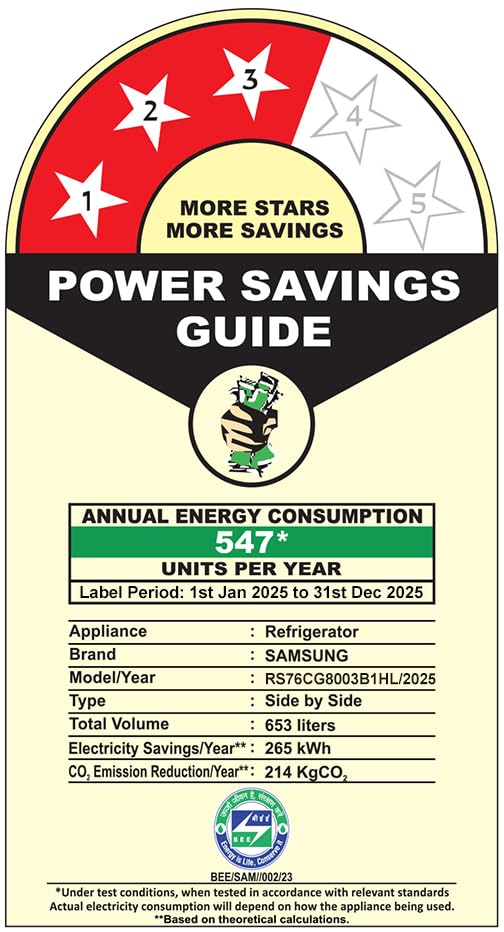
Figure 11: Energy efficiency label for the refrigerator, showing 3-star rating and annual consumption.
9. Garanzija u Appoġġ
Your Samsung refrigerator comes with comprehensive warranty coverage and dedicated customer support.
9.1 Informazzjoni dwar Garanzija
Il-prodott jinkludi a Garanzija komprensiva ta '1 snin. The Digital Inverter Compressor is covered by a garanzija ta 'sena. For purchases made between December 1st, 2022, and March 31st, 2026, the Digital Inverter Compressor warranty is extended to 20 snin. Please retain your seller invoice to avail warranty services.
9.2 Appoġġ għall-Klijent
For any queries, assistance, or to schedule a service, please contact Samsung customer care:
- Telephone (Toll Free): 1800 40 7267864 (1800 40 SAMSUNG)
- WhatsApp: 1800-57-267864
- Email: support.india@samsung.com
When contacting support, provide your product's model name (RS76CG8003B1HL) and the seller's details from your invoice.


