1. Introduzzjoni
This manual provides detailed instructions for the installation, operation, and maintenance of your PWAYTEK HDMI Extender Splitter 1x4. This device is designed to distribute a single HDMI source to four displays over long distances using CAT5e/6/7 Ethernet cables, supporting resolutions up to 4K@60Hz. It also includes features such as HDMI loop out, bi-directional IR control, Power over Cable (POC), and EDID management for enhanced flexibility.
2. Kontenut tal-Pakkett
Jekk jogħġbok ivverifika li l-oġġetti kollha elenkati hawn taħt huma inklużi fil-pakkett tiegħek:
- 1x HDMI Extender Splitter Transmitter (PW-HT247P4IR)
- 4x HDMI Extender Receivers
- 1x DC 12V Power Adapter
- 1x IR TX Cable (for transmitter)
- 4x IR RX Cables (for receivers)
- 1x Manwal għall-Utent
- 1x Karta tal-Garanzija

Image: Contents of the PWAYTEK HDMI Extender Splitter 1x4 package, showing the main transmitter unit, four receiver units, power adapter, IR cables, and user manual.
3. Prodott Aktarview
The PWAYTEK HDMI Extender Splitter system consists of a transmitter unit and four receiver units. The transmitter connects to your HDMI source and distributes the signal, while each receiver connects to a display.
Unità tat-Trasmettitur (TX)
- DC 12V: Port tad-dħul tal-enerġija.
- HD IN: HDMI input from source device.
- ĦRUĠ HD: HDMI loop out to a local display.
- UTP (x4): RJ45 outputs for connecting to receivers via CAT5e/6/7 cable.
- IR OUT: Port for connecting the IR TX cable to control the source device.
- EDID: EDID management switch.
- ON/OFF: Swiċċ tal-enerġija.
- LED PWR: Indikatur tal-qawwa.
- LED STA: Indikatur tal-istatus.
Unità Riċevitur (RX)
- UTP: RJ45 input from the transmitter via CAT5e/6/7 cable.
- IR IN: Port for connecting the IR RX cable to receive IR signals from the remote.
- ĦRUĠ HD: HDMI output to display device.
- LED PWR: Indikatur tal-qawwa.
- LED STA: Indikatur tal-istatus.
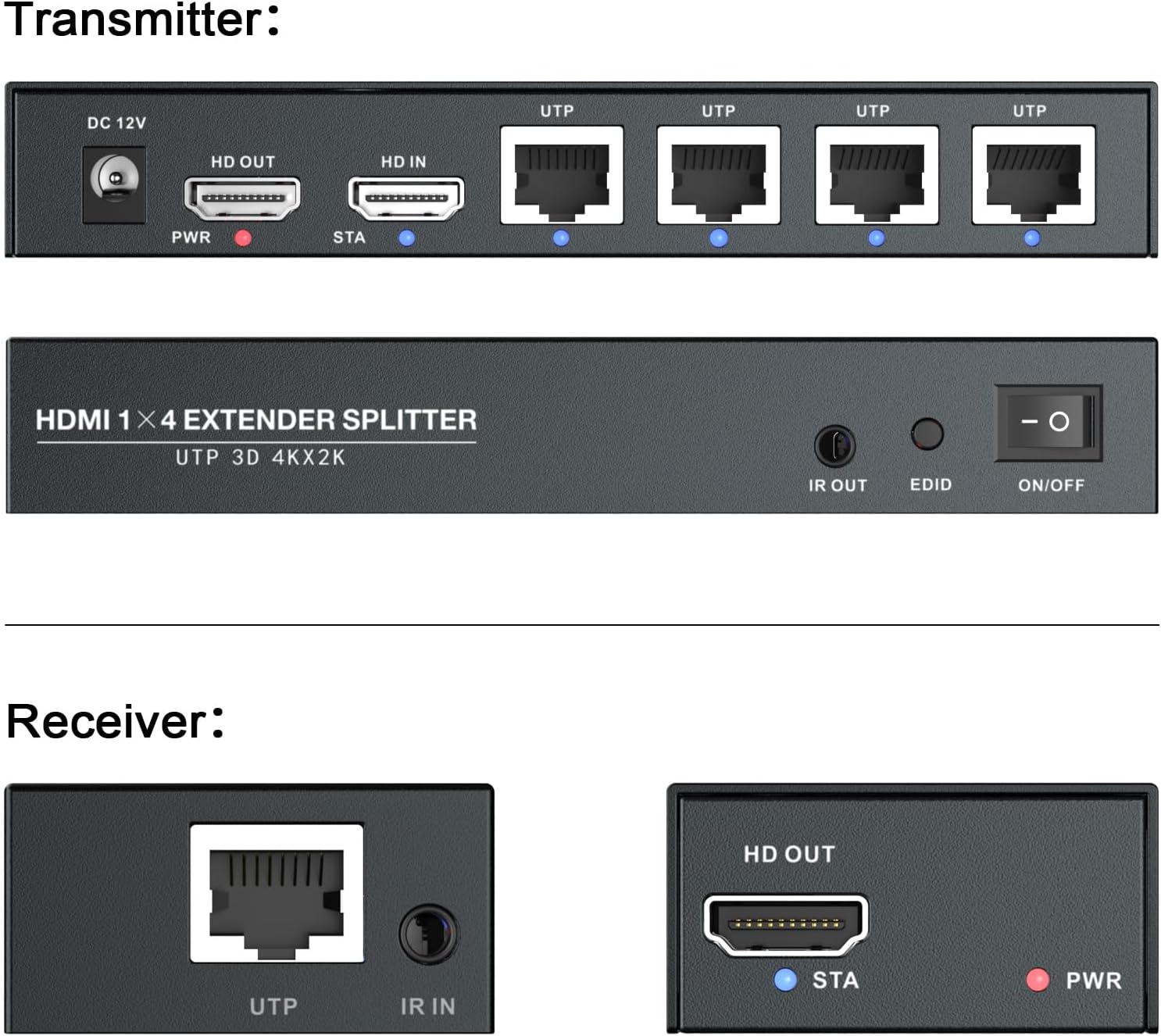
Immaġni: Dettaljata view of the ports on both the transmitter and receiver units, including HDMI In/Out, UTP (Ethernet), DC 12V, IR In/Out, EDID switch, and power/status indicators.
4. Istruzzjonijiet ta' Setup
Follow these steps to set up your HDMI Extender Splitter system:
- Apparat mitfi: Ensure all HDMI source devices, displays, and the extender units are powered off before making any connections.
- Qabbad is-Sors HDMI mat-Trasmettitur: Connect your HDMI source (e.g., Blu-ray player, PC, game console) to the HD IN port on the transmitter unit using an HDMI cable.
- Qabbad id-Displej Lokali (Mhux obbligatorju): If you wish to have a local display near the source, connect it to the HD OUT (loop out) port on the transmitter unit using an HDMI cable.
- Qabbad Kejbils Ethernet: Connect up to four CAT5e/6/7 Ethernet cables from the UTP output ports on the transmitter to the UTP input ports on each of the four receiver units. Ensure the cables are of good quality and within the maximum recommended length (up to 196ft for 4K@60Hz).
- Connect Receivers to Displays: Connect each receiver unit's HD OUT port to its respective display (e.g., TV, monitor, projector) using an HDMI cable.
- Qabbad il-Kejbils tal-IR (Mhux obbligatorju):
- Qabbad il- IR TX cable lill- IR OUT port on the transmitter. Position the IR emitter head near the IR sensor of your source device.
- Qabbad il- IR RX cables lill- IR IN ports on each receiver. Position the IR receiver head in a location where it can easily receive signals from your remote control.
- Qawwa Mixgħul: Connect the DC 12V power adapter to the transmitter unit. The PWR LED on the transmitter should illuminate. Since the receivers are powered via POC (Power over Cable), they do not require separate power adapters.
- Power On Displays and Source: Power on all connected displays and your HDMI source device.
- Ivverifika s-Sinjal: Check each display for the video signal. The STA LEDs on both the transmitter and receivers should indicate a stable connection.
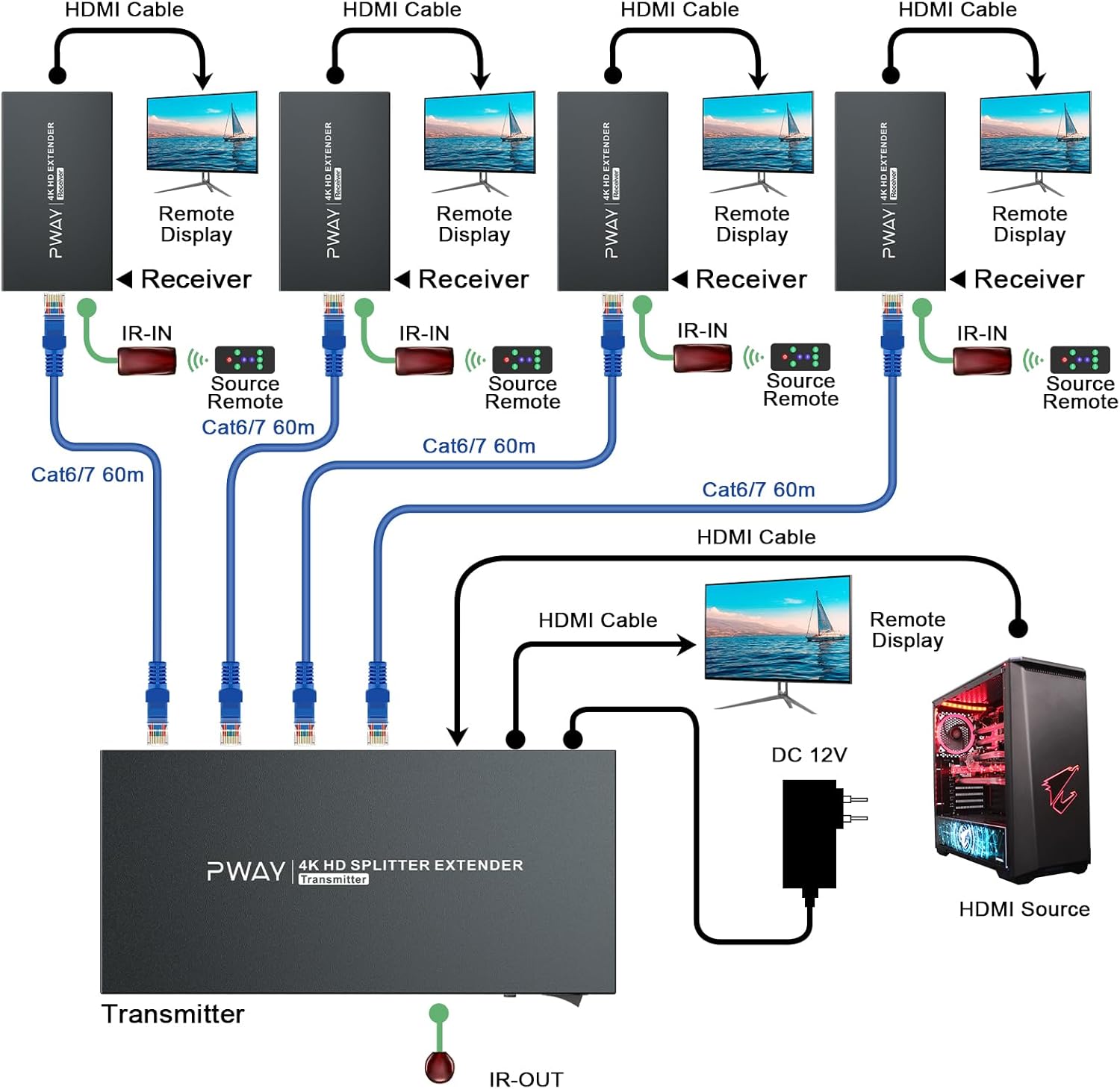
Image: A detailed connection diagram illustrating how to connect the HDMI source to the transmitter, the transmitter to multiple receivers via CAT6/7 cables, and each receiver to a remote display, including IR connections.
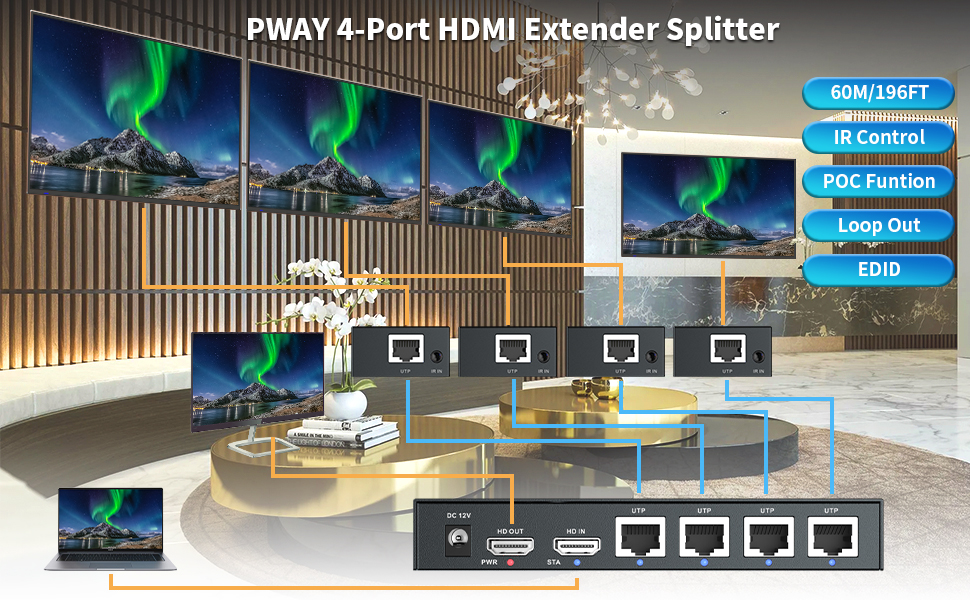
Image: An illustrative diagram showing the PWAYTEK 4-Port HDMI Extender Splitter connecting a laptop to four remote displays, highlighting the use of UTP cables for extended reach and features like IR control, POC, Loop Out, and EDID.
5. Istruzzjonijiet Operattivi
Once the system is set up, operation is straightforward:
- Video Distribution: The HDMI signal from your source will be automatically distributed to all connected displays via the transmitter and receivers.
- Kontroll IR: Use your original remote control at any receiver location. The IR RX cable will capture the signal, send it back through the Ethernet cable to the transmitter, and the IR TX cable will relay it to your source device, allowing you to control the source remotely.
- Ġestjoni EDID: The EDID switch on the transmitter allows you to manage the Extended Display Identification Data. This can help resolve compatibility issues between the source and displays by ensuring the source outputs a resolution and format supported by all connected displays. Refer to the specific EDID settings in the full user manual for advanced configurations.
- Loop Out HDMI: The HDMI loop out port on the transmitter provides a convenient way to connect a local display, allowing you to monitor the source content directly at the transmitter location.

Immaġni: Eksample application of the HDMI Extender Splitter in a security monitoring environment, demonstrating its ability to provide stable video across multiple screens for extended periods.
6. Karatteristiċi ewlenin
- Riżoluzzjoni 4K@60Hz: Supports high-definition video transmission up to 4K@60Hz, ensuring clear and smooth visuals.
- Trażmissjoni fuq Distanza Twila: Extends HDMI signals up to 196ft (60m) over a single CAT5e/6/7 Ethernet cable.
- Bi-Directional IR Control: Allows control of the source device from any remote display location and vice-versa.
- Power over Cable (POC): Receivers are powered directly from the transmitter via the Ethernet cable, eliminating the need for separate power adapters at each display location.
- Ġestjoni EDID: Built-in EDID switch for display compatibility and optimal video output.
- Loop Out HDMI: Provides an additional HDMI output on the transmitter for a local display.

Image: A television screen displaying a high-resolution image, with text indicating support for 4K@60Hz YUV 4:4:4, demonstrating the device's advanced video capabilities.
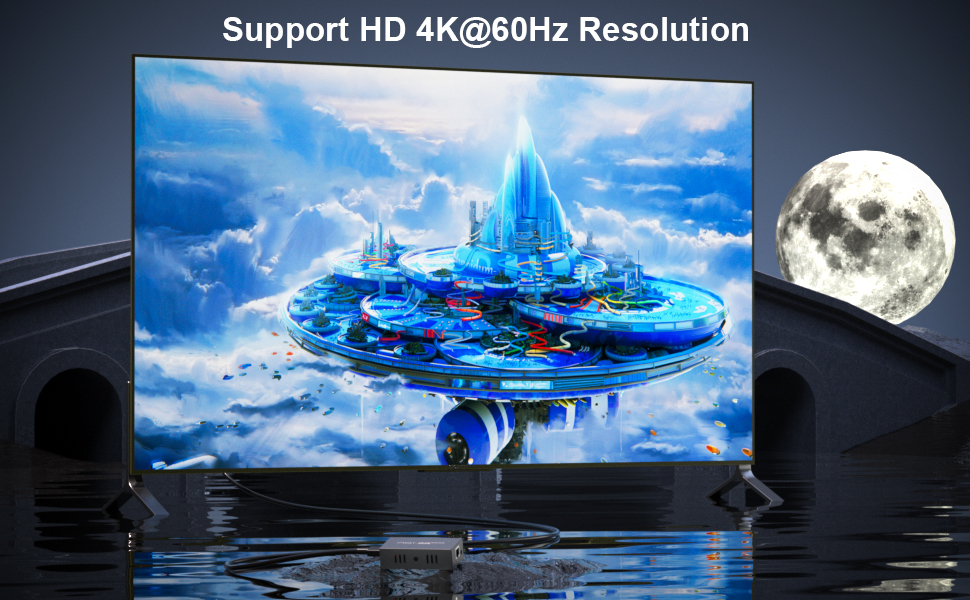
Image: A large display showcasing vibrant, high-definition content, with an overlay confirming support for HD 4K@60Hz Resolution, emphasizing the visual quality provided by the extender.

Image: The PWAYTEK HDMI Extender Splitter units with graphical overlays emphasizing key features: 4K@60Hz resolution, 60M/196FT extension distance, IR Control, POC Function, Loop Out, and EDID support.

Image: A setup demonstrating the IR Control and Loop Out features, showing a remote control interacting with a receiver unit, and the signal being looped out to a local display, indicating flexible control options.
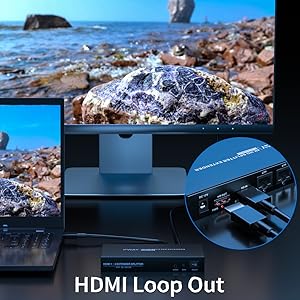
Image: Multiple displays connected to receiver units, illustrating the IR Control Function, which allows users to control the source device from any of the remote display locations.

Image: A visual representation of the POC (Power over Cable) Function, showing the transmitter powering the receiver units through the Ethernet cable, simplifying installation by reducing power outlet requirements.
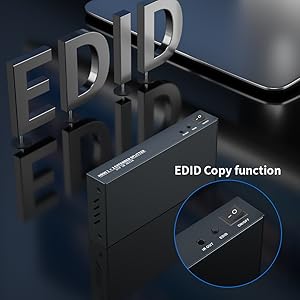
Image: A close-up of the transmitter unit, highlighting the EDID Copy function, which allows for intelligent management of display capabilities to ensure optimal video signal compatibility.
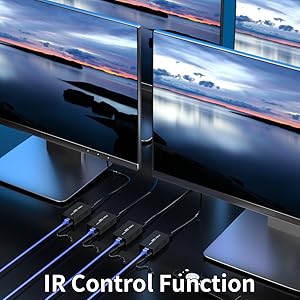
Image: A close-up of the transmitter unit, showing the HDMI Loop Out port in use, allowing a local display to be connected directly to the source unit.
7. Manutenzjoni
To ensure optimal performance and longevity of your PWAYTEK HDMI Extender Splitter, follow these maintenance guidelines:
- Tindif: Use a soft, dry cloth to clean the units. Avoid using liquid or aerosol cleaners.
- Ventilazzjoni: Kun żgur li l-unitajiet jitqiegħdu f'żona ventilata sew biex tevita li jisħnu żżejjed. Timblokkax xi fetħiet tal-ventilazzjoni.
- Ġestjoni tal-Kejbil: Żomm il-kejbils organizzati u ħielsa minn brim jew liwja eċċessiva biex tevita l-ħsara.
- Qawwa: Dejjem uża l-adapter tal-enerġija pprovdut. Skonnettja l-provvista tal-enerġija waqt maltempati jew meta ma tkunx qed tużaha għal perjodi twal.
8 Issolvi l-problemi
Jekk tiltaqa' ma' problemi, irreferi għall-problemi u s-soluzzjonijiet komuni li ġejjin:
- L-ebda Stampa fuq il-Wiri:
- Check all HDMI and Ethernet cable connections to ensure they are secure.
- Verify that the transmitter is powered on (PWR LED illuminated).
- Ensure the source device and displays are powered on and set to the correct input.
- Try adjusting the EDID switch on the transmitter to a different setting.
- Test with shorter Ethernet cables or different cable types (CAT6/7 recommended for longer distances and higher resolutions).
- Kwalità Fqira tal-Istampa (Teptip, Distorsjoni):
- Ensure you are using high-quality CAT5e/6/7 cables.
- Check the length of the Ethernet cable; exceeding the maximum recommended distance (196ft) can degrade signal quality.
- Verify that the source resolution is compatible with all displays. Adjust the EDID switch if necessary.
- Il-Kontroll tal-IR Mhux Jaħdem:
- Ensure the IR TX cable emitter is correctly positioned directly over the IR sensor of the source device.
- Ensure the IR RX cable receiver is positioned to receive signals from your remote control.
- Check that the IR cables are securely connected to their respective ports.
- Sinjal Intermittenti:
- Iċċekkja għal konnessjonijiet tal-kejbil maħlula.
- Kun żgur li m'hemm l-ebda sorsi qawwija ta' interferenza elettromanjetika fil-qrib.
- Try restarting all devices (source, extender, displays).
9. Speċifikazzjonijiet
| Karatteristika | Speċifikazzjoni |
|---|---|
| Dimensjonijiet tal-Prodott | 8.98 x 6.5 x 2.95 pulzieri |
| Piż tal-oġġett | 2.42 liri |
| Brand | PWAYTEK |
| Mudell | 1x4 4K60Hz 196FT |
| Tip ta' Konnettur | HDMI |
| Tip ta' Cable | HDMI, CAT5e/6/7 Ethernet |
| Kulur | Iswed |
| Riżoluzzjoni massima | 4K@60Hz |
| Distanza Massima ta' Estensjoni | 196ft (60m) |
| Karatteristiċi | HDMI Loop Out, Bi-Directional IR, POC, EDID |
10. Garanzija u Appoġġ
Your PWAYTEK HDMI Extender Splitter comes with a warranty. Please refer to the included Warranty Card in your package for specific terms and conditions, including warranty period and coverage details. For technical support, troubleshooting assistance, or any product-related inquiries, please contact PWAYTEK customer service through the contact information provided on the Warranty Card or the official PWAYTEK websit.


