Introduzzjoni
The Celestron StarSense Explorer 12" Dobsonian Telescope (Model C22472) represents a significant advancement in amateur astronomy, combining powerful optics with intuitive smartphone integration. This manual provides essential information for assembling, operating, and maintaining your telescope, ensuring a rewarding stargazing experience.
Designed for both novice and experienced observers, the StarSense Explorer system transforms your smartphone into a celestial guide, simplifying the process of locating and identifying thousands of celestial objects. Its robust 12-inch parabolic primary mirror, enhanced with XLT coatings, delivers bright, detailed views of planets, nebulae, galaxies, and star clusters.

Image: Banner displaying the Celestron StarSense Explorer 12" Dobsonian Telescope.
X'hemm fil-Kaxxa
Your Celestron StarSense Explorer 12" Dobsonian Telescope package includes the following components:
- Optical Tube Assembly (OTA) with 12-inch parabolic primary mirror
- Dobsonian Base Assembly
- StarSense Explorer Phone Dock
- 25mm Plossl Eyepiece (1.25")
- Red Dot Finderscope
- Trej Aċċessorju
- Tools for assembly (Allen wrenches, screwdriver)
- Battery (CR2032 for StarSense dock)
- Dust Caps for optical tube and eyepiece

Image: All major components of the StarSense Explorer Dobsonian telescope, including the optical tube, base, phone dock, and eyepiece.
Gwida ta' Setup
Follow these steps to assemble your StarSense Explorer Dobsonian Telescope:
- Assemble the Dobsonian Base: Carefully follow the instructions provided in the separate assembly guide for the wooden base. Ensure all screws are tightened securely for stability.
- Waħħal it-Tubu Ottiku: Once the base is assembled, carefully lift the optical tube and place it into the cradle of the Dobsonian base. Secure it using the provided hardware.
- Installa l-Finderscope: Slide the Red Dot Finderscope into its bracket on the optical tube and tighten the retaining screw.
- Insert the Eyepiece: Loosen the thumbscrews on the focuser, insert the 25mm Plossl eyepiece, and gently tighten the thumbscrews to secure it.
- Attach the StarSense Explorer Phone Dock: Mount the phone dock onto the designated bracket on the optical tube. Ensure it is firmly attached.
- Download the StarSense Explorer App: Before your first use, download the Celestron StarSense Explorer app from the Apple App Store or Google Play Store onto your smartphone.

Image: The fully assembled Celestron StarSense Explorer 12" Dobsonian Telescope.
It-tħaddim tat-Teleskopju
1. Initial Alignment with StarSense Explorer App
The StarSense Explorer app uses your smartphone's camera to analyze the night sky and determine the telescope's orientation. This process is quick and highly accurate.
- Place your Smartphone: Securely place your smartphone into the StarSense Explorer dock. Ensure the camera lens is unobstructed.
- Ibda l-App: Open the StarSense Explorer app. Follow the on-screen prompts for initial alignment. The app will guide you to point the telescope at a few bright stars for calibration.
- Achieve Alignment: Once aligned, the app will display a real-time sky map, indicating your current viewing direction and available celestial objects.

Image: An observer using the StarSense Explorer telescope with a smartphone docked.

Image: The StarSense Explorer app displaying a real-time sky map on a smartphone.
2. Lokalizzazzjoni ta' Oġġetti Ċelesti
The app provides various ways to find objects:
- "Tonight's Best Objects": The app automatically generates a list of the best celestial objects visible from your location and time.
- Funzjoni tat-Tiftix: Use the search bar to find specific objects (e.g., "Moon," "Jupiter," "Orion Nebula").
- Guided Tour: Select an object, and the app will display on-screen arrows, guiding you to manually move the telescope until the object is centered in your eyepiece.
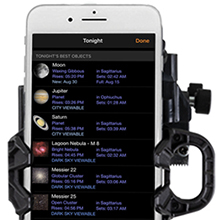
Image: The StarSense Explorer app's "Tonight's Best Objects" feature, listing visible celestial bodies.

Image: The StarSense Explorer app providing on-screen guidance to locate Saturn.
3. Viewing u Iffukar
Once an object is centered in the eyepiece, use the focuser knob to achieve a sharp image. The large 12-inch aperture gathers ample light for bright and detailed views.

Immaġni: Interna view of the telescope, highlighting the primary mirror and its support structure.
Manutenzjoni
- Ottika tat-Tindif: Use a soft, lint-free cloth and specialized optical cleaning fluid for the lenses and mirrors. Avoid touching optical surfaces with bare hands.
- Protezzjoni mit-Trab: Always replace dust caps on the optical tube and eyepiece when the telescope is not in use.
- Ħażna: Store the telescope in a dry, dust-free environment. Avoid extreme temperature fluctuations.
- Kollimazzjoni: Periodically check and adjust the collimation (alignment of the mirrors) for optimal image quality. Refer to online resources or advanced guides for detailed collimation procedures.
- Sostituzzjoni tal-batterija: The StarSense Explorer phone dock uses a CR2032 battery. Replace it when the app indicates low power or connectivity issues.
Issolvi l-problemi
| Problema | Kawża Possibbli | Soluzzjoni |
|---|---|---|
| Stampi Mċajpra | Out of focus, poor seeing conditions, misaligned optics (collimation). | Adjust focuser. Wait for stable air. Check and adjust collimation. |
| StarSense App Not Aligning | Insufficient clear sky, phone not seated correctly, low phone battery, low StarSense dock battery. | Tiżgura ċar view of sky. Reseat phone. Charge phone. Replace CR2032 battery in dock. |
| Difficulty Moving Telescope Smoothly | Tension knobs too tight/loose, base not level. | Adjust altitude tension knobs. Ensure base is on a flat, stable surface. |
| No Image Through Eyepiece | Dust caps on, wrong eyepiece, object not centered. | Remove all dust caps. Ensure eyepiece is inserted correctly. Use the app to center the object. |
Speċifikazzjonijiet
| Karatteristika | Dettall |
|---|---|
| Disinn Ottiku | Riflettur Newtonjan |
| Apertura | 12 pulzieri (304 mm) |
| Tul Fokali | 1500 mm (f/4.9) |
| Mera Primarja | Parabolic with XLT coatings |
| Lenti Inkluża | 25mm Plossl (1.25") |
| finderscope | Red Dot Finderscope |
| Tip Muntaġġ | Altazimuth Dobsonian |
| Power Source (StarSense Dock) | 1 x Batterija CR2032 (inkluża) |
| Apparati Kompatibbli | Smartphone (via StarSense Explorer App) |
| Dimensjonijiet tal-Prodott | 56 x 26 x 29 pulzieri |
| Piż tal-oġġett | 83.6 liri |
| Numru tal-Mudell | C22472 |
| Manifattur | Celestron |
| Pajjiż ta' Oriġini | Iċ-Ċina |
Informazzjoni Importanti dwar is-Sigurtà
- NEVER look directly at the Sun, even for an instant, without a proper, professionally made solar filter. Tista' tirriżulta ħsara permanenti u irriversibbli fl-għajnejn.
- Do not use the telescope to project an image of the Sun onto any surface. Internal heat build-up will damage the telescope and any accessories attached to it.
- Never use an eyepiece solar filter or a Herschel wedge. Internal heat build-up can cause these devices to crack or break, allowing unfiltered sunlight to pass through to the eye.
- Never leave the telescope unsupervised, especially when children are present.
- Handle the telescope with care. Dropping or mishandling can cause damage to optical components or the mechanical structure.
Appoġġ għall-Klijent
For technical assistance, product inquiries, or warranty information, please contact Celestron Customer Support. Visit the official Celestron webis-sit għad-dettalji ta' kuntatt u r-riżorsi ta' appoġġ l-aktar aġġornati.
Online resources include FAQs, troubleshooting guides, and software updates for the StarSense Explorer app.
Websit: www.celestron.com


