1. Introduzzjoni
This manual provides detailed instructions for the installation, operation, and maintenance of your SECULINK C17-4MP Dual-Band WiFi Dome Security Camera. This camera is designed for outdoor surveillance, featuring 4MP resolution, pan/tilt/zoom capabilities, automatic tracking, human detection, and color night vision. Please read this manual thoroughly before use to ensure proper functionality and safety.
2. Kontenut tal-Pakkett
Ivverifika li l-oġġetti kollha huma preżenti fil-pakkett tiegħek:
- SECULINK C17-4MP Dome Security Camera
- Adapter tal-Enerġija (Ċarġer)
- Viti tal-Immuntar u Plugs tal-Ħajt
- Waterproof Kit for Network Cable (if applicable)
- Gwida Quick Start
3. Prodott Aktarview
The SECULINK C17-4MP camera features a robust dome design suitable for outdoor environments. Key components include:
- Lenti tal-Kamera: Jaqbad video footage.
- LEDs infra-aħmar: Ipprovdi dawl għall-viżjoni bil-lejl.
- White Light LEDs (Floodlight): Enhance color night vision and act as a deterrent.
- Mikrofonu: Għal input awdjo u komunikazzjoni f'żewġ direzzjonijiet.
- Kelliem: Għall-ħruġ tal-awdjo u l-komunikazzjoni f'żewġ direzzjonijiet.
- Antenni: For dual-band 2.4GHz/5GHz Wi-Fi connectivity.
- Slott tal-Karta Mikro SD: Jappoġġja ħażna lokali sa 256GB.
- Buttuna Irrisettja: Għal reset tal-fabbrika.
- Port tal-Enerġija: Input ta 'enerġija DC 12V.

Immaġni 3.1: Fuqview of the SECULINK C17-4MP camera and its mobile application interface.
4. Setup
4.1 Tniżżil tal-App u Reġistrazzjoni tal-Kont
- Niżżel il- SECUEYE mobile application from the App Store (iOS) or Google Play Store (Android).
- Iftaħ l-app u segwi l-istruzzjonijiet fuq l-iskrin biex tirreġistra kont ġdid jew tidħol jekk diġà għandek wieħed.
4.2 Kif Tixgħel il-Kamera
Connect the provided power adapter to the camera's power port and plug it into an electrical outlet. The camera will initiate its self-test sequence, indicated by a rotating motion and status light changes.
4.3 Konnessjoni mal-Wi-Fi
The SECULINK C17-4MP supports dual-band Wi-Fi (2.4GHz and 5GHz) for flexible network connectivity.
- Ensure your mobile device is connected to the same Wi-Fi network you intend to connect the camera to.
- In the SECUEYE app, tap the "Add Device" or "+" icon.
- Select your camera model or scan the QR code on the camera (if available).
- Follow the app's instructions to enter your Wi-Fi network name (SSID) and password.
- L-app tiggwidak fil-proċess ta' tqabbil, li jista' jinvolvi l-iskennjar ta' kodiċi QR muri fuq it-telefon tiegħek bil-lenti tal-kamera jew is-smigħ ta' mess awdjo.
- Once connected, the camera's status light will indicate a successful connection (refer to the app or quick start guide for specific light indicators).
4.4 Immuntar tal-Kamera
The camera is designed for wall mounting and is IP65/IP66 weatherproof, making it suitable for outdoor installation.
- Choose a suitable mounting location that provides the desired viewangolu ta' ing u jinsab fil-firxa tal-Wi-Fi.
- Use the mounting template (if provided) or the camera base to mark the drill holes on the wall.
- Ħaffer toqob u daħħal il-plakek tal-ħajt.
- Waħħal il-bażi tal-kamera mal-ħajt billi tuża l-viti pprovduti.
- Attach the camera body to the base.
- Ensure all cable connections are secure and protected from weather using the waterproof kit if necessary.
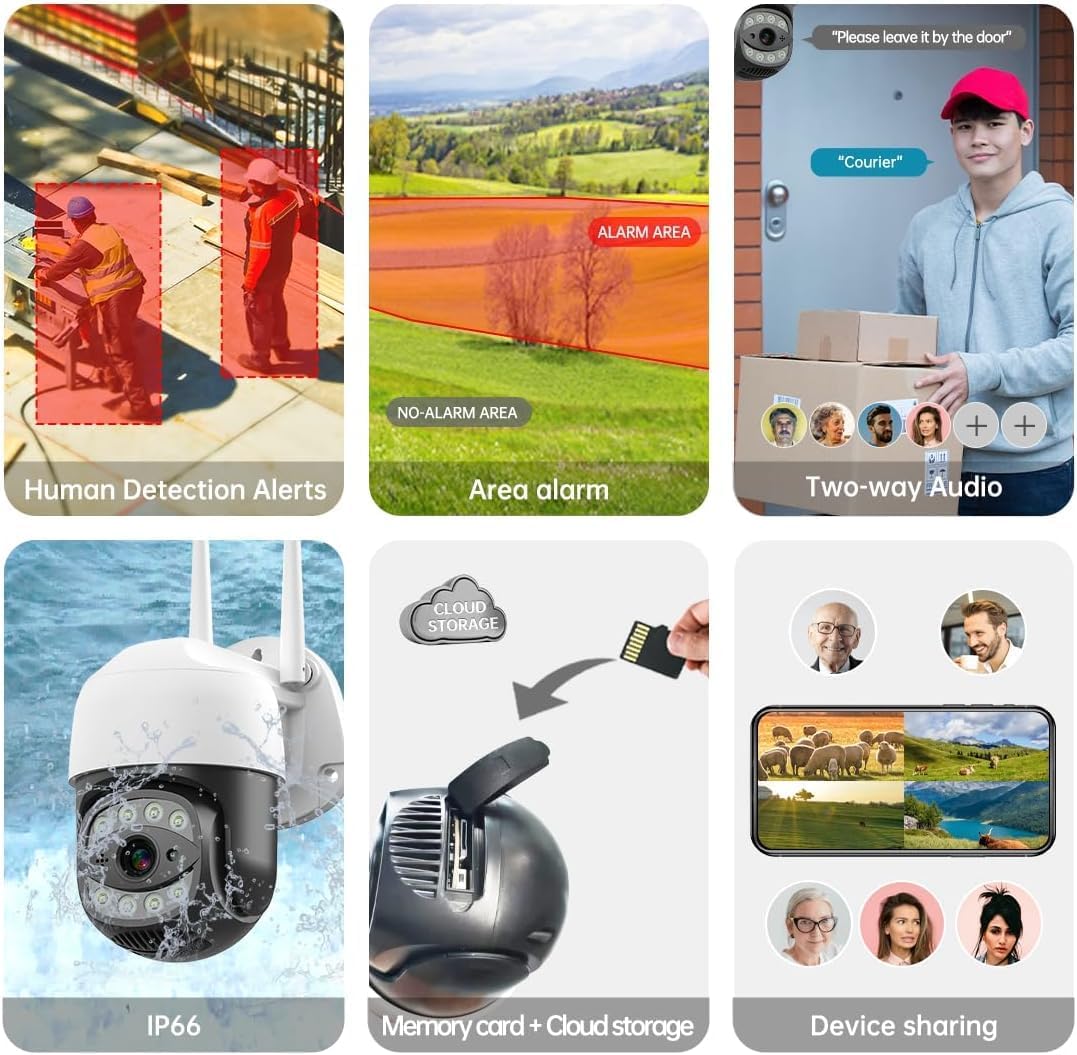
Image 4.1: The SECULINK C17-4MP camera is rated IP66 for dust and water resistance, suitable for various weather conditions.
5. Istruzzjonijiet Operattivi
5.1 Ħaj View u Daqq
Aċċessa l-feed tal-vidjow dirett u erġa' luraview irreġistrat footage through the SECUEYE app. The camera provides 4MP (2560x1440p) resolution for clear images.

Image 5.1: Visual comparison demonstrating the enhanced clarity of 5MP resolution over lower resolutions.
5.2 Pan, Tilt, and Digital Zoom (PTZ)
Ikkontrolla l-kamera viewing angle remotely using the SECUEYE app. The camera offers:
- Rotazzjoni Orizzontali: 335 grad
- Mejjel Vertikali: 90 grad
- Żum diġitali: 10x ingrandiment
Use pinch-to-zoom gestures on your mobile device to digitally zoom in on specific areas of interest.

Image 5.2: Demonstrates controlling the camera's pan and tilt functions via the mobile app.

Image 5.3: Illustration of the 10x digital zoom feature, allowing closer inspection of details.
5.3 Automatic Tracking and Human Motion Detection
The camera features intelligent detection capabilities to enhance security monitoring.
- Traċċar Awtomatiku: When enabled, the camera will automatically detect and follow moving human figures within its field of view, recording their path.
- Sejbien tal-Moviment tal-Bniedem: Advanced algorithms distinguish human activity from other movements (e.g., pets, swaying branches), reducing false alarms.
- Twissijiet: Upon detection, the camera can send real-time alerts to your mobile phone.
- Floodlight and Sound Alarm: Built-in spotlights activate upon motion detection at night, and a security siren can be triggered as an additional deterrent.

Image 5.4: The camera's AI Humanoid Detection identifies human presence and sends alerts.

Image 5.5: The camera's automatic tracking capability follows detected human movement.

Image 5.6: Illustrates the camera's ability to differentiate human activity from other movements, reducing false alarms.
5.4 Modi ta' Viżjoni bil-Lejl
The camera offers multiple night vision options for clear surveillance in low-light conditions:
- Viżjoni bil-Lejl bl-Infra-aħmar (IR): Uses IR LEDs to provide black and white video in complete darkness, with a range of up to 100ft (30m).
- Viżjoni bil-lejl bil-kulur: Utilizes white light LEDs (floodlight) to capture full-color video at night when motion is detected or manually activated.
- Starlight Sensor: Enhances low-light performance to produce clearer images even without additional illumination.

Image 5.7: Demonstrates the different night vision modes: infrared (black and white), white light (color), and full-color night vision.

Image 5.8: The camera's infrared night vision provides visibility up to 20 meters in darkness.
5.5 Awdjo b'żewġ direzzjonijiet
The built-in microphone and speaker allow for real-time two-way communication through the SECUEYE app. You can listen to audio from the camera's location and speak through the camera's speaker.
5.6 Għażliet ta' Ħażna
The camera supports two primary storage methods for recorded footage:
- Karta Micro SD: Insert a Micro SD card (up to 256GB, sold separately) into the designated slot for local storage. The camera can record 24/7 or motion-triggered videos.
- Ħażna Cloud: Optional cloud storage services are available through the SECUEYE app for secure, remote backup of your recordings.
5.7 Kondiviżjoni tal-Apparat
You can share access to your camera's live feed and recordings with family members or trusted individuals through the SECUEYE app, allowing multiple users to monitor the property simultaneously.
6. Manutenzjoni
To ensure optimal performance and longevity of your SECULINK C17-4MP camera, consider the following maintenance tips:
- Naddaf il-Lenti: Periodically wipe the camera lens with a soft, clean, lint-free cloth to remove dust, dirt, or water spots that may affect image clarity. Avoid abrasive cleaners.
- Iċċekkja l-Konnessjoni tal-Enerġija: Ensure the power adapter and cable remain securely connected and free from damage, especially in outdoor environments.
- Aġġornamenti tal-Firmware: Regularly check the SECUEYE app for available firmware updates. Updates often include performance improvements, new features, and security enhancements.
- Spezzjona l-Immuntar: Periodically check the camera's mounting for stability, especially after severe weather conditions.
7 Issolvi l-problemi
If you encounter issues with your SECULINK C17-4MP camera, refer to the following common troubleshooting steps:
7.1 Il-Kamera Mhux Qed Tikkonnettja mal-Wi-Fi
- Iċċekkja s-Sinjal tal-Wi-Fi: Ensure the camera is within range of your Wi-Fi router. Weak signals can cause connection issues.
- Verify Network Credentials: Double-check that the Wi-Fi network name (SSID) and password entered in the app are correct.
- Kompatibilità tar-router: Confirm your router supports 2.4GHz or 5GHz bands, and that the camera is attempting to connect to a compatible band.
- Irristartja l-Apparati: Power cycle both your Wi-Fi router and the camera.
- Irrisettja l-Kamera: If issues persist, perform a factory reset on the camera (refer to the quick start guide for reset button location and procedure) and attempt the setup process again.
7.2 Kwalità Fqira tal-Immaġni
- Lenti Naddaf: Kun żgur li l-lenti tal-kamera hija nadifa u ħielsa minn tbajja’ jew ħmieġ.
- Faxxa tan-Netwerk: A slow internet connection can affect live stream quality. Check your network speed.
- Kundizzjonijiet tad-Dawl: Ensure adequate lighting for optimal image quality, especially for color night vision.
7.3 Motion Detection Not Working or Too Sensitive
- Aġġusta s-Sensittività: In the SECUEYE app settings, adjust the motion detection sensitivity level.
- Żoni ta' sejbien: Configure specific detection zones to monitor only relevant areas and exclude areas with frequent irrelevant motion (e.g., public roads, swaying trees).
- Check Schedule: Ensure motion detection is enabled for the desired time periods in the app.
7.4 No Recording to SD Card
- Insert SD Card Correctly: Ensure the Micro SD card is inserted properly into the slot.
- Format SD Card: Format the SD card through the camera settings in the SECUEYE app.
- Card Capacity/Health: Ensure the SD card is not full or corrupted. Try a different, known-good SD card if necessary.
- Settings tar-Reġistrazzjoni: Verify that continuous recording or motion-triggered recording is enabled in the app settings.
8. Speċifikazzjonijiet
| Karatteristika | Speċifikazzjoni |
|---|---|
| Mudell | C17-4MP |
| Riżoluzzjoni | 4MP (2560x1440p Max) |
| Sensor tal-Immaġni | CMOS |
| Tul Fokali | 3.6mm |
| Angolu ta' Rotazzjoni Pan | 335° Orizzontali |
| Angolu ta 'Rotazzjoni Mejjel | 90 ° Vertikali |
| Zoom Diġitali | 10x |
| Viżjoni bil-lejl | IR-Cut, Starlight, LED (Color Night Vision) |
| Distanza Infrared | Sa 100 pied (30 metri) |
| Awdjo | Built-in Microphone and Speaker (Two-Way Audio) |
| Reżistenza għall-Ilma | IP65, IP66 (Waterproof) |
| Konnettività | Dual-Band Wi-Fi (2.4GHz/5GHz), Wired Ethernet |
| Ħażna | Karta Mikro SD (sa 256GB), Ħażna fis-Sħab |
| Qawwa | DC 12V, 9 Watts |
| Temperatura operattiva | -10°C sa +50°C (14°F sa 122°F) |
| Kompatibilità tal-App | SECUEYE (iOS, Android) |
| Dimensjonijiet | 7 x 7 x 5 pulzieri (Pakkett) |
| Piż tal-oġġett | 1.2 liri |
9. Garanzija u Appoġġ
For warranty information and technical support, please refer to the official SECULINK webis-sit jew ikkuntattja lis-servizz tal-konsumatur tagħhom direttament. Żomm l-irċevuta tax-xiri tiegħek bħala prova tax-xiri għal talbiet ta' garanzija.
Manifattur: SECULINK


