1. Introduzzjoni
This user manual provides comprehensive instructions for the setup, operation, and maintenance of your FULLJA 17-inch Dual-WiFi Digital Picture Frame. This device allows you to instantly share photos and videos with loved ones from anywhere using the VPhoto app or email, supporting both 2.4 GHz and 5 GHz Wi-Fi networks. With its large display, ample storage, and versatile features, it is designed to preserve and display your precious memories with ease.
2. Informazzjoni dwar is-Sigurtà
Please read all safety instructions carefully before using the device to ensure proper operation and to prevent damage or injury. Keep this manual for future reference.
- Tesponix l-apparat għall-ilma jew għal umdità eċċessiva.
- Evita li tpoġġi l-apparat ħdejn sorsi tas-sħana bħal radjaturi, reġistri tas-sħana, stufi, jew apparat ieħor (inkluż amplifiers) li jipproduċu sħana.
- Uża biss l-adapter tal-enerġija fornut mal-apparat.
- Timblokkax il-fetħiet tal-ventilazzjoni. Installa skont l-istruzzjonijiet tal-manifattur.
- Ipproteġi l-korda tad-dawl milli timxi fuqha jew maqrusa, partikolarment fil-plakek, ir-reċipjenti tal-konvenjenza, u l-punt fejn joħorġu mill-apparat.
- Aqla 'l-apparat waqt maltempati tas-sajjetti jew meta ma jintużax għal perjodi twal ta' żmien.
- Irreferi l-manutenzjoni kollha lil persunal tas-servizz kwalifikat. Is-servizz huwa meħtieġ meta l-apparat ikun ġie bil-ħsara b'xi mod, bħal korda tal-provvista tal-enerġija jew plagg ikun bil-ħsara, likwidu jkun inxtered jew oġġetti jkunu waqgħu fl-apparat, l-apparat ikun ġie espost għax-xita jew umdità, ma jaħdimx b'mod normali , jew twaqqgħet.
- Naddaf biss b'ċarruta niexfa.
3. Kontenut tal-Pakkett
Ivverifika li l-oġġetti kollha huma preżenti fil-pakkett:
- 1x FULLJA 17-inch Digital Picture Frame
- 1x Manwal għall-Utent
- 1x Adapter tal-Enerġija
- 1x Bracket (for stand)
- 1x Kontroll mill-bogħod
- 1x Cable USB Micro

Image: FULLJA Brand Logo
This image displays the official FULLJA brand logo, typically found on product packaging and documentation.

Image: FULLJA 17-inch Digital Picture Frame
This image shows the 17-inch FULLJA Digital Picture Frame in a vertical orientation, resting on a surface.
4. Prodott Aktarview
4.1. Komponenti u Kontrolli
Familiarize yourself with the various parts of your digital picture frame:
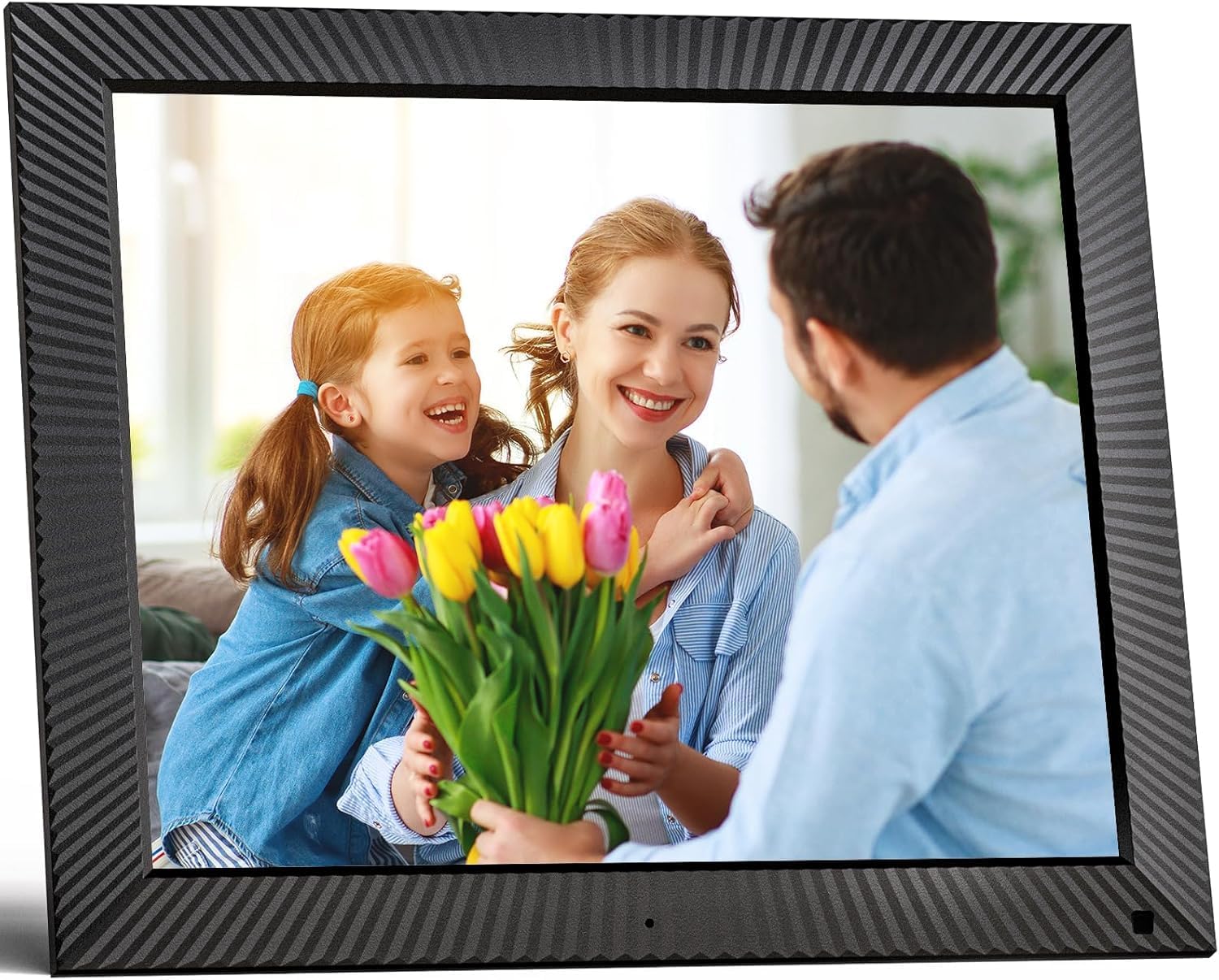
Immaġni: Quddiem view of the FULLJA 17-inch Digital Picture Frame
This image displays the front of the digital picture frame, showcasing its large screen with a family photo displayed. The frame has a textured black border.

Image: Features of the FULLJA 17-inch Digital Picture Frame
This image highlights key features of the 17-inch digital picture frame, including its touch screen, HD 1280x1024 pixel resolution, 4:3 aspect ratio, and remote control functionality. It shows the frame in both landscape and portrait orientations, with a view of the back panel and stand.
- Skrin tad-displej: 17-inch IPS display with 1280x1024 resolution. Touch-enabled for direct interaction.
- Buttuna tal-Qawwa: Located on the back or side, used to turn the frame on/off or put it into standby.
- Port USB: For connecting USB sticks to transfer photos/videos.
- Slott tal-Karta TF: For inserting TF (MicroSD) cards (up to 64GB) to expand storage or transfer media.
- Port Micro USB: For connecting to a computer for data transfer or firmware updates.
- Input ta' Enerġija DC: Għall-konnessjoni tal-adapter tal-enerġija.
- Sensor tal-Moviment: Detects presence to automatically turn the screen on/off, saving energy.
- Kelliem inkorporat: For audio playback with videos or background music.
- Wall Mount Holes: VESA compatible holes on the back for wall mounting.
- Stand Bracket: Attachable bracket for desktop placement in portrait or landscape orientation.
4.2. Kontroll mill-bogħod
The included remote control provides convenient access to various functions without touching the screen.
- Qawwa: Turn the frame on/off.
- Menu/Settings: Access the main menu and settings.
- Buttuni tan-Navigazzjoni ('il fuq/'l isfel/'il fuq/'il fuq/'il fuq): Innaviga permezz tal-menus u l-għażliet.
- OK/Daħħal: Ikkonferma l-għażliet.
- Lura/Ħruġ: Mur lura għall-iskrin preċedenti jew oħroġ minn menu.
- Volum +/-: Aġġusta l-volum tal-awdjo.
- Play/Pawsa: Kontroll tal-plejbek tal-midja.
- Li jmiss/Preċedenti: Skip to the next or previous photo/video.
5. Setup
5.1. L-Ewwel Tixgħil
- Unpack the digital picture frame and all accessories.
- Attach the stand bracket to the back of the frame if you intend to place it on a desk or shelf. Ensure it is securely fastened.
- Connect the power adapter to the DC power input port on the frame, then plug the adapter into a wall outlet.
- The frame will automatically power on or you may need to press the power button.
- Segwi l-istruzzjonijiet fuq l-iskrin biex tagħżel il-lingwa u ż-żona tal-ħin tiegħek.
5.2. Konnessjoni mal-Wi-Fi
A Wi-Fi connection is essential for sharing photos via the app or email.
- Mill-menù prinċipali, mur fuq Settings.
- Agħżel Wi-Fi.
- The frame will scan for available networks. Select your desired 2.4 GHz or 5 GHz network from the list.
- Daħħal il-password tal-Wi-Fi tiegħek billi tuża t-tastiera fuq l-iskrin.
- Tektek Qabbad. Once connected, a Wi-Fi icon will appear on the screen.

Image: Digital Picture Frame with Wi-Fi Sharing
This image illustrates the capability of the digital picture frame to share photos and videos wirelessly via Wi-Fi. It shows the frame displaying a family photo, with a smartphone in the foreground indicating app-based sharing.
5.3. Installazzjoni tal-App VPhoto
The VPhoto app is available for both iOS and Android devices and is the primary method for sharing content remotely.
- Fittex għal "VPhoto" in the Apple App Store (for iOS) or Google Play Store (for Android).
- Niżżel u installa l-app fuq l-ismartphone jew it-tablet tiegħek.
- Open the VPhoto app and create an account or log in.
- To connect your frame, go to the Settings menu on your digital picture frame and find the unique binding code.
- In the VPhoto app, select Żid Apparat and enter the binding code displayed on your frame.
- Once connected, you can start sending photos and videos to your frame. Up to 30 app accounts can be bound to one frame.

Image: Sharing Options for Digital Picture Frame
This image demonstrates the various ways to share content with the digital picture frame, including the free VPhoto app for iOS and Android, unlimited cloud storage with 32GB built-in, and the ability to invite multiple family members to share. It shows the frame displaying a photo and a smartphone screen with the VPhoto app interface.
6. Istruzzjonijiet Operattivi
6.1. Sending Photos and Videos
There are multiple ways to send media to your FULLJA digital picture frame:
- Permezz tal-App VPhoto: Open the VPhoto app, select the photos/videos you wish to send (up to 50 at a time), choose your connected frame, and tap send.
- Via Email: Each frame has a unique email address. You can send photos and short videos as attachments to this email address. The frame will automatically receive and display them.
- Via USB Stick/TF Card: Insert a USB stick or TF card into the respective port. Navigate to the Folder tar-Ritratti or Video section on the frame, select the external storage, and copy files to the internal memory if desired.

Image: Digital Picture Frame with 32GB Internal Storage
This image highlights the frame's built-in 32GB internal storage, capable of storing approximately 80,000+ photos. The main frame displays a photo of a mother and child, surrounded by smaller circular images representing the vast number of memories that can be stored.
6.2. Funzjonijiet Bażiċi
- Slideshow Playback: Photos and videos will automatically play in a slideshow. You can adjust the display interval and transition effects in the settings.
- Photo/Video Browsing: Tap the screen or use the remote to manually browse through your media.
- Kontroll tal-Volum: Adjust the volume for videos or background music using the touch screen controls or the remote.
- Dawwar Awtomatiku: The frame automatically adjusts the display orientation (portrait or landscape) based on how it is positioned.
6.3. Funzjonijiet Avvanzati
- Sensor tal-Moviment: Enable this feature in settings to have the frame automatically turn on when motion is detected and off when no motion is detected for a set period, saving energy.
- Auto Screen On/Off: Set specific times for the frame to automatically turn on and off daily.
- Arloġġ u Kalendarju: Access the built-in clock and calendar functions from the main menu.
- Allarm: Issettja allarmi għal tfakkiriet.
- Skrin maqsum: Display multiple photos simultaneously (check settings for layout options).
- Sottotitli tat-Test: Add captions to your photos via the VPhoto app.
- Daqq tal-mużika: Play background music during slideshows (ensure music files are on the frame's internal storage or connected USB/TF card).

Image: Digital Picture Frame with Function Icons
This image showcases the multi-functional capabilities of the digital picture frame, including Wi-Fi connectivity, weather display, clock, calendar, photo and video playback, music, and slideshow features. Two frames are shown, one on a wall and one on a cabinet, with icons representing these functions below.
7. Manutenzjoni
7.1. Tindif tal-Qafas
- Dejjem aqla’ l-qafas qabel ma tnaddaf.
- Uża drapp artab, niexef u mingħajr suf biex timsaħ bil-mod l-iskrin u l-qafas.
- Għal tbajja’ iebsa fuq l-iskrin, agħfas ħafifampen the cloth with water or a screen-cleaning solution (specifically designed for electronics) and wipe carefully. Do not spray liquid directly onto the screen.
- Avoid using abrasive cleaners, waxes, or solvents as they may damage the surface.
7.2. Aġġornamenti tas-Software
Periodically check for software updates in the frame's settings menu to ensure optimal performance and access to new features. Updates are typically downloaded and installed over Wi-Fi.
7.3. Ġestjoni tal-Ħażna
While the frame has 32GB of internal storage and unlimited cloud storage, you may occasionally want to manage local files:
- Aċċess għall- Folder tar-Ritratti or File Maniġer in the settings to view, delete, or organize stored media.
- Tista 'tittrasferixxi files to/from a USB stick or TF card to manage internal storage.
8 Issolvi l-problemi
Jekk tiltaqa' ma' problemi bil-frejm diġitali tiegħek, irreferi għall-problemi u s-soluzzjonijiet komuni li ġejjin:
| Problema | Kawża / Soluzzjoni Possibbli |
|---|---|
| Il-qafas ma jixgħelx. |
|
| Ma tistax tikkonnettja mal-Wi-Fi. |
|
| Ritratti/vidjows mhux jidhru fuq il-frejm. |
|
| Screen freezes or is unresponsive. |
|
| Is-senser tal-moviment mhux qed jaħdem. |
|
9. Speċifikazzjonijiet
| Karatteristika | Dettall |
|---|---|
| Numru tal-Mudell | B0CCVBSM87 |
| Brand | FULLJA |
| Daqs tal-Iskrin | 17 Pulzier |
| Riżoluzzjoni tal-Wiri | 1280 x 1024 pixel (IPS) |
| Proporzjon ta' l-aspett | 4:3 |
| Ħażna Interna | 32GB |
| Appoġġ għall-Ħażna Esterna | USB stick, TF card (MicroSD) up to 64GB |
| Konnettività Wi-Fi | 2.4 GHz / 5 GHz Doppju Banda |
| Metodu ta' Kontroll | Touch Screen, Remote Control, VPhoto App |
| Sensor tal-Moviment | Iva |
| Dawwar Awtomatiku | Iva |
| Immontabbli fuq il-ħajt | Iva |
| Dimensjonijiet tal-Prodott | 29.67 x 43.51 x 2.51 ċm |
| Piż tal-Prodott | 2.52 kg |
| Kulur | Iswed |
10. Garanzija u Appoġġ
10.1. Garanzija Limitata
The FULLJA 17-inch Dual-WiFi Digital Picture Frame comes with a garanzija limitata ta 'sena from the date of purchase. This warranty covers defects in materials and workmanship under normal use. It does not cover damage caused by accident, misuse, abuse, neglect, unauthorized modification, or improper installation.
To make a warranty claim, please retain your proof of purchase and contact FULLJA customer support.
10.2. Appoġġ għall-Klijent
For any questions, technical assistance, or support inquiries, please contact FULLJA customer service. We offer lifetime support and aim to provide a prompt response within 24 hours.
Please refer to the contact information provided on the product packaging or the official FULLJA websit għall-aktar kanali ta' appoġġ aġġornati.

