Introduzzjoni
Grazzi tax-xiriasing the JTEMAN Cell Phone Stand with Wireless Bluetooth Speaker and Alarm Clock. This multi-functional device is designed to enhance your daily routine by combining essential features into one compact and stylish unit. It serves as a high-quality Bluetooth speaker, a reliable alarm clock with a clear display, and a stable, adjustable stand for your mobile devices. Please read this manual carefully to ensure proper use and optimal performance.
Informazzjoni dwar is-Sigurtà
- Tesponix l-apparat għal temperaturi estremi, dawl tax-xemx dirett, jew umdità għolja.
- Evita li twaqqa’ jew tissuġġetta l-apparat għal impatti qawwija.
- Keep away from water and other liquids. If the device comes into contact with liquid, disconnect it immediately and allow it to dry completely before reuse.
- Tippruvax tiżżarma, issewwi, jew timmodifika l-apparat int stess. Irreferi għal kull manutenzjoni f'idejn persunal kwalifikat.
- Uża biss il-kejbil tal-iċċarġjar provdut jew wieħed ekwivalenti ċċertifikat.
- Żomm fejn ma jintlaħaqx mit-tfal.
Kontenut tal-Pakkett
- JTEMAN Cell Phone Stand with Wireless Bluetooth Speaker and Alarm Clock (Model: JT-L36)
- Kejbil tal-Iċċarġjar tat-Tip C
- Manwal għall-Utent
Prodott Overview
Familiarize yourself with the components and controls of your JTEMAN device:
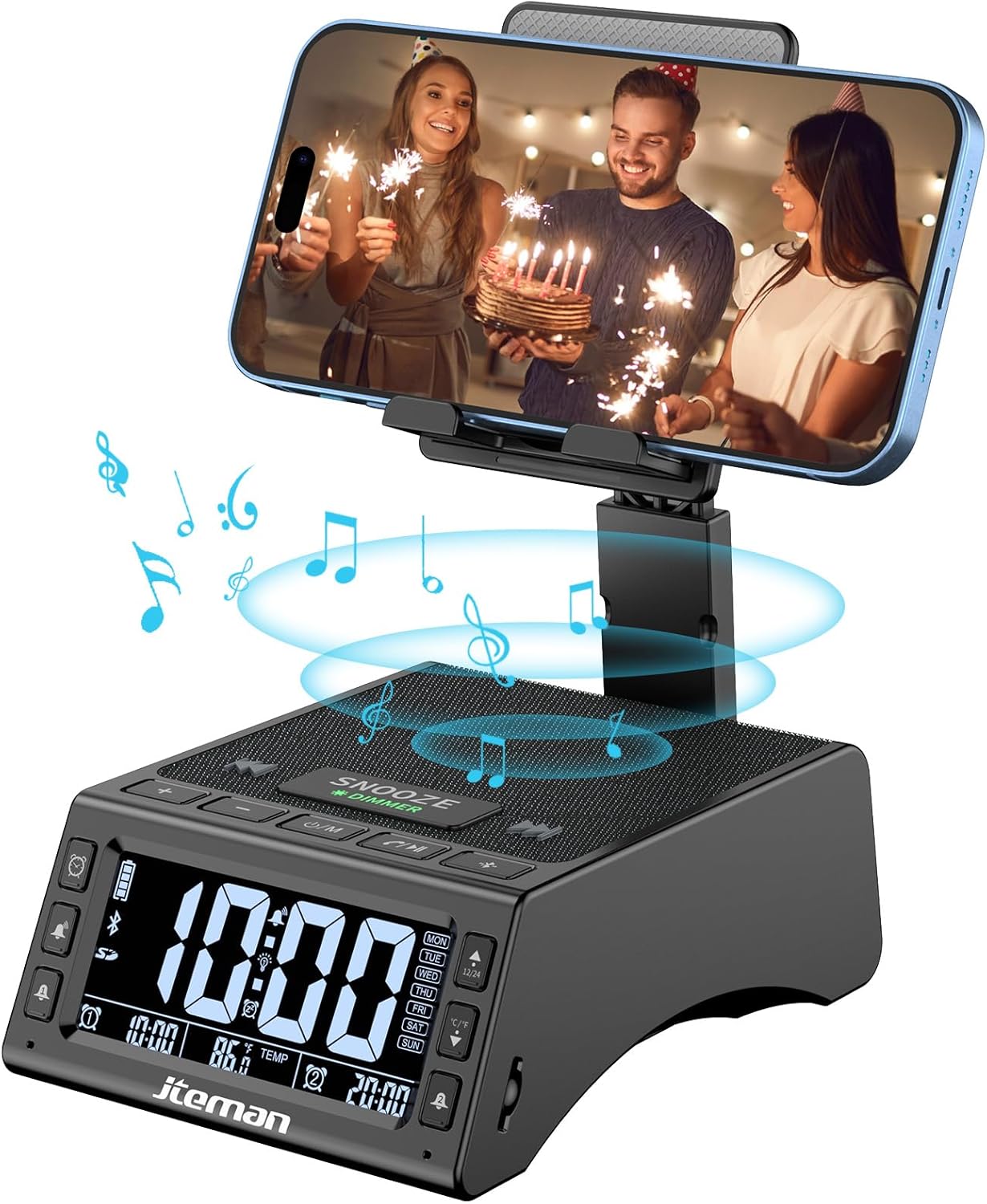
Figura 1: Quddiem view of the JTEMAN device with a smartphone on the adjustable stand, displaying the time and temperature.

Figura 2: Aktarview highlighting the multi-functional aspects including Bluetooth speaker, 12/24H time display, temperature display, foldable phone stand, TF card support, microphone, charging station, dual alarm clocks, and 9 ringtones.
Kontrolli u Portijiet:
- Skrin tad-displej: Shows time, temperature, day of the week, and alarm indicators.
- SNOOZE/DIMMER Button: Press to snooze an active alarm (5 minutes); long press to adjust display brightness (4 levels).
- Power On/Off/Mode Button: Long press to power on/off; short press to cycle through modes (Bluetooth, TF Card).
- Play/Pause/Answer Button: Controls music playback; answers/ends calls.
- Buttuna tal-Volum 'il Fuq/Trakka li Jmiss: Increases volume; short press for next track.
- Buttuna għat-Tnaqqis tal-Volum/Trakka Preċedenti: Decreases volume; short press for previous track.
- Buttuna ta' Tqabbil tal-Bluetooth: Jibda l-modalità ta' tqabbil Bluetooth.
- Alarm 1 & Alarm 2 Buttons: For setting and managing dual alarms.
- Mikrofonu: Għal sejħiet mingħajr idejn.
- Port tad-Dħul tat-Tip C: Għall-iċċarġjar tal-apparat.
- Port tal-Ħruġ tat-Tip C: Għall-iċċarġjar ta' apparati esterni.
- Slott tal-Karta TF: Biex iddoqq il-mużika direttament minn karta TF.
- Adjustable Phone Stand: Foldable and extendable for various viewing angles. Features anti-slip pads and base for stability.
Setup
1. Iċċarġjar Inizjali
- Connect the provided Type-C charging cable to the Port tal-Input tat-Tip-C fuq l-apparat.
- Connect the other end of the cable to a compatible USB power adapter (not included) and plug it into a wall outlet.
- Id-displej se jindika l-istatus tal-iċċarġjar. Iċċarġja l-apparat kompletament qabel l-ewwel użu.

Figure 3: The device connected via Type-C for charging itself and an external phone.
2. L-issettjar tal-Ħin u d-Data
- Upon powering on, the device should automatically synchronize the current time.
- If manual adjustment is needed, refer to the detailed instructions in the full user manual (included in the package).
- To switch between 12/24 hour format or °F/°C temperature display, use the dedicated buttons or refer to the full manual.

Figure 4: The HD display showing time, temperature, and alarm settings with brightness adjustment levels.
Istruzzjonijiet Operattivi
1. Using the Phone Stand
- The integrated phone stand can be pulled up from the back of the unit.
- Aġġusta l-għoli u l-angolu tal-istand għall-preferut tiegħek viewing position. The stand is designed to be stable and strong, accommodating devices from 4.0 to 13 inches.
- When not in use, the stand can be folded back into the unit for a compact form factor.

Figure 5: Demonstrates the adjustable height and angle of the phone stand, along with its anti-slip features and foldable design.
2. Funzjoni tal-Ispeaker Bluetooth
- Qawwa Mixgħul: Long press the Power On/Off/Mode button. The device will enter Bluetooth pairing mode, indicated by a flashing Bluetooth icon on the display.
- Tqabbil: On your smartphone or other Bluetooth-enabled device, search for “JT-L36” in the Bluetooth settings and select it to pair. A confirmation sound will indicate successful pairing.
- Daqq tal-mużika: Once paired, you can play audio from your device through the JTEMAN speaker. Use the Play/Pause, Volume Up/Next Track, and Volume Down/Previous Track buttons to control playback.
3. Daqq tal-Karta TF
- Insert a TF card (not included) with audio files into the TF Card Slot.
- The device will automatically switch to TF Card mode and begin playing music. If not, short press the Mode button to select TF Card mode.
4. Alarm Clock Features
- Issettjar ta' Allarmi: Use the Alarm 1 and Alarm 2 buttons to set up to two independent alarms. Follow the on-screen prompts to set the time and alarm frequency (e.g., Mon-Fri, Sat-Sun, Mon-Sun).
- Funzjoni Snooze: When an alarm sounds, press the large SNOOZE button on top to activate a 5-minute snooze.
- Aġġustament tal-luminożità: Long press the SNOOZE/DIMMER button to cycle through four levels of display brightness, including an off setting for minimal light disturbance.
5. Sejħiet mingħajr idejn
- When a call comes in while your phone is connected via Bluetooth, press the Play/Pause/Answer button to answer the call.
- Uża l-mikrofonu integrat għal komunikazzjoni ċara.
- Press the Play/Pause/Answer button again to end the call.
6. Iċċarġjar ta' Apparati Esterni
- Connect your external device (e.g., smartphone, tablet) to the Port tal-Ħruġ tat-Tip C on the JTEMAN unit using a compatible charging cable.
- The JTEMAN device will provide power to charge your external device.
Manutenzjoni
- Naddaf l-apparat b'ċarruta ratba u niexfa. Tużax prodotti tat-tindif jew solventi li joborxu.
- Kun żgur li l-portijiet kollha huma ħielsa mit-trab u l-fdalijiet.
- Aħżen l-apparat f'post frisk u niexef meta ma jkunx qed jintuża għal perjodi twal.
Issolvi l-problemi
| Problema | Kawża Possibbli | Soluzzjoni |
|---|---|---|
| L-apparat ma jixgħelx. | Low battery; power adapter/cable issue. | Charge the device fully. Check power adapter and cable connections. |
| L-ebda ħoss mill-ispiker. | Volume too low; not paired correctly; wrong mode. | Increase volume on both device and connected phone. Re-pair Bluetooth. Ensure correct mode (Bluetooth/TF Card). |
| Tqabbil Bluetooth ifalli. | Device too far; pairing mode not active; interference. | Ensure device is in pairing mode and within 10 meters. Turn off other Bluetooth devices. Try restarting both devices. |
| L-allarm ma jdoqqx. | Alarm not set; alarm volume too low; alarm disabled. | Verify alarm settings and ensure it's enabled. Increase alarm volume. |
| Phone not charging via output port. | Cable issue; device battery low; incompatible device. | Ensure the JTEMAN device is charged. Try a different charging cable. Confirm your phone is compatible with Type-C charging. |
Speċifikazzjonijiet
| Brand | JTEMAN |
| Numru tal-Mudell | JT-L36 |
| Dimensjonijiet tal-Prodott | 6.1 x 4.3 x 2.1 pulzieri |
| Piż tal-oġġett | 1.26 liri |
| Kulur | Iswed |
| Interface tal-Ħardwer | USB 2.0 |
| Portijiet USB totali | 2 (Type-C Input, Type-C Output) |
| Kompatibilità | 4.0-13 inch devices |
Garanzija u Appoġġ
JTEMAN products are manufactured with high standards of quality. For specific warranty information, please refer to the warranty card included in your product packaging or visit the official JTEMAN website. If you encounter any issues or have questions not covered in this manual, please contact JTEMAN customer support through the contact information provided on the product packaging or websit.
Jekk jogħġbok żomm il-prova tax-xiri tiegħek għal pretensjonijiet ta' garanzija.


