1. Introduzzjoni
Welcome to your new Homall Electric Standing Desk. This manual provides essential information for the safe and efficient assembly, operation, and maintenance of your desk. Please read these instructions carefully before use and retain them for future reference.
Informazzjoni dwar is-Sigurtà
- Do not exceed the maximum weight capacity of 50 kg (110 lbs) on the desktop.
- Ensure the desk is placed on a level surface and properly anchored to prevent tipping.
- Żomm it-tfal u l-annimali domestiċi 'l bogħod mill-iskrivanija waqt l-operazzjoni biex tevita li tagħmel xi korriment.
- Avoid placing liquids directly on the control panel or near electrical components.
- Do not disassemble or modify the desk's electrical components. Contact customer support for service.
- Ensure there are no obstructions in the desk's path during height adjustment.
2. Setup u Assemblea
The Homall Electric Standing Desk is designed for straightforward assembly. All necessary tools and detailed instructions are included in the packaging. The desktop is composed of multiple sections that fit together precisely using dowels and screws.
Passi tal-Assemblea Fuqview:
- Iftaħ il-komponenti kollha mill-pakkett u vverifika mal-lista tal-partijiet ipprovduta fil-gwida tal-assemblaġġ.
- Assemble the desktop sections using the provided dowels and screws. Ensure a flush and secure fit.
- Attach the lifting columns to the desktop using the designated hardware.
- Install the foot supports onto the lifting columns.
- Mount the control panel and motor unit according to the instructions.
- Connect all electrical cables as indicated in the assembly guide.
- Perform an initial test of the height adjustment function.

3. Istruzzjonijiet Operattivi
Your Homall Electric Standing Desk features an intuitive control panel for easy height adjustment and personalized settings.
Funzjonijiet tal-Panew tal-Kontroll:

- Aġġustament Għoli: Uża l- + (Fuq) u - (Down) buttons to smoothly adjust the desk height between 73 cm and 118 cm. The current height is displayed on the LCD screen.
- Presets tal-memorja: The desk supports 3 programmable height memory positions. To save a position: Adjust the desk to your desired height, then press the M buttuna segwita minn 1, 2, jew 3. To recall a saved position, simply press the corresponding number button (1, 2, jew 3).
- Tifkira Sedentarja: Activate the sedentary reminder function to receive alerts to change your working posture. Refer to the detailed assembly guide for specific activation and setting instructions.
- Port tal-Iċċarġjar tal-USB: A convenient USB port is integrated into the control panel for charging mobile devices or powering small accessories.
- Teknoloġija Kontra l-Ħbit: The desk is equipped with an anti-collision system that automatically stops and slightly reverses the desk's movement if it encounters an obstruction during height adjustment, enhancing safety.

4. Manutenzjoni
Regular maintenance ensures the longevity and optimal performance of your Homall Electric Standing Desk.
- Tindif: Imsaħ id-desktop u l-qafas b'ċarruta ratba u damp drapp. Evita prodotti tat-tindif li joborxu jew kimiċi ħarxa li jistgħu jagħmlu ħsara lill-finitura.
- Spezzjoni: Iċċekkja l-viti u l-konnessjonijiet kollha perjodikament biex tiżgura li huma ssikkati. Erġa' ssikka jekk meħtieġ.
- Ġestjoni tal-Kejbil: Ensure all cables are neatly managed and not pinched or tangled, especially during height adjustments.
- Kura tal-Mutur: The motor is designed for quiet and stable operation. Avoid overloading the desk, which can strain the motor.
5 Issolvi l-problemi
If you encounter issues with your Homall Electric Standing Desk, refer to the following common troubleshooting steps:
| Problema | Kawża Possibbli | Soluzzjoni |
|---|---|---|
| L-iskrivanija ma tiċċaqlaqx 'il fuq jew 'l isfel. | Power cable disconnected, motor error, overload. | Check power connection. Unplug and replug the desk. Reduce weight on the desktop. Refer to the full manual for error codes. |
| L-iskrivanija tiċċaqlaq b'mod irregolari jew tagħmel ħsejjes mhux tas-soltu. | Uneven load, loose connections, obstruction. | Distribute weight evenly. Check and tighten all assembly screws. Ensure no objects are interfering with the lifting columns. |
| Il-presets tal-memorja mhux qed jaħdmu. | Proċedura ta' salvataġġ mhux korretta. | Ensure you press 'M' then the number button to save. To recall, press only the number button. |
| Anti-collision feature triggers frequently. | Obstruction in path. | Clear any objects above or below the desk that might be causing interference. |
If the problem persists after attempting these solutions, please contact Homall customer support for further assistance.
6. Speċifikazzjonijiet
Detailed technical specifications for the Homall Electric Standing Desk Model 01 (140x60cm, White).
- Ditta: Homall
- Numru tal-Mudell: 01
- Kulur: Abjad
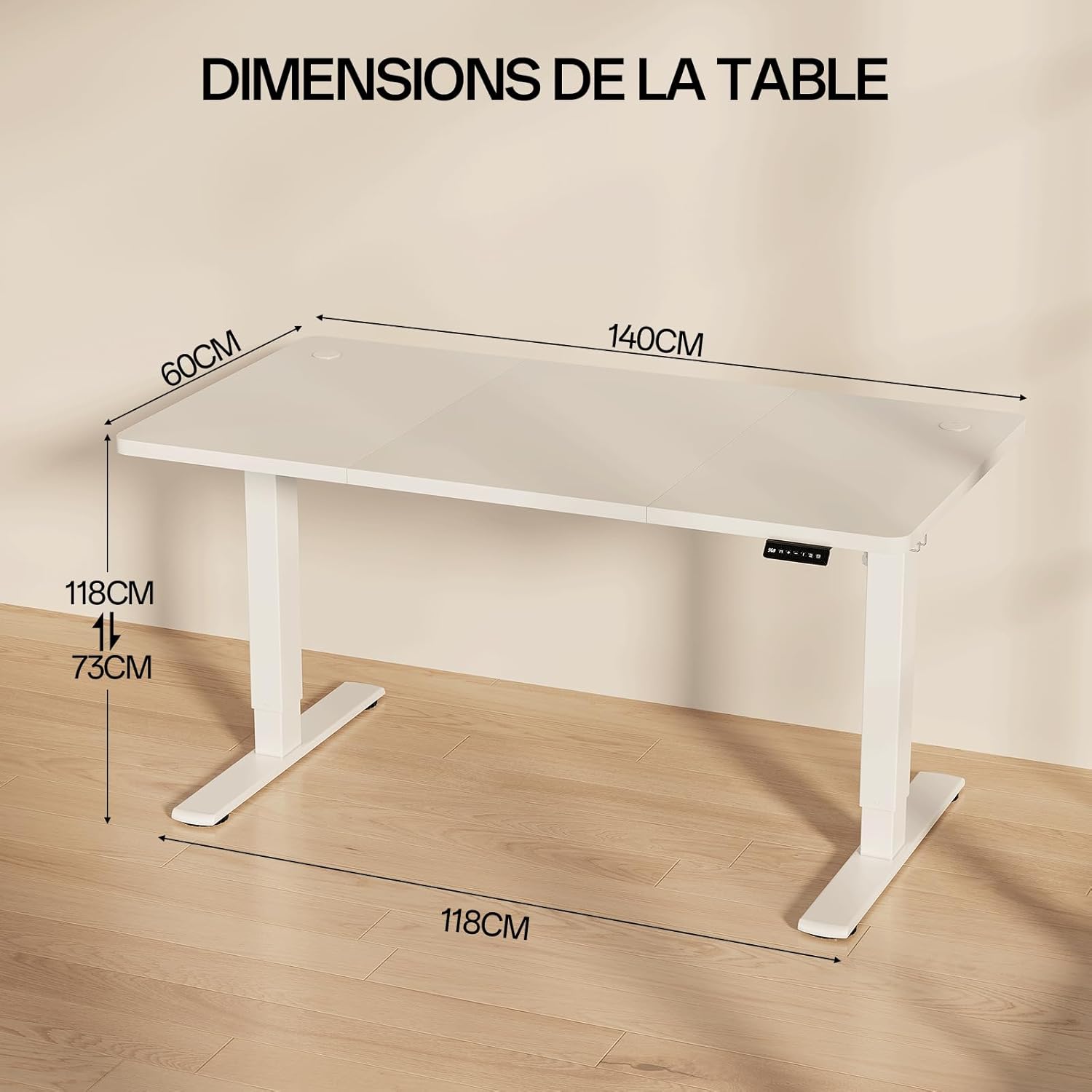
- Dimensjonijiet tal-Prodott (L x W x H): 140 ċm x 60 ċm x 73-118 ċm
- Medda ta' Għoli Aġġustabbli: 73 ċm sa 118 ċm
- Kapaċità massima tal-piż: 50 kg
- Materjal: Alloy Steel (frame), Painted finish (desktop)
- Karatteristiċi Speċjali: Ergonomic, Adjustable, Electric, USB Charging Port, Sedentary Reminder, 3 Memory Positions, Anti-collision Technology
- Livell ta' Storbju: Approximately 55 dB during operation (comparable to quiet conversation)
- Piż tal-oġġett: Madwar 25.5 kg

7. Garanzija u Appoġġ
For warranty information, product support, or to purchase replacement parts, please contact Homall customer service. Refer to your purchase documentation for specific warranty terms and contact details.
You can typically find support contact information on the Homall official webis-sit jew permezz tal-bejjiegħ bl-imnut minn fejn xtrajt il-prodott.


