Introduzzjoni
This manual provides detailed instructions for the assembly, operation, and maintenance of your Homall Electric Standing Desk. Please read this manual thoroughly before use to ensure proper function and longevity of your desk. This desk is designed to offer a flexible workspace, allowing you to switch between sitting and standing positions for improved well-being and concentration.

Image: The Homall Electric Standing Desk in white, showcasing its clean design and ample workspace for multiple devices.
Setup u Assemblea
The Homall Electric Standing Desk is designed for straightforward assembly. All necessary tools and detailed instructions are included in the packaging. Please follow the step-by-step guide provided with your product for a smooth setup process.
- Ħoll il-Komponenti: Carefully remove all parts from the packaging and verify against the parts list in your included manual.
- Arma qafas: Attach the desk legs to the crossbar and feet using the provided screws and tools.
- Waħħal id-Desktop: Secure the desktop panels to the assembled frame. Ensure all connections are tight and stable.
- Installa l-Panel tal-Kontroll: Mount the control panel to the underside of the desk and connect the motor cables as instructed.
- Ġestjoni tal-Kejbil: Utilize the integrated cable box and hooks for organizing power cords and accessories.
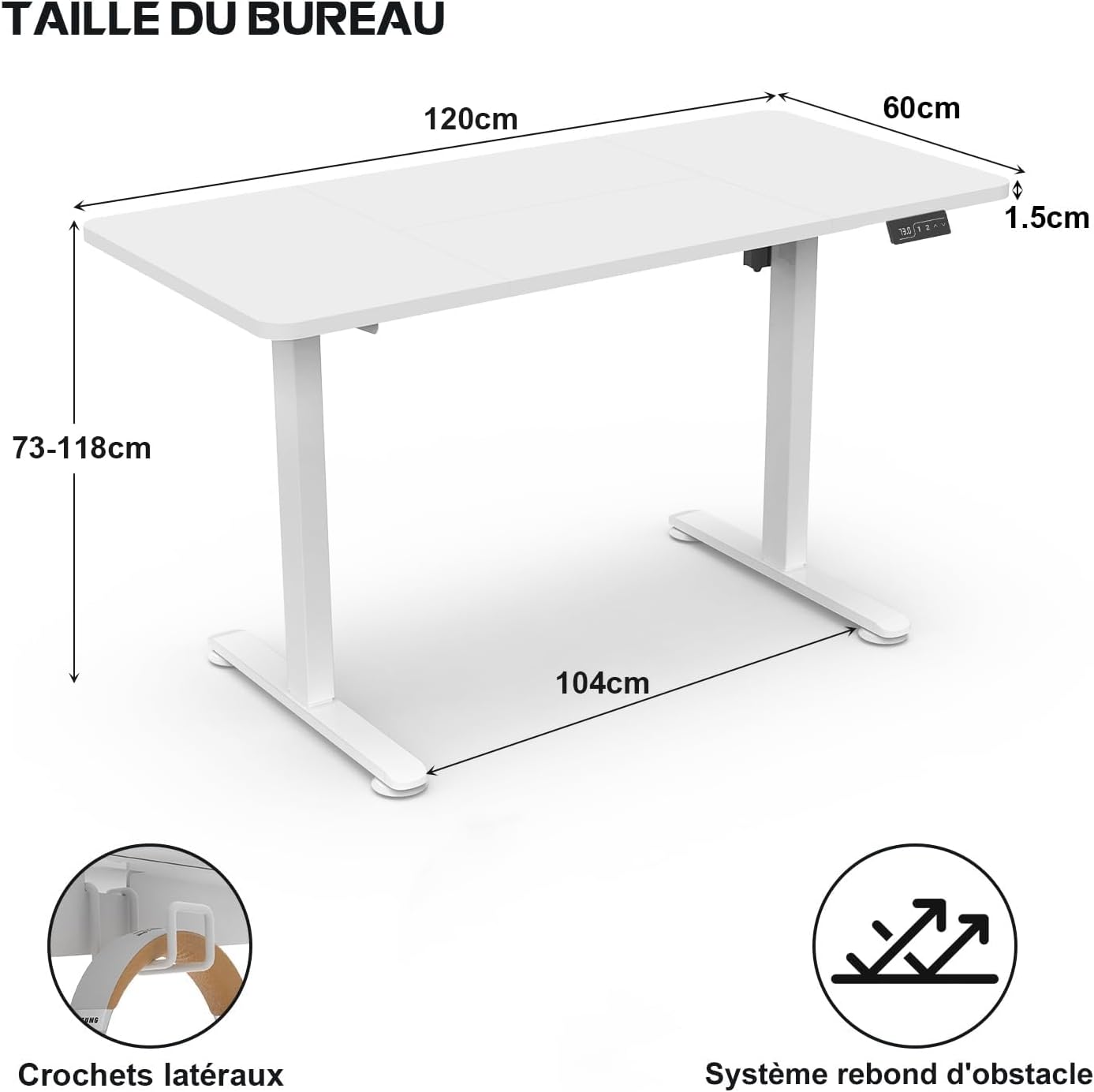
Image: A diagram illustrating the key dimensions of the desk and highlighting features such as the side hooks for headphones and the anti-collision system.
Istruzzjonijiet Operattivi
Aġġustament Għoli
The desk's height can be electrically adjusted between 73 cm (28.7 inches) and 116 cm (45.7 inches). Use the up and down buttons on the control panel to achieve your desired height.

Image: Visual representation of the desk's adjustable height range, from 73cm (sitting) to 118cm (standing).
Presets tal-Memorja
The control panel features two memory preset buttons (1 and 2) to save your preferred sitting and standing heights. To set a memory position:
- Aġġusta l-iskrivanija għall-għoli mixtieq tiegħek.
- Press the "M" button, then press either "1" or "2" to save the current height.
- To recall a saved height, simply press the corresponding "1" or "2" button.
Anti-Collision System
L-iskrivanija hija mgħammra b'sistema kontra l-ħabtiet. Jekk l-iskrivanija tiltaqa' ma' ostaklu waqt l-aġġustament tal-għoli, tieqaf awtomatikament u ddur lura ftit biex tevita l-ħsara.
Port tal-Iċċarġjar tal-USB
A built-in USB port is available on the control panel for convenient charging of your electronic devices.

Immaġni: Dettaljata view of the desk's control panel, highlighting the LED display, height adjustment buttons, memory functions, and the integrated USB charging port.
Tifkira Sedentarja
The control panel includes a timer function to remind you to switch between sitting and standing positions, promoting healthier work habits.
Manutenzjoni
- Tindif: Imsaħ il-wiċċ tal-iskrivanija b'artab, damp drapp. Evita cleaners li joborxu jew kimiċi ħarxa li jistgħu jagħmlu ħsara lill-finitura.
- Spezzjoni: Iċċekkja l-viti u l-konnessjonijiet kollha perjodikament biex tiżgura li jibqgħu ssikkati. Erġa' ssikka jekk meħtieġ.
- Ġestjoni tal-Kejbil: Keep cables organized to prevent entanglement with moving parts during height adjustment.
The desk surface is designed to be durable and waterproof, making it easy to clean and maintain.

Image: The Homall Electric Standing Desk in a typical home office environment, demonstrating its practical use and clean surface.
Issolvi l-problemi
If you encounter any issues with your Homall Electric Standing Desk, please refer to the following common solutions:
- L-Iskrivanija Mhux Tiċċaqlaq:
- Ensure the power cable is securely plugged into both the desk and a working power outlet.
- Check for any obstructions under or around the desk that might be triggering the anti-collision system.
- Moviment Irregolari:
- Iċċekkja li l-iskrivanija titqiegħed fuq wiċċ livellat.
- Ensure all assembly screws are tightened properly.
- Presets tal-Memorja Mhux Taħdem:
- Re-program the memory presets by following the "Operating Instructions" section.
For persistent issues or further assistance, please contact Homall customer support.
Speċifikazzjonijiet
| Karatteristika | Dettall |
|---|---|
| Brand | Homall |
| Numru tal-Mudell | 01 |
| Kulur | Abjad |
| Dimensjonijiet tal-Prodott (L x W x H) | 120 cm x 60 cm x (73-116 cm) |
| Materjal | Industrial-grade Steel Frame, Wood Desktop |
| Karatteristiċi Speċjali | Ergonomic, Adjustable, Electric, Anti-Collision System, USB Charging, Memory Presets, Headphone Hooks |
| Kapaċità tat-Tagħbija | 70 KG (154 lbs) |
| Livell ta' Storbju | Inqas minn 55dB waqt it-tħaddim |

Image: A graphic demonstrating the quiet operation of the desk's motor, rated at less than 55dB.
Garanzija u Appoġġ
Homall offers a comprehensive warranty for your electric standing desk:
- Garanzija tal-Mutur: Sentejn mid-data tax-xiri.
- Table Warranty: Sentejn mid-data tax-xiri.
Our customer service team, based in Germany, is available 24/7 to assist you with any questions or issues. Please refer to your product packaging or the Homall websit għad-dettalji tal-kuntatt.


