1. Introduzzjoni
Grazzi tax-xiriasing the Artis BT X5 60 Watts Wireless Bluetooth 5.0 Soundbar. This manual provides essential information for setting up, operating, and maintaining your soundbar to ensure optimal performance and longevity. Please read this manual thoroughly before use and retain it for future reference.
2. Informazzjoni dwar is-Sigurtà
- Tesponix is-soundbar għall-ilma, umdità, jew temperaturi estremi.
- Tippruvax tiżżarma jew issewwi l-unità int stess. Irreferi għal kull manutenzjoni f'idejn persunal kwalifikat.
- Aċċerta ruħek li jkun hemm ventilazzjoni xierqa madwar is-soundbar biex tevita li tissaħħan iżżejjed.
- Uża biss l-adapter tal-enerġija fornut mal-apparat.
- Żomm is-soundbar 'il bogħod minn kampi manjetiċi qawwija.
- Avoid placing heavy objects on top of the soundbar.
3. Kontenut tal-Pakkett
Ivverifika li l-oġġetti kollha huma preżenti fil-pakkett:
- 1 x Artis BT X5 Bluetooth Soundbar
- 1 x All Function Remote Control
- 1 x Cable Aux
- 1 x Manwal tal-Utent (dan id-dokument)
- 1 x Wall Mount Screws Set
4. Prodott Aktarview
The Artis BT X5 Soundbar features a sleek design with multiple connectivity options and powerful audio output. It includes four driver units and two passive radiators for a 2.0 channel 3D surround sound experience.
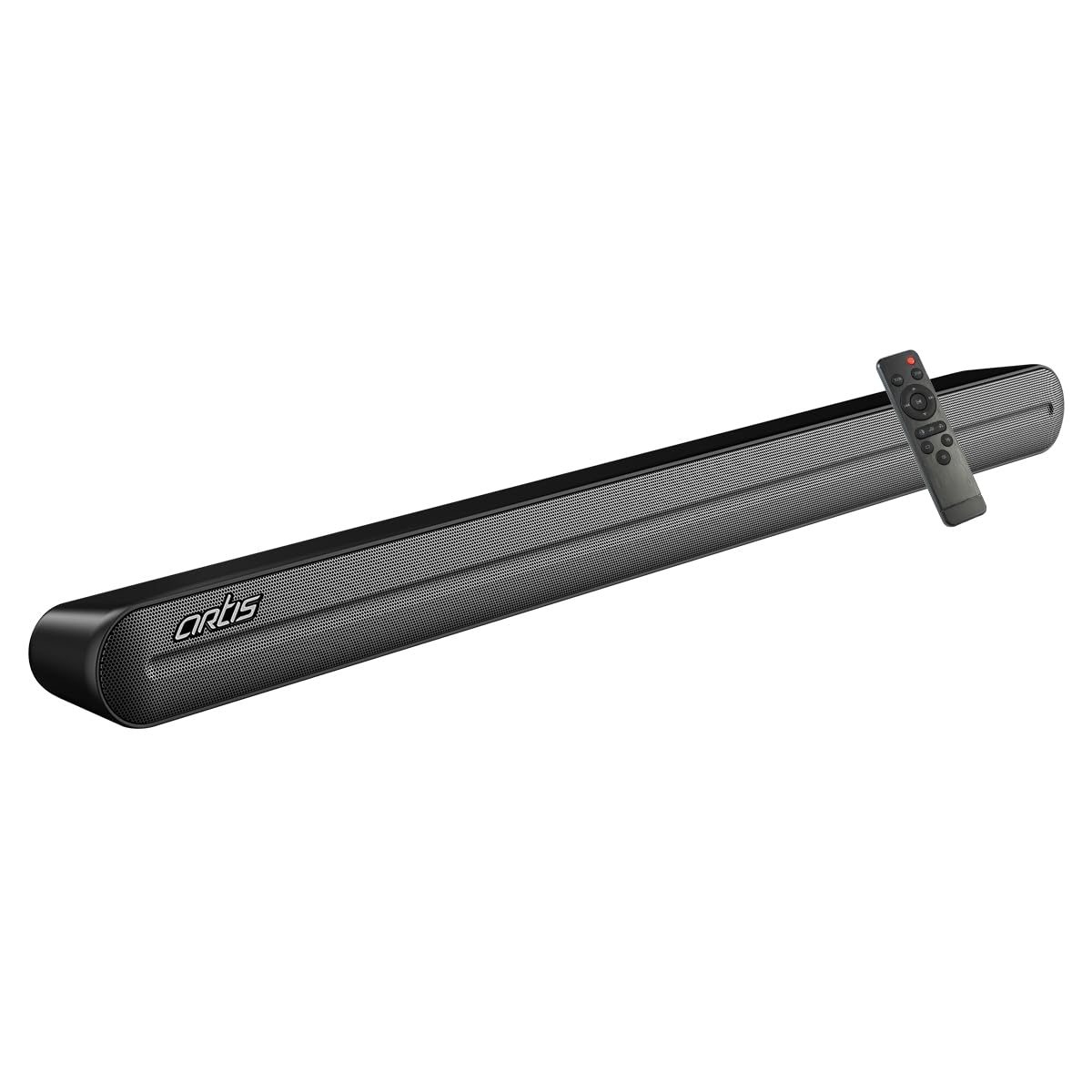
Figura 4.1: Artis BT X5 Soundbar and its remote control. The soundbar features a black finish with a metal mesh grille.
4.1. Front and Top Panel
- Wiri LED: Shows current input mode, volume level, and EQ settings.
- Kontrolli Integrati: Power, Volume Up/Down, Mode selection buttons.
4.2. Konnessjonijiet tal-Panew ta 'wara
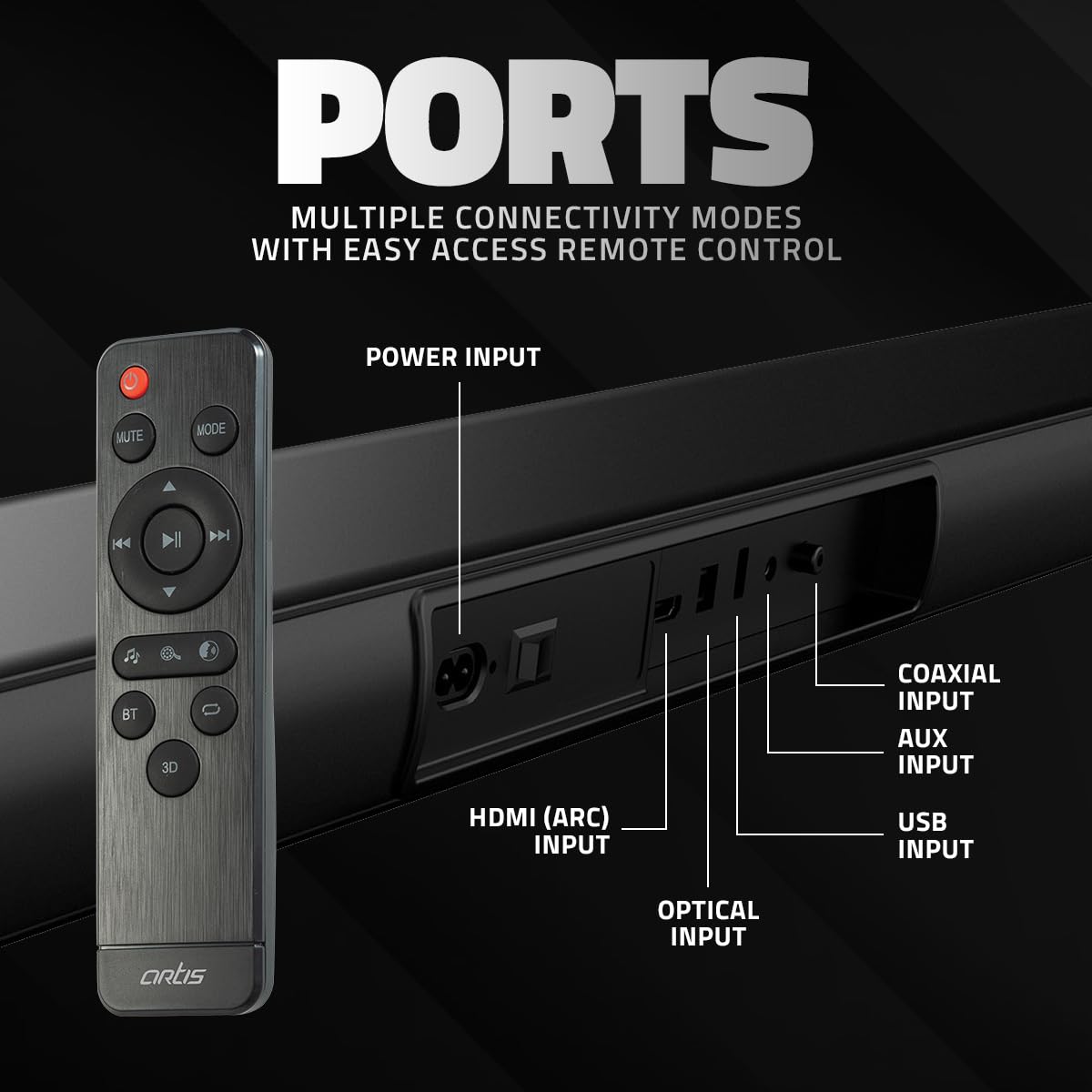
Figura 4.2: Wara view of the Artis BT X5 Soundbar showing the various input ports. From left to right: Power Input, HDMI (ARC) Input, Optical Input, Coaxial Input, AUX Input, and USB Input.
- Input ta' Enerġija: Qabbad l-adapter tal-enerġija hawn.
- Input HDMI (ARC): For connecting to a TV with HDMI ARC support.
- Input ottiku: For digital audio connection from devices like TVs or game consoles.
- Input koassjali: For digital audio connection from compatible devices.
- Input AUX: Għal konnessjoni awdjo analoga bl-użu ta' kejbil ta' 3.5mm.
- Input USB: Għad-daqq tal-awdjo files from a USB pen drive.
4.3. Kontroll mill-bogħod
The included remote control provides full functionality for operating the soundbar from a distance.
- Buttuna tal-Qawwa: Jixgħel/Jitfi s-soundbar.
- Buttuna Mute: Issikket jew jitneħħa l-awdjo.
- Buttuna tal-Modalità: Cycles through input sources (Bluetooth, AUX, HDMI ARC, Optical, Coaxial, USB).
- Volum +/-: Jaġġusta l-livell tal-volum.
- Kontrolli tal-daqq: Play/Pause, Previous/Next Track (for Bluetooth and USB modes).
- Buttuni EQ: Selects sound equalization presets (Music, Movie, Speech).
- Buttuna 3D: Activates or deactivates 3D surround sound mode.
- Buttuna BT: Jaqleb direttament għall-modalità Bluetooth.
5. Setup
5.1 Tqegħid
Place the soundbar on a stable, flat surface in front of your television or mount it on the wall below your TV. Ensure there are no obstructions in front of the soundbar for optimal sound dispersion.

Figura 5.1: Illustration of the Artis BT X5 Soundbar mounted on a wall below a television, demonstrating its space-saving placement option.
5.2. Konnessjoni tal-Enerġija
- Connect the power adapter to the Power Input port on the rear of the soundbar.
- Ipplaggja t-tarf l-ieħor tal-adapter tal-enerġija f'iżbokk tal-ħajt.
5.3. Konnessjoni ma' Sorsi tal-Awdjo
Agħżel wieħed mill-metodi ta' konnessjoni li ġejjin skont it-tagħmir tiegħek:
5.3.1. HDMI (ARC) Connection
For optimal digital audio quality and control, connect to a TV with HDMI ARC (Audio Return Channel) support.
- Connect an HDMI cable (not included) from the HDMI (ARC) port on the soundbar to the HDMI ARC port on your TV.
- Ensure HDMI ARC is enabled in your TV's audio settings.
5.3.2. Konnessjoni ottika
For high-quality digital audio from devices without HDMI ARC.
- Connect an optical cable (not included) from the Optical Input port on the soundbar to the Optical Output port on your TV or other audio device.
- Ensure your device's audio output is set to 'Optical' or 'PCM'.
5.3.3. Konnessjoni Koassjali
For digital audio connection from compatible devices.
- Connect a coaxial cable (not included) from the Coaxial Input port on the soundbar to the Coaxial Output port on your audio device.
5.3.4. Konnessjoni AUX (3.5mm)
For analog audio connection from devices with a 3.5mm audio output.
- Connect the supplied AUX cable from the AUX Input port on the soundbar to the 3.5mm audio output jack on your device.
5.3.5. Konnessjoni USB
Għad-daqq tal-awdjo files directly from a USB pen drive.
- Insert a USB pen drive (FAT32 format, max 32GB) into the USB Input port on the soundbar.
6. Istruzzjonijiet Operattivi
6.1. Power On/Off
Agħfas il- Qawwa buttuna fuq is-soundbar jew ir-remote control biex tixgħel jew titfi l-unità.
6.2. L-Għażla tas-Sors tal-Input
Agħfas il- Modalità button on the soundbar or the remote control repeatedly to cycle through the available input sources: Bluetooth, AUX, HDMI (ARC), Optical, Coaxial, USB. The selected mode will be indicated on the LED display.
6.3. Tqabbil tal-Bluetooth

Figura 6.1: The Artis BT X5 Soundbar wirelessly connected via Bluetooth to a smartphone, illustrating easy music streaming.
- Ixgħel il-soundbar.
- Agħfas il- Modalità buttuna jew il- BT button on the remote control to select Bluetooth mode. The LED display will show 'BT' and flash, indicating it is in pairing mode.
- Fuq l-apparat tiegħek li jaħdem bil-Bluetooth (eż. smartphone, tablet), fittex apparati Bluetooth disponibbli.
- Select 'Artis BT X5' from the list.
- Once paired, the LED display will stop flashing and show 'BT' steadily. You can now play audio from your device through the soundbar.
6.4. Daqq USB
When a USB pen drive is inserted and USB mode is selected, the soundbar will automatically begin playing compatible audio files.
- Uża l- Kontrolli tal-daqq (Play/Pause, Previous/Next) on the remote control to manage playback.
6.5. Volum ta 'aġġustament
Agħfas il- Volum + or Volum - buttons on the soundbar or remote control to adjust the audio level.
6.6. EQ Presets
The soundbar offers three equalization presets to optimize audio for different content types.

Figura 6.2: Visual representation of the three EQ presets: Movie, Music, and Speech, each designed to enhance specific audio experiences.
Agħfas il-korrispondenti EQ button on the remote control to select:
- Mużika: Optimized for musical playback.
- Film: Enhanced for cinematic audio with deeper bass and clearer dialogue.
- Diskors: Prioritizes vocal clarity, ideal for news or podcasts.
6.7. 3D Surround Mode
Activate the 3D Surround Mode for an immersive audio experience.

Figura 6.3: A hand holding the remote control, with a visual representation of sound waves emanating from the soundbar, indicating the activation of the 3D effect mode.
Agħfas il- 3D button on the remote control to toggle the 3D surround sound effect on or off.
7. Manutenzjoni
7.1. Tindif
- Before cleaning, ensure the soundbar is powered off and unplugged from the power outlet.
- Use a soft, dry cloth to wipe the exterior surfaces of the soundbar.
- Do not use liquid cleaners, aerosols, or abrasive materials, as they may damage the finish.
7.2. Ħażna
If storing the soundbar for an extended period, unplug it from the power source and store it in a cool, dry place, away from direct sunlight and extreme temperatures.
8 Issolvi l-problemi
If you encounter issues with your Artis BT X5 Soundbar, refer to the following troubleshooting guide:
| Problema | Kawża Possibbli | Soluzzjoni |
|---|---|---|
| Ebda qawwa | Kejbil tal-enerġija mhux imqabbad; Sokit tal-enerġija mhux attiv | Kun żgur li l-kejbil tal-enerġija huwa konness sew. Iċċekkja jekk is-sokit tal-enerġija hux qed jaħdem. |
| L-ebda ħoss | Sors ta' input mhux korrett; Volum baxx wisq; Mute attivat; Problema bil-konnessjoni tal-kejbil | Select the correct input source. Increase volume. Deactivate mute. Check audio cable connections. |
| Tqabbil Bluetooth ifalli | Is-soundbar mhux fil-modalità ta' tqabbil; L-apparat wisq 'il bogħod; Interferenza | Ensure soundbar is in Bluetooth pairing mode. Move device closer. Avoid interference from other wireless devices. |
| Il-kontroll mill-bogħod ma jaħdimx | Batteries depleted; Obstruction; Remote not pointed at sensor | Replace remote control batteries. Remove any obstructions. Point remote directly at the soundbar's sensor. |
| Ħoss distort | Volume too high; Poor audio source quality; Cable issue | Reduce volume. Try a different audio source. Check audio cables for damage. |
9. Speċifikazzjonijiet
Detailed technical specifications for the Artis BT X5 Soundbar:

Figura 9.1: Dimensions of the Artis BT X5 Soundbar: 93.5 cm (length), 9.95 cm (depth), and 7 cm (height).
| Karatteristika | Speċifikazzjoni |
|---|---|
| Isem tal-Mudell | BT X5 |
| Tip ta' Kelliem | Soundbar |
| Qawwa tal-Ħruġ Totali | 60 Watt RMS |
| Verżjoni Bluetooth | 5.0 |
| Medda Bluetooth | Sa 10 metri (33 pied) |
| Unitajiet tas-sewwieqa | 4 x 2.25 inch drivers |
| Radjaturi Passivi | 2 |
| Surround Sound Channel | 2.0 |
| Modi ta' Input | Bluetooth, HDMI (ARC), Optical, Coaxial, AUX (3.5mm), USB |
| Presets tal-EQ | Music, Movie, Speech |
| Karatteristiċi Speċjali | 3D Surround Mode, Bass Boost, Display, USB Port |
| Sinjal-mal-ħoss Ratio | 75 dB |
| Dimensjonijiet tal-Prodott (T x P x G) | 93.5 ċm x 10 ċm x 7 ċm |
| Piż tal-oġġett | 2.5 Kilogrammi |
| Materjal | Metall, plastik |
| Sors tal-Enerġija | Corded Elettriku |
| Metodu ta' Kontroll | Remote |
10. Garanzija u Appoġġ
10.1. Informazzjoni dwar Garanzija
The Artis BT X5 Soundbar comes with a 1 Year Carry-In Service Center Warranty mid-data tax-xiri. Din il-garanzija tkopri difetti fil-manifattura u abbilità taħt użu normali. Ma tkoprix ħsara kkawżata minn użu ħażin, inċidenti, modifiki mhux awtorizzati, jew diżastri naturali.
10.2. Appoġġ għall-Klijent
For technical assistance, warranty claims, or any other inquiries, please contact Artis customer support:
- Numru bla ħlas: 1800 123 8195 / 1800 120 8195
- Email: inquiry@artis.in


