1. Introduzzjoni
Grazzi tax-xiriasing the DBPOWER W32 Projector. This manual provides essential information for the safe and efficient operation of your device. Please read it thoroughly before use and keep it for future reference.
Kontenut tal-Pakkett
Iċċekkja li l-oġġetti kollha huma inklużi fil-pakkett tiegħek:
- DBPOWER W32 Projector
- Kontroll mill-bogħod
- Korda tal-Enerġija
- Cable HDMI
- AV Cable
- Manwal għall-Utent (dan id-dokument)
- Invita għall-Aġġustament tal-Għoli

2. Setup
2.1 Tqegħid
Place the projector on a stable, flat surface. Ensure adequate ventilation around the device. For optimal viewing, project onto a smooth, light-colored wall or a projector screen.

2.2 Konnessjoni tal-Enerġija
- Qabbad il-korda tal-enerġija mad-dħul tal-enerġija tal-proġettazzjoni.
- Ipplaggja t-tarf l-ieħor tal-korda tad-dawl fi żbokk tad-dawl.
- Agħfas il-buttuna tal-qawwa fuq il-proġettazzjoni jew fuq il-kontroll remot biex tixgħelu.
2.3 Korrezzjoni tal-Fokus u l-Keystone
Adjust the focus ring on the projector lens until the image is clear. Use the keystone correction dial to correct any trapezoidal distortion, ensuring a rectangular image.

3. Istruzzjonijiet Operattivi
3.1 Apparat li jgħaqqad
The DBPOWER W32 Projector supports various input sources:
- HDMI: Connect to laptops, game consoles (PS3/PS4, X-Box, Switch), TV sticks (Fire TV, Roku Stick), and other HDMI-enabled devices.
- USB: Qabbad id-drajvs tal-USB għad-daqq tal-midja.
- TA’: Connect to DVD players or older devices using the included AV cable.
- Karta TF: Insert a TF card for direct media playback.

3.2 Konnettività bla fili (WiFi u Bluetooth)
The projector features built-in WiFi and Bluetooth for seamless wireless connections.
WiFi Screen Mirroring (iOS/Android)
- Select "Screen" from the input source menu to enter the mirroring interface.
- Ensure your iOS/Android device and the projector are connected to the same WiFi network.
- On your iOS device, enable Screen Mirroring and select "DBPOWER-XXXXXX" from the detected devices.
- On your Android device, enable Cast/Wireless Display and select "DBPOWER-XXXX" from the detected devices.

Konnessjoni Awdjo Bluetooth
Qabbad kelliema jew headphones Bluetooth esterni għal esperjenza awdjo mtejba.
- Go to the projector's Bluetooth settings.
- Ippermetti Bluetooth fuq il-proġekter.
- Poġġi l-apparat tal-awdjo Bluetooth tiegħek fil-modalità ta 'tqabbil.
- Select your device from the list on the projector to connect.
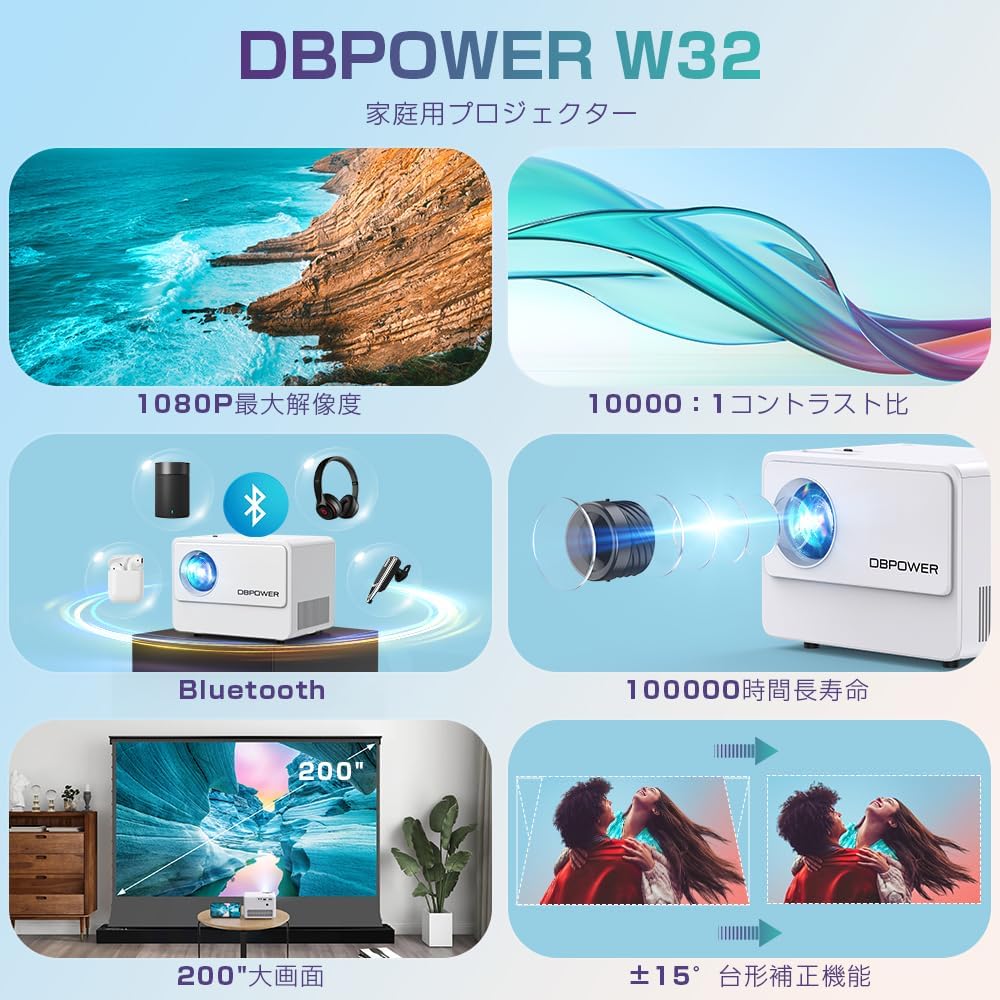
3.3 Output Awdjo
The projector has two built-in speakers for basic audio. For a more immersive experience, connect external audio devices via Bluetooth or the 3.5mm audio jack.

4. Manutenzjoni
4.1 Tindif tal-Lenti
Use a soft, lint-free cloth specifically designed for optical lenses to clean the projector lens. Do not use abrasive cleaners or solvents.
4.2 Tindif tal-Filtru tal-Arja
Regularly check and clean the air filter to ensure proper ventilation and prevent overheating. Refer to the diagram below for the location of the air vents.

4.3 Ħażna
When not in use for extended periods, store the projector in a cool, dry place, away from direct sunlight and excessive dust. Use the original packaging or a protective case.
5 Issolvi l-problemi
| Problema | Kawża Possibbli | Soluzzjoni |
|---|---|---|
| Ebda immaġini murija | Power cable not connected; Incorrect input source selected; Device not connected properly. | Check power connection; Select correct input source (HDMI, USB, AV); Ensure cables are securely connected. |
| Immaġini mċajpra | Focus not adjusted; Keystone not adjusted. | Adjust the focus ring; Adjust the keystone correction dial. |
| L-ebda ħoss | Volume too low; External audio device not connected or selected; Muted. | Increase volume; Check external audio connections/Bluetooth pairing; Unmute the projector. |
| Il-kontroll mill-bogħod ma jaħdimx | Batteries dead; Obstruction between remote and projector; Remote sensor blocked. | Ibdel il-batteriji; Neħħi l-ostruzzjonijiet; Kun żgur li l-kontroll remot huwa ppuntat lejn is-senser IR tal-proġettazzjoni. |
| Is-sħana żejda | Ventilazzjoni mblukkata; Użu fit-tul f'ambjent sħun. | Kun żgur li l-ventijiet huma nodfa; Ħaddem f'żona ventilata sew; Ħalli l-proġettur jiksaħ. |
6. Speċifikazzjonijiet
| Karatteristika | Dettall |
|---|---|
| Brand | DBPOWER |
| Numru tal-Mudell | W32 |
| Dimensjonijiet tal-Prodott | 14.9 x 11 x 10.4 ċm |
| Piż tal-oġġett | 970 g |
| Luminożità | 10000 Lumens (equivalent to 300 ANSI Lumens) |
| Riżoluzzjoni Nattiva | 1920 x 1080 pixels (1080P) |
| Riżoluzzjoni Appoġġjata | Sa 4K |
| Proporzjon ta' Kuntrast | 10,000:1 |
| Lamp Ħajja | ≥100,000 sigħat |
| Teknoloġija tal-Konnettività | Bluetooth, WiFi, HDMI, USB, AV, TF Card |
| Użu Rakkomandat | Home Theater |
| Karatteristiċi Speċjali | 4K compatible, Bluetooth, Built-in Speaker, Keystone Correction, WiFi |


7. Garanzija u Appoġġ
DBPOWER provides a 12-month warranty from the date of purchase. This warranty covers initial defects and natural failures under normal use. For any issues, including exchanges or returns, please contact our customer support.
Appoġġ għall-Klijent
- 24-hour quick response service
- Garanzija ta 'kwalità ta' 12-il xahar
- 30-day return validity period
- Dedicated customer support always available
For direct support, you can scan the QR code below to add us on LINE or visit our official store page.

Please note: Customer support is closed on Saturdays, Sundays, and public holidays, as well as during year-end/New Year, Golden Week, and Obon holidays.


