Introduzzjoni
Thank you for choosing the HOCO EQ3 True Wireless Earbuds. This manual provides essential information for setting up, operating, and maintaining your earbuds to ensure optimal performance and longevity. The EQ3 earbuds feature Bluetooth 5.3 for stable connectivity, touch controls, clear stereo sound with high bass, and a water-resistant design.
X'hemm fil-Kaxxa
- HOCO EQ3 True Wireless Earbuds
- Kawża tal-Iċċarġjar
- Cable tal-Iċċarġjar tal-USB-C
- Kuxxini tal-widnejn (Daqsijiet multipli)
- Kawża Protettiva
Prodott Overview
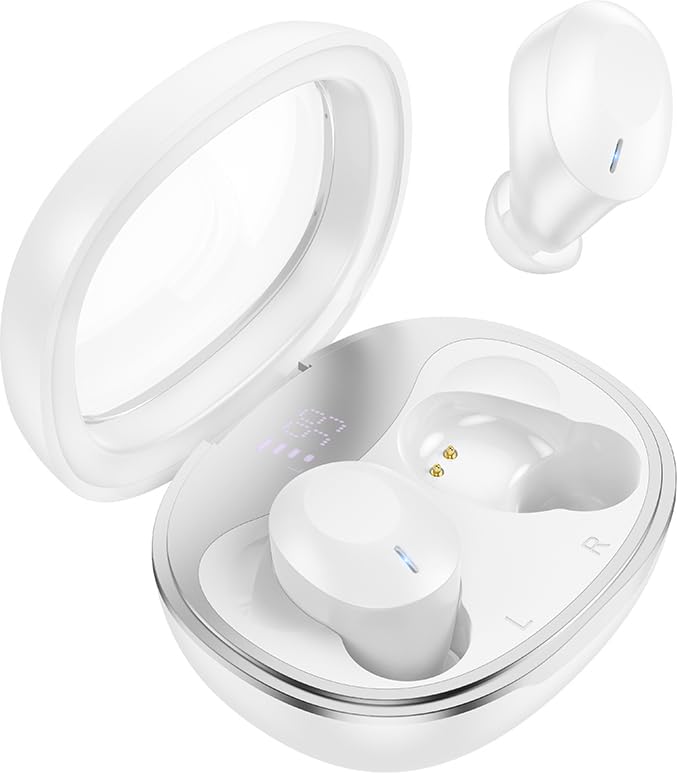
The HOCO EQ3 True Wireless Earbuds are housed in a compact, transparent charging case, designed for portability and convenience.

This infographic highlights key features such as extended battery life, high-fidelity sound quality, Bluetooth 5.3 connectivity, and intuitive touch controls.
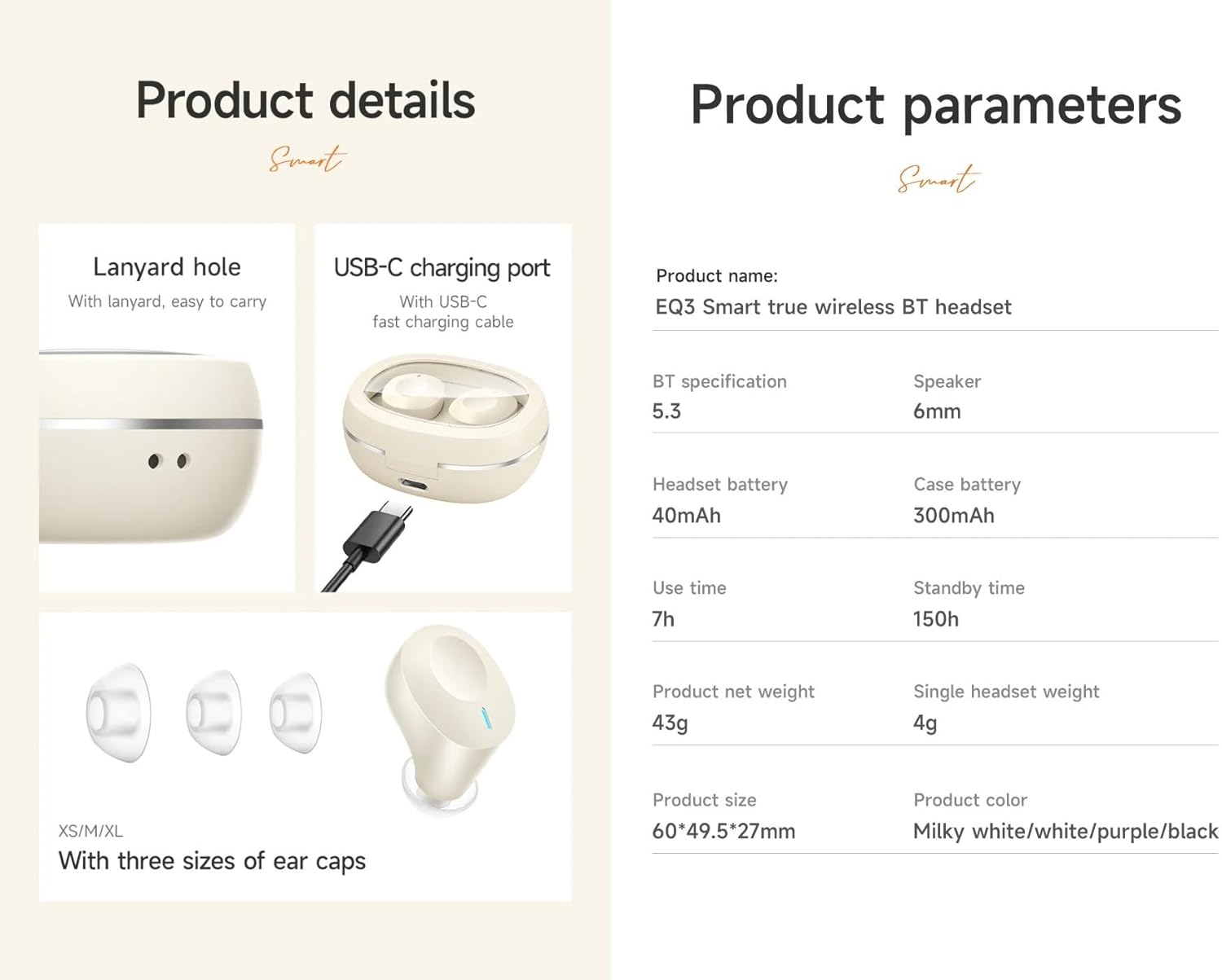
Dettaljati view of the earbuds' design, including the USB-C charging port, lanyard hole, and available ear cap sizes for a customized fit. Product parameters are also listed.
Setup
1. Iċċarġjar tal-Earbuds u l-Kaxxa
Before first use, fully charge the earbuds and the charging case. Connect the provided USB-C cable to the charging port on the case and to a power source. The LED digital display on the case will indicate the charging status. The earbuds charge automatically when placed inside the case.
2. Tqabbil ma' Apparat
- Ensure the charging case has sufficient power and the earbuds are inside.
- Open the lid of the charging case. The earbuds will automatically enter pairing mode, indicated by a flashing light (if applicable).
- Fuq l-apparat tiegħek (smartphone, tablet, eċċ.), attiva l-Bluetooth u fittex apparati disponibbli.
- Select "HOCO EQ3" from the list of devices.
- Once connected, the earbuds will indicate successful pairing, and the LED light will stop flashing.
The earbuds support master-slave switching, allowing either earbud to be used independently after initial pairing.

The earbuds connect automatically to your paired device when the charging case is opened.
3. L-ilbies tal-Earbuds
Select the ear cushions that provide the most comfortable and secure fit for your ears. The HOCO EQ3 earbuds are designed for a semi-in-ear fit, ensuring comfort during extended use.

The semi-in-ear design ensures a light and comfortable fit for prolonged listening.
Tħaddim tal-Earbuds
Touch Kontrolli
The HOCO EQ3 earbuds feature intuitive touch controls on each earbud. The functions are as follows:
- Tektek Waħda (X/L): Play/Pawsa mużika.
- Tektek Doppju (Xellug/Lemin): Binarju li jmiss.
- Tektek Triplu (Xellug/Lemin): Track preċedenti.
- Long Press (L/R) for 2 seconds: Activate voice assistant (e.g., Siri).

Detailed guide to the touch control functions on the HOCO EQ3 earbuds.
Nagħmlu Sejħiet
The earbuds support clear calls with stereo sound. Use the touch controls to manage calls:
- Tektek Uniku: Answer/End a call.
- Stampa Twila: Tiċħad telefonata li tkun deħlin.
Assistent tal-Vuċi
Activate your device's voice assistant by long-pressing either earbud for 2 seconds. This allows for hands-free control of your device.
Manutenzjoni
Tindif
Regularly clean your earbuds and charging case to maintain optimal performance and hygiene. Use a soft, dry, lint-free cloth. For ear tips, gently remove them and clean with a mild soap solution, then rinse and dry thoroughly before reattaching. Do not use harsh chemicals or abrasive materials.
Ħażna
Meta ma tkunx qed tużahom, aħżen il-earbuds fil-kaxxa tal-iċċarġjar tagħhom biex tipproteġihom mit-trab, ħsara, u biex iżżommhom iċċarġjati. Aħżen il-kaxxa f'post frisk u niexef 'il bogħod mix-xemx diretta u minn temperaturi estremi.
Issolvi l-problemi
- Il-earbuds mhux qed jitqabbdu: Ensure both earbuds are charged. Place them back in the case, close the lid, wait a few seconds, then open the lid to re-enter pairing mode. Delete "HOCO EQ3" from your device's Bluetooth list and try pairing again.
- Earbud wieħed biss jaħdem: Ensure both earbuds are charged. Try placing both earbuds back in the case, closing the lid, and then reopening it. This often resets the connection between the two earbuds.
- Ebda ħoss: Iċċekkja l-livell tal-volum fuq l-apparat konness tiegħek. Kun żgur li l-earbuds huma mqabbdin sew u magħżula bħala l-output tal-awdjo.
- Kwistjonijiet tal-iċċarġjar: Verify the USB-C cable is securely connected to both the charging case and the power source. Ensure the charging contacts on the earbuds and inside the case are clean and free of debris.
- L-assistent tal-vuċi mhux qed jirrispondi: Ensure the earbuds are connected to your device and that the voice assistant feature is enabled on your device.
Speċifikazzjonijiet
| Isem tal-Mudell | EQ3 |
| Verżjoni Bluetooth | 5.3 |
| Ċippa Bluetooth | JL AC6983D2 |
| Kawża tal-Iċċarġjar Kapaċità tal-Batterija | 300mAh |
| Kapaċità tal-batterija tal-headset | 40mAh |
| Single Headset Use Time | Sa 7 sigħat |
| Total Use Time (with charging case) | Sa 28 sigħat |
| Ħin ta' Standby | 150 sigħat |
| Dimensjonijiet tal-Każ tal-Iċċarġjar | 60 x 49.5 x 27 mm |
| Total Weight (Case + Earbuds) | 43g |
| Single Headset Weight | 4g |
| Daqs tal-Kelliem | 6mm |
| Livell ta 'Reżistenza għall-Ilma | Reżistenti għall-Ilma |
| Metodu ta' Kontroll | Mess |
| Kontroll tal-Ħoss | Kanċellazzjoni Attiva tal-Ħoss |
Informazzjoni dwar Garanzija
HOCO products are covered by a limited warranty against manufacturing defects. Please refer to the warranty policy provided at the time of purchase or visit the official HOCO websit għal termini u kundizzjonijiet dettaljati. Żomm il-prova tax-xiri tiegħek għal talbiet ta' garanzija.
Appoġġ għall-Klijent
For further assistance, technical support, or inquiries regarding your HOCO EQ3 True Wireless Earbuds, please contact HOCO customer service through their official webis-sit jew l-informazzjoni ta' kuntatt ipprovduta mal-imballaġġ tal-prodott tiegħek.


