Introduzzjoni
Thank you for choosing the GOBOULT Z60 Wireless Earbuds. This manual provides detailed instructions to help you set up, operate, and maintain your earbuds for an optimal audio experience. Please read this manual thoroughly before use and retain it for future reference.

Image: GOBOULT Z60 Earbuds, illustrating the brand transition from BOULT to GOBOULT, highlighting the new logo and packaging while assuring consistent product performance.
X'hemm fil-Kaxxa
Kun żgur li l-oġġetti kollha huma preżenti fil-pakkett:
- GOBOULT Z60 Wireless Earbuds (Left and Right)
- Kawża tal-Iċċarġjar
- Cable tal-Iċċarġjar tal-USB tat-Tip-Ċ
- Ponot tal-widnejn (daqsijiet varji)
- Manwal għall-Utent
- Karta ta' Garanzija

Image: The GOBOULT Z60 Wireless Earbuds and their charging case, showcasing the product's design and included accessories.
Prodott Overview
The GOBOULT Z60 earbuds are designed for comfort and high-quality audio. Each earbud features a 13mm bass driver and multiple microphones for clear calls. The charging case provides extended battery life.
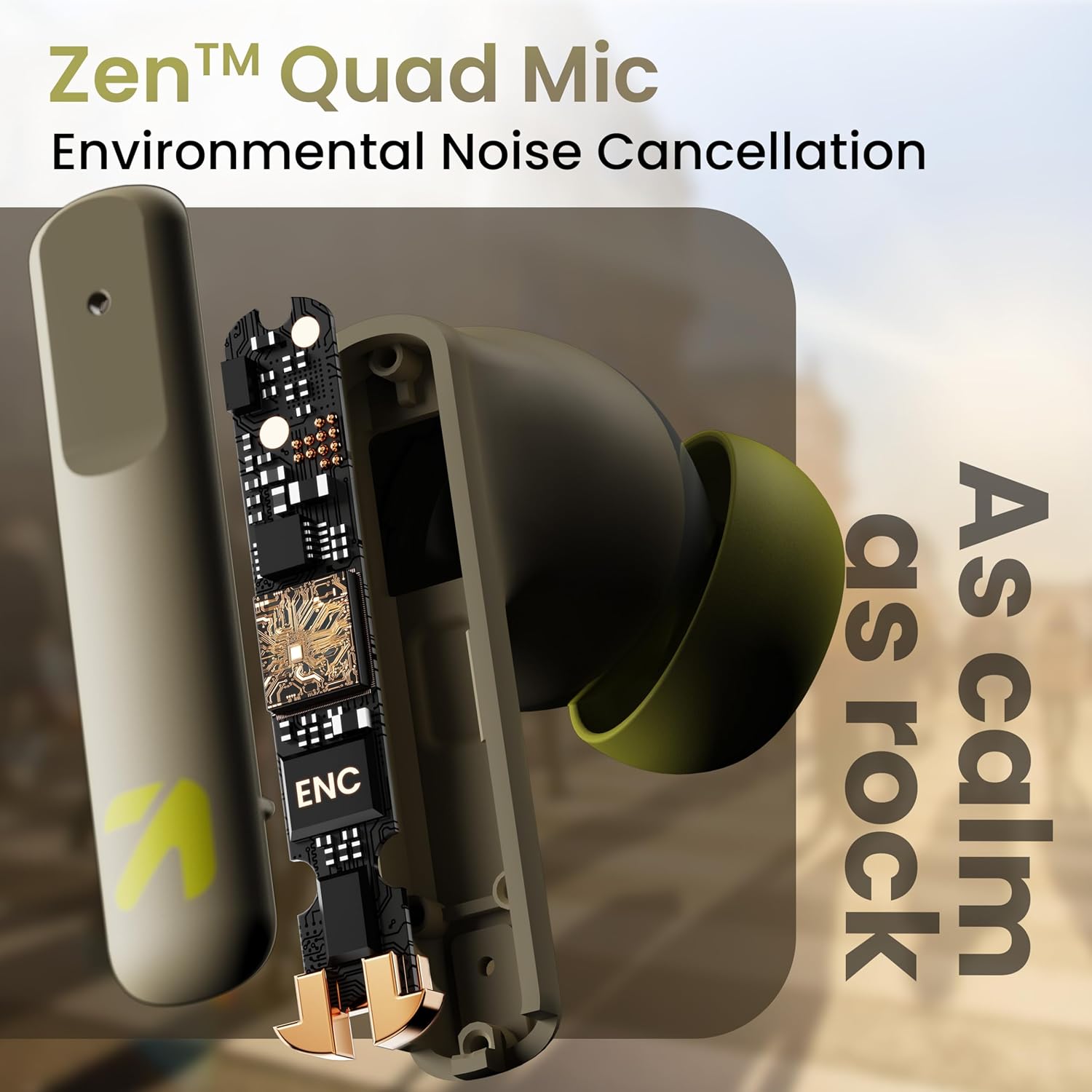
Immaġni: Interna view of a GOBOULT Z60 earbud, highlighting the Zen Quad Mic Environmental Noise Cancellation (ENC) technology for clear audio.

Image: A close-up of a GOBOULT Z60 earbud, emphasizing the 13mm BoomX Drivers responsible for rich bass and superior sound quality.
Iċċarġjar
To charge your GOBOULT Z60 earbuds and charging case:
- Poġġi l-earbuds fil-kaxxa tal-iċċarġjar. Kun żgur li huma mqiegħda sew.
- Qabbad il-kejbil tal-iċċarġjar USB Type-C mal-port tal-iċċarġjar fuq il-kaxxa u ma' sors tal-enerġija.
- L-indikatur LED fuq il-kaxxa juri l-istatus tal-iċċarġjar.
A full charge provides up to 60 hours of total playtime with the charging case. A quick 10-minute charge can provide up to 150 minutes of playtime.

Image: The GOBOULT Z60 charging case connected via a Type-C cable, illustrating the fast charging capability with indicators for 10 minutes charge yielding 150 minutes playtime.

Image: GOBOULT Z60 earbuds in their charging case, highlighting the impressive 60 hours of total playtime and 8 hours of playtime on a single earbud charge.
Setup: Pairing with Your Device
The GOBOULT Z60 earbuds utilize Bluetooth 5.3 for stable and efficient wireless connectivity.
- Tqabbil Inizjali:
- Iftaħ il-kaxxa tal-iċċarġjar. Il-earbuds jidħlu awtomatikament fil-modalità ta' tqabbil.
- Fuq l-apparat tiegħek (smartphone, tablet, laptop), attiva l-Bluetooth.
- Fittex għal "GOBOULT Z60" in the list of available Bluetooth devices and select it to connect.
- Once connected, you will hear an audio prompt, and the LED indicator on the case will change.
- Tqabbil mill-ġdid: The earbuds will automatically connect to the last paired device when taken out of the case, if Bluetooth is enabled on the device.

Image: GOBOULT Z60 earbuds and their open charging case next to a smartphone, illustrating the Bluetooth 5.3 "Blink & Pair" feature for quick and stable connection.
Kif Tħaddem il-Earbuds Tiegħek
Touch Kontrolli
The GOBOULT Z60 earbuds feature intuitive touch controls. The specific functions are:
- Daqq tal-mużika:
- Vit wieħed: Play/Pause
- Tektek darbtejn (Earbud tal-lemin): It-trakka li jmiss
- Double tap (Left earbud): Previous track
- Triple tap (Right earbud): Volume Up
- Triple tap (Left earbud): Volume Down
- Ġestjoni tas-Sejħiet:
- Single tap: Answer/End call
- Long press: Reject call
- Assistent tal-Vuċi: Long press (either earbud) to activate Google Assistant or Siri.
- Mod tal-Logħob: Tap 4 times on either earbud to activate/deactivate Combat Gaming Mode (50ms low latency).

Image: A visual guide to the GOBOULT Z60's touch controls, detailing actions for music playback (play/pause, next/back, volume), call management, activating voice assistance, and toggling game/music mode.
Modalità tal-Logħob
Activate the 50ms low latency Combat Gaming Mode for a synchronized audio-visual experience during gaming. Tap 4 times on either earbud to switch between gaming and normal modes.

Image: GOBOULT Z60 earbuds in use with a smartphone displaying a racing game, emphasizing the "Combat Gaming Mode" with 50ms ultra-low latency, activated by tapping the earbud 4 times.
Assistent tal-Vuċi
Access your device's voice assistant (Google Assistant or Siri) by long-pressing either earbud. This allows for hands-free control of your device.

Image: GOBOULT Z60 earbuds and their charging case, illustrating how to activate voice assistance (Ok Google, Hey Siri) with a long press on an earbud.
Manutenzjoni
To ensure the longevity and optimal performance of your GOBOULT Z60 earbuds:
- Tindif: Naddaf il-earbuds u l-kaxxa tal-iċċarġjar regolarment b'ċarruta ratba u niexfa. Evita li tuża kimiċi ħarxa jew materjali li joborxu.
- Widnejn: Remove and clean the eartips periodically. Ensure they are dry before reattaching.
- Reżistenza għall-Ilma: The earbuds are IPX5 water-resistant, meaning they can withstand sweat and light rain. Do not submerge them in water or expose them to heavy downpours. Ensure the charging port is dry before charging.
- Ħażna: Meta ma tkunx qed tużahom, aħżen il-earbuds fil-kaxxa tal-iċċarġjar tagħhom biex tipproteġihom u żżommhom iċċarġjati.

Image: A GOBOULT Z60 earbud with water droplets on its surface, illustrating its IPX5 water resistance, suitable for protection against sweat, rain, and splashes.
Issolvi l-problemi
If you encounter issues with your GOBOULT Z60 earbuds, refer to the following common solutions:
| Problema | Soluzzjoni Possibbli |
|---|---|
| Earbuds ma jingħaqdux |
|
| L-ebda ħoss minn earbud wieħed |
|
| Earbuds ma jiċċarġjawx |
|
| Volum baxx jew kwalità ħażina tal-ħoss |
|
Speċifikazzjonijiet
| Karatteristika | Dettall |
|---|---|
| Isem tal-Mudell | AirBass (Z60) |
| Teknoloġija tal-Konnettività | Wireless (Bluetooth) |
| Verżjoni Bluetooth | 5.3 |
| Medda Bluetooth | 10 Meters |
| Daqs tas-Sewwieq tal-Awdjo | 13 Millimetru |
| Tip ta' Sewwieq Awdjo | Sewwieq Dinamika |
| Ħajja tal-Batterija (Totali) | Sa 60 Siegħa (bil-kaxxa tal-iċċarġjar) |
| Ħin tal-Iċċarġjar | Madwar 90 Minuta |
| Iċċarġjar Mgħaġġel | 10 minuti ta' ħlas = 150 minuta ta' daqq |
| Port tal-Iċċarġjar | Tip-Ċ |
| Mikrofoni | 4 ENC Mics for Clear Calling |
| Latency tal-Awdjo | 50 Millisekondi (Modalità tal-Logħob) |
| Reżistenza għall-Ilma | IPX5 (Reżistenti għall-Għaraq, Reżistenti għax-Xita, Reżistenti għall-Isplash) |
| Metodu ta' Kontroll | Mess, Voice |
| Piż tal-oġġett | 41.5 Gramm |
| Pajjiż ta' Oriġini | Indja |
Garanzija u Appoġġ
Your GOBOULT Z60 Wireless Earbuds come with a Garanzija tal-Manifattur ta' Sena mid-data tax-xiri.
For any support, warranty claims, or technical assistance, please refer to the contact information provided on your warranty card or visit the official GOBOULT support websit.


