1. Introduzzjoni
This manual provides essential information for the safe and efficient use of your CUBOT P80 smartphone. Please read it carefully before using the device and keep it for future reference.
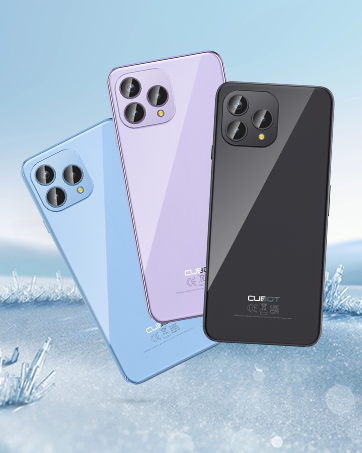
The CUBOT P80 is available in multiple color options.
2. X'hemm fil-Kaxxa
Ivverifika li l-oġġetti kollha huma preżenti fil-pakkett tal-prodott tiegħek:
- Smartphone CUBOT P80
- Phone protective case
- Phone protection film (pre-applied or separate)
- Charger (9V2A)
- Kejbil USB (Tip-Ċ)
- Type-C headphone
- SIM pin ejector tool
- Gwida Quick Start
- Compliance regulation document

Included accessories with the CUBOT P80 smartphone.
3. Device Layout and Physical Features
The CUBOT P80 features a sleek design with a 6.58-inch FHD+ display and a triple camera system on the rear.
Dimensjonijiet u Piż
- Ħxuna: 9.75 mm
- Piż: 217 g

The CUBOT P80's slim profile u disinn ħafif.
Skaner tal-marki tas-swaba'
The device includes a side-mounted fingerprint scanner for secure and quick unlocking.

Fingerprint sensor location for convenient unlocking.
4. Setup
Daħħal SIM Cards u TF Card
The CUBOT P80 supports dual SIM functionality or one SIM card with a TF (microSD) card for expanded storage.
- Sib it-trej tas-SIM fuq il-ġenb tat-telefon.
- Daħħal l-għodda tal-ejecter tas-SIM fit-toqba ż-żgħira ħdejn it-trej u agħfas sew sakemm it-trej joħroġ 'il barra.
- Place your Nano SIM card(s) and/or TF card into the designated slots on the tray. Ensure the gold contacts are facing down.
- Imbotta t-trej lura fit-telefon bir-reqqa sakemm ikun laħlaħ mal-qafas tal-apparat.

SIM and TF card installation options.
Qawwa Inizjali Mixgħula
Press and hold the power button located on the side of the device until the CUBOT logo appears. Follow the on-screen instructions to complete the initial setup, including language selection, Wi-Fi connection, and Google account login.
5. Istruzzjonijiet Operattivi
Sistema Operattiva Android 13
The CUBOT P80 runs on Android 13, offering a user-friendly interface, enhanced privacy controls, and access to the Google Play Store for applications.

Fuqview of the Android 13 operating system.
Karatteristiċi tal-Wiri
The device features a 6.58-inch FHD+ Capacitive Touch Screen with a resolution of 2408x1080 pixels, 400 nits peak brightness, and a 20:9 aspect ratio.

Key features of the CUBOT P80 display.
6. Karatteristiċi tal-Kamera
The CUBOT P80 is equipped with an AI Quad Camera System on the rear and a high-resolution front camera.
Speċifikazzjonijiet tal-Kamera
- Kamera Prinċipali: 48MP
- Kamera ta' quddiem: 24MP
- Makro Kamera: 2MP

The CUBOT P80's AI Quad Camera System.
Kamera Prinċipali
The 48MP main camera captures images with high detail and clarity.

High-resolution capture with the 48MP main camera.
Kamera ta' Quddiem
The 24MP front camera is designed for clear selfies and video calls, featuring beauty modes.

Selfie capabilities of the 24MP front camera.
Makro Kamera
The 2MP macro lens allows for detailed close-up photography of small objects.

Detailed close-up shots with the 2MP macro camera.
Multiple Camera Modes
The camera application includes various modes such as Night View, Portrait, and Panorama to enhance your photography experience.

Explore various photography modes.
7. Konnettività
Netwerk u Wi-Fi
The CUBOT P80 supports Dual 4G Dual VoLTE for cellular connectivity and 2.4/5GHz Dual Wi-Fi for stable and faster internet access.
- GSM: 850/900/1800/1900MHz
- WCDMA: B1/2/4/5/6/8/19
- FDD: B1/2/3/4/5/7/8/12/13/17/18/19/20/26/28A/28B/66
- TDD: 38/39/40/41
Cellular and Wi-Fi network support.
NFC and GPS
The device includes Multifunctional NFC for cash-free mobile payments and supports GPS, GLONASS, and Galileo for accurate global satellite positioning.
NFC for payments and advanced GPS for navigation.
8. Batterija u Iċċarġjar
The CUBOT P80 is equipped with a 5200mAh battery, providing extended usage times. It supports 18W fast charging and OTG (On-The-Go) functionality.
- Standby: Sa 26 jum
- Sejħiet: Sa 29 sigħat
- Daqq tal-mużika: Sa 26 sigħat
- Daqq tal-Vidjo: Sa 7 sigħat

Battery life and charging features.
9. Ħażna u Prestazzjoni
The CUBOT P80 is powered by an MT8788 Octa-core processor and features ampil-memorja u l-ħażna.
- Proċessur: MediaTek MT8788 Octa-core (12nm process, 2.0 GHz clock speed)
- RAM: 8GB + 8GB Expansion RAM (total 16GB)
- Ħażna Interna (ROM): 256GB
- Ħażna espansibbli: Sa 1TB permezz ta' karta TF

Processor and memory details.

RAM expansion technology for enhanced performance.

Internal and expandable storage options.
10. Avviżi Importanti
Kompatibilità tat-Trasportatur
The CUBOT P80 smartphone does not support AT&T, Cricket, or Verizon networks in the United States. Please confirm your carrier's compatibility before purchasing jew bl-użu ta' dan l-apparat.

Important information regarding network compatibility.
11. Speċifikazzjonijiet
| Karatteristika | Speċifikazzjoni |
|---|---|
| Numru tal-Mudell | P80-schwarz-US |
| Sistema Operattiva | Android 13.0 |
| Proċessur | MediaTek MT8788 Octa-core |
| RAM | 16 GB (8GB + 8GB Espansjoni) |
| Ħażna Interna | 256 GB |
| Ħażna espansibbli | Sa 1TB (Karta TF) |
| Daqs tal-Iskrin | 6.58 Pulzier |
| Riżoluzzjoni | 1920 x 1080 (FHD+) |
| Kamera Prinċipali | 48MP |
| Kamera ta' Quddiem | 24MP |
| Makro Kamera | 2MP |
| Kapaċità tal-batterija | 5200 mAh |
| Iċċarġjar | 18W Iċċarġjar Mgħaġġel |
| Konnettività | 4G LTE, Dual SIM, Wi-Fi (2.4/5GHz), NFC, Bluetooth |
| Navigazzjoni | GPS, GLONASS, Galileo |
| Awdjo Jack | 3.5 mm |
| Dimensjonijiet | 9.29 x 7.17 x 1.81 pulzieri (Pakkett) |
| Piż tal-oġġett | 7.7 uqija |
12 Issolvi l-problemi
Kwistjonijiet Komuni u Soluzzjonijiet
- Apparat mhux mixgħul: Kun żgur li l-batterija hija ċċarġjata. Qabbad it-telefon mal-ċarġer u stenna ftit minuti qabel ma tipprova tixgħelu mill-ġdid.
- Sinjal tan-netwerk fqir: Check SIM card insertion. Ensure you are within your carrier's coverage area. Note that the CUBOT P80 is not compatible with AT&T, Cricket, or Verizon.
- Applikazzjonijiet li jiġġarraf: Clear the cache of the problematic app (Settings > Apps > [App Name] > Storage > Clear Cache). If the issue persists, try reinstalling the app or performing a factory reset (backup data first).
- Batterija tisbat malajr: Reduce screen brightness, close unused apps running in the background, disable unnecessary notifications, and limit location services.
- Fingerprint scanner not working: Ensure your finger is clean and dry. Re-register your fingerprints in the security settings.
13. Garanzija u Appoġġ
For warranty information and technical support, please refer to the official CUBOT webis-sit jew ikkuntattja lill-bejjiegħ tiegħek. Żomm il-prova tax-xiri tiegħek għal talbiet ta' garanzija.
Riżorsi onlajn:
- Żur il- CUBOT Store on Amazon għal informazzjoni u aġġornamenti dwar il-prodott.
14. Vidjo tal-Prodott Aktar minnview
Wirja uffiċjali tal-vidjo tal-prodottasing the CUBOT P80's features and design.


