1. Introduzzjoni
This manual provides instructions for the safe and effective operation of your iJoy Stitch Speaker. Please read this manual thoroughly before using the device and retain it for future reference.

Image 1.1: The iJoy Stitch Speaker, showcasing the Stitch Hula Dancing design. This portable Bluetooth speaker is designed for wireless audio playback and features a silicone loop for portability.
2. Kontenut tal-Pakkett
Ivverifika li l-oġġetti kollha huma preżenti fil-pakkett:
- iJoy Stitch Speaker
- Manwal tas-Sid (dan id-dokument)
- Kejbil tal-Iċċarġjar (Mikro USB)

Image 2.1: The iJoy Stitch Speaker alongside its retail packaging, illustrating the product and its box.
3. Karatteristiċi u Komponenti tal-Prodott
The iJoy Stitch Speaker is equipped with various features for versatile audio playback and portability.
3.1 Buttuni tal-Kontroll
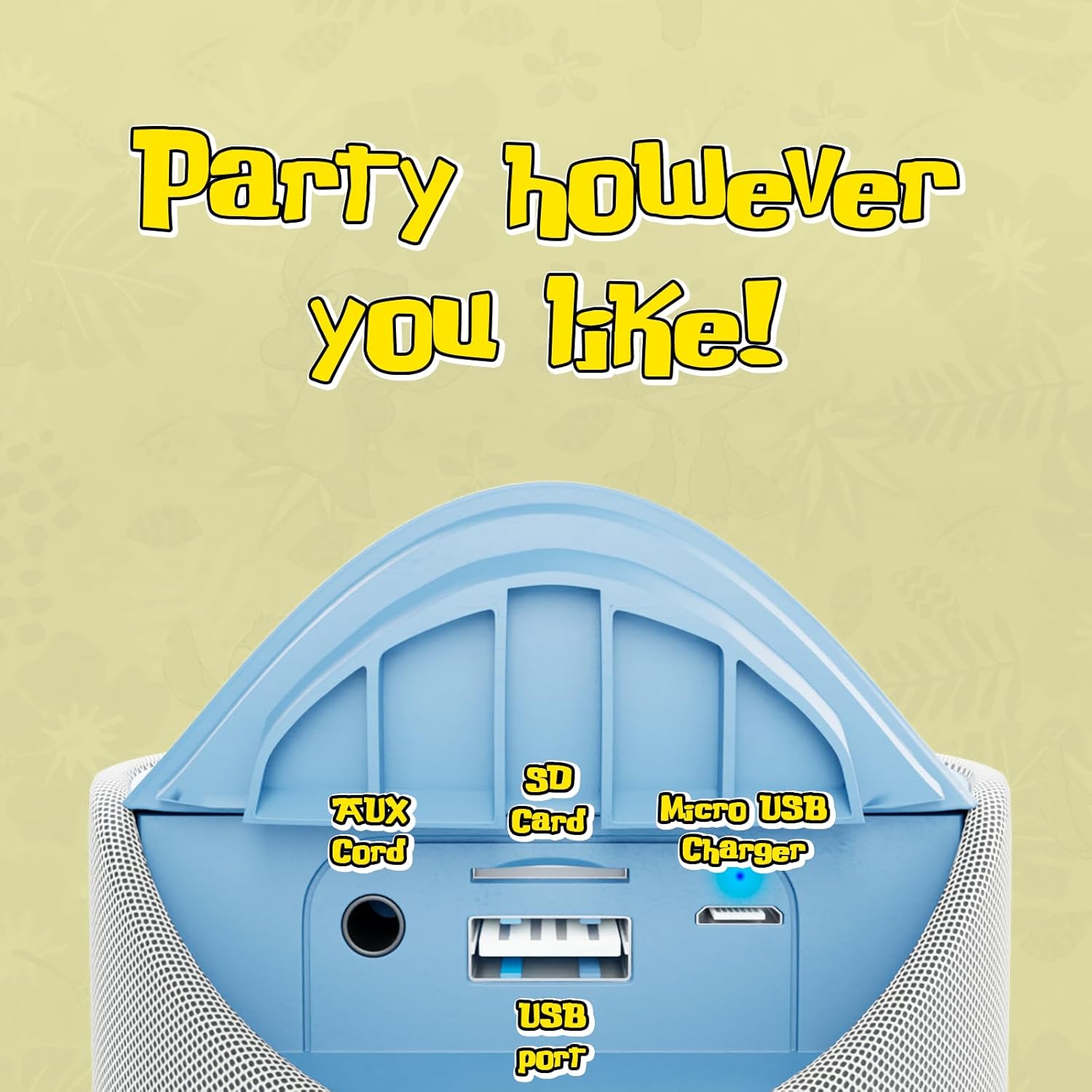
Image 3.1: Top panel of the speaker displaying the control buttons. These include Volume Down (-), Volume Up (+), Play/Pause/Call Answer, Mode Switch (M), and Power On/Off.
- Buttuna tal-Qawwa (⏻): Agħfas u żomm biex tixgħel jew titfi l-ispiker.
- Buttuna tal-Logħob/Pawża/Sejħa (⏸): Agħfas biex tilgħab jew twaqqaf l-awdjo. Agħfas biex twieġeb jew ittemm telefonata.
- Buttuna 'l isfel tal-volum (−): Agħfas biex tnaqqas il-volum.
- Buttuna tal-Volum 'il Fuq (+): Agħfas biex iżżid il-volum.
- Mode Switch Button (M): Press to cycle through available modes (Bluetooth, FM Radio, SD Card, AUX).
3.2 Portijiet u Indikaturi

Image 3.2: Rear panel of the speaker revealing the various input ports. These include the AUX port, SD Card slot, USB port, and Micro USB charging port.
- Port AUX: Għall-konnessjoni ta' apparati awdjo esterni permezz ta' kejbil awdjo ta' 3.5mm.
- Slot tal-Kard SD: Għad-daqq tal-awdjo filedirettament minn kard tal-memorja SD.
- Port USB: Għad-daqq tal-awdjo files direttament minn USB flash drive.
- Mikro USB Charging Port: Għall-iċċarġjar tal-batterija interna tal-ispiker.
- Indikatur LED: Indicates charging status and Bluetooth pairing status.
4. Setup u Iċċarġjar
4.1 Iċċarġjar tal-Ispeaker
- Connect the Micro USB end of the charging cable to the speaker's Micro USB charging port.
- Qabbad it-tarf USB-A tal-kejbil tal-iċċarġjar ma' adapter tal-enerġija USB (mhux inkluż) jew mal-port USB tal-kompjuter.
- The LED indicator will illuminate to show charging is in progress.
- Charging typically takes approximately 2 hours. The LED indicator will change or turn off once fully charged.
Ċarġ sħiħ jipprovdi sa 3 siegħa ta' ħin ta' daqq.
4.2 Tixgħel/Jitfi
- Biex tixgħel: Agħfas u żomm il-buttuna tal-Enerġija (⏻) until the speaker indicates it is on (e.g., a sound prompt or LED illumination).
- Biex titfi: Agħfas u żomm il-buttuna tal-Enerġija (⏻) again until the speaker indicates it is off.
5. Istruzzjonijiet Operattivi
5.1 Tqabbil tal-Bluetooth
- Ensure the speaker is powered on and in Bluetooth mode. If not, press the Mode Switch (M) button until the speaker enters Bluetooth pairing mode (indicated by a flashing LED).
- Fuq it-tagħmir tiegħek (eż., smartphone, tablet), ippermetti l-Bluetooth u fittex tagħmir disponibbli.
- Select "iJoy Stitch Speaker" from the list of found devices.
- Once paired, the speaker will indicate a successful connection (e.g., a sound prompt or solid LED).
- Il-firxa tal-Bluetooth hija ta' madwar 30 pied (9 metri).
5.2 SD Card / USB Playback
- Insert a formatted SD card or USB flash drive containing audio files into the respective slot on the speaker.
- Press the Mode Switch (M) button to select SD Card mode or USB mode.
- L-ispiker jibda jdoqq l-awdjo awtomatikament files mill-midja mdaħħla.
5.3 Radju FM
- Press the Mode Switch (M) button to select FM Radio mode.
- In FM mode, press the Play/Pause button (⏸) to automatically scan and save available radio stations.
- Uża l-buttuna 'l fuq tal-Volum (+) u Volum 'l isfel (−) buttuni biex tinnaviga bejn l-istazzjonijiet salvati.
5.4 Input AUX
- Qabbad tarf wieħed ta' kejbil awdjo ta' 3.5mm (mhux inkluż) mal-port AUX fuq l-ispiker.
- Qabbad it-tarf l-ieħor tal-kejbil tal-awdjo mal-jack tal-headphones jew mal-output tal-awdjo tat-tagħmir estern tiegħek.
- Press the Mode Switch (M) button to select AUX mode.
- L-awdjo issa se jindaqq permezz tal-ispiker mit-tagħmir konness tiegħek.
5.5 Funzjonijiet ta' Sejħa
- When a call is incoming while connected via Bluetooth, press the Play/Pause button (⏸) biex iwieġeb is-sejħa.
- Agħfas il-buttuna Play / Pause (⏸) again to end the call.
- To reject an incoming call, press and hold the Play/Pause button (⏸).
6. Manutenzjoni
6.1 Tindif
Imsaħ l-ispiker b'ċarruta ratba u niexfa. Tużax prodotti tat-tindif jew solventi li joborxu.
6.2 Reżistenza għall-Ilma
The speaker has an IPX4 water resistance rating, meaning it is protected against splashing water from any direction. It is not designed for submersion in water.
7 Issolvi l-problemi
| Problema | Soluzzjoni |
|---|---|
| L-ispiker ma jixgħelx. | Ensure the battery is charged. Connect the speaker to a power source using the Micro USB cable. |
| L-ebda ħoss mill-ispiker. | Check the volume level on both the speaker and your connected device. Ensure the correct mode (Bluetooth, SD, FM, AUX) is selected. |
| Ma tistax tqabbad permezz tal-Bluetooth. | Ensure the speaker is in Bluetooth pairing mode (flashing LED). Make sure your device's Bluetooth is enabled and within 30 feet of the speaker. Try restarting both devices. |
| Riċeviment ħażin tar-radju FM. | Relocate the speaker to an area with better signal. Ensure automatic station scanning has been performed. |
8. Speċifikazzjonijiet

Image 8.1: Visual representation of the speaker's dimensions, indicating it is approximately 6.3 inches tall and 2.9 inches across.
| Karatteristika | Dettall |
|---|---|
| Isem tal-Mudell | Stitch Speaker |
| Brand | iJoy |
| Teknoloġija tal-Konnettività | Bluetooth |
| Teknoloġija tal-Komunikazzjoni mingħajr Fili | Bluetooth |
| Medda Bluetooth | 30 pied (9 metru) |
| Tip ta' Kelliem | Speaker Bluetooth portabbli |
| Qawwa tal-Ħruġ Massimu tal-Ispeaker | 5 Watts |
| Modalità tal-Ħruġ tal-Awdjo | Stereo |
| Sors tal-Enerġija | Mħaddma bil-batterija |
| Kapaċità tal-batterija | 800 Milliamp Sigħat |
| Ħin tal-Iċċarġjar | 2 Sigħat |
| Ħin tal-logħob | Sa 3-il Siegħa |
| Livell ta 'Reżistenza għall-Ilma | IPX4 (Reżistenti għall-Ilma) |
| Dimensjonijiet tal-Prodott | 3"D x 3"W x 6"H (madwar 7.6cm D x 7.6cm W x 15.2cm H) |
| Piż tal-oġġett | 8 Uqija (madwar 227 grammi) |
| Materjal | Silikonju |
| Metodu ta' Kontroll | Touch (Button Controls) |
| UPC | 810116713943 |
9. Garanzija u Appoġġ
The iJoy Stitch Speaker comes with a 90-Day Manufacturer Warranty. For warranty claims or technical support, please contact the manufacturer, Quest USA Corp, or refer to the contact information provided with your purchase documentation.
Għal aktar għajnuna, jekk jogħġbok żur il- iJoy Store on Amazon.


