Introduzzjoni
This manual provides essential instructions for the setup, operation, maintenance, and troubleshooting of your ONN 43-Inch Class 4K LED Smart TV. This Roku Smart TV offers access to over 500,000 movies and TV episodes through various streaming services, all accessible via a customizable home screen. It features 4K UHD resolution, HDR10 support, and integrated Wi-Fi connectivity. The package also includes a wall mount for flexible installation options.
Informazzjoni Importanti dwar is-Sigurtà
Please read all safety instructions before operating your TV. Keep this manual for future reference.
- Tesponix it-TV għax-xita jew għall-umdità biex tevita nar jew xokk elettriku.
- Timblokkax il-fetħiet tal-ventilazzjoni. Kun żgur li jkun hemm biżżejjed spazju madwar it-TV għal fluss tal-arja xieraq.
- Uża biss aċċessorji/aċċessorji speċifikati mill-manifattur.
- Skonnettja t-TV waqt maltempati bis-sajjetti jew meta ma tużahx għal perjodi twal.
- Irreferi l-manutenzjoni kollha lil persunal tas-servizz kwalifikat.
- Żomm il-partijiet żgħar u l-materjali tal-ippakkjar 'il bogħod mit-tfal.
Setup
X'hemm fil-Kaxxa
Ivverifika li l-komponenti kollha huma preżenti fil-pakkett tiegħek:
- ONN 43-Inch 4K LED Smart TV
- TV Stand (if not using wall mount)
- Kontroll mill-bogħod (batteriji mhux inklużi)
- Korda tal-Enerġija
- Kitt tal-Immuntar fuq il-Ħajt
- Gwida Quick Start
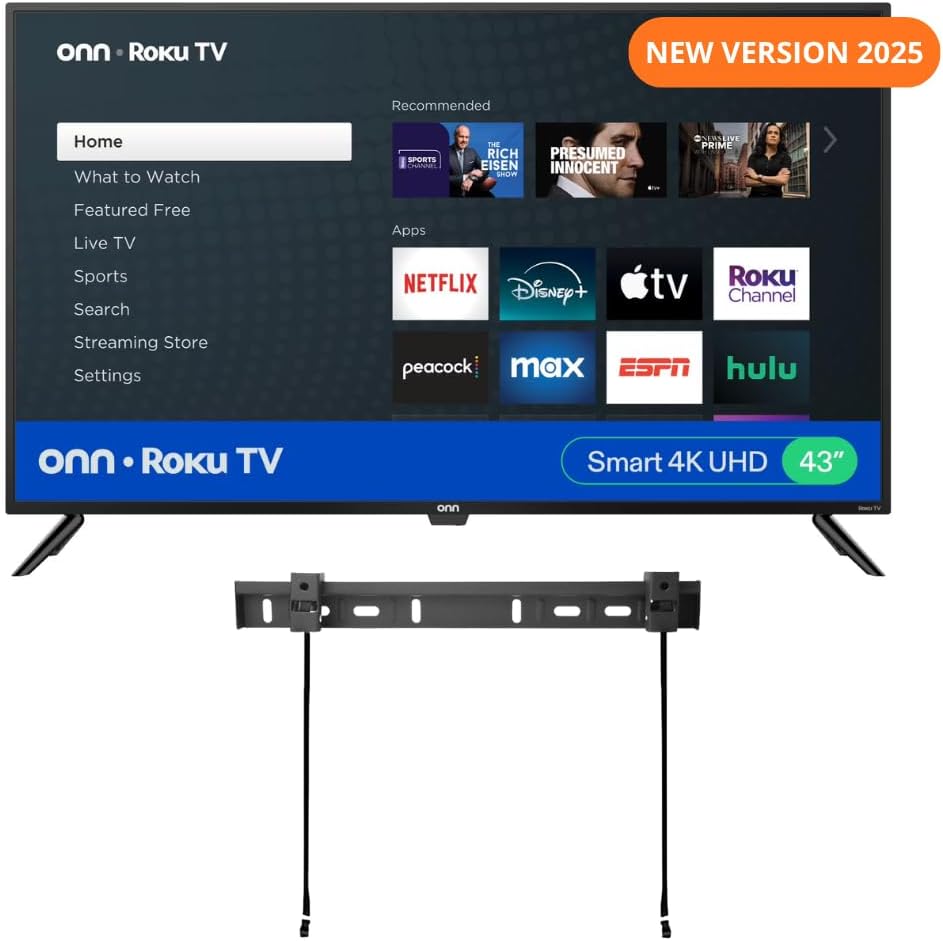
Image: ONN 43-Inch Roku TV with included wall mount and stand.

Immaġni: Dettaljata view of the wall mount components, including brackets, screws, and level.
Immuntar mal-ħajt tat-TV
The included wall mount allows for a secure and space-saving installation. Follow these general steps. Refer to the specific wall mount instructions for detailed guidance.
- Identifika l-Post tal-Immuntar: Choose a sturdy wall capable of supporting the TV's weight.
- Installa Wall Bracket: Secure the wall bracket to the wall using appropriate hardware for your wall type (wood studs, concrete, etc.). Use a level to ensure it is straight.
- Waħħal il-Brakketti tat-TV: Fasten the TV brackets to the back of your ONN TV.
- Mount TV: Carefully lift the TV and hook the TV brackets onto the wall bracket. Ensure the TV is securely seated.

Image: Diagram illustrating the process of attaching the TV to the wall mount.

Image: Infographic detailing the features of the ultra-slim TV wall mount, including capacity and distance from wall.
Konnessjoni Periferali
Your ONN TV offers various connection ports for external devices:
- HDMI (x3): For high-definition devices like Blu-ray players, game consoles, or cable/satellite boxes.
- Kompost (AV): For older devices with red, white, and yellow RCA cables.
- USB (x1): Għall-konnessjoni ta' apparati tal-ħażna USB ma' view ritratti jew daqq il-midja.
- Ottiku (Ħruġ Awdjo Diġitali): Għall-konnessjoni ma' soundbar jew sistema ta' home theater.
- Coaxial/Cable (RF): Għall-konnessjoni ta' antenna jew provvista ta' kejbil tat-TV.
- Headphone: Għal smigħ privat b'headphones bil-fili.
Istruzzjonijiet Operattivi
Initial Power On and Roku Setup
After connecting the power cord, press the power button on the remote or TV. The TV will guide you through the initial setup process:
- Għażla tal-Lingwa: Agħżel il-lingwa ppreferuta tiegħek.
- Konnessjoni tan-Netwerk: Connect to your home Wi-Fi network. You will need your network name (SSID) and password.
- Konfigurazzjoni tal-Kont Roku: Follow the on-screen prompts to create or link a Roku account. This is required to access streaming channels.
- Installazzjoni tal-Kanal: Select and install your favorite streaming channels.

Image: The Roku TV home screen displaying various streaming app icons and navigation options.
Karatteristiċi intelliġenti u Kontroll tal-Vuċi
Your ONN Roku TV integrates smart features for enhanced usability:
- Applikazzjoni Mobbli Roku: Download the free Roku mobile app for iOS or Android to control your TV, use voice search, enjoy private listening with headphones, or cast media from your phone.

Image: Screenshots of the Roku mobile app showing remote control, search, and voice command interfaces.
- Assistenti tal-Vuċi: The TV is compatible with Amazon Alexa, Google Assistant, and Apple HomeKit. Use voice commands to find content, launch channels, or switch inputs.

Image: Logos indicating compatibility with Apple AirPlay, Apple Home, Amazon Alexa, and Google Home.
Settings tal-Istampa u tal-Ħoss
Access the TV's settings menu to adjust picture and sound to your preference.
- 4K UHD: Experience lifelike color, texture, and detail with 4K Ultra High Definition resolution.

Image: Visual representation of 4K UHD display quality, highlighting vibrant colors and detail.
- HDR10: High Dynamic Range 10 technology enhances viewing with vivid colors and improved contrast.

Image: A split image demonstrating the difference between HDR10 and Standard Dynamic Range, showcasing richer colors and contrast.
- Dolby Audio: Enjoy superior sound quality through the built-in 8W speakers, enhanced by Dolby Audio technology.
Manutenzjoni
Kura xierqa tiżgura l-lonġevità tat-TV tiegħek.
- Tindif tal-Iskrin: Imsaħ l-iskrin bil-mod b'ċarruta ratba, niexfa u mingħajr suf. Għal marki iebsa, uża prodott għat-tindif tal-iskrin iddisinjat speċifikament għat-televiżjonijiet, applikat fuq iċ-ċarruta, mhux direttament fuq l-iskrin.
- Tindif tal-Kabinett: Uża drapp artab u niexef biex timsaħ il-kabinett tat-TV. Evita li tuża prodotti tat-tindif jew solventi li joborxu.
- Ventilazzjoni: Kun żgur li l-fetħiet tal-ventilazzjoni fuq wara tat-TV mhumiex imblukkati biex tevita li jisħon iżżejjed.
- Korda tal-Enerġija: Regularly check the power cord for any damage. If damaged, discontinue use and contact support.
Issolvi l-problemi
Jekk tiltaqa' ma' problemi bit-TV tiegħek, irreferi għas-soluzzjonijiet komuni li ġejjin:
| Problema | Soluzzjoni Possibbli |
|---|---|
| Ebda Qawwa | Kun żgur li l-korda tal-enerġija hija pplaggjata sew kemm fit-TV kif ukoll f'sokit elettriku li jaħdem. Ipprova sokit differenti. |
| L-ebda Stampa, Iżda Għandha Ħoss | Check the input source. Press the 'Input' or 'Source' button on your remote to cycle through inputs. Ensure external devices are powered on and connected correctly. |
| L-ebda ħoss, iżda għandu stampa | Check the volume level and ensure the TV is not muted. If using external audio, verify connections and settings. |
| Remote Mhux Taħdem | Ibdel il-batteriji fir-remote control. Kun żgur li m'hemm l-ebda ostaklu bejn ir-remote u s-sensor IR tat-TV. |
| Kwistjonijiet ta' Konnessjoni Wi-Fi | Restart your router and modem. Go to the TV's network settings and try reconnecting to your Wi-Fi network. Ensure the password is correct. |
Speċifikazzjonijiet
Detailed technical specifications for the ONN 43-Inch Class 4K LED Smart TV, Model 100012584:
| Karatteristika | Dettall |
|---|---|
| Brand | ONN |
| Numru tal-Mudell | 100012584 |
| Daqs tal-Iskrin | 43 Pulzier (110 ċm djagonali) |
| Teknoloġija tal-Wiri | LED |
| Riżoluzzjoni | 4K UHD (Ultra High Definition) |
| Riffriskar Rata | 60 KHz |
| Proporzjon ta' l-aspett | 16:9 |
| Teknoloġija tal-Konnettività | Ethernet, HDMI (x3), RF, USB (x1), Wi-Fi |
| Karatteristiċi Speċjali | Works with Alexa & Google Assistant, Roku Smart TV |
| Tip ta' Kelliem | Built-In (2 x 8W speakers with Dolby Audio) |
| Dimensjonijiet tal-Prodott (bl-istand) | 10"D x 38"W x 24"Għ (madwar) |
| Piż tal-oġġett | 17.36 liri (madwar) |
| Voltage | 1.1E+2 Volts (AC) |
| Wattage | 16 watt |
Garanzija u Appoġġ
Informazzjoni dwar Garanzija
This product is sold as an Amazon Renewed item. Amazon Renewed products are backed by the Amazon Renewed Guarantee. Please refer to the Amazon Renewed Guarantee policy on the Amazon website for details regarding coverage, duration, and claims process. This typically includes a 90-day replacement or refund guarantee if the product does not work as expected.
Appoġġ għall-Klijent
For technical assistance, troubleshooting beyond this manual, or warranty claims, please contact the retailer or the Amazon Renewed support team. You can typically find contact information on your purchase invoice or on the Amazon Renewed product page.
For general information about Roku TV features and services, visit the official Roku support websit: support.roku.com


