1. Prodott Aktarview
The ION Audio Highlander is a high-powered, all-weather portable Bluetooth speaker designed to deliver rich sound and deep bass even at high volumes. Its durable construction makes it suitable for various environments, ensuring your music can accompany you wherever you go.
Karatteristiċi ewlenin:
- High-Power Audio: Delivers 120 Watts of speaker maximum output power for impactful sound.
- Spinta baxxa: Enhances low frequencies for maximum impact.
- Bluetooth 5.0 Enabled: Allows wireless streaming and control of your music from compatible devices.
- IPX5 Reżistenti għall-Ilma: Designed to withstand splashes and rain, making it safe for outdoor use.
- Rechargeable 50-Hour Battery: Provides extended playtime on a single charge.
- Built-in Handles and Wheels: Facilitates easy transportation.
2. Kontenut tal-Pakkett
Kun żgur li l-oġġetti kollha elenkati hawn taħt huma preżenti fil-pakkett tiegħek:
- ION Audio Highlander Portable Speaker
- Kejbil tal-Enerġija
3. Gwida ta' Setup
3.1 Iċċarġjar tal-batterija
Before first use, fully charge the Highlander speaker. The battery life is approximately 50 hours, but initial charging may take several hours.
- Connect the included power cable to the power input on the back of the Highlander speaker.
- Ipplaggja t-tarf l-ieħor tal-kejbil tal-enerġija f'sokit standard tal-ħajt.
- Id-dawl indikatur tal-iċċarġjar se jixgħel. Id-dawl se jinbidel jew jintefa ladarba l-iċċarġjar ikun komplut.
3.2 Tixgħel/Jitfi
To power the speaker on or off, locate the power button on the control panel.
- Biex Tixgħel: Press and hold the Power button for a few seconds until the display illuminates.
- Biex Tifi: Press and hold the Power button again for a few seconds until the display turns off.
3.3 Tqabbil tal-Bluetooth
Follow these steps to connect your Bluetooth device to the Highlander speaker:
- Ensure the Highlander speaker is powered on and in Bluetooth mode. The Bluetooth indicator on the display will flash, indicating it's ready to pair.
- On your Bluetooth device (smartphone, tablet, laptop), go to its Bluetooth settings.
- Fittex għal available devices. Select "ION Highlander" from the list.
- Once paired, the Bluetooth indicator on the speaker will stop flashing and remain solid. You can now play audio through the speaker.
- To disconnect, turn off Bluetooth on your device or select "Forget This Device" in your device's Bluetooth settings.
4. Istruzzjonijiet Operattivi
4.1 Control Panel Overview
The top panel of the Highlander speaker features various controls for managing audio playback and settings.

- Buttuna tal-Qawwa: Ixgħel jew jitfi l-kelliem.
- Buttuna tal-Volum: Jaġġusta l-livell tal-volum ġenerali.
- Buttuna Bluetooth: Jibda l-modalità ta' tqabbil Bluetooth.
- Buttuna tal-Bass Boost: Activates or deactivates the bass boost feature.
- Skrin tad-displej: Shows current mode, battery status, and other information.
4.2 Adjusting Volume and Bass Boost
- Volum: Rotate the main volume knob clockwise to increase volume and counter-clockwise to decrease it.
- Spinta baxxa: Press the "Bass Boost" button to enhance the bass output. Press it again to return to normal audio.
4.3 Portability Features
The Highlander is designed for easy transport:
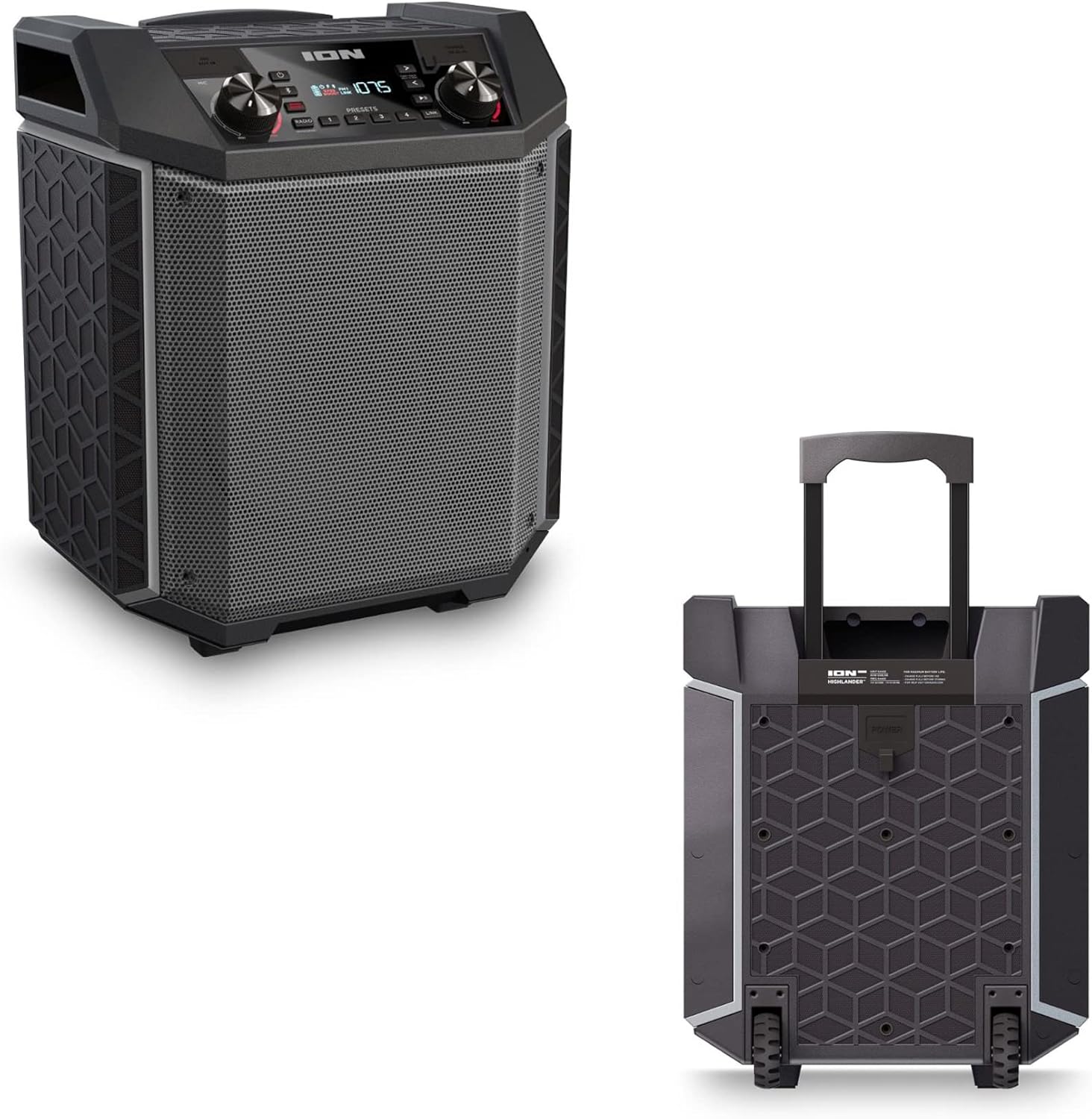

- Manku li jinġibed: Pull up the integrated handle to roll the speaker like luggage.
- Roti: Use the built-in wheels for smooth movement across various surfaces.
4.4 Reżistenza għall-Ilma (IPX5)
The Highlander speaker is IPX5 water-resistant, meaning it can withstand splashes of water from any direction. It is suitable for use by the pool or in light rain.

Importanti: Do not submerge the speaker in water. Ensure all port covers are securely closed when exposed to water.
5. Manutenzjoni
5.1 Tindif
- Dejjem itfi l-ispiker u skonnettjah mis-sors tal-enerġija qabel ma tnaddfu.
- Uża drapp artab u niexef biex timsaħ l-uċuħ ta' barra.
- Għal ħmieġ iebsa, ħafif dampLaħlaħ id-drapp bl-ilma. Evita li tuża kimiċi ħarxa, solventi, jew prodotti tat-tindif li joborxu.
- Do not spray cleaning liquids directly onto the speaker.
5.2 Ħażna
- Aħżen l-ispiker f'post frisk u niexef 'il bogħod mix-xemx diretta u minn temperaturi estremi.
- If storing for an extended period, ensure the battery is partially charged (around 50%) to maintain battery health. Recharge every few months if not in use.
5.3 Kura tal-Batterija
- Evita li l-batterija tixxotta kompletament ta' spiss.
- Tesponix il-batterija għal sħana eċċessiva jew kesħa.
- If the battery performance significantly degrades, contact customer support for assistance.
6 Issolvi l-problemi
If you encounter issues with your Highlander speaker, refer to the table below for common problems and solutions.
| Problema | Soluzzjoni Possibbli |
|---|---|
| L-ispiker ma jixgħelx. |
|
| Ma tistax tgħaqqad ma' apparat Bluetooth. |
|
| L-ebda ħoss jew volum baxx. |
|
| Distorsjoni tal-ħoss. |
|
7. Speċifikazzjonijiet
| Karatteristika | Dettall |
|---|---|
| Isem tal-Mudell | Highlander |
| Brand | JONI |
| Tip ta' Kelliem | Barra |
| Teknoloġija tal-Konnettività | Bluetooth 5.0 |
| Sors tal-Enerġija | Mħaddma bil-batterija |
| Ħajja tal-batterija | 50 Sigħat |
| Livell ta 'Reżistenza għall-Ilma | IPX5 (Reżistenti għall-Ilma) |
| Qawwa tal-Ħruġ Massimu tal-Ispeaker | 120 Watts |
| Dimensjonijiet tal-Prodott | 19.5"D x 19.5"W x 14"H |
| Piż tal-oġġett | 23.2 liri |
| Materjal | Water-resistant plastic or rubber, with a black coating |
| Komponenti Inklużi | Kejbil tal-Enerġija |
| UPC | 657768542732 |
8. Garanzija u Appoġġ
The ION Audio Highlander speaker comes with a Limited Warranty. For specific details regarding warranty coverage, duration, and terms, please refer to the warranty information provided with your purchase or visit the official ION Audio websit.
For technical support, troubleshooting assistance beyond this manual, or warranty claims, please contact ION Audio customer support through their official channels. Keep your proof of purchase handy when contacting support.


